
วิธีการส่งอีเมลโดยใช้ฟังก์ชั่น PHP mail()
 ทีมบรรณาธิการ
⚡ สรุปอย่างชาญฉลาด
ฟังก์ชัน `mail` ใน PHP เป็นฟังก์ชันในตัวที่ใช้ส่งอีเมลโดยตรงจากสคริปต์ PHP โดยใช้การตั้งค่า SMTP ของเซิร์ฟเวอร์ คู่มือนี้จะครอบคลุมไวยากรณ์และพารามิเตอร์ของฟังก์ชัน `mail()` การกำหนดค่า SMTP ในไฟล์ `php.ini` การตรวจสอบความถูกต้องของข้อมูลที่ผู้ใช้ป้อนด้วย `filter_var` การส่งอีเมลที่ปลอดภัย และการใช้งาน PHPMailเพื่อการจัดส่งที่เชื่อถือได้
PHP mail คืออะไร?
PHP mail คือฟังก์ชันในตัวของ PHP ที่ใช้สำหรับส่งอีเมลจากสคริปต์ PHP
ฟังก์ชันการส่งเมล์ยอมรับพารามิเตอร์ต่อไปนี้:
- อีเมล
- หัวข้อ
- ระบุความประสงค์หรือข้อมูลเพิ่มเติม
- ที่อยู่อีเมล CC หรือ BCC
เหตุใดและเมื่อใดจึงควรใช้ PHP mail
ฟังก์ชันการส่งอีเมลมีประโยชน์ในหลายสถานการณ์:
- นับเป็นวิธีที่มีประสิทธิภาพและประหยัดค่าใช้จ่ายในการแจ้งให้ผู้ใช้ทราบถึงเหตุการณ์สำคัญต่างๆ
- ให้ผู้ใช้ติดต่อคุณผ่านอีเมล์โดยมีแบบฟอร์มติดต่อเราบนเว็บไซต์ที่ส่งเนื้อหาที่ให้มาทางอีเมล
- นักพัฒนาสามารถใช้ฟังก์ชันนี้เพื่อรับข้อผิดพลาดของระบบทางอีเมลได้
- คุณสามารถใช้มันเพื่อส่งอีเมล์ถึงสมาชิกรับจดหมายข่าวของคุณได้
- คุณสามารถใช้ฟังก์ชันนี้เพื่อส่งลิงก์สำหรับรีเซ็ตรหัสผ่านให้กับผู้ใช้ที่ลืมรหัสผ่านได้
- คุณสามารถใช้ฟังก์ชันนี้เพื่อส่งอีเมลลิงก์สำหรับเปิดใช้งานและยืนยันตัวตน ซึ่งมีประโยชน์เมื่อลงทะเบียนผู้ใช้และตรวจสอบที่อยู่อีเมลของพวกเขา
การส่งเมล์โดยใช้ PHP
ฟังก์ชัน mail ของ PHP มีไวยากรณ์พื้นฐานดังต่อไปนี้
<?php
mail($to_email_address,$subject,$message,[$headers],[$parameters]);
?>
ที่นี่
- “$to_email_address” คือที่อยู่อีเมลของผู้รับอีเมล
- “$subject” คือหัวเรื่องอีเมล
- “$message” คือข้อความที่จะส่ง
- “[$headers]” เป็นตัวเลือกเสริม สามารถใช้เพื่อใส่ข้อมูลต่างๆ เช่น CC และ BCC ได้
- CC เป็นคำย่อของ Carbon Copy (สำเนา) ใช้เมื่อต้องการส่งสำเนาให้บุคคลที่เกี่ยวข้อง เช่น อีเมลร้องเรียนที่ส่งถึงบริษัท สามารถส่งสำเนาแบบ CC ไปยังคณะกรรมการรับเรื่องร้องเรียนได้ด้วย
- BCC ย่อมาจาก Blind Carbon Copy (สำเนาลับ) คล้ายกับ CC แต่ที่อยู่อีเมลที่อยู่ในช่อง BCC จะไม่ปรากฏให้ผู้รับคนอื่นๆ เห็น
ง่าย Mail Transmission โปรโตคอล (SMTP)
PHP mail ใช้ Simple Mail Transmission โปรโตคอล (SMTP) ในการส่งอีเมล
บนเซิร์ฟเวอร์ที่ให้บริการแบบโฮสต์ การตั้งค่า SMTP จะถูกตั้งค่าไว้แล้ว
สามารถกำหนดค่าการตั้งค่าอีเมล SMTP ได้จากไฟล์ “php.ini” ในโฟลเดอร์ติดตั้ง PHP
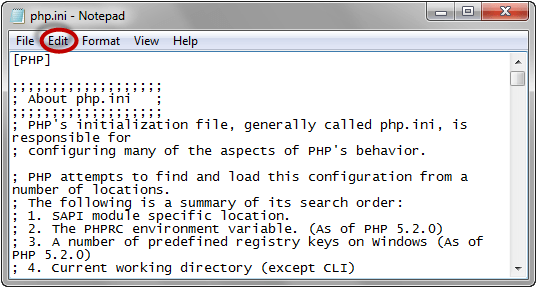
ในการกำหนดค่าการตั้งค่า SMTP บน localhost ของคุณ โดยสมมติว่าคุณกำลังใช้ XAMPP อยู่ Windowsค้นหาไฟล์ “php.ini” ในไดเร็กทอรี “C:\xampp\php”
- เปิดไฟล์โดยใช้ Notepad หรือโปรแกรมแก้ไขข้อความอื่นๆ ในตัวอย่างนี้เราจะใช้ Notepad คลิกที่เมนู แก้ไข
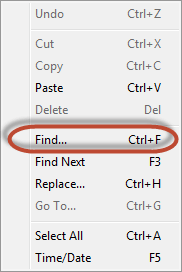
- คลิกที่เมนู ค้นหา…
- หน้าต่างค้นหาจะปรากฏขึ้น
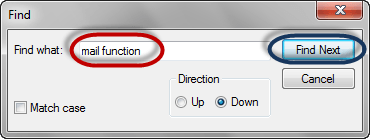
- คลิกที่ปุ่ม "ค้นหาถัดไป"
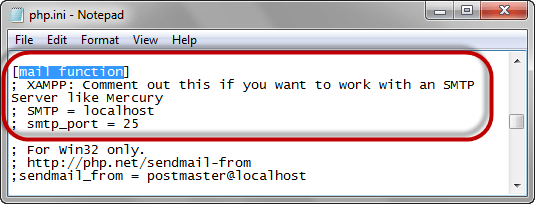
ค้นหารายการภายใต้ [ฟังก์ชันอีเมล] บรรทัดเริ่มต้นมักจะมีลักษณะดังนี้:
- - SMTP = โลคัลโฮสต์
- - smtp_พอร์ต = 25
ลบเครื่องหมายเซมิโคลอนหน้า SMTP และ smtp_port แล้วตั้งค่า SMTP เป็นของคุณ เซิร์ฟเวอร์ และระบุพอร์ตที่เชื่อมต่อกับพอร์ต SMTP ของคุณ การตั้งค่าของคุณควรมีลักษณะดังนี้:
- SMTP = smtp.example.com
- smtp_พอร์ต = 25
หมายเหตุ: คุณสามารถดูการตั้งค่า SMTP ได้จากผู้ให้บริการเว็บโฮสติ้งของคุณ หากเซิร์ฟเวอร์ต้องการการตรวจสอบสิทธิ์ ให้เพิ่มบรรทัดต่อไปนี้:
- auth_username = example_username@example.com
- auth_password = example_password
บันทึกการเปลี่ยนแปลงใหม่และรีสตาร์ท อาปาเช่ เซิร์ฟเวอร์
PHP Mail ตัวอย่าง
ต่อไปนี้เราจะมาดูตัวอย่างการส่งอีเมลแบบง่ายๆ กัน
<?php
$to_email = 'name@example.com';
$subject = 'Testing PHP Mail';
$message = 'This mail is sent using the PHP mail function';
$headers = 'From: noreply@example.com';
mail($to_email,$subject,$message,$headers);
?>
Output:
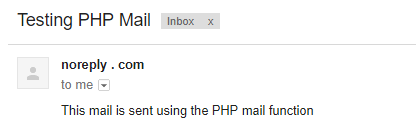
หมายเหตุ: ตัวอย่างข้างต้นใช้เฉพาะพารามิเตอร์ที่จำเป็น 4 ตัวเท่านั้น คุณควรแทนที่ที่อยู่อีเมลสมมติข้างต้นด้วยที่อยู่อีเมลจริง
การฆ่าเชื้อข้อมูลอินพุตของผู้ใช้อีเมล์
ตัวอย่างข้างต้นใช้ค่าที่เข้ารหัสแบบตายตัวในโค้ดต้นฉบับสำหรับที่อยู่อีเมลและรายละเอียดอื่น ๆ เพื่อความเรียบง่าย
สมมติว่าคุณต้องสร้างแบบฟอร์มติดต่อเรา ซึ่งผู้ใช้กรอกรายละเอียดแล้วส่งแบบฟอร์ม
- ผู้ใช้สามารถแทรกโค้ดลงในส่วนหัวของอีเมลโดยไม่ตั้งใจหรือโดยเจตนา ซึ่งอาจส่งผลให้มีการส่งอีเมลสแปมได้
- เพื่อปกป้องระบบของคุณจากการโจมตีดังกล่าว คุณสามารถสร้างฟังก์ชันแบบกำหนดเองที่ทำการทำความสะอาดและตรวจสอบค่าต่างๆ ก่อนที่จะส่งอีเมล
เรามาสร้างฟังก์ชันแบบกำหนดเองที่ตรวจสอบและกรองที่อยู่อีเมลโดยใช้ฟังก์ชัน filter_var ที่มีอยู่แล้วในระบบ ฟังก์ชัน filter_var ใช้สำหรับกรองและตรวจสอบข้อมูลที่ผู้ใช้ป้อนเข้ามา
มีโครงสร้างพื้นฐานดังต่อไปนี้
<?php
filter_var($field, SANITIZATION_TYPE);
?>
ที่นี่
- “filter_var(…)” คือฟังก์ชันการตรวจสอบและฆ่าเชื้อ
- “$field” คือค่าของฟิลด์ที่จะกรอง
- “SANITIZATION_TYPE” คือประเภทของการฆ่าเชื้อที่จะดำเนินการในสนาม เช่น:
- ตัวกรอง_ตรวจสอบอีเมล – ส่งคืนค่า true สำหรับที่อยู่อีเมลที่ถูกต้อง และค่า false สำหรับที่อยู่อีเมลที่ไม่ถูกต้อง
- อีเมลกรองสุขอนามัย – ลบอักขระที่ไม่พึงประสงค์ออกจากที่อยู่อีเมล ดังนั้นที่อยู่อีเมลที่มีอักขระที่ไม่ต้องการจะถูกลดเหลือเพียง info@domain.com
- กรอง_ฆ่าเชื้อ_URL – ลบอักขระที่ไม่ถูกต้องออกจาก URLโดยเว้นที่อยู่เว็บที่สะอาดตา เช่น https://www.example.com
- FILTER_SANITIZE_STRING – ลบแท็กออกจากค่าสตริง ดังนั้น am bold จึงกลายเป็น am bold โปรดทราบว่าตัวกรองนี้เลิกใช้แล้วใน PHP 8.1 โปรดใช้ htmlspecialchars() แทน
โค้ดด้านล่างนี้ใช้ฟังก์ชันที่กำหนดเองเพื่อส่งอีเมลที่ปลอดภัย
<?php
function sanitize_my_email($field) {
$field = filter_var($field, FILTER_SANITIZE_EMAIL);
if (filter_var($field, FILTER_VALIDATE_EMAIL)) {
return true;
} else {
return false;
}
}
$to_email = 'name@example.com';
$subject = 'Testing PHP Mail';
$message = 'This mail is sent using the PHP mail function';
$headers = 'From: noreply@example.com';
// check if the email address is invalid
$secure_check = sanitize_my_email($to_email);
if ($secure_check == false) {
echo "Invalid input";
} else { // send email
mail($to_email, $subject, $message, $headers);
echo "This email is sent using PHP Mail";
}
?>
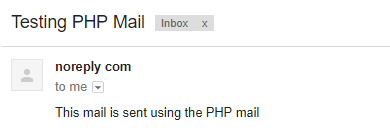
Output:
ปลอดภัย Mail
อีเมลอาจถูกดักจับระหว่างการส่งโดยผู้รับที่ไม่ได้ตั้งใจ
การกระทำเช่นนี้อาจทำให้เนื้อหาของอีเมลรั่วไหลไปยังผู้รับที่ไม่พึงประสงค์ได้
อีเมลที่ปลอดภัยช่วยแก้ปัญหานี้ได้โดย transmitการส่งอีเมลผ่านการเชื่อมต่อที่เข้ารหัสผ่าน SSL หรือ TLS เช่น SMTP ผ่าน SSL บนพอร์ต 465 หรือ STARTTLS บนพอร์ต 587
การเข้ารหัสจะทำการเข้ารหัสข้อความก่อนส่ง เพื่อให้เฉพาะเซิร์ฟเวอร์อีเมลของผู้รับปลายทางเท่านั้นที่สามารถอ่านข้อความนั้นได้
PHPMailer: ทางเลือกที่ดีกว่า mail()
สำหรับการใช้งานจริง นักพัฒนาส่วนใหญ่ใช้ PHPMailใช้ไลบรารี er แทนฟังก์ชัน mail() ดั้งเดิมใน PHPMailโปรแกรมนี้ตรวจสอบสิทธิ์กับเซิร์ฟเวอร์ SMTP ภายนอก ซึ่งช่วยเพิ่มประสิทธิภาพในการส่งอีเมลได้อย่างมาก และทำให้การแนบไฟล์และอีเมล HTML ทำได้ง่ายขึ้น
ติดตั้งโดยใช้ Composer จากนั้นส่งอีเมลผ่านการเชื่อมต่อ SMTP ที่เข้ารหัสและตรวจสอบสิทธิ์แล้ว ดังแสดงด้านล่าง
<?php
use PHPMailer\PHPMailer\PHPMailer;
require 'vendor/autoload.php';

$mail = new PHPMailer(true);
$mail->isSMTP();
$mail->Host = 'smtp.example.com';
$mail->SMTPAuth = true;
$mail->Username = 'user@example.com';
$mail->Password = 'secret';
$mail->SMTPSecure = 'tls';
$mail->Port = 587;

$mail->setFrom('noreply@example.com', 'My App');
$mail->addAddress('name@example.com');
$mail->Subject = 'Testing PHPMailer';
$mail->Body = 'This email is sent using PHPMailer over SMTP';
$mail->send();
?>
เมื่อเปรียบเทียบกับ mail() แล้ว PHPMailer มีคุณสมบัติการตรวจสอบสิทธิ์ SMTP การเข้ารหัสในตัว การรองรับไฟล์แนบ และการจัดการข้อผิดพลาดที่ชัดเจนยิ่งขึ้น ซึ่งเป็นเหตุผลว่าทำไมจึงเป็นตัวเลือกที่แนะนำสำหรับการส่งอีเมลในระบบการผลิต
