
Python ฟังก์ชันและเมธอดหลัก: ทำความเข้าใจ def Main()
 โลแกน ยัง
⚡ สรุปอย่างชาญฉลาด
Python ฟังก์ชัน main เป็นจุดเริ่มต้นที่ตัวแปลภาษาจะเริ่มรันโปรแกรม โดยกำหนดด้วย def main() และใช้เงื่อนไข if __name__ == “__main__” เป็นตัวตรวจสอบเงื่อนไข เพื่อแยกโค้ดโมดูลที่นำกลับมาใช้ใหม่ได้ออกจากการรันสคริปต์แบบเดี่ยวๆ
ความหมายของ Python ฟังก์ชั่นหลัก?
การขอ Python ฟังก์ชั่นหลัก เป็นจุดเริ่มต้นของโปรแกรมใดๆ เมื่อโปรแกรมถูกเรียกใช้งาน... Python ตัวแปลภาษาจะรันโค้ดตามลำดับ ฟังก์ชันหลักจะถูกเรียกใช้ก็ต่อเมื่อถูกเรียกใช้ในรูปแบบ `include` เท่านั้น Python โปรแกรมจะไม่รันฟังก์ชันหลักหากนำเข้าเป็นโมดูล
ฟังก์ชัน def main() คืออะไร Pythonเพื่อให้เข้าใจเรื่องนี้ ลองพิจารณาตัวอย่างโค้ดต่อไปนี้ ซึ่งเป็นส่วนหนึ่งของแกนหลัก Python การเขียนโปรแกรม พื้นฐาน:
def main() ตัวอย่างที่ 1
def main():
     print ("Hello World!")
print ("Guru99")
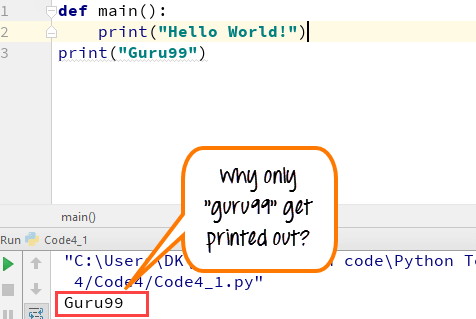
ตรงนี้ เรามีข้อความพิมพ์สองส่วน ส่วนหนึ่งกำหนดไว้ในฟังก์ชันหลักคือ “Hello World!” และอีกส่วนหนึ่งเป็นอิสระ คือ “Guru99” เมื่อคุณรันฟังก์ชัน def main ():
- เท่านั้น "Guruพิมพ์ออกมา 99 นิ้ว
- และไม่ใช่โค้ด “Hello World!”
เป็นเพราะเราไม่ได้ประกาศสาย ฟังก์ชัน “if__name__== “__main__”
สิ่งสำคัญคือหลังจากกำหนดฟังก์ชันหลักแล้ว คุณต้องเรียกใช้โค้ดโดยใช้ if__name__== “__main__” จากนั้นจึงรันโค้ด จากนั้นคุณจะได้รับเอาต์พุต “hello world!” ในคอนโซลการเขียนโปรแกรม พิจารณาโค้ดต่อไปนี้
def main() ตัวอย่างที่ 2
def main():
    print("Hello World!")

if __name__ == "__main__":
    main()

print("Guru99")
Guruในกรณีนี้จะพิมพ์เลข 99 ลงไป
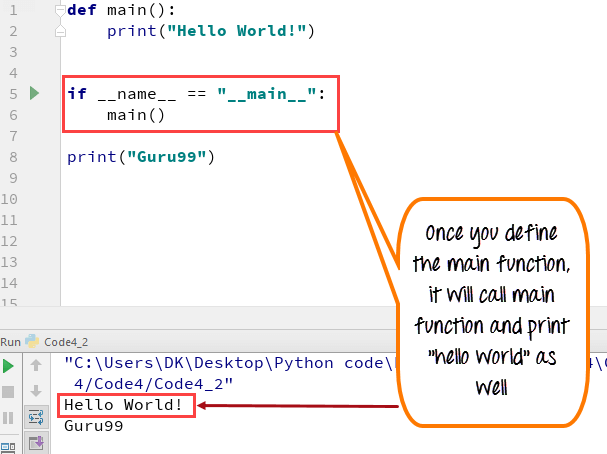
นี่คือคำอธิบาย
- เมื่อ Python ล่ามอ่านไฟล์ต้นฉบับ มันจะรันโค้ดทั้งหมดที่พบในนั้น
- เมื่อ Python รัน “ไฟล์ต้นฉบับ” เป็นโปรแกรมหลัก โดยจะตั้งค่าตัวแปรพิเศษ (__name__) ให้มีค่า (“__main__”)
- เมื่อคุณรันฟังก์ชัน main ใน python มันจะอ่านคำสั่ง “if” และตรวจสอบว่า __name__ เท่ากับ __main__ หรือไม่
- In Python “ถ้า__ชื่อ__== “__หลัก__” ช่วยให้คุณสามารถเรียกใช้ Python ไฟล์อย่างใดอย่างหนึ่งเช่น โมดูลที่ใช้ซ้ำได้หรือโปรแกรมแบบสแตนด์อโลน
เหตุใดจึงต้องใช้ฟังก์ชัน main() ใน Python?
Python รูปแบบ `def main()` ไม่ได้บังคับให้คุณเขียนฟังก์ชัน `main` แต่ผู้พัฒนาที่มีประสบการณ์มักใช้ฟังก์ชันนี้ในสคริปต์ที่ไม่ซับซ้อนเกือบทุกสคริปต์ รูปแบบ `def main()` ช่วยจัดระเบียบไฟล์และทำให้โค้ดสามารถนำกลับมาใช้ใหม่ได้อย่างปลอดภัย นี่คือเหตุผลหลักที่ควรใช้รูปแบบนี้:
- ทางเข้าที่ชัดเจน: ฟังก์ชัน main() จะบอกผู้อ่านทุกคนอย่างชัดเจนว่าโปรแกรมเริ่มต้นที่จุดใด ทำให้เข้าใจตรรกะได้ง่าย
- โมดูลที่สามารถนำกลับมาใช้ใหม่ได้: Code ฟังก์ชันนี้ถูกควบคุมโดยเงื่อนไข if __name__ == “__main__” และจะทำงานเฉพาะเมื่อมีการเรียกใช้งานโดยตรงเท่านั้น ดังนั้นไฟล์อื่นๆ จึงสามารถนำเข้าฟังก์ชันของคุณได้โดยไม่มีผลข้างเคียง
- ขอบเขตท้องถิ่น: ตัวแปรที่สร้างขึ้นภายในฟังก์ชัน main() จะคงสถานะเป็นตัวแปรภายในฟังก์ชันนั้น ซึ่งจะช่วยหลีกเลี่ยงการชนกันโดยไม่ได้ตั้งใจกับชื่อตัวแปรส่วนกลางในส่วนอื่นๆ ของโมดูล
- การทดสอบที่ง่ายขึ้น: การแยกตรรกะไว้ในฟังก์ชัน main() ช่วยให้ชุดทดสอบสามารถเรียกใช้ฟังก์ชันนั้นได้โดยตรงและตรวจสอบผลลัพธ์ได้
- ข้อตกลงร่วมกัน: ฟังก์ชัน main() เป็นสัญญาณที่ได้รับการยอมรับอย่างกว้างขวางว่าเป็นจุดเริ่มต้นของโปรแกรม ซึ่งช่วยให้การบำรุงรักษาทำได้ง่ายขึ้นสำหรับทีมต่างๆ
โดยสรุป ฟังก์ชัน main() เป็นตัวเลือกเสริมใน Pythonแต่จะช่วยให้โปรแกรมขนาดใหญ่สามารถอ่านได้ ทดสอบได้ และปลอดภัยสำหรับการนำเข้า
ตัวแปร __name__ และ Python โมดูล
เพื่อให้เข้าใจถึงความสำคัญของ __name__ ตัวแปรใน Python วิธีฟังก์ชันหลักพิจารณาโค้ดต่อไปนี้:
def main():
    print("hello world!")

if __name__ == "__main__":
    main()

print("Guru99")

print("Value in built variable name is:  ",__name__)

ตอนนี้ให้พิจารณาว่าโค้ดถูกนำเข้าเป็นโมดูล
import MainFunction

print("done")

นี่คือคำอธิบายโค้ด: เช่นเดียวกับซี Python ใช้ == เพื่อการเปรียบเทียบ ในขณะที่ = สำหรับการมอบหมาย Python ล่ามใช้ฟังก์ชันหลักได้สองวิธี
วิ่งตรง:
- __ชื่อ__=__หลัก__
- ถ้าคำสั่ง == True และสคริปต์ใน _main_will จะถูกดำเนินการ
นำเข้าเป็นโมดูล
- __name__= ชื่อไฟล์ของโมดูล
- ถ้าคำสั่ง == false และสคริปต์ใน __main__ จะไม่ถูกดำเนินการ
เมื่อโค้ดถูกดำเนินการ มันจะตรวจสอบชื่อโมดูลด้วย “if” กลไกนี้ช่วยให้มั่นใจได้ว่าฟังก์ชันหลักจะดำเนินการเฉพาะเมื่อรันโดยตรงเท่านั้น ไม่ใช่เมื่อนำเข้าเป็นโมดูล
ตัวอย่างข้างต้นคือ Python 3 รหัสถ้าคุณต้องการใช้ Python 2 โปรดพิจารณาโค้ดต่อไปนี้
def main():
  print "Hello World!"

if __name__== "__main__":
  main()

print "Guru99"
In Python 3. คุณไม่จำเป็นต้องใช้ if__name โค้ดต่อไปนี้ก็ใช้งานได้เช่นกัน
def main():
  print("Hello World!")

main()
print("Guru99")
หมายเหตุ ตรวจสอบให้แน่ใจว่าหลังจากกำหนดฟังก์ชัน main แล้ว คุณเว้นการย่อหน้าไว้บ้างและอย่าประกาศโค้ดไว้ด้านล่างฟังก์ชัน def main(): มิฉะนั้น จะทำให้เกิดข้อผิดพลาดการย่อหน้า
วิธีการส่งอาร์กิวเมนต์บรรทัดคำสั่งไปยัง Python ฟังก์ชัน main()
ฟังก์ชัน main() เป็นสถานที่ที่เหมาะสมที่สุดในการจัดการข้อมูลที่ผู้ใช้ป้อนเข้ามาทางบรรทัดคำสั่ง Python ค่าเหล่านี้จะอยู่ในรายการ sys.argv ซึ่งโมดูล sys มาตรฐานจัดเตรียมไว้ให้ รายการแรก sys.argv[0] คือชื่อสคริปต์ และค่าทุกค่าหลังจากนั้นคืออาร์กิวเมนต์ที่ผู้ใช้ป้อน
ตัวอย่างต่อไปนี้แสดงวิธีการอ่านและพิมพ์อาร์กิวเมนต์จากบรรทัดคำสั่งภายในฟังก์ชัน main():
import sys

def main():
    print("Script name:", sys.argv[0])
    print("Arguments passed:", sys.argv[1:])

if __name__ == "__main__":
    main()
ถ้าคุณบันทึกไฟล์เป็น script.py แล้วรัน สคริปต์ python.py อัลฟา เบต้าโปรแกรมจะพิมพ์ชื่อสคริปต์และรายการ ['alpha', 'beta'] ออกมา เนื่องจากค่าต่างๆ ถูกส่งเข้ามาภายในฟังก์ชัน main() ทำให้ตรรกะยังคงเป็นระเบียบและทดสอบได้ง่าย
ต่อไปนี้เป็นเคล็ดลับที่เป็นประโยชน์บางประการเมื่อทำงานกับข้อมูลป้อนเข้าทางบรรทัดคำสั่ง:
- ตัดชื่อสคริปต์ออก: ใช้ sys.argv[1:] เพื่ออ่านเฉพาะอาร์กิวเมนต์ที่ผู้ใช้พิมพ์เท่านั้น
- ใช้ argparse สำหรับเครื่องมือที่มีประสิทธิภาพ: โมดูล argparse ที่มีมาให้ในตัวจะแยกวิเคราะห์แฟล็ก ตัวเลือก และข้อความช่วยเหลือได้อย่างปลอดภัยกว่าการอ่าน sys.argv ด้วยตนเองมาก
- ส่งคืนรหัสออก: ห่อการเรียกใช้เป็น sys.exit(main()) เพื่อให้ค่าที่ส่งคืนจาก main() กลายเป็นสถานะการออกจากกระบวนการ
- ตรวจสอบล่วงหน้า: ตรวจสอบจำนวนและประเภทของอาร์กิวเมนต์ที่ด้านบนของฟังก์ชัน main() ก่อนที่จะรันโปรแกรมส่วนที่เหลือ
รูปแบบนี้เปลี่ยนสคริปต์ธรรมดาให้กลายเป็นเครื่องมือบรรทัดคำสั่งที่เชื่อถือได้ ในขณะเดียวกันก็ยังคง...ping ทุกขั้นตอนภายในฟังก์ชัน main() เดียวที่สามารถทดสอบได้
Python ฟังก์ชัน main() เทียบกับภาษาโปรแกรมอื่นๆ
นักพัฒนาที่มาจากภาษา C, C++หรือ Java โดยทั่วไปมักคาดหวังฟังก์ชัน main() ที่จำเป็น Python วิธีการทำงานแตกต่างออกไป เพราะเป็นภาษาที่ใช้การตีความ ดังนั้นตัวตีความจึงรันไฟล์จากบรรทัดบนสุดไปจนถึงบรรทัดล่างสุด ฟังก์ชัน main() ใน Python ดังนั้นจึงเป็นเพียงธรรมเนียมปฏิบัติมากกว่ากฎเกณฑ์
- C, C++, C# และ Java: ฟังก์ชัน main() เป็นจุดเริ่มต้นที่จำเป็น รันไทม์จะเรียกฟังก์ชันนี้โดยอัตโนมัติ และจะมีได้เพียงฟังก์ชันเดียวต่อโปรแกรมเท่านั้น
- Python: ไม่จำเป็นต้องมีฟังก์ชัน main() การทำงานจะเริ่มต้นที่บรรทัดแรกของไฟล์ และฟังก์ชัน def main() จะทำงานก็ต่อเมื่อโค้ดของคุณเรียกใช้เท่านั้น
- ยาม: บล็อก if __name__ == “__main__” จะให้ผลลัพธ์ดังนี้ Python มีจุดประสงค์คล้ายกับการคอมไพล์ฟังก์ชัน main() โดยการกำหนดโค้ดที่ควรทำงานเฉพาะเมื่อไฟล์นั้นเป็นโปรแกรมหลักเท่านั้น
ดังนั้นในขณะที่ภาษาอื่นๆ กำหนดให้ต้องมีจุดเริ่มต้นที่เมธอด main() Python เปิดโอกาสให้คุณเลือกเอง โดยให้ความชัดเจนแบบเดียวกันผ่านข้อตกลงแทนที่จะใช้กฎของคอมไพเลอร์
