---
description: The syntax to create a database in PostgreSQL is CREATE DATABASE databasename
title: How to Create Database in PostgreSQL
image: https://www.guru99.com/images/create-database-postgresql.png
---


[Skip to content](#main) 

**⚡ Smart Summary**

PostgreSQL Create Database operations let you build a new database using either the psql command-line shell or the pgAdmin graphical tool. The CREATE DATABASE statement also accepts options for the owner, template, encoding, collation, tablespace, and connection limit.

* 💻 **Command Line:** Open the SQL Shell (psql), connect to the server, and run CREATE DATABASE to make a new database.
* 🖱️ **pgAdmin GUI:** Right-click Databases in the Object Tree, choose Create, name the database, and save it visually.
* 📝 **Basic Syntax:** The minimal command is CREATE DATABASE databasename, which builds a database with default settings.
* ⚙️ **Full Options:** OWNER, TEMPLATE, ENCODING, LC\_COLLATE, LC\_CTYPE, TABLESPACE, and CONNECTION LIMIT customize the new database.
* 🔌 **Connect and Verify:** Use \\l to list databases and \\c databasename to connect to the one you created.
* ⚠️ **Common Errors:** Watch for createdb not found, server not running, missing role, and permission-denied errors.

[ Read More ](javascript:void%280%29;) 

![How to Create Database in PostgreSQL](https://www.guru99.com/images/create-database-postgresql.png)

The syntax to create database in PostgreSQL is

CREATE DATABASE databasename

Let’s learn setting up PostgreSQL and how to create database in PostgreSQL command line and the GUI

## PSQL Create Database Command Line (SQL Shell)

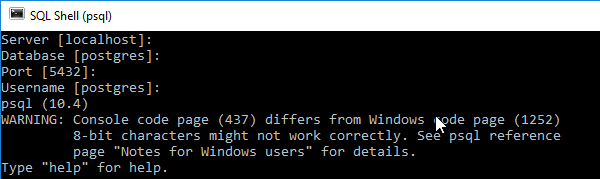
**Step 1)** Open the SQL Shell

[![PSQL Create Database Command Line](https://www.guru99.com/images/1/092818_0513_PostgreSQLC1.png)](https://www.guru99.com/images/1/092818%5F0513%5FPostgreSQLC1.png)

**Step 2)** Press enter five times to connect to the DB

[![PSQL Create Database Command Line](https://www.guru99.com/images/1/092818_0513_PostgreSQLC2.png)](https://www.guru99.com/images/1/092818%5F0513%5FPostgreSQLC2.png)

**Step 3)** Enter the command

CREATE DATABASE guru99;

[![PSQL Create Database Command Line](https://www.guru99.com/images/1/092818_0513_PostgreSQLC3.png)](https://www.guru99.com/images/1/092818%5F0513%5FPostgreSQLC3.png)

**Step 4)** Enter command \\l to get a list of all databases

[![PSQL Create Database Command Line](https://www.guru99.com/images/1/092818_0513_PostgreSQLC4.png)](https://www.guru99.com/images/1/092818%5F0513%5FPostgreSQLC4.png)

**Step 5)** To connect to a Database use PostgreSQL database command

\c guru99

[![PSQL Create Database Command Line](https://www.guru99.com/images/1/092818_0513_PostgreSQLC5.png)](https://www.guru99.com/images/1/092818%5F0513%5FPostgreSQLC5.png)

Prompt changes to guru99 which signifies that we are connected to database guru99 and can perform operations like create table, trigger, execute [SQL](https://www.guru99.com/sql.html) on it.

### RELATED ARTICLES

* [DISTINCT in PostgreSQL: Select, Order By & Limit (Examples) ](https://www.guru99.com/postgresql-select-distinct.html "DISTINCT in PostgreSQL: Select, Order By & Limit (Examples)")
* [PostgreSQL Create View with Example ](https://www.guru99.com/postgresql-view.html "PostgreSQL Create View with Example")
* [PostgreSQL LIKE, Not Like, Wildcards (%, \_ ) Examples ](https://www.guru99.com/postgresql-like-query.html "PostgreSQL LIKE, Not Like, Wildcards (%, _ ) Examples")
* [PostgreSQL Constraints: Types with Example ](https://www.guru99.com/postgresql-constraints.html "PostgreSQL Constraints: Types with Example")

## PostgreSQL Create Database using pgAdmin

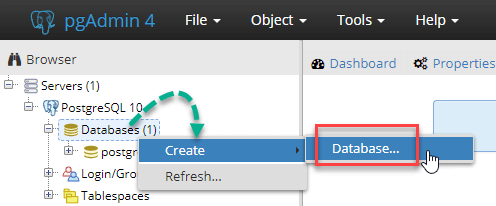
**Step 1)** In the Object Tree, right click and select create a database to Postgres create database

[![PostgreSQL Create Database using pgAdmin](https://www.guru99.com/images/1/092818_0513_PostgreSQLC6.png)](https://www.guru99.com/images/1/092818%5F0513%5FPostgreSQLC6.png)

**Step 2)** In the pop-up,

1. Enter Database Name
2. Comment if any database – optional
3. Click Save

[![PostgreSQL Create Database using pgAdmin](https://www.guru99.com/images/1/092818_0513_PostgreSQLC7.png)](https://www.guru99.com/images/1/092818%5F0513%5FPostgreSQLC7.png)

**Step 3)** DB is created and shown in the Object tree.

[![PostgreSQL Create Database using pgAdmin](https://www.guru99.com/images/1/092818_0513_PostgreSQLC8.png)](https://www.guru99.com/images/1/092818%5F0513%5FPostgreSQLC8.png)

**Step 4)** The right pane gives you the SQL used to create the Database.

[![PostgreSQL Create Database using pgAdmin](https://www.guru99.com/images/1/092818_0513_PostgreSQLC9.png)](https://www.guru99.com/images/1/092818%5F0513%5FPostgreSQLC9.png)

## Complete syntax to create a database

Here is complete Syntax to create a DB in PostgreSQL

CREATE DATABASE db_name
OWNER =  role_name
TEMPLATE = template
ENCODING = encoding
LC_COLLATE = collate
LC_CTYPE = ctype
TABLESPACE = tablespace_name
CONNECTION LIMIT = max_concurrent_connection

| Option                          | Description                                                                                                                                                                                                                                                                                                                                 |
| ------------------------------- | ------------------------------------------------------------------------------------------------------------------------------------------------------------------------------------------------------------------------------------------------------------------------------------------------------------------------------------------- |
| **db\_name**                    | Use this option to specify the name of the new database that you want to create. Although, you need to make sure that the [Database](https://www.guru99.com/introduction-to-database-sql.html) must be unique because If you attempt to create a new database with the same name as an existing database, PostgreSQL will display an error. |
| **role\_name**                  | Use this parameter to define the the role name for the user who will own the new database. Default is postgres                                                                                                                                                                                                                              |
| **Template**                    | You can specify database template name from which you want to creates the new database.                                                                                                                                                                                                                                                     |
| **Encoding**                    | This parameter allows specifying character set encoding for the new database. Default is UTF8                                                                                                                                                                                                                                               |
| **Collate**                     | The collation parameter specifies the sort order of strings which affect the result of the ORDER BY clause while using a SELECT statement.                                                                                                                                                                                                  |
| **Ctype**                       | It specifies the character classification for the new database. It affects the categorization, e.g., digit, lower and upper.                                                                                                                                                                                                                |
| **tablespace\_name**            | Using this option you can specify the tablespace name for the new database. The default is the template database’s tablespace.                                                                                                                                                                                                              |
| **max\_concurrent\_connection** | Use this option to specify the maximum concurrent connections to the new database. The default is -1, i.e., unlimited.                                                                                                                                                                                                                      |

Common Errors while using the createdb command

| Error                                                                                          | Description                                                                                                                                                                                                                 |
| ---------------------------------------------------------------------------------------------- | --------------------------------------------------------------------------------------------------------------------------------------------------------------------------------------------------------------------------- |
| createdb command not found.                                                                    | This kind of error may occur when PostgreSQL is not installed correctly. At that time, you need to run createdb command from your [PostgreSQL installation path](https://www.guru99.com/install-postgresql-on-ubuntu.html). |
| No such file in the server is running locally and accepting connections on Unix domain socket. | This error occurs when PostgreSQL Server is not started properly, or it was not started where the createdb command wants it to start.                                                                                       |
| FATAL role “usr name” does not exist                                                           | This error may occur if the PostgreSQL user account is created which are different from system user accounts.                                                                                                               |
| Permission denied to create a database                                                         | If the PostgreSQL account is created does not have permission to create a database In this case, you need to grant permission to the associated users to access create command.                                             |

## FAQs

🗄️ What is the default database in PostgreSQL?

PostgreSQL creates a database named postgres by default during installation. It serves as the default connection target for tools and superusers, and it is used as a workspace before you create your own databases.

✏️ How do you rename a PostgreSQL database?

Use the ALTER DATABASE command, for example ALTER DATABASE oldname RENAME TO newname. You must be connected to a different database and no other sessions can be using the database you are renaming.

📋 What is a template database in PostgreSQL?

A template database is a model that PostgreSQL copies when creating a new database. template1 is the default template, so any object added to it appears in every new database. template0 is a clean, unmodifiable copy.

🤖 How can AI help write PostgreSQL CREATE DATABASE commands?

AI can generate a complete CREATE DATABASE statement from a plain description, filling in owner, encoding, and collation options correctly. It also explains each clause, helping beginners avoid syntax and configuration mistakes.

🤖 Can AI help fix PostgreSQL database creation errors?

Yes. AI can read errors such as ‘permission denied’ or ‘role does not exist’, explain the cause, and suggest the exact GRANT or role command needed to resolve the problem quickly.

#### Summarize this post with:

ChatGPT Perplexity Grok Google AI 

**Stay Updated on AI** **Get Weekly AI Skills, Trends, Actionable Advice.** 

##### Sign up for the newsletter

Subscribe for Free 

You have successfully subscribed.  
Please check your inbox. 

![AI-Newsletter](https://www.guru99.com/images/footer-email-avatar-imges-1.png) Chosen by over **350,000+** professionals 

[Scroll to top ](#wrapper)Scroll to top 

× 

Toggle Menu Close 

Search for: 

Search

```json
{"@context":"https://schema.org","@graph":[{"@type":"Organization","@id":"https://www.guru99.com/#organization","name":"Guru99","sameAs":["https://www.facebook.com/Guru99Official","https://twitter.com/guru99com"],"logo":{"@type":"ImageObject","@id":"https://www.guru99.com/#logo","url":"https://www.guru99.com/images/guru99-logo-v1-150x59.png","contentUrl":"https://www.guru99.com/images/guru99-logo-v1-150x59.png","caption":"Guru99","inLanguage":"en-US"}},{"@type":"WebSite","@id":"https://www.guru99.com/#website","url":"https://www.guru99.com","name":"Guru99","publisher":{"@id":"https://www.guru99.com/#organization"},"inLanguage":"en-US"},{"@type":"ImageObject","@id":"https://www.guru99.com/images/create-database-postgresql.png","url":"https://www.guru99.com/images/create-database-postgresql.png","width":"700","height":"250","caption":"How to Create Database in PostgreSQL","inLanguage":"en-US"},{"@type":"BreadcrumbList","@id":"https://www.guru99.com/postgresql-create-database.html#breadcrumb","itemListElement":[{"@type":"ListItem","position":"1","item":{"@id":"https://www.guru99.com","name":"Home"}},{"@type":"ListItem","position":"2","item":{"@id":"https://www.guru99.com/postgresql","name":"PostgreSQL"}},{"@type":"ListItem","position":"3","item":{"@id":"https://www.guru99.com/postgresql-create-database.html","name":"How to Create Database in PostgreSQL"}}]},{"@type":"WebPage","@id":"https://www.guru99.com/postgresql-create-database.html#webpage","url":"https://www.guru99.com/postgresql-create-database.html","name":"How to Create Database in PostgreSQL","dateModified":"2026-07-02T10:47:53+05:30","isPartOf":{"@id":"https://www.guru99.com/#website"},"primaryImageOfPage":{"@id":"https://www.guru99.com/images/create-database-postgresql.png"},"inLanguage":"en-US","breadcrumb":{"@id":"https://www.guru99.com/postgresql-create-database.html#breadcrumb"}},{"@type":"Person","@id":"https://www.guru99.com/author/juniper","name":"Juniper Willow","description":"I am Juniper Willow, a PostgreSQL Developer, offering expert guidance to help you optimize and master PostgreSQL database development.","url":"https://www.guru99.com/author/juniper","image":{"@type":"ImageObject","@id":"https://www.guru99.com/images/juniper-willow-author.png","url":"https://www.guru99.com/images/juniper-willow-author.png","caption":"Juniper Willow","inLanguage":"en-US"},"worksFor":{"@id":"https://www.guru99.com/#organization"}},{"articleSection":"PostgreSQL","headline":"How to Create Database in PostgreSQL","description":"The syntax to create a database in PostgreSQL is CREATE DATABASE databasename","keywords":"postgresql, sql","speakable":{"@type":"SpeakableSpecification","cssSelector":[".entry-title",".summary"]},"@type":"Article","author":{"@id":"https://www.guru99.com/author/juniper","name":"Juniper Willow"},"dateModified":"2026-07-02T10:47:53+05:30","image":{"@id":"https://www.guru99.com/images/create-database-postgresql.png"},"copyrightYear":"2026","name":"How to Create Database in PostgreSQL","subjectOf":[{"@type":"HowTo","name":"How to Create PostgreSQL Database using pgAdmi","description":"Let's learn setting up PostgreSQL and how to create database in PostgreSQL command line and the GUI","step":[{"@type":"HowToStep","name":"Step 1) Select create a database","text":"In first step In the Object Tree, right click and select create a database to Postgres create database.","image":{"@type":"ImageObject","url":"https://cdn.guru99.com/images/1/092818_0513_PostgreSQLC6.png"},"url":"https://www.guru99.com/postgresql-create-database.html#step1"},{"@type":"HowToStep","name":"Step 2) Open pop-up","text":"Now Enter Database Name, and then Comment if any database - optional and then Click Save","image":{"@type":"ImageObject","url":"https://cdn.guru99.com/images/1/092818_0513_PostgreSQLC7.png"},"url":"https://www.guru99.com/postgresql-create-database.html#step2"},{"@type":"HowToStep","name":"Step 3) DB Created","text":"Now DB is created and shown in the Object tree.","image":{"@type":"ImageObject","url":"https://cdn.guru99.com/images/1/092818_0513_PostgreSQLC8.png"},"url":"https://www.guru99.com/postgresql-create-database.html#step3"},{"@type":"HowToStep","name":"Step 4) Check right pane","text":"Now The right pane gives you the SQL used to create the Database.","image":{"@type":"ImageObject","url":"https://cdn.guru99.com/images/1/092818_0513_PostgreSQLC9.png"},"url":"https://www.guru99.com/postgresql-create-database.html#step4"}]},{"@type":"FAQPage","mainEntity":[{"@type":"Question","name":"What is the default database in PostgreSQL?","acceptedAnswer":{"@type":"Answer","text":"PostgreSQL creates a database named postgres by default during installation. It serves as the default connection target for tools and superusers, and it is used as a workspace before you create your own databases."}},{"@type":"Question","name":"How do you rename a PostgreSQL database?","acceptedAnswer":{"@type":"Answer","text":"Use the ALTER DATABASE command, for example ALTER DATABASE oldname RENAME TO newname. You must be connected to a different database and no other sessions can be using the database you are renaming."}},{"@type":"Question","name":"What is a template database in PostgreSQL?","acceptedAnswer":{"@type":"Answer","text":"A template database is a model that PostgreSQL copies when creating a new database. template1 is the default template, so any object added to it appears in every new database. template0 is a clean, unmodifiable copy."}},{"@type":"Question","name":"How can AI help write PostgreSQL CREATE DATABASE commands?","acceptedAnswer":{"@type":"Answer","text":"AI can generate a complete CREATE DATABASE statement from a plain description, filling in owner, encoding, and collation options correctly. It also explains each clause, helping beginners avoid syntax and configuration mistakes."}},{"@type":"Question","name":"Can AI help fix PostgreSQL database creation errors?","acceptedAnswer":{"@type":"Answer","text":"Yes. AI can read errors such as 'permission denied' or 'role does not exist', explain the cause, and suggest the exact GRANT or role command needed to resolve the problem quickly."}}]}],"@id":"https://www.guru99.com/postgresql-create-database.html#schema-21737","isPartOf":{"@id":"https://www.guru99.com/postgresql-create-database.html#webpage"},"publisher":{"@id":"https://www.guru99.com/#organization"},"inLanguage":"en-US","mainEntityOfPage":{"@id":"https://www.guru99.com/postgresql-create-database.html#webpage"}}]}
```