---
description: User Defined Exception or custom exception is creating your own exception class and throw that exception using ‘throw’ keyword. In this tutorial learn how to create User Defined Exception in Java with examples.
title: User Defined Exception in Java
image: https://www.guru99.com/images/user-defined-exception-in-java.png
---


[Skip to content](#main) 

**⚡ Smart Summary**

User Defined Exception in Java lets you create your own exception class by extending the Exception class and raising it with the throw keyword. This resource explains what custom exceptions are, when to use them, and how to build one with a complete working example.

* 🧱 **Definition:** A user-defined exception is a custom class that extends Exception and is raised using the throw keyword.
* 🎯 **Specific Errors:** Use custom exceptions when standard exceptions cannot describe an application-specific error condition.
* 🔍 **Readability:** Custom exceptions clarify the issue, making debugging and code maintenance easier.
* 🧩 **Clean Structure:** They separate error-handling logic from core functionality, keeping code organized.
* 📝 **Example:** Extend Exception, override toString, and throw the custom exception inside a try-catch block.

[ Read More ](javascript:void%280%29;) 

![User Defined Exception in Java](https://www.guru99.com/images/user-defined-exception-in-java.png)

## What is User Defined Exception in Java?

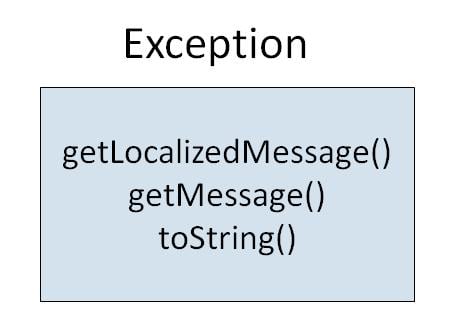
A User Defined Exception, or custom exception, means creating your own exception class and throwing that exception using the ‘throw’ keyword. This can be done by extending the class Exception.

[](https://www.guru99.com/images/uploads/2012/06/Exception-class.jpg)

There is no need to override any of the above methods available in the Exception class in your derived class. But practically, you will require some amount of customizing as per your programming needs.

## When to Use User-Defined Exceptions in Java?

User-defined exceptions in Java are custom exceptions created to handle specific error conditions in your application. They provide flexibility by allowing developers to define their own error scenarios.

* **Handle Specific Application Errors:** If your application encounters a scenario that standard exceptions cannot cover, create a user-defined exception to address that situation.
* **Enhance Readability and Debugging:** User-defined exceptions offer more clarity by explicitly indicating the issue, making debugging easier.
* **Ensure Clean Code Structure:** These exceptions help maintain clean code, as they separate error-handling logic from the core functionality.
* **Improve Code Maintenance:** User-defined exceptions allow you to update error handling without modifying the entire code, making maintenance more efficient.

**Example:** To create a User-Defined Exception class.

**Step 1)** Copy the following code into the editor.

class JavaException {
   public static void main(String args[]) {
      try {
          throw new MyException(2);
          // throw is used to create a new exception and throw it.
      }
      catch (MyException e) {
          System.out.println(e);
      }
   }
}
class MyException extends Exception {
   int a;
   MyException(int b) {
      a = b;
   }
   public String toString() {
      return ("Exception Number = " + a);
   }
}

### RELATED ARTICLES

* [15 BEST Java Books for Beginners (2026 Update) ](https://www.guru99.com/books.html "15 BEST Java Books for Beginners (2026 Update)")
* [String Manipulation in Java with EXAMPLE ](https://www.guru99.com/string-manipulation-in-java.html "String Manipulation in Java with EXAMPLE")
* [Java vs C# – Difference Between Them ](https://www.guru99.com/java-vs-c-sharp-key-difference.html "Java vs C# – Difference Between Them")
* [Top 30 Hibernate Interview Questions and Answers (2026) ](https://www.guru99.com/hibernate-interview-questions.html "Top 30 Hibernate Interview Questions and Answers (2026)")

**Step 2)** Save, Compile & Run the code. Expected output:

[](https://www.guru99.com/images/uploads/2012/06/java-user-defined-exception.jpg)

**NOTE:** The keyword “[throw](https://www.guru99.com/throws-keyword-in-java.html)” is used to create a new exception and throw it to the catch block.

## FAQs

🤖 Can AI generate custom Java exception classes?

Yes. AI assistants can scaffold user-defined exception classes that extend Exception, including constructors and a toString method. You should still review the messages and logic to fit your specific use case.

🧠 Does AI help design exception handling in modern Java apps?

AI can suggest where custom exceptions are useful and improve error messages. However, developers still decide the exception hierarchy and the overall handling strategy for the application.

🔀 What is the difference between checked and unchecked exceptions?

Checked exceptions must be declared or caught at compile time. Unchecked exceptions, which extend RuntimeException, occur at runtime and do not need to be declared. User-defined exceptions can be either type.

⚙️ What is the difference between throw and throws in Java?

The throw keyword actually raises an exception inside the code. The throws keyword is used in a method signature to declare that the method may throw one or more exceptions to its caller.

#### Summarize this post with:

ChatGPT Perplexity Grok Google AI 

**Stay Updated on AI** **Get Weekly AI Skills, Trends, Actionable Advice.** 

##### Sign up for the newsletter

Subscribe for Free 

You have successfully subscribed.  
Please check your inbox. 

![AI-Newsletter]() Chosen by over **350,000+** professionals 

[Scroll to top ](#wrapper)Scroll to top 

× 

Toggle Menu Close 

Search for: 

Search

```json
{"@context":"https://schema.org","@graph":[{"@type":"Organization","@id":"https://www.guru99.com/#organization","name":"Guru99","sameAs":["https://www.facebook.com/Guru99Official","https://twitter.com/guru99com"],"logo":{"@type":"ImageObject","@id":"https://www.guru99.com/#logo","url":"https://www.guru99.com/images/guru99-logo-v1-150x59.png","contentUrl":"https://www.guru99.com/images/guru99-logo-v1-150x59.png","caption":"Guru99","inLanguage":"en-US"}},{"@type":"WebSite","@id":"https://www.guru99.com/#website","url":"https://www.guru99.com","name":"Guru99","publisher":{"@id":"https://www.guru99.com/#organization"},"inLanguage":"en-US"},{"@type":"ImageObject","@id":"https://www.guru99.com/images/user-defined-exception-in-java.png","url":"https://www.guru99.com/images/user-defined-exception-in-java.png","width":"700","height":"250","caption":"User Defined Exception in Java","inLanguage":"en-US"},{"@type":"BreadcrumbList","@id":"https://www.guru99.com/java-user-defined-exception.html#breadcrumb","itemListElement":[{"@type":"ListItem","position":"1","item":{"@id":"https://www.guru99.com","name":"Home"}},{"@type":"ListItem","position":"2","item":{"@id":"https://www.guru99.com/java-tutorials","name":"Java Tutorials"}},{"@type":"ListItem","position":"3","item":{"@id":"https://www.guru99.com/java-user-defined-exception.html","name":"User Defined Exception in Java"}}]},{"@type":"WebPage","@id":"https://www.guru99.com/java-user-defined-exception.html#webpage","url":"https://www.guru99.com/java-user-defined-exception.html","name":"User Defined Exception in Java","dateModified":"2026-06-30T16:32:10+05:30","isPartOf":{"@id":"https://www.guru99.com/#website"},"primaryImageOfPage":{"@id":"https://www.guru99.com/images/user-defined-exception-in-java.png"},"inLanguage":"en-US","breadcrumb":{"@id":"https://www.guru99.com/java-user-defined-exception.html#breadcrumb"}},{"@type":"Person","@id":"https://www.guru99.com/author/james","name":"James Hartman","description":"I am James Hartman, a seasoned professional in Oracle Certified Java Professional tutorials, specializing in crafting comprehensive guides to help you excel in your Java certification journey.","url":"https://www.guru99.com/author/james","image":{"@type":"ImageObject","@id":"https://www.guru99.com/images/james-hartman-author-v2-120x120.png","url":"https://www.guru99.com/images/james-hartman-author-v2-120x120.png","caption":"James Hartman","inLanguage":"en-US"},"worksFor":{"@id":"https://www.guru99.com/#organization"}},{"articleSection":"Java Tutorials","headline":"User Defined Exception in Java","description":"User Defined Exception or custom exception is creating your own exception class and throw that exception using \u2018throw\u2019 keyword. In this tutorial learn how to create User Defined Exception in Java with examples.","keywords":"java","speakable":{"@type":"SpeakableSpecification","cssSelector":[".entry-title",".summary"]},"@type":"Article","author":{"@id":"https://www.guru99.com/author/james","name":"James Hartman"},"dateModified":"2026-06-30T16:32:10+05:30","image":{"@id":"https://www.guru99.com/images/user-defined-exception-in-java.png"},"copyrightYear":"2026","name":"User Defined Exception in Java","subjectOf":[{"@type":"FAQPage","mainEntity":[{"@type":"Question","name":"Can AI generate custom Java exception classes?","acceptedAnswer":{"@type":"Answer","text":"Yes. AI assistants can scaffold user-defined exception classes that extend Exception, including constructors and a toString method. You should still review the messages and logic to fit your specific use case."}},{"@type":"Question","name":"Does AI help design exception handling in modern Java apps?","acceptedAnswer":{"@type":"Answer","text":"AI can suggest where custom exceptions are useful and improve error messages. However, developers still decide the exception hierarchy and the overall handling strategy for the application."}},{"@type":"Question","name":"What is the difference between checked and unchecked exceptions?","acceptedAnswer":{"@type":"Answer","text":"Checked exceptions must be declared or caught at compile time. Unchecked exceptions, which extend RuntimeException, occur at runtime and do not need to be declared. User-defined exceptions can be either type."}},{"@type":"Question","name":"What is the difference between throw and throws in Java?","acceptedAnswer":{"@type":"Answer","text":"The throw keyword actually raises an exception inside the code. The throws keyword is used in a method signature to declare that the method may throw one or more exceptions to its caller."}}]}],"@id":"https://www.guru99.com/java-user-defined-exception.html#schema-1126774","isPartOf":{"@id":"https://www.guru99.com/java-user-defined-exception.html#webpage"},"publisher":{"@id":"https://www.guru99.com/#organization"},"inLanguage":"en-US","mainEntityOfPage":{"@id":"https://www.guru99.com/java-user-defined-exception.html#webpage"}}]}
```