---
description: Dev-C++, developed by Bloodshed Software, is a fully-featured graphical IDE. In this C++ tutorial, you will learn step by step how to download and install the latest version of Dev C++ on Windows.
title: How to Download and Install C++ IDE on Windows
image: https://www.guru99.com/images/cpp-ide-download-install.png
---


[Skip to content](#main) 

## What is Dev-C++?

Dev-C++, developed by Bloodshed Software, is a fully-featured graphical IDE (Integrated Development Environment) for C and C++ programming. It is distributed under the GNU General Public License for programming in C and C++.

## How to Download and Install Dev C++ on Windows

There are many compilers available for [C++ programming](https://www.guru99.com/cpp-tutorial.html). You can download anyone. Here, we are going to use Dev C++. It will work for both C++ and C programming languages.

**To install Dev C++ software, you need to follow the following steps.**

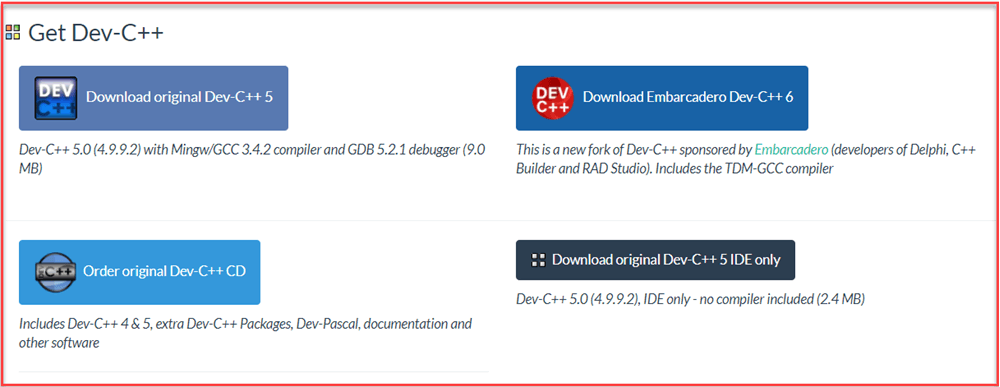
**Step 1)** First you must download the Dev C++ on your Windows machine. Visit to Download Dev C++: <http://www.bloodshed.net/>

**Step 2)** There are packages for different Operating Systems.

[](https://www.guru99.com/images/2/install-Cpp-ide-1.png)

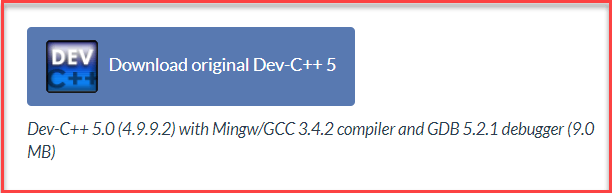
**Step 3)** Under package Dev-C++ 5.0 (4.9.9.2) with Mingw/GCC 3.4.2 compiler and GDB 5.2.1 debugger (9.0 MB) Click on the link “Download from SourceForge”.

[](https://www.guru99.com/images/2/install-Cpp-ide-2.png)

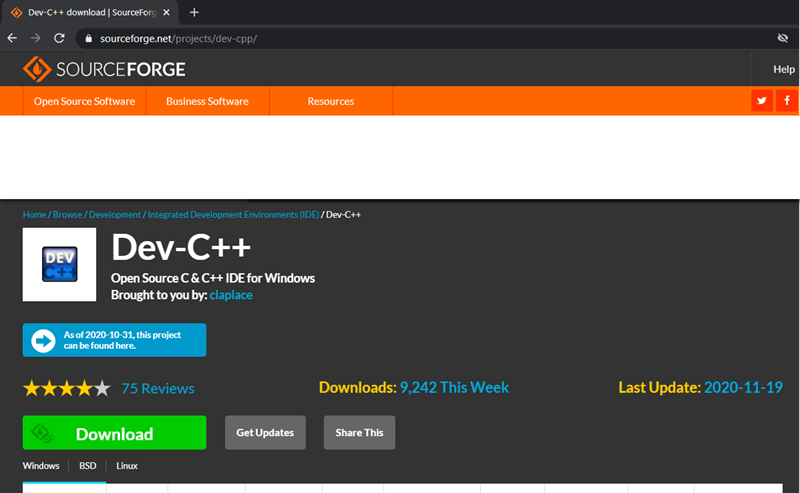
**Step 4)** This package will download C++ **.exe file** for Windows that can be used to install on Windows 7/8/XP/Vista/10.

[](https://www.guru99.com/images/2/install-Cpp-ide-3.png)

**Step 5)** You will direct to SourceForge website, and your C++ download will start automatically.

* Click on save button to save. By default, it is saved in “Downloads” folder.
* After the download completes, go to the saved .exe file and click on it to Run.
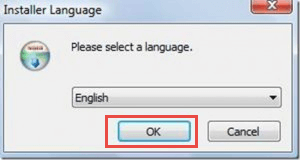
* The installer will ask you a language to select. Select “English” and click on “OK”.

[](https://www.guru99.com/images/c-sharp-net/052716%5F1040%5FInstallandF4.png)

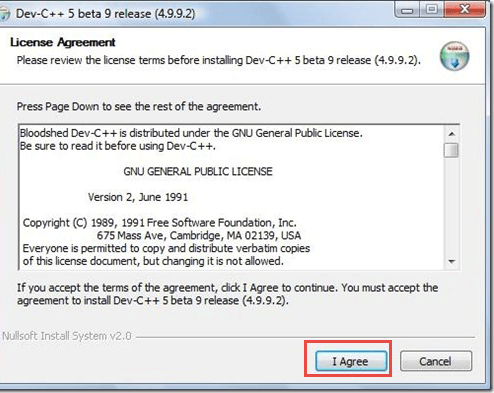
* Then screen for license agreement will appear. Click on “I agree” to proceed further.

[](https://www.guru99.com/images/c-sharp-net/052716%5F1040%5FInstallandF5.png)

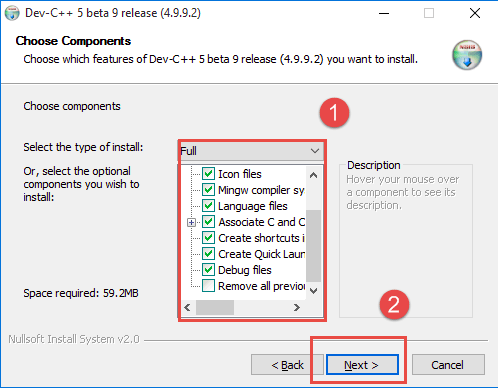
**Step 6)** In this step,

1. You can see different components of Dev C++ that will be installed with this package.
2. Just click on “next” button.

[](https://www.guru99.com/images/c-sharp-net/052716%5F1040%5FInstallandF6.png)

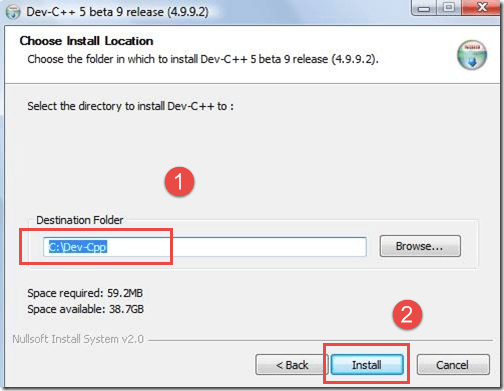
**Step 7)** In this step,

1. By default, the destination folder is in C drive. You are free to change this destination folder but make sure you have enough memory.
2. Click on “Install” button.

[](https://www.guru99.com/images/c-sharp-net/052716%5F1040%5FInstallandF7.png)

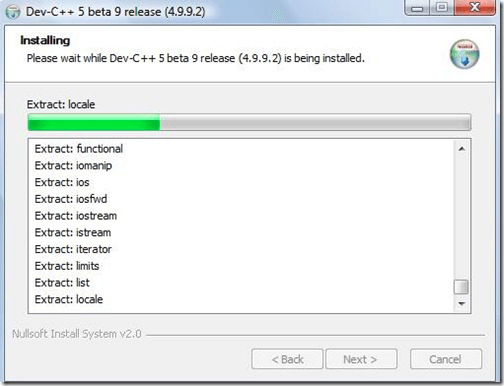
In the next screen, installation begins

[](https://www.guru99.com/images/c-sharp-net/052716%5F1040%5FInstallandF8.png)

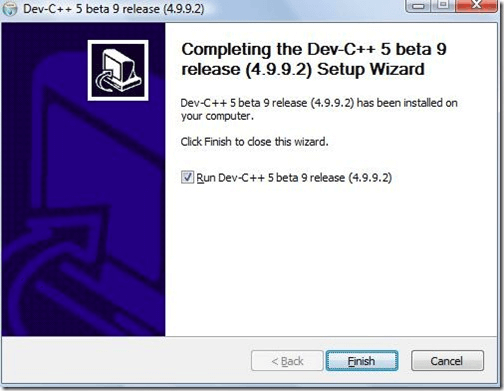
Now, Dev C++ is installed successfully on your Windows. Select ” Run Dev C++” to run it and click on ” Finish” button.

[](https://www.guru99.com/images/c-sharp-net/052716%5F1044%5FInstallandF1.png)

That’s it! Now you are ready to compile your [C](https://www.guru99.com/c-programming-language.html) or C++ programs with Dev C++ compiler.

### RELATED ARTICLES

* [For Loop in C++ with Syntax & Program EXAMPLES ](https://www.guru99.com/cpp-for-loop.html "For Loop in C++ with Syntax & Program EXAMPLES")
* [C++ do…while loop with Examples ](https://www.guru99.com/cpp-do-while-loop.html "C++ do…while loop with Examples")
* [Top 24 C++ Interview Questions and Answers (PDF) ](https://www.guru99.com/cpp-interview-questions.html "Top 24 C++ Interview Questions and Answers (PDF)")
* [Static Member Function in C++ (Examples) ](https://www.guru99.com/static-function-in-cpp.html "Static Member Function in C++ (Examples)")

## Features Of Dev-C++ IDE

Here are some important features of Dev-C++ IDE:

* Dev-C++ IDE allows us to use integrated debugging using GDB.
* Localization feature that provides support for multiple languages.
* Offers editing and compiling the resource files.
* It has a inbuilt find and replace facility.
* Helps you to create your own project templates to create project types.
* It offers support for class browser as well as debug variable browser.
* Provides project manager feature that helps you to manage various projects.
* Provides CVS support for source code management.

#### Summarize this post with:

ChatGPT Perplexity Grok Google AI 

**Stay Updated on AI** **Get Weekly AI Skills, Trends, Actionable Advice.** 

##### Sign up for the newsletter

Subscribe for Free 

You have successfully subscribed.  
Please check your inbox. 

![AI-Newsletter]() Chosen by over **350,000+** professionals 

[Scroll to top ](#wrapper)Scroll to top 

× 

Toggle Menu Close 

Search for: 

Search

```json
{"@context":"https://schema.org","@graph":[{"@type":"Organization","@id":"https://www.guru99.com/#organization","name":"Guru99","sameAs":["https://www.facebook.com/Guru99Official","https://twitter.com/guru99com"],"logo":{"@type":"ImageObject","@id":"https://www.guru99.com/#logo","url":"https://www.guru99.com/images/guru99-logo-v1-150x59.png","contentUrl":"https://www.guru99.com/images/guru99-logo-v1-150x59.png","caption":"Guru99","inLanguage":"en-US"}},{"@type":"WebSite","@id":"https://www.guru99.com/#website","url":"https://www.guru99.com","name":"Guru99","publisher":{"@id":"https://www.guru99.com/#organization"},"inLanguage":"en-US"},{"@type":"ImageObject","@id":"https://www.guru99.com/images/cpp-ide-download-install.png","url":"https://www.guru99.com/images/cpp-ide-download-install.png","width":"634","height":"250","inLanguage":"en-US"},{"@type":"BreadcrumbList","@id":"https://www.guru99.com/cpp-ide-download-install.html#breadcrumb","itemListElement":[{"@type":"ListItem","position":"1","item":{"@id":"https://www.guru99.com","name":"Home"}},{"@type":"ListItem","position":"2","item":{"@id":"https://www.guru99.com/cpp","name":"CPP"}},{"@type":"ListItem","position":"3","item":{"@id":"https://www.guru99.com/cpp-ide-download-install.html","name":"How to Download and Install C++ IDE on Windows"}}]},{"@type":"WebPage","@id":"https://www.guru99.com/cpp-ide-download-install.html#webpage","url":"https://www.guru99.com/cpp-ide-download-install.html","name":"How to Download and Install C++ IDE on Windows","dateModified":"2024-08-10T19:25:22+05:30","isPartOf":{"@id":"https://www.guru99.com/#website"},"primaryImageOfPage":{"@id":"https://www.guru99.com/images/cpp-ide-download-install.png"},"inLanguage":"en-US","breadcrumb":{"@id":"https://www.guru99.com/cpp-ide-download-install.html#breadcrumb"}},{"@type":"Person","@id":"https://www.guru99.com/author/benjamin","name":"Benjamin Walker","description":"I'm Benjamin Walker, an expert in C, C++, and C# programming, providing resources to enhance your coding proficiency and project outcomes.","url":"https://www.guru99.com/author/benjamin","image":{"@type":"ImageObject","@id":"https://www.guru99.com/images/benjamin-walker-author.png","url":"https://www.guru99.com/images/benjamin-walker-author.png","caption":"Benjamin Walker","inLanguage":"en-US"},"worksFor":{"@id":"https://www.guru99.com/#organization"}},{"@type":"Article","headline":"How to Download and Install C++ IDE on Windows","description":"Dev-C++, developed by Bloodshed Software, is a fully-featured graphical IDE. In this C++ tutorial, you will learn step by step how to download and install the latest version of Dev C++ on Windows.","author":{"@id":"https://www.guru99.com/author/benjamin","name":"Benjamin Walker"},"copyrightYear":"2024","name":"How to Download and Install C++ IDE on Windows","articleSection":"CPP","subjectOf":[{"@type":"HowTo","name":"How to Download and Install Dev C++ on Windows","description":"There are many compilers available for C++ programming. You can download anyone. Here, we are going to use Dev C++. It will work for both C++ and C programming languages.","step":[{"@type":"HowToStep","name":"First you must download the Dev C++ on your Windows machine.","text":"Visit to Download Dev C++: <a href='http://www.bloodshed.net/'>http://www.bloodshed.net/</a>","url":"https://www.guru99.com/cpp-ide-download-install.html#step1"},{"@type":"HowToStep","name":"Under package Dev-C++ 5.0 (4.9.9.2) with Mingw/GCC 3.4.2 compiler and","text":"GDB 5.2.1 debugger (9.0 MB) Click on the link 'Download from SourceForge'.","image":"https://www.guru99.com/images/2/install-Cpp-ide-2.png","url":"https://www.guru99.com/cpp-ide-download-install.html#step2"},{"@type":"HowToStep","name":"This package will download C++ .exe file for Windows","text":"that can be used to install on Windows 7/8/XP/Vista/10.","image":"https://www.guru99.com/images/2/install-Cpp-ide-3.png","url":"https://www.guru99.com/cpp-ide-download-install.html#step3"},{"@type":"HowToStep","name":"You will direct to SourceForge website, and your C++ download will start automatically.","text":"<ul><li>Click on save button to save. By default, it is saved in 'Downloads' folder.</li><li>After the download completes, go to the saved .exe file and click on it to Run.</li></ul>","image":"https://www.guru99.com/images/c-sharp-net/052716_1040_InstallandF4.png","url":"https://www.guru99.com/cpp-ide-download-install.html#step4"},{"@type":"HowToStep","name":"In this step,","text":"<p>1.You can see different components of Dev C++ that will be installed with this package.</p><p>2.Just click on 'next' button.</p>","image":"https://www.guru99.com/images/c-sharp-net/052716_1040_InstallandF6.png","url":"https://www.guru99.com/cpp-ide-download-install.html#step5"},{"@type":"HowToStep","name":"In this step,","text":"<p>1. By default, the destination folder is in C drive. You are free to change this destination folder but make sure you have enough memory.</p><p>2. Click on 'Install' button.</p>","image":"https://www.guru99.com/images/c-sharp-net/052716_1040_InstallandF7.png","url":"https://www.guru99.com/cpp-ide-download-install.html#step6"}]}],"@id":"https://www.guru99.com/cpp-ide-download-install.html#schema-522895","isPartOf":{"@id":"https://www.guru99.com/cpp-ide-download-install.html#webpage"},"publisher":{"@id":"https://www.guru99.com/#organization"},"image":{"@id":"https://www.guru99.com/images/cpp-ide-download-install.png"},"inLanguage":"en-US","mainEntityOfPage":{"@id":"https://www.guru99.com/cpp-ide-download-install.html#webpage"}}]}
```