
TestNG श्रोतागण Selenium
 Krishna रूंगटा
⚡ स्मार्ट सारांश
श्रोतागण Selenium वेबड्राइवर हैं TestNG यह लेख ITestListener विधियों की व्याख्या करता है और एक रन करने योग्य इंटरफ़ेस के माध्यम से लॉग, रिपोर्ट और विफलता के बाद की कार्रवाइयों को अनुकूलित करने के लिए परीक्षण घटनाओं को इंटरसेप्ट करता है। Java उदाहरण के लिए, और यह स्पष्ट करता है कि कैसे Selenium 4 ने अप्रचलित WebDriverEventListener को प्रतिस्थापित कर दिया।
Selenium वेबड्राइवर स्क्रिप्ट को अक्सर परीक्षण घटनाओं जैसे कि उत्तीर्ण अभिकथन, विफल लोकेटर या छूटे हुए चरण पर प्रतिक्रिया करने की आवश्यकता होती है। लिसनर इसे संभव बनाते हैं। मोटे तौर पर, Selenium ये परियोजनाएं दो श्रोता परिवारों पर निर्भर करती हैं:
- वेबड्राइवर श्रोता
- TestNG श्रोताओं
इस ट्यूटोरियल में, हम पर ध्यान केंद्रित करेंगे TestNG वेबड्राइवर-स्तर के श्रोताओं में किस प्रकार परिवर्तन हुए, इस पर एक टिप्पणी के साथ श्रोताओं के लिए। Selenium 4.x।
श्रोता क्या होता है? TestNG?
लिसनर एक इंटरफ़ेस है जो डिफ़ॉल्ट व्यवहार को संशोधित करता है। TestNGजैसा कि नाम से पता चलता है, लिसनर्स परिभाषित घटनाओं को "सुनते" हैं। Selenium स्क्रिप्ट और प्रतिक्रिया को तदनुसार संचालित करें। आप संबंधित लिसनर इंटरफ़ेस को लागू करके और इसे अपनी टेस्ट क्लास या सूट पर पंजीकृत करके इनका उपयोग कर सकते हैं। लिसनर आपको अनुकूलन की अनुमति देते हैं। TestNG रिपोर्ट तैयार करें, स्क्रीनशॉट संलग्न करें और संरचित लॉग उत्सर्जित करें।
श्रोताओं के प्रकार TestNG
TestNG यह लिसनर इंटरफेस के एक परिवार को शिप करता है, और प्रत्येक इंटरफेस परीक्षण जीवनचक्र के एक अलग चरण को लक्षित करता है।
नीचे आमतौर पर उपयोग किए जाने वाले शब्द दिए गए हैं TestNG श्रोताओं:
- आईएनोटेशनट्रांसफॉर्मर
- IAnnotationTransformer2
- Iकॉन्फ़िगर करने योग्य
- आईकॉन्फ़िगरेशनश्रोता
- IExecutionListener
- IHookable
- IInvokedMethodListener
- IInvokedMethodListener2
- IMethodइंटरसेप्टर
- आईरिपोर्टर
- ISuiteListener
- आईटेस्ट लिस्टनर
इन इंटरफेसों का उपयोग किया जाता है Selenium लॉग उत्पन्न करने या अनुकूलित करने के लिए TestNG रिपोर्ट। इस ट्यूटोरियल में, हम इसे लागू करेंगे। आईटेस्ट लिस्टनर.
आईटेस्ट लिस्टनर निम्नलिखित विधियों को उजागर करता है:
- ऑनस्टार्ट – किसी भी परीक्षण के शुरू होने पर इसे कॉल किया जाता है।
- ऑनटेस्टसक्सेस – टेस्ट पास होने पर कॉल किया जाता है।
- onTestFailure – टेस्ट विफल होने पर कॉल किया जाता है।
- onTestSkipped – जब कोई टेस्ट स्किप किया जाता है तो इसे कॉल किया जाता है।
- onTestFailedButWithinSuccessPercentage – यह तब कॉल किया जाता है जब कोई टेस्ट विफल हो जाता है लेकिन सफलता प्रतिशत के भीतर होता है।
- ऑनफ़िनिश – क्लास में सभी टेस्ट पूरे होने के बाद इसे कॉल किया जाता है।
परिदृश्य का परीक्षण करें
इस परीक्षण परिदृश्य में, हम लॉगिन प्रक्रिया को स्वचालित करेंगे और इसे लागू करेंगे। आईटेस्ट लिस्टनर इसके खिलाफ।
- लांच Firefox और साइट खोलें https://demo.guru99.com/V4/

- एप्लिकेशन में लॉग इन करें।

बनाने के चरण TestNG श्रोता
ऊपर दिए गए परीक्षण परिदृश्य के लिए, हम लिसनर को चरण दर चरण लागू करेंगे।
चरण 1) एक क्लास बनाएं जिसका नाम हो लिसनरटेस्ट जो लागू करता है आईटेस्ट लिस्टनरलाल अंडरलाइन पर माउस ले जाएं और Eclipse नीचे दिखाए गए अनुसार दो त्वरित समाधान सुझाए जाएंगे:
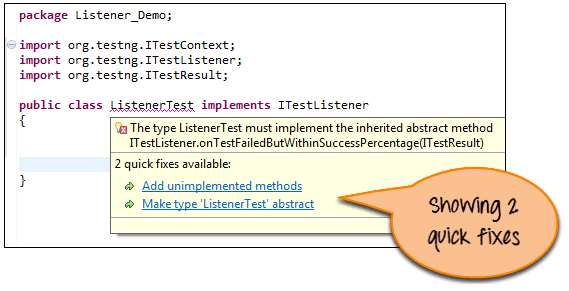
“अपूर्णीकृत विधियाँ जोड़ें” पर क्लिक करें। आपके कोड में कई स्टब विधियाँ (बिना बॉडी के) जुड़ जाएँगी, जो इस प्रकार दिखाई देंगी:
आयात org.testng.ITestContext;
आयात org.testng.ITestListener;
आयात org.testng.ITestResult;
सार्वजनिक वर्ग लिसनरटेस्ट औजार आईटेस्ट लिस्टनर {
@ ऑवरराइड
सार्वजनिक शून्य ऑनफ़िनिश(ITestContext arg0) {
// TODO स्वचालित रूप से उत्पन्न विधि स्टब
}
@ ऑवरराइड
सार्वजनिक शून्य ऑनस्टार्ट(ITestContext arg0) {
// TODO स्वचालित रूप से उत्पन्न विधि स्टब
}
@ ऑवरराइड
सार्वजनिक शून्य onTestFailedButWithinSuccessPercentage(आईटीेस्ट परिणाम arg0) {
// TODO स्वचालित रूप से उत्पन्न विधि स्टब
}
@ ऑवरराइड
सार्वजनिक शून्य onTestFailure(आईटीेस्ट परिणाम arg0) {
// TODO स्वचालित रूप से उत्पन्न विधि स्टब
}
@ ऑवरराइड
सार्वजनिक शून्य onTestSkipped(आईटीेस्ट परिणाम arg0) {
// TODO स्वचालित रूप से उत्पन्न विधि स्टब
}
@ ऑवरराइड
सार्वजनिक शून्य onTestStart(आईटीेस्ट परिणाम arg0) {
// TODO स्वचालित रूप से उत्पन्न विधि स्टब
}
@ ऑवरराइड
सार्वजनिक शून्य ऑनटेस्टसक्सेस(आईटीेस्ट परिणाम arg0) {
// TODO स्वचालित रूप से उत्पन्न विधि स्टब
}
}
अब आइए इसमें संशोधन करें लिसनरटेस्ट क्लास। विशेष रूप से, हम निम्नलिखित विधियों को भरेंगे: ऑनटेस्टफेलियर, onTestSkipped, ऑनटेस्टस्टार्ट, तथा ऑनटेस्टसफलता.
यह बदलाव सरल है: प्रत्येक विधि परीक्षण का नाम प्रिंट करती है ताकि कंसोल स्पष्ट रूप से पास, फेल और स्किप स्थिति दिखा सके।
संशोधन के बाद, कोड इस प्रकार दिखता है:
आयात org.testng.ITestContext;
आयात org.testng.ITestListener;
आयात org.testng.ITestResult;
सार्वजनिक वर्ग लिसनरटेस्ट औजार आईटेस्ट लिस्टनर {
@ ऑवरराइड
सार्वजनिक शून्य ऑनफ़िनिश(ITestContext परिणाम) {
}
@ ऑवरराइड
सार्वजनिक शून्य ऑनस्टार्ट(ITestContext परिणाम) {
}
@ ऑवरराइड
सार्वजनिक शून्य onTestFailedButWithinSuccessPercentage(आईटीेस्ट परिणाम परिणाम) {
}
// जब कोई टेस्ट केस विफल होता है, तो यह विधि कॉल की जाती है।
@ ऑवरराइड
सार्वजनिक शून्य onTestFailure(आईटीेस्ट परिणाम परिणाम) {
System.out.println(“जिस टेस्ट केस में विफलता मिली है उसका नाम यह है:” + परिणाम.getName());
}
// जब कोई टेस्ट केस स्किप किया जाता है, तो यह मेथड कॉल की जाती है।
@ ऑवरराइड
सार्वजनिक शून्य onTestSkipped(आईटीेस्ट परिणाम परिणाम) {
System.out.println(“स्किप किए गए टेस्ट केस का नाम यह है:” + परिणाम.getName());
}
// जब कोई टेस्ट केस शुरू होता है, तो यह विधि कॉल की जाती है।
@ ऑवरराइड
सार्वजनिक शून्य onTestStart(आईटीेस्ट परिणाम परिणाम) {
System.out.println(Result.getName() + "टेस्ट केस शुरू हो गया");
}
// जब कोई टेस्ट केस पास होता है, तो यह विधि कॉल की जाती है।
@ ऑवरराइड
सार्वजनिक शून्य ऑनटेस्टसक्सेस(आईटीेस्ट परिणाम परिणाम) {
System.out.println(“सफल हुए टेस्ट केस का नाम यह है:” + परिणाम.getName());
}
}
चरण 2) एक और क्लास बनाएं जिसे कहा जाता है टेस्टकेस लॉगिन स्वचालन के लिए। Selenium यह क्लास डेमो साइट पर लॉग इन करने के लिए निष्पादित की जाएगी।
आयात org.openqa.सेलेनियम.बाय;
आयात org.openqa.selenium.WebDriver;
आयात org.openqa.selenium.फ़ायरफ़ॉक्स.Firefoxचालक;
आयात org.testng.Assert;
आयात org.testng.annotations.Listeners;
आयात org.testng.annotations.टेस्ट;
सार्वजनिक वर्ग टेस्टकेस {
वेबड्राइवर ड्राइवर = नई Firefoxचालक();
// यह परीक्षण सफल होने के लिए डिज़ाइन किया गया है, ताकि सफलता श्रोता की पुष्टि की जा सके।
@परीक्षा
सार्वजनिक शून्य लॉग इन करें() {
ड्राइवर.गेट("https://demo.guru99.com/V4/");
ड्राइवर.फाइंडएलिमेंट(बाय.नाम(“यूआईडी”)).sendKeys(“mngr34926”);
ड्राइवर.फाइंडएलिमेंट(बाय.नाम("कुंजिका")).sendKeys(“अमुपेनु”);
ड्राइवर.फाइंडएलिमेंट(बाय.नाम(“बटन लॉगिन”)).क्लिक();
}
// विफलता श्रोता को सत्यापित करने के लिए परीक्षण को जबरदस्ती विफल किया गया।
@परीक्षा
सार्वजनिक शून्य TestToFail() {
System.out.println(“परीक्षण की यह विधि विफल रही”);
Assert.assertTrue(असत्य);
}
}
चरण 3) इसके बाद, इस लिसनर को हमारी टेस्ट क्लास से अटैच करें। टेस्टकेसकिसी क्लास को लिसनर इंटरफेस से जोड़ने के दो तरीके हैं।
पहला तरीका यह है कि @श्रोताओं नीचे दिखाए गए अनुसार एनोटेशन:
हम इस एनोटेशन को ऊपर जोड़ते हैं टेस्टकेस क्लास। फिर क्लास इस प्रकार दिखाई देगी:
आयात org.openqa.सेलेनियम.बाय;
आयात org.openqa.selenium.WebDriver;
आयात org.openqa.selenium.फ़ायरफ़ॉक्स.Firefoxचालक;
आयात org.testng.Assert;
आयात org.testng.annotations.Listeners;
आयात org.testng.annotations.टेस्ट;
@Listeners(Listener_Demo.ListenerTest.class)
सार्वजनिक वर्ग टेस्टकेस {
वेबड्राइवर ड्राइवर = नई Firefoxचालक();
// सफलता श्रोता को सत्यापित करने के लिए परीक्षण पास होना चाहिए।
@परीक्षा
सार्वजनिक शून्य लॉग इन करें() {
ड्राइवर.गेट("https://demo.guru99.com/V4/");
ड्राइवर.फाइंडएलिमेंट(बाय.नाम(“यूआईडी”)).sendKeys(“mngr34926”);
ड्राइवर.फाइंडएलिमेंट(बाय.नाम("कुंजिका")).sendKeys(“अमुपेनु”);
ड्राइवर.फाइंडएलिमेंट(बाय.नाम(“बटन लॉगिन”)).क्लिक();
}
// विफलता श्रोता को सत्यापित करने के लिए परीक्षण को जबरदस्ती विफल किया गया।
@परीक्षा
सार्वजनिक शून्य TestToFail() {
System.out.println(“परीक्षण की यह विधि विफल रही”);
Assert.assertTrue(असत्य);
}
}
परियोजना संरचना इस प्रकार है:

चरण 4) निष्पादित करें टेस्टकेस क्लास. अंदर के तरीके लिसनरटेस्ट एनोटेट किए गए तरीकों के व्यवहार के आधार पर स्वचालित रूप से लागू होते हैं। @परीक्षा.
चरण 5) कंसोल में दिखाए गए आउटपुट की जाँच करें।
का उत्पादन टेस्टकेस की तरह लगता है:

C:\Users\gauravn\AppData\Local\Temp\testng-eclipse–1058076918\testng-customsuite.xml
लॉगिन परीक्षण मामला शुरू हो गया
उत्तीर्ण हुए टेस्ट केस का नाम है: लॉगिन
TestToFail टेस्ट केस शुरू हो गया
यह परीक्षण विधि विफल हो जाती है
असफल हुए टेस्ट केस का नाम है: TestToFail
सफल: लॉगिन
असफल: टेस्ट टू फेल
java.lang.AssertionError: अपेक्षित [true] था लेकिन [false] मिला
एकाधिक कक्षाओं के लिए श्रोता का उपयोग करना
यदि किसी प्रोजेक्ट में कई टेस्ट क्लास हैं, तो उन्हें जोड़ना @श्रोताओं प्रत्येक पर टिप्पणी लिखना बोझिल और त्रुटिपूर्ण हो जाता है।
उस स्थिति में, एक बनाएँ testng.xml फाइल बनाएं और वहां एक बार लिसनर को रजिस्टर करें।
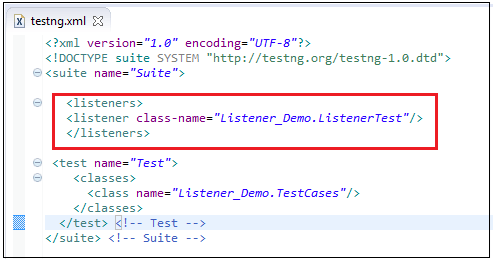
यह लिसनर फिर क्लासों की संख्या की परवाह किए बिना पूरे टेस्ट सूट पर लागू होता है। जब आप XML फ़ाइल चलाते हैं, तो सूट में घोषित प्रत्येक क्लास के लिए लिसनर सक्रिय हो जाता है, और आप एक ही टैग के भीतर कितनी भी लिसनर क्लासों को एक साथ जोड़ सकते हैं।
वेबड्राइवरलिसनर में Selenium 4 बनाम अप्रचलित EventFiringWebDriver
जबकि TestNG लिसनर टेस्ट लाइफसाइकिल इवेंट्स पर प्रतिक्रिया करते हैं, जबकि वेबड्राइवर लिसनर ब्राउज़र-ड्राइवर क्रियाओं जैसे क्लिक, नेविगेशन या फाइंडएलिमेंट कॉल पर प्रतिक्रिया करते हैं। Selenium 3. सामान्य दृष्टिकोण यह था कि वेबड्राइवरइवेंटलिसनर इंटरफ़ेस के माध्यम से वायर्ड इवेंटफायरिंगवेबड्राइवरदोनों को अप्रचलित कर दिया गया है। Selenium 4.x।
इसका आधुनिक प्रतिस्थापन यह है: वेबड्राइवरलिसनर इंटरफ़ेस संयुक्त के साथ इवेंटफायरिंगडेकोरेटर:
आयात org.openqa.selenium.chrome.ChromeDriver;
आयात org.openqa.selenium.support.events.EventFiringDecorator;
आयात org.openqa.selenium.support.events.WebDriverListener;
सार्वजनिक वर्ग लॉगिंगलिसनर औजार वेबड्राइवरलिसनर {
@ ऑवरराइड
सार्वजनिक शून्य beforeGet(वेबड्राइवर ड्राइवर, स्ट्रिंग यूआरएल) {
System.out.println(“की ओर अग्रसर हो रहा है” + यूआरएल);
}
}
वेबड्राइवर कच्चा = नई क्रोमड्राइवर();
वेबड्राइवर ड्राइवर = नई इवेंटफायरिंगडेकोरेटर<>(नई लॉगिंगलिसनर()).डेकोरेट(रॉ);
डेकोरेटर किसी भी वेबड्राइवर, वेबएलिमेंट या अलर्ट को रैप कर सकता है, जो पुराने इवेंट-फायरिंग रैपर की तुलना में अधिक लचीला है। उपयोग करें वेबड्राइवरलिसनर ब्राउज़र-साइड अवलोकनशीलता के लिए और TestNG आईटेस्ट लिस्टनर सुइट-स्तरीय रिपोर्टिंग के लिए।
एआई-संचालित श्रोता: बेहतर लॉग और विफलता प्रबंधन
आधुनिक Selenium टीमें सीआई संकेतों को अधिक उपयोगी बनाने के लिए अपने श्रोताओं में एआई सेवाओं को तेजी से एकीकृत कर रही हैं। ऑनटेस्टफेलियरएक एआई-सहायता प्राप्त श्रोता डीओएम स्नैपशॉट और स्क्रीनशॉट कैप्चर कर सकता है, उन्हें एक मॉडल को भेज सकता है जो संभावित मूल-कारण क्लस्टर लौटाता है, और एक टैग वापस लिख सकता है। TestNG रिपोर्ट या रिपोर्टपोर्टल जैसे टूल का उपयोग करें।
सामान्य एआई-संचालित पैटर्न में निम्नलिखित शामिल हैं:
- फ्लेकी-टेस्ट डिटेक्शन: श्रोता उत्तीर्ण/अनुत्तीर्ण होने की समयरेखा को एक मॉडल को अग्रेषित करते हैं जो विफलता को अस्थिर, पर्यावरणीय या वास्तविक प्रतिगमन के रूप में वर्गीकृत करता है।
- स्मार्ट स्क्रीनशॉट: कंप्यूटर-विज़न मॉडल यूआई स्क्रीनशॉट को क्रॉप करते हैं, एनोटेट करते हैं और उनमें अंतर दिखाते हैं ताकि समीक्षक पूरे पेज के स्क्रीनशॉट के बजाय बदले हुए क्षेत्र को देख सकें।
- स्व-उपचार लोकेटर: A वेबड्राइवरलिसनर हुक beforeFindElement और जब प्राथमिक लोकेटर त्रुटि देता है तो वैकल्पिक लोकेटर सुझाने के लिए एआई सहायक से अनुरोध करता है। कोई ऐसाएलिमेंटएक्सेप्शन नहीं.
- प्राकृतिक भाषा में सारांश: An आईरिपोर्टर कार्यान्वयन प्रक्रिया के परिणाम एलएलएम में जाते हैं, जो एक पैराग्राफ का स्टैंड-अप सारांश तैयार करता है।
लिसनर लेयर इन हुक्स को इंजेक्ट करने के लिए सबसे साफ जगह है क्योंकि यह टेस्ट लॉजिक से बाहर रहता है और पूरे सूट में समान रूप से लागू होता है।
सारांश
श्रोताओं को लॉग उत्पन्न करने या अनुकूलित करने की आवश्यकता होती है TestNG में रिपोर्ट Selenium वेबड्राइवर.
- TestNG यह कई लिसनर इंटरफेस प्रदान करता है; उस इंटरफेस को चुनें जो आपके लिए महत्वपूर्ण घटना से मेल खाता हो।
- लिसनर वे इंटरफेस हैं जिनका उपयोग किया जाता है Selenium टेस्ट लाइफसाइकिल इवेंट्स पर प्रतिक्रिया देने के लिए वेबड्राइवर स्क्रिप्ट।
- ट्यूटोरियल में यह दिखाया गया है आईटेस्ट लिस्टनर एक उत्तीर्ण और एक अनुत्तीर्ण परीक्षा के साथ।
- आप एक लिसनर को इससे जोड़ सकते हैं @श्रोताओं या इसे एक बार पंजीकृत करें testng.xml पूरे सुइट के लिए।
- Selenium 4.x प्रतिस्थापित करता है इवेंटफायरिंगवेबड्राइवर साथ में वेबड्राइवरलिसनर + इवेंटफायरिंगडेकोरेटर वेबड्राइवर-स्तर की घटनाओं के लिए।
