
Ehdolliset lausekkeet C:ssä: If, Else, Nested If esimerkin avulla
 Benjamin kävelijä
⚡ Älykäs yhteenveto
C-kielen ehtolausekkeet ohjaavat ohjelman kulkua suorittamalla koodilohkoja vain silloin, kun testattu ehto arvioidaan tosiksi, mikä mahdollistaa päätöksenteon if-, if-else-, sisäkkäisten ja else-if-tikapuurakenteiden avulla.
Mikä on ehdollinen lauseke C:ssä?
C-ohjelmoinnissa ehtolauseita käytetään päätöksentekoon ehtojen perusteella. Ehdolliset lauseet suoritetaan peräkkäin, kun lausekkeiden ympärillä ei ole ehtoa. Jos asetat ehdon lauselohkolle, suorituskulku voi muuttua ehdon arvioiman tuloksen perusteella. Tätä prosessia kutsutaan C-kielessä päätöksenteoksi.
Toisin kuin silmukat C-kielellä jotka toistavat koodia, ehdolliset lauseet valitsevat yhden polun.
'C'-ohjelmoinnissa ehdolliset lauseet ovat mahdollisia seuraavien kahden konstruktin avulla:
- Jos lausunto
- Jos-muuten-lauseke
Sitä kutsutaan myös haarautumiseksi, koska ohjelma päättää, minkä käskyn se suorittaa arvioidun ehdon tuloksen perusteella.
Jos lausunto
Se on yksi vahvimmista ehdollisista lausunnoista. If-lause on vastuussa ohjelman suoritusvirran muuttamisesta. Jos lauseketta käytetään aina ehdon kanssa. Ehto arvioidaan ensin ennen kuin suoritetaan mitään käskyä Ifin rungossa. If-lausekkeen syntaksi on seuraava:
 if (condition)
     instruction;
Ehto arvioi joko tosi tai epätosi. True on aina nollasta poikkeava arvo, ja false on arvo, joka sisältää nollan. Ohjeet voivat olla yksittäisiä käskyjä tai koodilohkoja, jotka on suljettu aaltosulkeilla { }.
Seuraava ohjelma havainnollistaa if-konstruktin käyttöä 'C'-ohjelmoinnissa:
#include<stdio.h>
int main()
{
	int num1=1;
	int num2=2;
	if(num1<num2)		//test-condition
	{
		printf("num1 is smaller than num2");
	}
	return 0;
}
lähtö:
num1 is smaller than num2
Yllä oleva ohjelma havainnollistaa if-konstruktin käyttöä kahden luvun yhtäläisyyden tarkistamiseen.
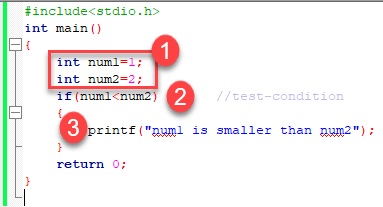
- Yllä olevassa ohjelmassa olemme alustaneet kaksi muuttujaa num1, num2 arvoilla 1, 2 vastaavasti.
- Sitten olemme käyttäneet if testilausekkeella tarkistamaan, mikä luku on pienin ja mikä suurin. Olemme käyttäneet relaatiolauseketta if-konstruktissa. Koska num1:n arvo on pienempi kuin num2, ehdon arvo on tosi.
- Siten se tulostaa lausunnon If-lohkon sisään. Sen jälkeen ohjaus menee lauseen ulkopuolelle ja ohjelma lopetetaan onnistuneella tuloksella.
omainen OperaTors
C:ssä on kuusi relaatiooperaattoria, joita voidaan käyttää loogisen lausekkeen muodostamiseen päätöksenteossa ja ehtojen testaamisessa. Lauseke palauttaa joko tosi tai epätosi:
<— vähemmän kuin<=— pienempi tai yhtä suuri kuin>— suurempi kuin>=— suurempi tai yhtä suuri kuin==— yhtä suuri kuin!=— ei yhtä suuri kuin
Huomaa, että yhtäläisyystesti (==) eroaa osoitusoperaattorista (=), koska se on yksi yleisimmistä ongelmista, joita ohjelmoija kohtaa sekoittamalla niitä.
Esimerkiksi:
int x = 41;
x =x+ 1;
if (x == 42) {
   printf("You succeed!");}
Lähtö:
You succeed
Muista, että ehto, joka laskee nollasta poikkeavaan arvoon, katsotaan tosi.
Esimerkiksi:
int present = 1;
if (present)
  printf("There is someone present in the classroom \n");
lähtö:
There is someone present in the classroom
If-Elsen lausunto
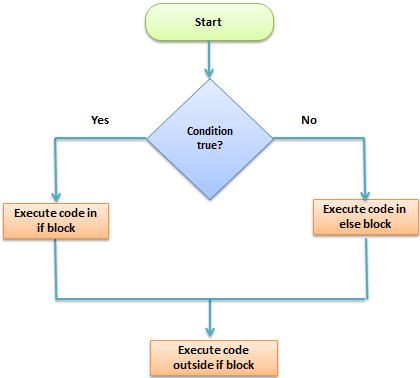
if-else-lauseke on If-lausekkeen laajennettu versio. if-else-lausekkeen yleinen muoto on seuraava:
if (test-expression)
{
    True block of statements
}
Else
{
    False block of statements
}
Statements;
Tällaisessa konstruktiossa, jos testilausekkeen arvo on true, suoritetaan lausekelohko true. Jos testilausekkeen arvo on false, suoritetaan lausekelohko false. Joka tapauksessa suorituksen jälkeen ohjaus siirtyy automaattisesti If-lausekkeen lohkon ulkopuolella oleviin lauseisiin.
Seuraavat ohjelmat havainnollistavat if-else-rakenteen käyttöä:
Alustamme muuttujan jollakin arvolla ja kirjoitamme ohjelman, joka määrittää, onko arvo pienempi kuin kymmenen vai suurempi kuin kymmenen.
Aloitetaan.
#include<stdio.h>
int main()
{
	int num=19;
	if(num<10)
	{
		printf("The value is less than 10");
	}
	else
	{
		printf("The value is greater than 10");
	}
	return 0;
}
lähtö:
The value is greater than 10
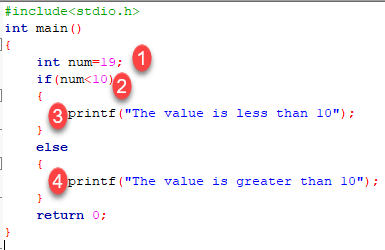
- Olemme alustaneet muuttujan, jonka arvo on 19. Meidän on selvitettävä 'C'-ohjelmalla, onko luku suurempi vai pienempi kuin 10. Tätä varten olemme käyttäneet if-else-rakennetta.
- Tässä olemme antaneet ehdon numero <10, koska meidän on verrattava arvoamme 10:een.
- Kuten näet, ensimmäinen lohko on aina tosi lohko, mikä tarkoittaa, että jos testilausekkeen arvo on tosi, ensimmäinen lohko, joka on If, suoritetaan.
- Toinen lohko on else-lohko. Tämä lohko sisältää lausunnot, jotka suoritetaan, jos testilausekkeen arvo tulee epätosi. Ohjelmassamme arvon num on suurempi kuin kymmenen, joten testiehdosta tulee epätosi ja muuten lohko suoritetaan. Siten lähtömme tulee muusta lohkosta, joka on "Arvo on suurempi kuin 10". Jos-else-komennon jälkeen ohjelma päättyy onnistuneella tuloksella.
'C'-ohjelmoinnissa voimme käyttää useita if-else-rakenteita toistensa sisällä, joita kutsutaan if-else-käskyjen sisäkkäisiksi.
Ehdolliset lausekkeet
Toinen tapa ilmaista if-else-lauseke on ottaa käyttöön ?:-operaattori. Ehdollisessa lausekkeessa ?:-operaattorilla on vain yksi lauseke, joka liittyy if- ja else-operaattoreihin.
Esimerkiksi:
#include <stdio.h>
int main() {
  int y;
  int x = 2;
   y = (x >= 6) ?  6 : x;/* This is equivalent to:  if (x >= 5)    y = 5;  else    y = x; */
   printf("y =%d ",y);
  return 0;}
lähtö:
y =2
Sisäkkäiset If-else-lausunnot
Kun tarvitaan sarja päätöstä, käytetään sisäkkäisiä if-else-asetuksia. Sisäkkäisyys tarkoittaa yhden if-else -rakenteen käyttämistä toisen sisällä.
Kirjoitetaan ohjelma havainnollistamaan sisäkkäisen if-else käyttöä.
#include<stdio.h>
int main()
{
	int num=1;
	if(num<10)
	{
		if(num==1)
		{
			printf("The value is:%d\n",num);
		}
		else
		{
			printf("The value is greater than 1");
		}
	}
	else
	{
		printf("The value is greater than 10");
	}
	return 0;
}
lähtö:
The value is:1
Yllä oleva ohjelma tarkistaa, onko luku pienempi vai suurempi kuin 10, ja tulostaa tuloksen käyttämällä sisäkkäistä if-else -rakennetta.
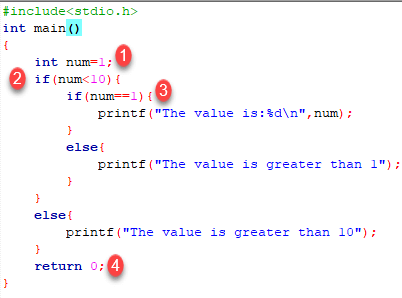
- Ensin olemme ilmoittaneet muuttujan num, jonka arvo on 1. Sitten olemme käyttäneet if-else -konstruktia.
- Ulommassa if-else-lausekkeessa annettu ehto tarkistaa, onko luku pienempi kuin 10. Jos ehto on tosi, niin ja vain silloin funktio suorittaa sisäisen lohkon. Tässä tapauksessa ehto on tosi, joten sisäinen lohko käsitellään.
- Sisälohkossa on jälleen ehto, joka tarkistaa, sisältääkö muuttujamme arvon 1 vai ei. Kun ehto on tosi, se käsittelee If-lohkon, muuten se käsittelee else-lohkon. Tässä tapauksessa ehto on tosi, joten If-lohko suoritetaan ja arvo tulostetaan tulostusnäytölle.
- Yllä oleva ohjelma tulostaa muuttujan arvon ja poistuu onnistuneesti.
Kokeile muuttaa arvoa muuttuja katso miten ohjelma käyttäytyy.
HUOMAUTUS: Sisäkkäisissä if-else-muuttujassa sisennyksen kanssa on oltava tarkkana, koska prosessiin liittyy useita if-else-rakenteita, joten yksittäisten rakenteiden selvittäminen on vaikeaa. Oikea sisennys helpottaa ohjelman lukemista.
Sisäkkäiset Else-if-lauseet
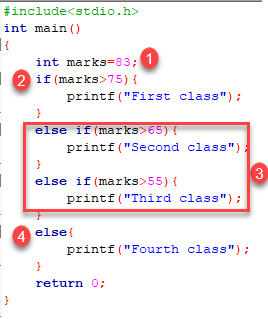
Sisäkkäistä else-if -toimintoa käytetään, kun tarvitaan monitiepäätöksiä.
Yleinen syntaksi sille, kuinka else-if tikkaat rakennetaan "C"-ohjelmoinnissa, on seuraava:
 if (test - expression 1) {
    statement1;
} else if (test - expression 2) {
    Statement2;
} else if (test - expression 3) {
    Statement3;
} else if (test - expression n) {
    Statement n;
} else {
    default;
}
Statement x;
Tämän tyyppistä rakennetta kutsutaan else-if-tikapuiksi. Tämä ketju näyttää yleensä tikapuilta, joten sitä kutsutaan myös else-if-tikapuiksi. Testilausekkeet arvioidaan ylhäältä alas. Aina kun löytyy tosi testilauseke, siihen liittyvä lauseke suoritetaan. Kun kaikki n testilauseketta muuttuvat epätosiksi, oletusarvoinen else-lauseke suoritetaan.
Katsotaanpa todellista toimintaa ohjelman avulla.
#include<stdio.h>
int main()
{
	int marks=83;
	if(marks>75){
		printf("First class");
	}
	else if(marks>65){
		printf("Second class");
	}
	else if(marks>55){
		printf("Third class");
	}
	else{
		printf("Fourth class");
	}
	return 0;
}
lähtö:
First class
Yllä oleva ohjelma tulostaa arvosanan kokeessa saatujen pisteiden mukaan. Olemme käyttäneet else-if tikapuurakennetta yllä olevassa ohjelmassa.
- Olemme alustaneet muuttujan merkeillä. Muu-if-tikapuurakenteessa olemme tarjonneet erilaisia ehtoja.
- Muuttujamerkkien arvoa verrataan ensimmäiseen ehtoon, koska se on totta, siihen liittyvä lause tulostetaan tulosnäytölle.
- Jos ensimmäinen testiehto osoittautuu vääräksi, sitä verrataan toiseen ehtoon.
- Tämä prosessi jatkuu, kunnes kaikki lausekkeet on laskettu, muuten ohjaus siirtyy pois else-if-tikkaita ja tulostuu oletusarvoinen lauseke.
Yritä muuttaa arvoa ja huomaa muutoksen lähdössä.
