
Ingresso multithread Python con Esempio: Impara GIL in Python
 Team editoriale
⚡ Riepilogo intelligente
Ingresso multithread Python Questo sistema esegue più thread all'interno di un singolo processo, consentendo loro di condividere la memoria e lavorare in parallelo. Il modulo di threading crea e gestisce questi thread, mentre il Global Interpreter Lock limita il parallelismo effettivo, rendendo questa tecnica più adatta ad attività vincolate a input/output.
Migliori Python Il linguaggio di programmazione ti consente di utilizzare il multiprocessing o il multithreading. In questo tutorial imparerai come scrivere applicazioni multithread in Python.
Che cos'è un filo?
Un thread è un'unità di esecuzione nella programmazione concorrente. Il multithreading è una tecnica che consente a una CPU di eseguire simultaneamente molte attività di un singolo processo. Questi thread possono essere eseguiti individualmente, pur condividendo le proprie risorse di processo.
Cos'è un processo?
Un processo è fondamentalmente il programma in esecuzione. Quando avvii un'applicazione sul tuo computer (come un browser o un editor di testo), il sistema operativo crea un processo.
In cosa consiste il multithreading Python?
Ingresso multithread Python La programmazione multithreading è una tecnica ben nota in cui più thread all'interno di un processo condividono il proprio spazio dati con il thread principale, rendendo la condivisione delle informazioni e la comunicazione tra i thread facili ed efficienti. I thread sono più leggeri dei processi. Più thread possono essere eseguiti individualmente condividendo le risorse del processo. Lo scopo del multithreading è quello di eseguire più attività e funzioni contemporaneamente.
Cos'è la multielaborazione?
multiprocessing consente di eseguire più processi non correlati contemporaneamente. Questi processi non condividono le loro risorse e comunicano tramite IPC.
Python Multithreading e multiprocessing
Per comprendere processi e thread, consideriamo questo scenario: un file .exe sul computer è un programma. Quando lo apri, il sistema operativo lo carica in memoria e la CPU lo esegue. L'istanza del programma in esecuzione viene chiamata processo.
Ogni processo ha due componenti fondamentali:
- Migliori Code
- I dati
Ora, un processo può contenere una o più sottoparti chiamate thread. Dipende dall'architettura del sistema operativo. Si può pensare a un thread come a una sezione di un processo che può essere eseguita separatamente dal sistema operativo.
In altre parole, si tratta di un flusso di istruzioni che possono essere eseguite in modo indipendente dal sistema operativo. I thread all'interno di un singolo processo condividono i dati di quel processo e sono progettati per lavorare insieme al fine di facilitare il parallelismo.
Perché utilizzare il multithreading?
Il multithreading consente di suddividere un'applicazione in più sotto-attività ed eseguirle simultaneamente. Se si utilizza il multithreading correttamente, la velocità, le prestazioni e il rendering dell'applicazione possono essere tutti migliorati.
Python multithreading
Python supporta costrutti sia per il multiprocessing che per il multithreading. In questo tutorial, ti concentrerai principalmente sull'implementazione multithreaded applicazioni con Python. Esistono due moduli principali che possono essere utilizzati per gestire i thread in Python:
- Migliori filo modulo, e
- Migliori threading modulo
Tuttavia, in Python, esiste anche qualcosa chiamato blocco globale dell'interprete (GIL). Non consente un grande guadagno in termini di prestazioni e potrebbe persino ridurre le prestazioni di alcune applicazioni multithread. Imparerai tutto al riguardo nelle prossime sezioni di questo tutorial.
I moduli Thread e Threading
I due moduli che imparerai in questo tutorial sono il modulo filo e modulo di filettatura.
Tuttavia, il modulo thread è stato da tempo deprecato. A partire da Python 3, è stato designato come obsoleto ed è accessibile solo come _filo per la retrocompatibilità.
Dovresti usare il livello più alto threading modulo per le applicazioni che si intende distribuire. Il modulo thread è stato trattato qui solo a scopo didattico.
Il modulo Discussione
La sintassi per creare un nuovo thread utilizzando questo modulo è la seguente:
thread.start_new_thread(function_name, arguments)
Bene, ora hai trattato la teoria di base per iniziare a programmare. Quindi, apri il tuo IDLE oppure un blocco note e digitare quanto segue:
import time
import _thread

def thread_test(name, wait):
   i = 0
   while i <= 3:
      time.sleep(wait)
      print("Running %s\n" %name)
      i = i + 1

   print("%s has finished execution" %name)

if __name__ == "__main__":

    _thread.start_new_thread(thread_test, ("First Thread", 1))
    _thread.start_new_thread(thread_test, ("Second Thread", 2))
    _thread.start_new_thread(thread_test, ("Third Thread", 3))
Salva il file e premi F5 per eseguire il programma. Se tutto è stato fatto correttamente, questo è l'output che dovresti vedere:
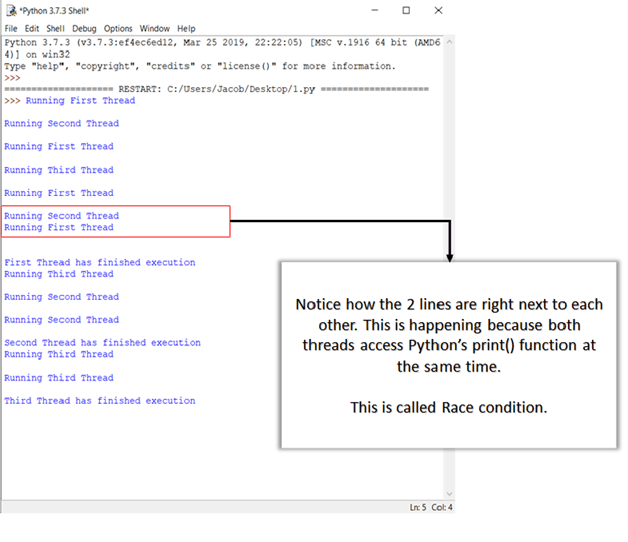
Nelle sezioni successive troverai maggiori informazioni sulle condizioni di gara e su come gestirle.
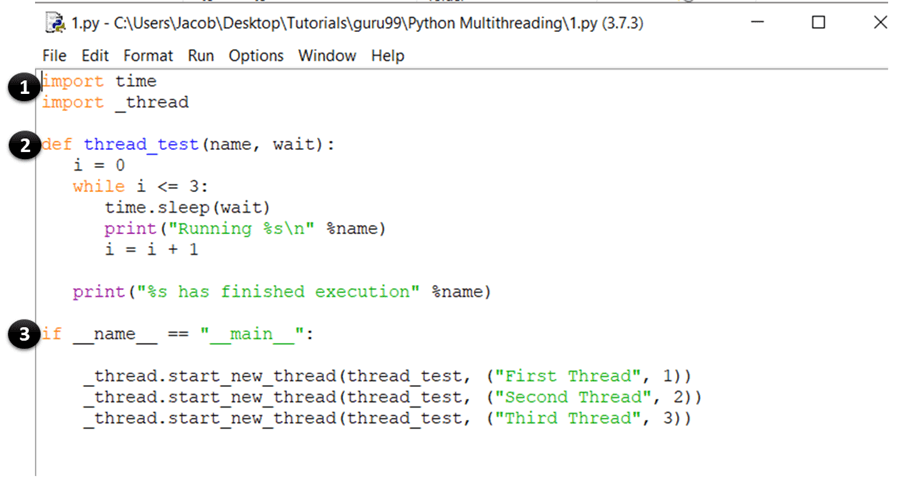
SPIEGAZIONE DEL CODICE
- Queste istruzioni importano il modulo time e thread, che vengono utilizzati per gestire l'esecuzione e il ritardo del Python thread.
- Qui hai definito una funzione chiamata test_thread, che sarà chiamato dal start_new_thread Metodo. La funzione esegue un ciclo while per quattro iterazioni e stampa il nome del thread che l'ha chiamata. Una volta completata l'iterazione, stampa un messaggio che indica che il thread ha terminato l'esecuzione.
- Questa è la sezione principale del tuo programma. Qui, chiami semplicemente il start_new_thread metodo con il thread_test funzione come argomento. Questo creerà un nuovo thread per la funzione che passi come argomento e inizierà a eseguirla. Nota che puoi sostituire questo (thread_test) con qualsiasi altra funzione che desideri eseguire come thread.
Il modulo di threading
Questo modulo è l'implementazione di alto livello del threading in Python e rappresenta lo standard di fatto per la gestione di applicazioni multithread. Offre una vasta gamma di funzionalità rispetto al modulo thread.
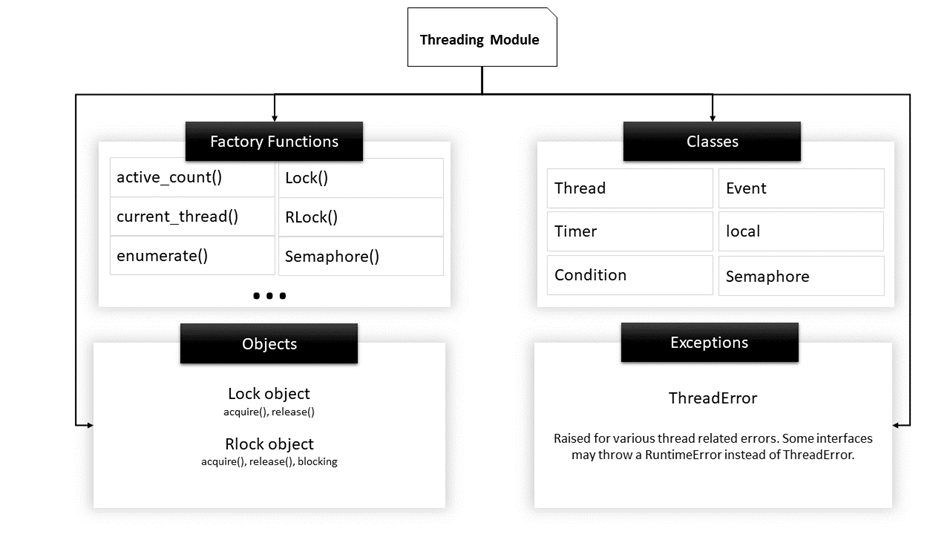
Struttura del modulo Threading
Ecco un elenco di alcune funzioni utili definite in questo modulo:
| Nome della funzione | Descrizione |
|---|---|
| conteggioattivo() | Restituisce il conteggio di Filo oggetti che sono ancora vivi. |
| thread corrente() | Restituisce l'oggetto corrente della classe Thread. |
| enumerare() | Elenca tutti gli oggetti Thread attivi. |
| èDaemon() | Restituisce vero se il thread è un demone. |
| è vivo() | Restituisce vero se il thread è ancora vivo. |
| Metodi della classe thread | |
| inizio() | Avvia l'attività di un thread. Deve essere chiamato solo una volta per ciascun thread perché genererà un errore di runtime se chiamato più volte. |
| correre() | Questo metodo denota l'attività di un thread e può essere sovrascritto da una classe che estende la classe Thread. |
| aderire() | Blocca l'esecuzione di altro codice finché il thread su cui è stato chiamato il metodo join() non viene terminato. |
Storia: la classe Thread
Prima di iniziare a programmare con il modulo threading, è fondamentale comprendere la classe Thread. La classe thread è la classe principale che definisce il modello e le operazioni di un thread in Python.
Il modo più comune per creare un multithread Python L'applicazione consiste nel dichiarare una classe che estende la classe Thread e sovrascrive il suo metodo run().
La classe Thread, in sintesi, indica una sequenza di codice che viene eseguita in un file separato filo di controllo.
Quindi, quando scrivi un'app multithread, dovrai fare quanto segue:
- definire una classe che estende la classe Thread
- Sostituisci il __init__ costruttore
- Sostituisci il correre() metodo
Una volta creato un oggetto thread, il file inizio() il metodo può essere utilizzato per avviare l'esecuzione di questa attività e il aderire() Il metodo può essere utilizzato per bloccare tutto il resto del codice fino al termine dell'attività corrente.
Ora proviamo a usare il modulo threading per implementare il tuo esempio precedente. Di nuovo, avvia il tuo IDLE e digita quanto segue:
import time
import threading

class threadtester (threading.Thread):
    def __init__(self, id, name, i):
       threading.Thread.__init__(self)
       self.id = id
       self.name = name
       self.i = i

    def run(self):
       thread_test(self.name, self.i, 5)
       print ("%s has finished execution " %self.name)

def thread_test(name, wait, i):

    while i:
       time.sleep(wait)
       print ("Running %s \n" %name)
       i = i - 1

if __name__=="__main__":
    thread1 = threadtester(1, "First Thread", 1)
    thread2 = threadtester(2, "Second Thread", 2)
    thread3 = threadtester(3, "Third Thread", 3)

    thread1.start()
    thread2.start()
    thread3.start()

    thread1.join()
    thread2.join()
    thread3.join()
Questo sarà l'output quando esegui il codice sopra:

SPIEGAZIONE DEL CODICE
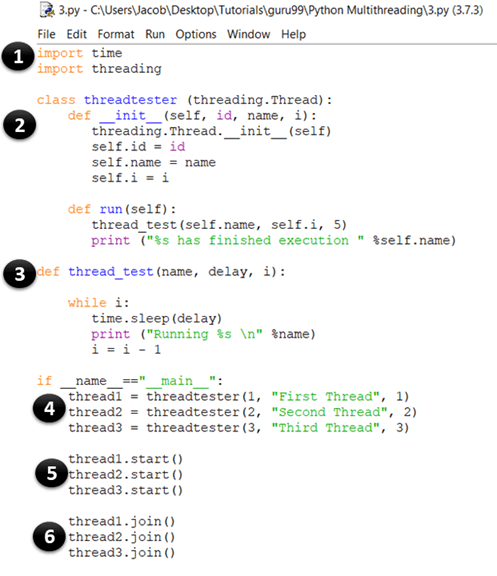
- Questa parte è uguale al nostro esempio precedente. Qui si importano i moduli time e thread, che vengono utilizzati per gestire l'esecuzione e i ritardi del Python thread.
- In questo momento stai creando una classe chiamata threadtester, che eredita o estende il file Filo classe del modulo threading. Questo è uno dei modi più comuni per creare thread in PythonTuttavia, dovresti sovrascrivere solo il costruttore e il correre() metodo nella tua app. Come puoi vedere nell'esempio di codice sopra, il file __init__ il metodo (costruttore) è stato sovrascritto. Allo stesso modo, hai anche sovrascritto il file correre() metodo. Contiene il codice che vuoi eseguire all'interno di un thread. In questo esempio, hai chiamato la funzione thread_test().
- Questo è il metodo thread_test(), che prende il valore di i come argomento, lo decrementa di 1 ad ogni iterazione e ripete il resto del codice finché i non diventa 0. Ad ogni iterazione, stampa il nome del thread attualmente in esecuzione e si mette in pausa per wait secondi (che viene anch'esso preso come argomento).
- thread1 = threadtester(1, “First Thread”, 1) Qui stiamo creando un thread e passando i tre parametri che abbiamo dichiarato in __init__. Il primo parametro è l'id del thread, il secondo parametro è il nome del thread e il terzo parametro è il contatore, che determina quante volte deve essere eseguito il ciclo while.
- thread2.start() Il metodo start viene utilizzato per avviare l'esecuzione di un thread. Internamente, la funzione start() chiama il metodo run() della tua classe.
- thread3.join() Il metodo join() blocca l'esecuzione di altro codice e attende fino al termine del thread su cui è stato chiamato.
Come già sapete, i thread che si trovano nello stesso processo hanno accesso alla memoria e ai dati di quel processo. Di conseguenza, se più di un thread tenta di modificare o accedere ai dati contemporaneamente, potrebbero verificarsi degli errori.
Nella sezione successiva, verranno illustrate le diverse tipologie di complicazioni che possono insorgere quando i thread accedono ai dati e la sezione critica relativa alla verifica delle transazioni di accesso esistenti.
Stalli e condizioni di gara
Prima di approfondire i concetti di deadlock e race condition, è utile comprendere alcune definizioni di base relative alla programmazione concorrente:
- Sezione critica: Si tratta di un frammento di codice che accede o modifica variabili condivise e deve essere eseguito come transazione atomica.
- Cambio di contesto: Si tratta del processo che una CPU segue per memorizzare lo stato di un thread prima di passare da un'attività all'altra, in modo da poterlo riprendere successivamente dallo stesso punto.
Deadlock
Deadlock sono il problema più temuto che gli sviluppatori affrontano quando scrivono applicazioni concorrenti/multithread in PythonIl modo migliore per comprendere i deadlock è utilizzare il classico problema di esempio dell'informatica noto come Ristoranti PhiloProblema di Sopher.
Il problema per i filosofi della tavola è il seguente:
Cinque filosofi sono seduti attorno a un tavolo rotondo con cinque piatti di spaghetti (un tipo di pasta) e cinque forchette, come mostrato nel diagramma.

Ristoranti PhiloProblema di Sopher
In ogni momento, un filosofo deve stare mangiando o pensando.
Inoltre, un filosofo deve prendere le due forchette adiacenti a lui (cioè, la forchetta sinistra e quella destra) prima di poter mangiare gli spaghetti. Il problema dello stallo si verifica quando tutti e cinque i filosofi prendono contemporaneamente la loro forchetta destra.
Poiché ognuno dei filosofi ha una forchetta, aspetteranno tutti che gli altri la appoggino. Di conseguenza, nessuno di loro potrà mangiare gli spaghetti.
Allo stesso modo, in un sistema concorrente, si verifica un deadlock quando diversi thread o processi (filosofi) tentano di acquisire le risorse di sistema condivise (fork) contemporaneamente. Di conseguenza, nessuno dei processi ha la possibilità di essere eseguito poiché sono in attesa di un'altra risorsa detenuta da un altro processo.
Condizioni di regata
Una condizione di gara (race condition) è uno stato indesiderato di un programma che si verifica quando un sistema esegue due o più operazioni simultaneamente. Ad esempio, si consideri questo semplice ciclo for:
i=0; # a global variable
for x in range(100):
    print(i)
    i+=1;
Se crei n Poiché il numero di thread che eseguono questo codice contemporaneamente non consente di determinare il valore di i (che è condiviso dai thread) al termine dell'esecuzione del programma, in un ambiente multithreading reale i thread possono sovrapporsi e il valore di i, recuperato e modificato da un thread, può cambiare nel frattempo quando un altro thread vi accede.
Queste sono le due principali classi di problemi che possono verificarsi in un sistema multithread o distribuito Python applicazione. Nella prossima sezione, imparerai come superare questo problema sincronizzando i thread.
Syncfili cronici
Per gestire condizioni di gara, deadlock e altri problemi basati sui thread, il modulo di threading fornisce bloccare oggetto. L'idea è che quando un thread vuole accedere a una risorsa specifica, acquisisce un blocco per quella risorsa. Una volta che un thread blocca una risorsa particolare, nessun altro thread può accedervi finché il blocco non viene rilasciato. Di conseguenza, le modifiche alla risorsa saranno atomiche e le condizioni di gara saranno evitate.
Un blocco è una primitiva di sincronizzazione di basso livello implementata da _filo modulo. In un dato momento, una serratura può trovarsi in uno dei due stati: bloccato or sbloccato. Supporta due metodi:
- acquisire(): Quando lo stato di blocco viene sbloccato, la chiamata al metodo acquire() cambierà lo stato in bloccato e terminerà. Tuttavia, se lo stato è bloccato, la chiamata a acquire() viene bloccata finché il metodo release() non viene chiamato da un altro thread.
- pubblicazione(): Il metodo release() viene utilizzato per impostare lo stato su sbloccato, ovvero per rilasciare un blocco. Può essere chiamato da qualsiasi thread, non necessariamente da quello che ha acquisito il lock.
Ecco un esempio di come usare i lucchetti nelle tue app. Avvia la tua IDLE e digita quanto segue:
import threading
lock = threading.Lock()

def first_function():
    for i in range(5):
        lock.acquire()
        print ('lock acquired')
        print ('Executing the first funcion')
        lock.release()

def second_function():
    for i in range(5):
        lock.acquire()
        print ('lock acquired')
        print ('Executing the second funcion')
        lock.release()

if __name__=="__main__":
    thread_one = threading.Thread(target=first_function)
    thread_two = threading.Thread(target=second_function)

    thread_one.start()
    thread_two.start()

    thread_one.join()
    thread_two.join()
Ora premi F5. Dovresti vedere un output come questo:

SPIEGAZIONE DEL CODICE
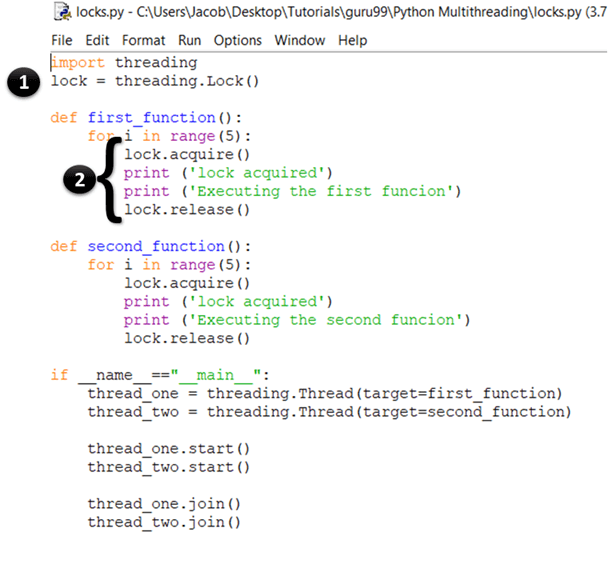
- In questo caso stai semplicemente creando una nuova serratura chiamando il file threading.Lock() funzione di fabbrica. Internamente, Lock() restituisce un'istanza della classe Lock concreta più efficace gestita dalla piattaforma.
- Nella prima istruzione acquisisci il blocco chiamando il metodo acquire(). Una volta concesso il blocco, si stampa “blocco acquisito” alla consolle. Una volta terminata l'esecuzione di tutto il codice che desideri venga eseguito dal thread, rilasci il blocco chiamando il metodo release().
La teoria è valida, ma come si fa a sapere se il blocco ha funzionato davvero? Se si osserva l'output, si noterà che ogni istruzione print stampa esattamente una riga alla volta. Ricordiamo che, in un esempio precedente, gli output di print erano casuali perché più thread accedevano contemporaneamente al metodo print(). Qui, la funzione print viene chiamata solo dopo che il blocco è stato acquisito. Pertanto, gli output vengono visualizzati uno alla volta e riga per riga.
Oltre alle serrature, Python Supporta inoltre altri meccanismi per la gestione della sincronizzazione dei thread, come elencato di seguito:
- RLocks
- Semaphores
- Condizioni
- Eventi, e
- Barriere
Blocco globale interprete (e come gestirlo)
Prima di entrare nei dettagli di PythonPrima di iniziare, definiamo alcuni termini che saranno utili per comprendere la sezione successiva:
- Codice legato alla CPU: si riferisce a qualsiasi porzione di codice che verrà eseguita direttamente dalla CPU.
- Codice vincolato all'I/O: si tratta di qualsiasi codice che accede al file system tramite il sistema operativo.
- CPython: è il riferimento implementazione of Python e può essere descritto come l'interprete scritto in C e Python (linguaggio di programmazione).
In cosa consiste GIL Python?
Blocco globale dell'interprete (GIL) in Python è un blocco di processo o un mutex utilizzato durante la gestione dei processi. Assicura che un solo thread possa accedere a una risorsa specifica alla volta e impedisce anche l'utilizzo simultaneo di oggetti e bytecode. Ciò avvantaggia i programmi a singolo thread con un aumento delle prestazioni. GIL in Python è molto semplice e facile da implementare.
È possibile utilizzare un blocco per assicurarsi che solo un thread abbia accesso a una particolare risorsa in un dato momento.
Una delle caratteristiche di Python è che utilizza un blocco globale su ogni processo interprete, il che significa che ogni processo tratta il Python l'interprete stesso come risorsa.
Ad esempio, supponiamo che tu abbia scritto un Python Programma che utilizza due thread per eseguire sia operazioni di CPU che operazioni di I/O. Quando si esegue questo programma, accade quanto segue:
- Migliori Python L'interprete crea un nuovo processo e avvia i thread.
- Quando il thread-1 inizia a funzionare, acquisirà prima il GIL e lo bloccherà.
- Se il thread-2 vuole essere eseguito adesso, dovrà attendere il rilascio del GIL anche se un altro processore è libero.
- Supponiamo ora che il thread-1 sia in attesa di un'operazione di I/O. A questo punto, rilascerà il GIL e il thread-2 lo acquisirà.
- Dopo aver completato le operazioni di I/O, se il thread-1 vuole essere eseguito adesso, dovrà nuovamente attendere che il GIL venga rilasciato dal thread-2.
Per questo motivo, solo un thread può accedere all'interprete in qualsiasi momento, il che significa che ci sarà un solo thread in esecuzione Python codice in un dato momento.
Questo non rappresenta un problema per un processore single-core, poiché utilizzerebbe la tecnica del time slicing (vedi la prima sezione di questo tutorial) per gestire i thread. Tuttavia, nel caso di processori multi-core, una funzione CPU-bound in esecuzione su più thread avrà un impatto considerevole sull'efficienza del programma, poiché non utilizzerà tutti i core disponibili contemporaneamente.
Perché era necessario il GIL?
Il CPython Il garbage collector utilizza una tecnica efficiente di gestione della memoria nota come conteggio dei riferimenti. Ecco come funziona: ogni oggetto in Python Gli oggetti hanno un contatore di riferimenti, che viene incrementato quando vengono assegnati a una nuova variabile o aggiunti a un contenitore (come tuple, liste, ecc.). Allo stesso modo, il contatore di riferimenti viene decrementato quando il riferimento esce dall'ambito di validità o quando viene chiamata l'istruzione `del`. Quando il contatore di riferimenti di un oggetto raggiunge 0, questo viene eliminato dal garbage collector e la memoria allocata viene liberata.
Ma il problema è che la variabile di conteggio dei riferimenti è soggetta a condizioni di gara come qualsiasi altra variabile globale. Per risolvere questo problema, gli sviluppatori di Python Abbiamo deciso di utilizzare il blocco globale dell'interprete. L'altra opzione era aggiungere un blocco a ciascun oggetto, il che avrebbe comportato deadlock e un aumento del sovraccarico dovuto alle chiamate acquire() e release().
Pertanto, GIL rappresenta una restrizione significativa per il multithreading Python programmi che eseguono operazioni pesanti legate alla CPU (rendendole di fatto a singolo thread). Se si desidera utilizzare più core della CPU nell'applicazione, utilizzare il multiprocessing modulo invece.
