
PHP preg_match(): Reguljära uttryck (Regex)
 Redaktionellt team
⚡ Smart sammanfattning
Reguljära uttryck i PHP är mönstermatchningsverktyg som validerar, delar och ersätter text i ett enda uttryck. Denna genomgång täcker kärnfunktionerna preg_match, preg_split och preg_replace, förklarar vanliga metatecken och bygger ett fungerande e-postvalideringsmönster steg för steg.
Vad är ett reguljärt uttryck i PHP?
PHP reguljära uttryck, även känt som regex, är ett kraftfullt mönstermatchningsverktyg som kan utföras i ett enda uttryck. Reguljära uttryck använder specialtecken som +, - och ^ för att skapa komplexa uttryck. De kan hjälpa dig att utföra uppgifter som att validera e-postadresser, IP-adresser med mera.
Varför använda reguljära uttryck
- PHP-reguljära uttryck förenklar identifiering av mönster i strängdata genom att anropa en enda funktion. Detta sparar oss kodningstid.
- Vid validering av användarinmatning som e-postadresser, domännamn, telefonnummer och IP-adresser
- Markera nyckelord i sökresultaten
- När du skapar en anpassad HTML-mall. Regex i PHP kan användas för att identifiera malltaggarna och ersätta dem med faktiska data.
Inbyggda reguljära uttrycksfunktioner i PHP
PHP har inbyggda funktioner som låter oss arbeta med reguljära uttryck, vilket vi kommer att lära oss i den här handledningen. Låt oss titta på de vanligaste reguljära uttrycksfunktionerna i PHP.
- preg_match() i PHP – den här funktionen används för att utföra mönstermatchning på en sträng. Den returnerar sant om en matchning hittas och falskt om ingen matchning hittas.
- preg_split() i PHP – den här funktionen används för att utföra en mönstermatchning på en sträng och sedan dela upp resultaten i en numerisk array.
- preg_replace() i PHP – den här funktionen används för att utföra en mönstermatchning på en sträng och sedan ersätta matchningen med den angivna texten.
Nedan följer syntaxen för en reguljär uttrycksfunktion som preg_match(), preg_split() eller preg_replace().
<?php
function_name('/pattern/',subject);
?>
HÄR,
- ”function_name(…)” är antingen preg_match(), preg_split() eller preg_replace().
- "/…/" snedstrecket anger början och slutet av vårt reguljära uttryck
- "'/pattern/'" är mönstret som vi behöver matcha
- "ämne" är textsträngen som ska matchas mot
Låt oss nu titta på praktiska exempel som implementerar ovanstående PHP regex-funktioner.
Preg_match() i PHP
Det första exemplet använder funktionen preg_match() för att utföra en enkel mönstermatchning för ordet guru i en given URL.
Koden nedan visar implementeringen av funktionen preg_match() för exemplet ovan.
<?php
$my_url = "www.guru99.com";
if (preg_match("/guru/", $my_url))
{
echo "the url $my_url contains guru";
}
else
{
echo "the url $my_url does not contain guru";
}
?>
Bläddra till URL http://localhost/phptuts/preg_match_simple.php

Låt oss undersöka den del av koden som är ansvarig för vår utdata, preg_match('/guru/', $min_url)HÄR,
- "preg_match(...)" är PHP regex-funktionen
- "'/guru/'" är det reguljära uttrycksmönstret som ska matchas
- "$my_url" är variabeln som innehåller texten som ska matchas mot.
PHP Preg_split()
Låt oss nu titta på ett annat exempel som använder funktionen preg_split().
Vi kommer att ta en strängfras och explodera den till en array; mönstret som ska matchas är ett enda utrymme.
Textsträngen som ska användas i det här exemplet är "Jag älskar reguljära uttryck".
Koden nedan illustrerar implementeringen av exemplet ovan.
<?php

$my_text = "I Love Regular Expressions";

$my_array = preg_split("/ /", $my_text);

print_r($my_array );

?>
Bläddra till URL http://localhost/phptuts/preg_split.php

PHP Preg_replace()
Låt oss nu titta på preg_replace() PHP-funktion som utför en mönstermatchning och sedan ersätter mönstret med något annat.
Koden nedan söker efter ordet guru i en sträng.
Den ersätter ordet guru med ordet guru omgivet av CSS-kod som framhäver bakgrundsfärgen.
<?php

$text = "We at Guru99 strive to make quality education affordable to the masses. Guru99.com";

$text = preg_replace("/Guru/", '<span style="background:yellow">Guru</span>', $text);

echo $text;

?>
Förutsatt att du har sparat filen preg_replace.php, bläddra till URL http://localhost/phptuts/preg_replace.php

Reguljära uttrycksmetakaraktärer
Exemplen ovan använde mycket enkla mönster. Metatecken låter oss utföra mer komplexa mönstermatchningar, som att testa giltigheten hos en e-postadress. Låt oss nu titta på de vanligt förekommande metatecknen.
| Metatecken | BESKRIVNING | Exempelvis |
|---|---|---|
| . | Matchar alla enstaka tecken utom en ny rad | /./ matchar allt som har ett enda tecken |
| ^ | Matchar början av en sträng eller utesluter tecken | /^PH/ matchar alla strängar som börjar med PH |
| $ | Matchar ett mönster i slutet av strängen | /com$/ matchar guru99.com, yahoo.com etc. |
| * | Matchar noll eller fler av föregående tecken | /com*/ matchar dator, kommunikation etc. |
| + | Kräver att föregående tecken förekommer minst en gång | /yah+oo/ matchar yahoo |
| \ | Används för att escape-metatecken | /yahoo+\.com/ behandlar punkten som ett bokstavligt värde |
| [...] | Karaktärsklass | /[abc]/ matchar a, b eller c |
| AZ | Matchar gemener | /az/ matchar cool, glad osv. |
| AZ | Matchar versaler | /AZ/ matchar VAD, HUR, VARFÖR osv. |
| 0-9 | Matchar valfritt tal mellan 0 och 9 | /0-4/ matchar 0,1,2,3,4 |
Listan ovan ger bara de vanligaste metatecken i reguljära uttryck.
Låt oss nu titta på ett ganska komplext exempel som kontrollerar giltigheten av en e-postadress.
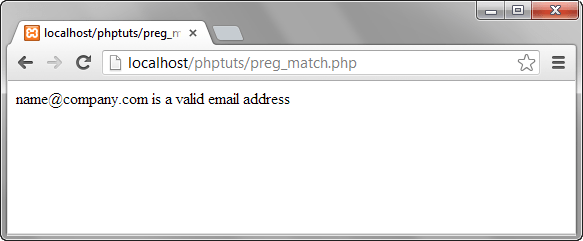
<?php
$my_email = "name@company.com";
if (preg_match("/^[a-zA-Z0-9._-]+@[a-zA-Z0-9-]+\.[a-zA-Z.]{2,5}$/", $my_email)) {
echo "$my_email is a valid email address";
}
else
{
echo "$my_email is NOT a valid email address";
}
?>
Förklaring av e-postvalideringsmönstret
HÄR,
- "/…/" börjar och avslutar det reguljära uttrycket
- ”^[a-zA-Z0-9._-]” matchar alla gemener eller versaler, siffror mellan 0 och 9, samt punkter, understreck eller bindestreck.
- ”+@[a-zA-Z0-9-]” matchar @-tecknet följt av gemener eller versaler, siffror mellan 0 och 9 eller bindestreck.
- "+\.[a-zA-Z.]{2,5}$/" använder ett omvänt snedstreck för att undanta punkten och matchar sedan eventuella gemener eller versaler med en teckenlängd mellan 2 och 5 i slutet av strängen.
Bläddra till URL http://localhost/phptuts/preg_match.php
Som du kan se av ovanstående sammanfattning är metatecken mycket kraftfulla när det gäller att matcha mönster.
