---
description: In this tutorial, you will learn How To Convert Youtube Videos to MP3 (Audio)on a Computer without YouTube Premium and with YouTube Premium.
title: How to Convert Youtube Videos to Mp3
image: https://www.guru99.com/images/youtube-playlist-howto1.png
---

[Skip to content](#main) 

Downloading YouTube videos as MP3 files is a useful way to enjoy your favorite music or podcasts offline anytime. However, using the wrong converter tools can lead to poor audio quality, malware risks, or even data loss. Unsafe websites may also expose your system to unwanted ads or tracking. Choosing the right and trusted methods ensures a smooth, secure, and high-quality experience. This guide explains reliable, well-researched, and safe ways to convert videos effectively.

After spending over 120 hours testing 15 different methods and 20 trusted tools, I have carefully handpicked the most reliable and efficient ones. Each option in this comprehensive guide is backed by in-depth analysis and tested thoroughly for ease of use and safety. This transparent breakdown will help you choose the right solution confidently.

 Editor's Choice 

[ ](https://www.byclickdownloader.com/?source=guru992&innerpage=download-convert-youtube-video-mp3 "By Click Downloader") 

[ By Click Downloader ](https://www.byclickdownloader.com/?source=guru992&innerpage=download-convert-youtube-video-mp3 "By Click Downloader") 

By Click Downloader is a powerful video downloading tool that allows you to download full video clips from YouTube and other platforms with ease. Its intuitive interface and fast download speed ensure a seamless experience for all your video and audio needs.

[ Visit By Click Downloader ](https://www.byclickdownloader.com/?source=guru992&innerpage=download-convert-youtube-video-mp3 "By Click Downloader") 

## How to Download and Convert Music from YouTube on Computer without YouTube Premium

YouTube Premium allows you to download music files. However, many people do not have a budget to subscribe to YouTube Premium.

Here are some free options for them:

#### Youtube Terms of Service

YouTube’s [Terms of Service](https://www.youtube.com/static?template=terms) explicitly mention that users shouldn’t download videos, except where YouTube provides a download button or link on that particular video. Moreover, you are not permitted to download or make copies of any copyrighted YouTube Videos. If you get caught doing such activity, you could face some legal troubles like trials or fines. YouTube considers these activities as unauthorized or illegitimate. At Guru99, we never encourage such activities.

**Important:** You should use these YouTube converter apps only to download and converter your personal YouTube videos or those with Creative Commons reusable licenses.

[Read more +](javascript:myFunction%28%29)

## Method 1: Download and convert YouTube music using By Click Downloader on Windows and Mac:

[By Click Downloader](https://www.byclickdownloader.com/?source=guru992&innerpage=download-convert-youtube-video-mp3) is a powerful video downloading tool that allows you to download full video clips from YouTube and other platforms with ease. It also offers quick conversion to popular formats such as MP3, MP4, AVI, and more.

This tool supports downloading from 10,000+ video websites, including YouTube, Facebook, Instagram, and Twitter. With By Click Downloader, you can effortlessly save entire playlists, channels, and even private videos in high quality. Its intuitive interface and fast download speed ensure a seamless experience for all your video and audio needs.

 #1 Top Pick 

[ ](https://www.byclickdownloader.com/?source=guru992&innerpage=download-convert-youtube-video-mp3 "By Click Downloader") 

[ By Click Downloader ](https://www.byclickdownloader.com/?source=guru992&innerpage=download-convert-youtube-video-mp3 "By Click Downloader") 

 5.0 

Full HD/4K/8K videos Supported 

Download YouTube videos 10,000+

Convert YouTube to mp4, mp3, mov, avi, m4a and more

Free Download

[ Visit By Click Downloader ](https://www.byclickdownloader.com/?source=guru992&innerpage=download-convert-youtube-video-mp3 "By Click Downloader") 

This method is applicable for Windows and Mac. Check the following steps for how to convert YouTube to MP3.

**Step 1)** Go to [https://www.byclickdownloader.com/](https://www.byclickdownloader.com/?source=guru992&innerpage=download-convert-youtube-video-mp3) and download the software.

[](https://www.byclickdownloader.com/?source=guru992&innerpage=download-convert-youtube-video-mp3)

**Step 2)** Click on the downloaded software and click on Accept and Install to complete the installation process.

**Step 3)** Double click the By Click Downloader icon on your desktop.

**Step 4)** Paste the URL of the video you want to download by clicking on the “Paste URL” button.

[](https://www.byclickdownloader.com/?source=guru992&innerpage=download-convert-youtube-video-mp3)

**Step 5)** Click on the “Download” button and click on the play button to play the video. The Default format is mp3.

[](https://www.byclickdownloader.com/?source=guru992&innerpage=download-convert-youtube-video-mp3)

**Step 6)** To convert into any other format, click convert Button.

Click on “Download” at the bottom of the popup window, and your download will start immediately.

[](https://www.byclickdownloader.com/?source=guru992&innerpage=download-convert-youtube-video-mp3)

**Challenges and Mitigation:**

Occasionally, download speed may slow due to network congestion. Switching to a stable connection or pausing other downloads usually resolves this.

[Visit By Click >>](https://www.byclickdownloader.com/?source=guru992&innerpage=download-convert-youtube-video-mp3)

Downloader for Free

YouTube Video Converter!

FREE Download

[Download Now](https://www.byclickdownloader.com/?source=guru992&innerpage=download-convert-youtube-video-mp3-widget) 

FREE Download

## Method 2: How to Convert YouTube Videos to MP3 on Mobile using By Click Downloader

If you prefer converting YouTube videos to MP3 directly on your phone, the [By Click Downloader](https://www.byclickdownloader.com/?source=guru992&innerpage=download-convert-youtube-video-mp3) mobile app makes it effortless. I found it handy during travel when I needed offline access to tutorial audio tracks. For instance, a language learner saving pronunciation guides from YouTube can quickly convert them into MP3s for repeated listening without internet access.

**Step 1)** Download By Click Downloader Android App from [here](https://www.byclickdownloader.com/?source=guru992&innerpage=download-convert-youtube-video-mp3).

Tap on the “Download” button to download and install the application in your smartphone.

### RELATED ARTICLES

* [ 9 Best Free YouTube Video Downloader App for PC (2026 List) ](https://www.guru99.com/best-free-youtube-downloader.html "9 Best Free YouTube Video Downloader App for PC (2026 List)")
* [ 9 Best YouTube Video Downloader Chrome Extension (2026) ](https://www.guru99.com/chrome-video-downloader.html "9 Best YouTube Video Downloader Chrome Extension (2026)")
* [ 12 Best YouTube to MP3 Converter App Download (2026) ](https://www.guru99.com/youtube-to-mp3-converter.html "12 Best YouTube to MP3 Converter App Download (2026)")
* [ 9 BEST YouTube Audio Ripper to Extract Audio from YouTube (2026) ](https://www.guru99.com/audio-ripper-to-extract-audio-from-youtube.html "9 BEST YouTube Audio Ripper to Extract Audio from YouTube (2026)")

[](https://www.guru99.com/images/screenshots/download-convert-youtube-video-mp3-byclick.png)

**Step 2)** Open the App and tap on the “YouTube” button.

[](https://www.guru99.com/images/2/041421%5F1224%5FHowtoDownlo8.png)

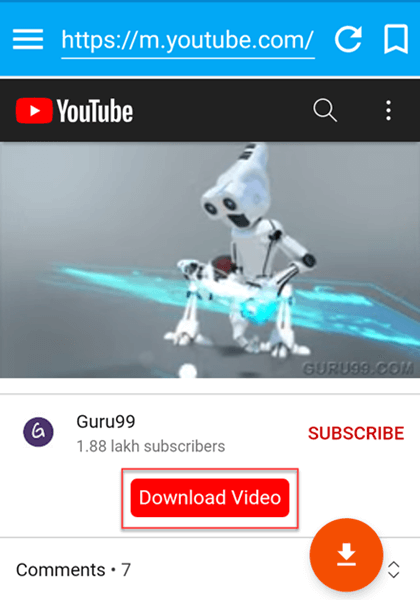
**Step 3)** Search and play the video clip you want to save into your device and tap on the “Download Video” button.

[](https://www.guru99.com/images/2/041421%5F1224%5FHowtoDownlo9.png)

**Step 4)** The following screen will be displayed.

1. Tap on the down arrow beside “Format”.
2. Tap on “MP3”.

[](https://www.guru99.com/images/2/041421%5F1224%5FHowtoDownlo10.png)

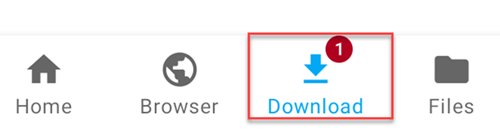
**Step 5)** You can see the downloaded MP3 file by tapping on the “Download” tab.

[](https://www.guru99.com/images/2/041421%5F1224%5FHowtoDownlo11.png)

**Step 6)** Wait till the video is getting downloaded.

After this, you will be able to play it.

**Challenges and Mitigation:**

Mobile storage limits can restrict downloads. To mitigate this, use an SD card or clear older media before starting new downloads.

## Method 3: How to Download and Convert YouTube Video using Chrome Extension

From my experience, browser extensions simplify the conversion process significantly. The Easy Video Downloader & MP3 Converter Chrome extension works seamlessly for users who prefer quick conversions without switching apps. For instance, a journalist extracting audio from news interviews can do so right within the browser window.

**Step 1)** Download Easy video downloader and MP3 converter Chrome extension from [here](https://chrome.google.com/webstore/detail/easy-video-downloader/eaicplkoeceoelookkiaeekhodehdhde?hl=en).

[](https://www.guru99.com/images/2/041421%5F1224%5FHowtoDownlo13.png)

**Step 2)** Search for the video clip or [open](https://www.youtube.com/watch?v=x-QfL%5FBmZVE) the YouTube video you want to download and let the video play for 1 minute.

**Step 3)** Double click on the Easy video Downloader and MP3 converter extension icon. This will launch the extension.

[](https://www.guru99.com/images/2/041421%5F1224%5FHowtoDownlo14.png)

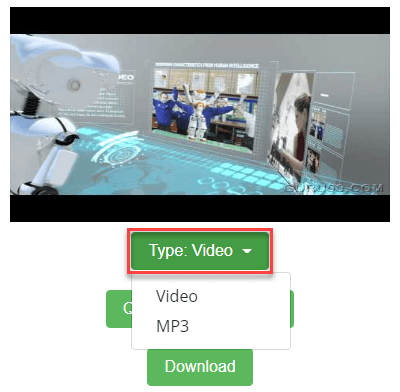
**Step 4)** The following screen will be displayed.

Click on the “Type: Video” button.

[](https://www.guru99.com/images/2/041421%5F1224%5FHowtoDownlo15.png)

**Step 5)** The dropdown menu will be appeared.

You need to select MP3 option.

[](https://www.guru99.com/images/2/041421%5F1224%5FHowtoDownlo16.png)

**Step 6)** Click on the “Convert” button to download and convert YouTube video to MP3.

Wait for few seconds till the downloading process is finished.

[](https://www.guru99.com/images/2/041421%5F1224%5FHowtoDownlo17.png)

**Challenges and Mitigation:**

Some browser updates may temporarily disable the extension. If that happens, reinstall the add-on or switch to an alternate browser.

## How to Download and Convert YouTube Video to MP3 using YouTube Premium

YouTube Premium is a paid service that enables you to access ad-free video content. It also allows you to download video clips to watch without an Internet connection.For users who value compliance and convenience, YouTube Premium offers a legal, in-app method for downloading music.

I find it especially beneficial when curating playlists for offline playback during flights or commutes. YouTube Premium provides features like ad-free music, background play, audio-only mode, etc. You can watch your favorite videos on your smartphone when you are offline. It also provides you with free access to YouTube Music Premium. This method is applicable for Android and iPhone.

**Step 1)** Select or search for the song you want to download. Click on.

[](https://www.guru99.com/images/2/041421%5F1224%5FHowtoDownlo19.png)

**Note:** Ensure you have YouTube Premium access.

**Step 2)** In the menu, select the “Download” option.

[](https://www.guru99.com/images/2/041421%5F1224%5FHowtoDownlo20.png)

**Note:** Ensure your phone is connected to Wi-Fi for download to proceed.

**Step 3)** Go to your Library. You will see the downloaded song.

[](https://www.guru99.com/images/2/041421%5F1224%5FHowtoDownlo21.png)

YouTube allows you to store up to 250 songs.

**Step 4)** To download a playlist, you need to follow a similar process. Go to the desired playlist. Click on the Download Icon. All the songs in the playlist will start downloading.

[](https://www.guru99.com/images/2/041421%5F1224%5FHowtoDownlo22.png)

**Challenges and Mitigation:**

Downloads are stored only within the app and require periodic internet access for renewal. To maintain access, connect online every few weeks.

**Also Check:** [Best FREE YouTube Video Downloader Apps](https://www.guru99.com/best-free-youtube-downloader.html)

## What are the advantages of YouTube to MP3 converters?

Here are the advantages of YouTube to MP3 converters:

* You can convert video into high-quality MP3 files.
* Enables you to save any YouTube video with ease.
* It allows you to convert files in a batch.
* It helps you download videos with just a video link.

## What are the best YouTube to MP3 converters for Mac?

Here are the best YouTube to MP3 converters for Mac:

* **iTubeGo:** iTubeGo is a Mac software that helps you download and convert YouTube videos. It has a built-in YouTube converter to convert videos to MP3, MP4, WAV, etc., audio file formats. This tool supports multiple audio and video formats. iTubeGo automatically searches for TV series and movies online for subtitles when you download any video.
* **SnapDownloader:** SnapDownloader is a [video grabber](https://www.guru99.com/best-video-grabber.html) that supports 900 websites, including YouTube. It allows you to download YouTube videos up to 8K resolution in MP4 and convert videos to MP3 with ease. It can also download YouTube playlists, entire channels, and VR 360° videos.
* **4k Downloader:** 4K Video Downloader is a cross-platform application that enables you to store any type of YouTube playlist. This software helps you to extract high-quality audio from YouTube Music in MP3, M4A, or OGG. It allows you to save multiple tracks faster and helps to keep track of download history.

## Can you download songs from YouTube to your MP3 player?

No. You cannot directly download songs from YouTube to an MP3 player. You need to convert and download songs using the methods mention in this article. Once your download is successfully completed, you have to transfer the downloaded music files to MP3 player.

**For that, you can perform the following steps:**

**Step 1)** Open Windows Media Player. Connect MP3 player to your PC using USB cable.

**Step 2)** Click the sync button available at the top right section of Windows Media Player.

**Step 3)** Drag and drop your files into the “List” window given below the sync button.

**Step 4)** Click on the “Start Sync” button.

## Conclusion

**In my experience**, the top three reliable ways to convert YouTube videos to MP3 are [By Click Downloader](https://www.byclickdownloader.com/?source=guru992&innerpage=download-convert-youtube-video-mp3), **Easy Video Downloader (Chrome Extension)**, and **YouTube Premium**. They’re simple, safe, and consistent. Remember, always respect creators’ rights and use these tools ethically — only for personal or Creative Commons content to stay privacy-conscious and compliant.

### FAQs:

❓ Is it illegal to download and convert music from YouTube to MP3?

Though it is legal to watch YouTube videos, it is illegal to download any video from YouTube. You are allowed to stream videos from YouTube to MP3, only if there is no involvement in creating a video or sharing on YouTube.

💻 What are the formats of downloading YouTube videos?

Video downloading apps generally gives you a choice of a wide range of file formats, including MP3, MP4, [WAV](https://www.guru99.com/youtube-to-wav-converter.html), 3GP, MOV, and AVI. However, the format and quality settings will affect your watching experience.

🏅 What is the audio quality supported by video downloader and converter software?

Audio quality conversion supported by a YouTube to MP3 converter is 320kbps.

👉 What are the best YouTube to mp3 converters for Android?

Here are some of the [best YouTube to MP3 converters](https://www.guru99.com/youtube-to-mp3-converter.html) for Android:

* iTubeGo
* 4k Downloader
* SnapDownloader

#### Summarize this post with:

ChatGPT Perplexity Grok Google AI 

**Stay Updated on AI** **Get Weekly AI Skills, Trends, Actionable Advice.** 

##### Sign up for the newsletter

Subscribe for Free 

 You have successfully subscribed.  
Please check your inbox.

![AI-Newsletter]() Chosen by over **350,000+** professionals 

[Scroll to top ](#wrapper)Scroll to top 

× 

Toggle Menu Close 

Search for: 

Search 

```json
{"@context":"https://schema.org","@graph":[{"@type":"Organization","@id":"https://www.guru99.com/#organization","name":"Guru99","sameAs":["https://www.facebook.com/Guru99Official","https://twitter.com/guru99com"],"logo":{"@type":"ImageObject","@id":"https://www.guru99.com/#logo","url":"https://www.guru99.com/images/guru99-logo-v1-150x59.png","contentUrl":"https://www.guru99.com/images/guru99-logo-v1-150x59.png","caption":"Guru99","inLanguage":"en-US"}},{"@type":"WebSite","@id":"https://www.guru99.com/#website","url":"https://www.guru99.com","name":"Guru99","publisher":{"@id":"https://www.guru99.com/#organization"},"inLanguage":"en-US"},{"@type":"ImageObject","@id":"https://www.guru99.com/images/youtube-playlist-howto1.png","url":"https://www.guru99.com/images/youtube-playlist-howto1.png","width":"200","height":"200","inLanguage":"en-US"},{"@type":"BreadcrumbList","@id":"https://www.guru99.com/download-convert-youtube-video-mp3.html#breadcrumb","itemListElement":[{"@type":"ListItem","position":"1","item":{"@id":"https://www.guru99.com","name":"Home"}},{"@type":"ListItem","position":"2","item":{"@id":"https://www.guru99.com/movie","name":"Entertainment"}},{"@type":"ListItem","position":"3","item":{"@id":"https://www.guru99.com/movie/downloads-entertainment","name":"Downloads"}},{"@type":"ListItem","position":"4","item":{"@id":"https://www.guru99.com/movie/downloads-entertainment/youtube-videos","name":"YouTube Videos"}},{"@type":"ListItem","position":"5","item":{"@id":"https://www.guru99.com/download-convert-youtube-video-mp3.html","name":"How to Convert Youtube Videos to Mp3"}}]},{"@type":["WebPage","FAQPage"],"@id":"https://www.guru99.com/download-convert-youtube-video-mp3.html#webpage","url":"https://www.guru99.com/download-convert-youtube-video-mp3.html","name":"How to Convert Youtube Videos to Mp3","dateModified":"2025-10-30T18:20:02+05:30","isPartOf":{"@id":"https://www.guru99.com/#website"},"primaryImageOfPage":{"@id":"https://www.guru99.com/images/youtube-playlist-howto1.png"},"inLanguage":"en-US","breadcrumb":{"@id":"https://www.guru99.com/download-convert-youtube-video-mp3.html#breadcrumb"},"mainEntity":[{"@type":"Question","name":"\u2753 Is it illegal to download and convert music from YouTube to MP3?","acceptedAnswer":{"@type":"Answer","text":"<p>Though it is legal to watch YouTube videos, it is illegal to download any video from YouTube. You are allowed to stream videos from YouTube to MP3, only if there is no involvement in creating a video or sharing on YouTube.</p>"}},{"@type":"Question","name":"\ud83d\udcbb What are the formats of downloading YouTube videos?","acceptedAnswer":{"@type":"Answer","text":"<p>Video downloading apps generally gives you a choice of a wide range of file formats, including MP3, MP4, <a href=\"/youtube-to-wav-converter.html\">WAV</a>, 3GP, MOV, and AVI. However, the format and quality settings will affect your watching experience.</p>"}},{"@type":"Question","name":"\ud83c\udfc5 What is the audio quality supported by video downloader and converter software?","acceptedAnswer":{"@type":"Answer","text":"<p>Audio quality conversion supported by a YouTube to MP3 converter is 320kbps.</p>"}},{"@type":"Question","name":"\ud83d\udc49 What are the best YouTube to mp3 converters for Android?","acceptedAnswer":{"@type":"Answer","text":"Here are some of the <a href=\"/youtube-to-mp3-converter.html\">best YouTube to MP3 converters</a> for Android: <ul><li>iTubeGo</li><li>4k Downloader</li><li>SnapDownloader</li></ul>"}}]},{"@type":"Person","@id":"https://www.guru99.com/author/hannah","name":"Hannah Roberts","description":"I'm Hannah Roberts, a Sr. Entertainment Journalist, dedicated to delivering insightful stories and in-depth coverage of the entertainment industry.","url":"https://www.guru99.com/author/hannah","image":{"@type":"ImageObject","@id":"https://www.guru99.com/images/hannah-roberts-author.png","url":"https://www.guru99.com/images/hannah-roberts-author.png","caption":"Hannah Roberts","inLanguage":"en-US"},"worksFor":{"@id":"https://www.guru99.com/#organization"}},{"headline":"How to Convert Youtube Videos to Mp3","description":"In this tutorial, you will learn How To Convert Youtube Videos to MP3 (Audio)on a Computer without YouTube Premium and with YouTube Premium.","keywords":"bigdata, programming, database, server","speakable":{"@type":"SpeakableSpecification","cssSelector":[".entry-title",".summary"]},"@type":"Article","author":{"@id":"https://www.guru99.com/author/hannah","name":"Hannah Roberts"},"dateModified":"2025-10-30T18:20:02+05:30","image":{"@id":"https://www.guru99.com/images/youtube-playlist-howto1.png"},"articleSection":"Downloads, Entertainment, YouTube Videos","name":"How to Convert Youtube Videos to Mp3","@id":"https://www.guru99.com/download-convert-youtube-video-mp3.html#schema-35564","isPartOf":{"@id":"https://www.guru99.com/download-convert-youtube-video-mp3.html#webpage"},"publisher":{"@id":"https://www.guru99.com/#organization"},"inLanguage":"en-US"},{"@type":"HowTo","name":"How to Download and Convert Music from YouTube on Computer without YouTube Premium","description":"YouTube Premium allows you to download music files","step":[{"@type":"HowToStep","name":"Step 1) Download the iTubeGo software from here","text":"install the software.","image":{"@type":"ImageObject","url":"https://cdn.guru99.com/images/2/100820_1012_HowtoDownlo1.png"},"url":"https://www.guru99.com/download-convert-youtube-video-mp3.html#step1"},{"@type":"HowToStep","name":"Step 2) Launching iTubeGo.","text":"Double click on 'iTubeGo' shortcut available on Desktop to open iTubeGo.","image":{"@type":"ImageObject","url":"https://cdn.guru99.com/images/2/041421_1224_HowtoDownlo2.png"},"url":"https://www.guru99.com/download-convert-youtube-video-mp3.html#step2"},{"@type":"HowToStep","name":"Step 3) Now, perform the following steps:","text":"Click on the down arrow.","image":{"@type":"ImageObject","url":"https://cdn.guru99.com/images/2/041421_1224_HowtoDownlo3.png"},"url":"https://www.guru99.com/download-convert-youtube-video-mp3.html#step3"},{"@type":"HowToStep","name":"Step 4) You will see the following dialogue box.","text":"Paste the YouTube video URL that you want to download the MP3 file","image":{"@type":"ImageObject","url":"https://cdn.guru99.com/images/2/041421_1224_HowtoDownlo4.png"},"url":"https://www.guru99.com/download-convert-youtube-video-mp3.html#step4"},{"@type":"HowToStep","name":"Step 5) Click on the 'Downloaded' button available on the left panel.","text":"Click on the play button to play MP3 file.","image":{"@type":"ImageObject","url":"https://cdn.guru99.com/images/2/100820_1012_HowtoDownlo6.gif"},"url":"https://www.guru99.com/download-convert-youtube-video-mp3.html#step5"}],"mainEntityOfPage":{"@id":"https://www.guru99.com/download-convert-youtube-video-mp3.html#webpage"}}]}
```