---
description: In this Python File Handling tutorial, learn How to Create, Read, Write, Open, Append text files in Python with Code and Examples for better understanding.
title: How to Create (Write) Text File in Python
image: https://www.guru99.com/images/read-and-write-files-in-python.png
---


[Skip to content](#main) 

**⚡ Smart Summary**

Python file handling lets you create, open, read, write, and append text files using the built-in open() function. Here you will learn each file mode and see step-by-step examples for reading and writing files in Python.

* 📂 **open():** The built-in open() function returns a file object for reading or writing.
* ✍️ **Write mode:** Open with w+ to create a file and write text to it.
* ➕ **Append mode:** Open with a+ to add new text without erasing existing content.
* 📖 **Read mode:** Open with r, then use read() or readlines() to get the contents.
* 🔤 **File modes:** Modes like r, w, x, a, t, b, and + control how a file opens.
* 🤖 **AI help:** AI tools like Copilot generate file read and write code instantly.

[ Read More ](javascript:void%280%29;) 

![Reading and Writing Files in Python](https://www.guru99.com/images/read-and-write-files-in-python.png)

## Python File Handling

In Python, there is no need for importing external library to read and write files. Python provides an inbuilt function for creating, writing, and reading files.

## How to Open a Text File in Python

To open a file, you need to use the built-in `open` function. The Python file open function returns a file object that contains methods and attributes to perform various operations for opening files in Python.

Syntax of Python open file function

file_object  = open("filename", "mode")

Here,

* **filename:** gives name of the file that the file object has opened.
* **mode:** attribute of a file object tells you which mode a file was opened in.

More details of these modes are explained below

## How to Create a Text File in Python

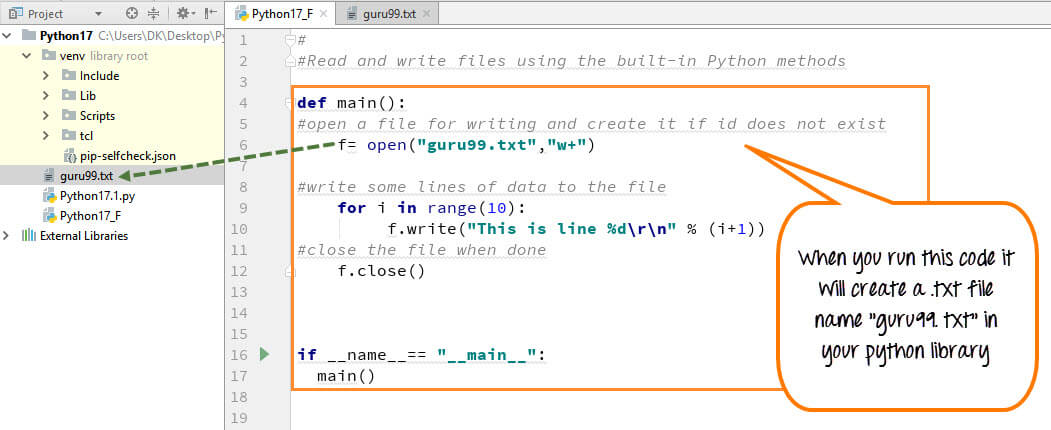
With Write to file Python, you can create a .text files (guru99.txt) by using the code, we have demonstrated here:

**Step 1) Open the .txt file**

f= open("guru99.txt","w+")

* We declared the variable “f” to open a file named guru99.txt. Open takes 2 arguments, the file that we want to open and a string that represents the kinds of permission or operation we want to do on the file
* Here, we used “w” letter in our argument, which indicates Python write to file and it will create file in Python if it does not exist in library
* Plus sign indicates both read and write for Python create file operation.

**Step 2) Enter data into the file**

for i in range(10):
     f.write("This is line %d\r\n" % (i+1))

* We have a [for loop](https://www.guru99.com/python-loops-while-for-break-continue-enumerate.html) that runs over a range of 10 numbers.
* Using the **write** function to enter data into the file.
* The output we want to iterate in the file is “this is line number”, which we declare with Python write file function and then percent d (displays integer)
* So basically we are putting in the line number that we are writing, then putting it in a carriage return and a new line character

**Step 3) Close the file instance**

f.close()

* This will close the instance of the file guru99.txt stored

Here is the result after code execution for create text file in Python example:

[](https://www.guru99.com/images/Pythonnew/Python17.1.jpg)

How to Create a Text File in Python

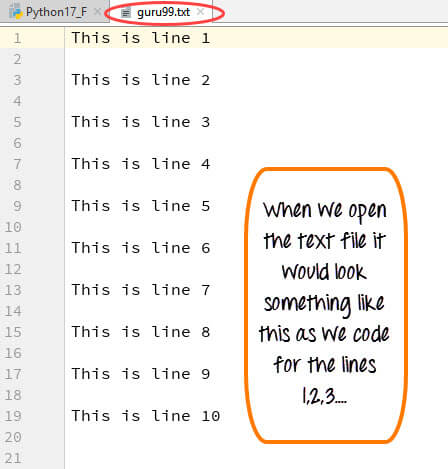
When you click on your text file in our case “guru99.txt” it will look something like this

[](https://www.guru99.com/images/Pythonnew/Python17.2.jpg) 

Example of how to create a text file in Python

### RELATED ARTICLES

* [Python Variables: How to Define/Declare String Variable Types ](https://www.guru99.com/variables-in-python.html "Python Variables: How to Define/Declare String Variable Types")
* [PHP Vs. Python: Key Difference Between Them ](https://www.guru99.com/python-vs-php.html "PHP Vs. Python: Key Difference Between Them")
* [10 BEST Python IDE & Code Editors for Windows (2026) ](https://www.guru99.com/python-ide-code-editor.html "10 BEST Python IDE & Code Editors for Windows (2026)")
* [Import module in Python with Examples ](https://www.guru99.com/import-module-python.html "Import module in Python with Examples")

## How to Append Text File in Python

You can also append/add a new text to the already existing file or a new file.

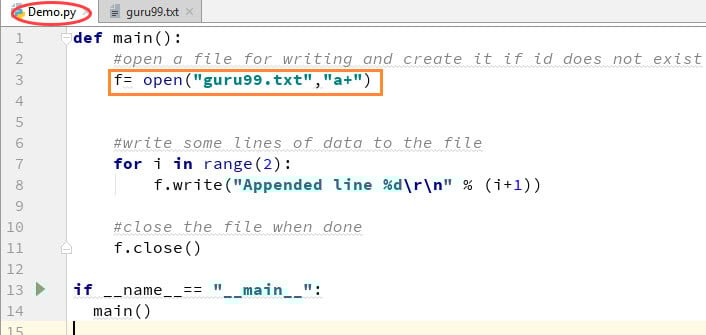
**Step 1)** 

f=open("guru99.txt", "a+")

Once again if you could see a plus sign in the code, it indicates that it will create a new file if it does not exist. But in our case we already have the file, so we are not required to create a new file for Python append to file operation.

**Step 2)** 

for i in range(2):
     f.write("Appended line %d\r\n" % (i+1))

This will write data into the file in append mode.

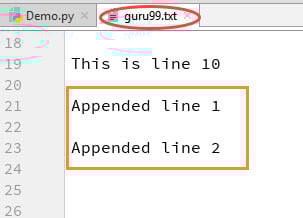
[](https://www.guru99.com/images/Pythonnew/Python17.3.jpg) 

How to Append Text File in Python

You can see the output in “guru99.txt” file. The output of the code is that earlier file is appended with new data by Python append to file operation.

[](https://www.guru99.com/images/Pythonnew/Python17.4.jpg) 

Example of How to Append Text File in Python

## How to Read Files in Python

You can read a file in Python by calling .txt file in a “read mode”(r).

**Step 1)** Open the file in Read mode

f=open("guru99.txt", "r")

**Step 2)** We use the mode function in the code to check that the file is in open mode. If yes, we proceed ahead

if f.mode == 'r':

**Step 3)** Use f.read to read file data and store it in variable content for reading files in Python

contents =f.read()

**Step 4)** Print contents for Python read text file

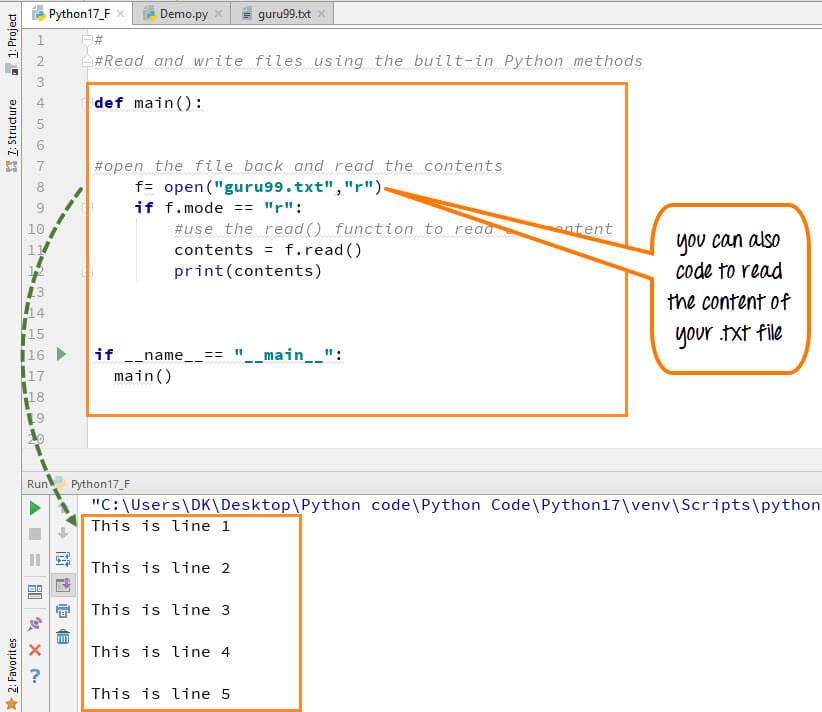
Here is the output of the read file Python example:

[](https://www.guru99.com/images/Pythonnew/Python17.5.jpg) 

How to Read Files in Python

## How to Read a File line by line in Python

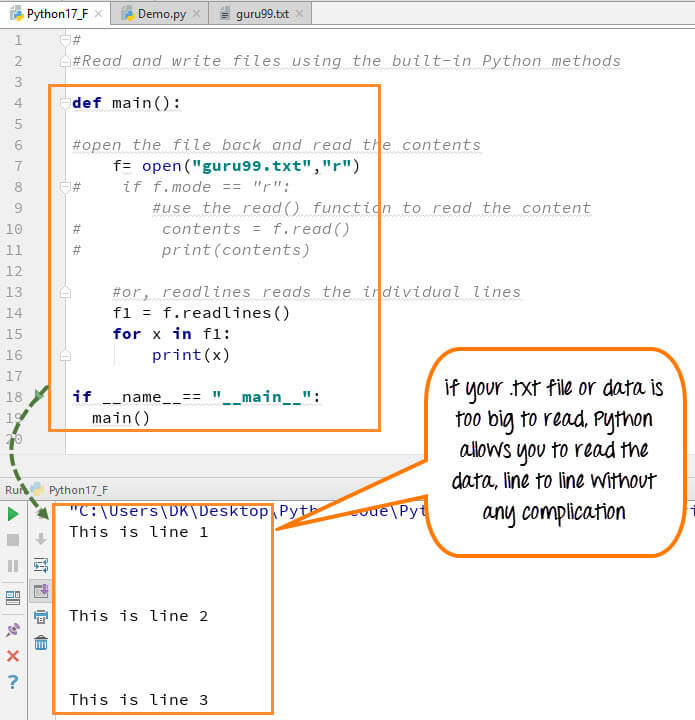
You can also read your .txt file line by line if your data is too big to read. readlines() code will segregate your data in easy to read mode.

[](https://www.guru99.com/images/Pythonnew/Python17.6.jpg) 

How to Read a File line by line in Python

When you run the code (**f1=f.readlines())** to read file line by line in Python, it will separate each line and present the file in a readable format. In our case the line is short and readable, the output will look similar to the read mode. But if there is a complex data file which is not readable, this piece of code could be useful.

## File Modes in Python

Following are the various **File Modes in Python**:

| Mode | Description                                                                                                          |
| ---- | -------------------------------------------------------------------------------------------------------------------- |
| ‘r’  | This is the default mode. It Opens file for reading.                                                                 |
| ‘w’  | This Mode Opens file for writing.If file does not exist, it creates a new file.If file exists it truncates the file. |
| ‘x’  | Creates a new file. If file already exists, the operation fails.                                                     |
| ‘a’  | Open file in append mode.If file does not exist, it creates a new file.                                              |
| ‘t’  | This is the default mode. It opens in text mode.                                                                     |
| ‘b’  | This opens in binary mode.                                                                                           |
| ‘+’  | This will open a file for reading and writing (updating)                                                             |

Here is the complete code for [Python print()](https://www.guru99.com/print-python-examples.html) to File Example

**Python 2 Example**

def main():
     f= open("guru99.txt","w+")
     #f=open("guru99.txt","a+")
     for i in range(10):
         f.write("This is line %d\r\n" % (i+1))
     f.close()   
     #Open the file back and read the contents
     #f=open("guru99.txt", "r")
     #   if f.mode == 'r': 
     #     contents =f.read()
     #     print contents
     #or, readlines reads the individual line into a list
     #fl =f.readlines()
     #for x in fl:
     #print x
if __name__== "__main__":
  main()

**Python 3 Example**

Below is another Python print() to File Example:

def main():
    f= open("guru99.txt","w+")
    #f=open("guru99.txt","a+")
    for i in range(10):
         f.write("This is line %d\r\n" % (i+1))
    f.close()
    #Open the file back and read the contents
    #f=open("guru99.txt", "r")
    #if f.mode == 'r':
    #   contents =f.read()
    #    print (contents)
    #or, readlines reads the individual line into a list
    #fl =f.readlines()
    #for x in fl:
    #print(x)
if __name__== "__main__":
  main()

## FAQs

📂 How do you create a text file in Python?

Open a file with open(‘guru99.txt’, ‘w+’), which creates it if missing. Then use write() to add text and close() to save.

✍️ How do you write to a file in Python?

Open the file in write (w) or append (a) mode, then call file.write(text). Mode w overwrites content, while a adds to the end.

➕ What is the difference between write and append mode?

Write mode (w) truncates the file, erasing old content. Append mode (a) keeps existing content and adds new text to the end.

📖 How do you read a file in Python?

Open the file with open(‘guru99.txt’, ‘r’), then call read() for the whole file or readlines() for a list of lines.

🔤 What does w+ mean when opening a file?

The w+ mode opens a file for both writing and reading. It creates the file if missing and truncates it if it exists.

🤖 How can AI tools like GitHub Copilot help with file handling?

AI assistants like GitHub Copilot autocomplete open(), write(), and read() calls, suggest the correct file mode, and generate safe file-handling blocks with context managers.

🧠 Can AI automate file read and write code in Python?

Yes. AI-powered tools automate generating file operations, convert loops into readlines() calls, and refactor open/close code into with-statements that close files automatically.

❓ What is the with statement used for in file handling?

The with statement opens a file and closes it automatically when the block ends, even if an error occurs. It is the safest file-handling approach.

#### Summarize this post with:

ChatGPT Perplexity Grok Google AI 

**Stay Updated on AI** **Get Weekly AI Skills, Trends, Actionable Advice.** 

##### Sign up for the newsletter

Subscribe for Free 

You have successfully subscribed.  
Please check your inbox. 

![AI-Newsletter]() Chosen by over **350,000+** professionals 

[Scroll to top ](#wrapper)Scroll to top 

× 

Toggle Menu Close 

Search for: 

Search

```json
{"@context":"https://schema.org","@graph":[{"@type":"Organization","@id":"https://www.guru99.com/#organization","name":"Guru99","sameAs":["https://www.facebook.com/Guru99Official","https://twitter.com/guru99com"],"logo":{"@type":"ImageObject","@id":"https://www.guru99.com/#logo","url":"https://www.guru99.com/images/guru99-logo-v1-150x59.png","contentUrl":"https://www.guru99.com/images/guru99-logo-v1-150x59.png","caption":"Guru99","inLanguage":"en-US"}},{"@type":"WebSite","@id":"https://www.guru99.com/#website","url":"https://www.guru99.com","name":"Guru99","publisher":{"@id":"https://www.guru99.com/#organization"},"inLanguage":"en-US"},{"@type":"ImageObject","@id":"https://www.guru99.com/images/read-and-write-files-in-python.png","url":"https://www.guru99.com/images/read-and-write-files-in-python.png","width":"700","height":"250","caption":"Read &amp; Write Files in Python","inLanguage":"en-US"},{"@type":"BreadcrumbList","@id":"https://www.guru99.com/reading-and-writing-files-in-python.html#breadcrumb","itemListElement":[{"@type":"ListItem","position":"1","item":{"@id":"https://www.guru99.com","name":"Home"}},{"@type":"ListItem","position":"2","item":{"@id":"https://www.guru99.com/python","name":"Python"}},{"@type":"ListItem","position":"3","item":{"@id":"https://www.guru99.com/reading-and-writing-files-in-python.html","name":"How to Create (Write) Text File in Python"}}]},{"@type":"WebPage","@id":"https://www.guru99.com/reading-and-writing-files-in-python.html#webpage","url":"https://www.guru99.com/reading-and-writing-files-in-python.html","name":"How to Create (Write) Text File in Python","dateModified":"2026-07-10T19:33:15+05:30","isPartOf":{"@id":"https://www.guru99.com/#website"},"primaryImageOfPage":{"@id":"https://www.guru99.com/images/read-and-write-files-in-python.png"},"inLanguage":"en-US","breadcrumb":{"@id":"https://www.guru99.com/reading-and-writing-files-in-python.html#breadcrumb"}},{"@type":"Person","@id":"https://www.guru99.com/author/anna","name":"Anna Blake","description":"I'm Anna Blake, specializing in Python tutorials, offering clear and concise lessons to help you master Python programming efficiently.","url":"https://www.guru99.com/author/anna","image":{"@type":"ImageObject","@id":"https://www.guru99.com/images/anna-blake-author.png","url":"https://www.guru99.com/images/anna-blake-author.png","caption":"Anna Blake","inLanguage":"en-US"},"worksFor":{"@id":"https://www.guru99.com/#organization"}},{"articleSection":"Python","headline":"How to Create (Write) Text File in Python","description":"In this Python File Handling tutorial, learn How to Create, Read, Write, Open, Append text files in Python with Code and Examples for better understanding.","keywords":"python","speakable":{"@type":"SpeakableSpecification","cssSelector":[".entry-title",".summary"]},"@type":"Article","author":{"@id":"https://www.guru99.com/author/anna","name":"Anna Blake"},"dateModified":"2026-07-10T19:33:15+05:30","image":{"@id":"https://www.guru99.com/images/read-and-write-files-in-python.png"},"copyrightYear":"2026","name":"How to Create (Write) Text File in Python","subjectOf":[{"@type":"HowTo","name":"How to Create a Text File in Python","description":"Here is a step by step process on how to create a Text File in Python","step":[{"@type":"HowToStep","name":"Step 1) Open the .txt file","text":"We declared the variable f to open a file named guru99.txt.","url":"https://www.guru99.com/reading-and-writing-files-in-python.html#step1"},{"@type":"HowToStep","name":"Step 2) Enter data into the file","text":"We have a for loop that runs over a range of 10 numbers.","url":"https://www.guru99.com/reading-and-writing-files-in-python.html#step2"},{"@type":"HowToStep","name":"Step 3) Close the file instance","text":"This will close the instance of the file guru99.txt stored. Here is the result after code execution for create text file Python example:","image":{"@type":"ImageObject","url":"https://www.guru99.com/images/Pythonnew/Python17.1.jpg"},"url":"https://www.guru99.com/reading-and-writing-files-in-python.html#step3"}]},{"@type":"FAQPage","mainEntity":[{"@type":"Question","name":"How do you create a text file in Python?","acceptedAnswer":{"@type":"Answer","text":"Open a file with open('guru99.txt', 'w+'), which creates it if missing. Then use write() to add text and close() to save."}},{"@type":"Question","name":"How do you write to a file in Python?","acceptedAnswer":{"@type":"Answer","text":"Open the file in write (w) or append (a) mode, then call file.write(text). Mode w overwrites content, while a adds to the end."}},{"@type":"Question","name":"What is the difference between write and append mode?","acceptedAnswer":{"@type":"Answer","text":"Write mode (w) truncates the file, erasing old content. Append mode (a) keeps existing content and adds new text to the end."}},{"@type":"Question","name":"How do you read a file in Python?","acceptedAnswer":{"@type":"Answer","text":"Open the file with open('guru99.txt', 'r'), then call read() for the whole file or readlines() for a list of lines."}},{"@type":"Question","name":"What does w+ mean when opening a file?","acceptedAnswer":{"@type":"Answer","text":"The w+ mode opens a file for both writing and reading. It creates the file if missing and truncates it if it exists."}},{"@type":"Question","name":"How can AI tools like GitHub Copilot help with file handling?","acceptedAnswer":{"@type":"Answer","text":"AI assistants like GitHub Copilot autocomplete open(), write(), and read() calls, suggest the correct file mode, and generate safe file-handling blocks with context managers."}},{"@type":"Question","name":"Can AI automate file read and write code in Python?","acceptedAnswer":{"@type":"Answer","text":"Yes. AI-powered tools automate generating file operations, convert loops into readlines() calls, and refactor open/close code into with-statements that close files automatically."}},{"@type":"Question","name":"What is the with statement used for in file handling?","acceptedAnswer":{"@type":"Answer","text":"The with statement opens a file and closes it automatically when the block ends, even if an error occurs. It is the safest file-handling approach."}}]}],"@id":"https://www.guru99.com/reading-and-writing-files-in-python.html#schema-20612","isPartOf":{"@id":"https://www.guru99.com/reading-and-writing-files-in-python.html#webpage"},"publisher":{"@id":"https://www.guru99.com/#organization"},"inLanguage":"en-US","mainEntityOfPage":{"@id":"https://www.guru99.com/reading-and-writing-files-in-python.html#webpage"}}]}
```