
모듈 가져오기 Python 예와 함께
 편집 팀
편집 팀
⚡ 스마트 요약
가져오기 Python 모듈은 한 파일에서 다른 파일에 정의된 변수, 함수 및 클래스를 재사용할 수 있도록 합니다. 모듈은 단순히 .py 파일이며, 패키지는 __init__.py 파일로 표시된 디렉터리 내에 관련 모듈들을 그룹화합니다.
아래 섹션에서는 모듈, 패키지, 다양한 가져오기 방식, 그리고 절대 및 상대 가져오기의 작동 방식에 대해 설명합니다. Python.
모듈은 무엇입니까? Python?
모듈은 다음과 같은 내용을 포함하는 파일입니다. Python 코드. 코드는 변수, 함수 또는 정의된 클래스의 형태일 수 있습니다. 파일 이름은 모듈 이름이 됩니다.
예를 들어 파일 이름이 guru99.py인 경우 모듈 이름은 다음과 같습니다. guru99. 모듈 기능을 사용하면 모든 것을 하나의 파일 안에 작성하는 대신 코드를 여러 파일로 나눌 수 있습니다.
무엇인가 Python 모듈을 가져오나요?
파일은 모듈로 간주됩니다. Python해당 모듈을 사용하려면 다음과 같이 임포트해야 합니다. import 키워드. 파일 내에 있는 함수나 변수는 모듈을 임포트하여 다른 파일에서 사용할 수 있습니다. 이러한 기능은 다른 언어에서도 사용할 수 있습니다. TypeScript, Java스크립트, Java, 루비 등
모듈을 생성하고 가져오는 방법 Python?
이제 모듈을 생성하고 다른 파일로 가져오겠습니다.
스크린샷에 표시된 대로 모듈을 만들고 가져오는 흐름은 다음과 같습니다.
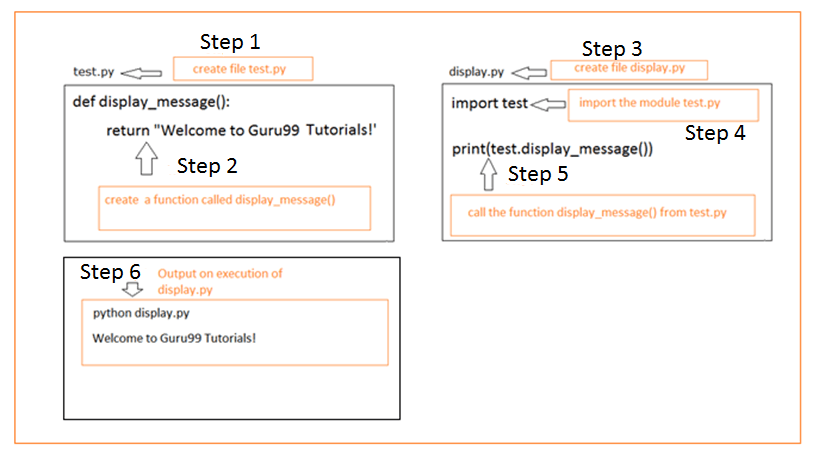
다음 단계를 따라 모듈을 생성하세요. Python.
코드 테스트에 사용된 폴더 구조는 다음과 같습니다.
modtest/
	test.py
	display.py
단계 1) test.py라는 이름의 파일을 생성하세요.
단계 2) test.py 내부에 display_message()라는 함수를 만듭니다.
Def display_message():
    return "Welcome to Guru99 Tutorials!"
단계 3) 이제 다른 파일 display.py를 만듭니다.
단계 4) display.py 파일 내부에서 아래와 같이 test.py 모듈을 임포트합니다.
import test
임포트할 때 test.py를 명시할 필요 없이 파일 이름만 입력하면 됩니다.
단계 5) 그런 다음 test.py에 있는 display_message() 함수를 display.py 내부에서 호출할 수 있습니다. module_name.function_name 형식을 사용해야 합니다.
예를 들어 test.display_message()입니다.
Import test
print(test.display_message())
단계 6) display.py를 실행하면 다음과 같은 결과가 나타납니다. 출력:
Welcome to Guru99 Tutorials!
클래스 가져오기 Python
앞서 우리는 함수가 포함된 간단한 모듈을 살펴보았습니다. 이제 클래스를 만들고 다른 파일 안에서 해당 클래스를 참조해 보겠습니다.
코드 테스트를 위한 폴더 구조는 다음과 같습니다.
myproj/
	Car.py
	display.py
다음 코드를 사용하여 Car.py라는 파일을 만듭니다.
파일명 : Car.py
class Car:
	brand_name = "BMW"
	model = "Z4"
	manu_year = "2020"

	def __init__(self, brand_name, model, manu_year):
		self.brand_name = brand_name
		self.model = model
		self.manu_year = manu_year

	def car_details(self):
		print("Car brand is ", self.brand_name)
		print("Car model is ", self.model)
		print("Car manufacture year is ", self.manu_year)


	def get_Car_brand(self):
		print("Car brand is ", self.brand_name)

	def get_Car_model(self):
		print("Car model is ", self.model)
Car.py 파일에는 brand_name, model, manu_year라는 속성이 있습니다. 클래스 내부에 정의된 함수는 car_details(), get_Car_brand(), get_Car_model()입니다.
이제 Car.py 파일을 display.py라는 다른 파일의 모듈로 사용해 보겠습니다.
파일명 : display.py
import Car
car_det = Car.Car("BMW","Z5", 2020)
print(car_det.brand_name)
print(car_det.car_details())
print(car_det.get_Car_brand())
print(car_det.get_Car_model())
출력:
BMW
Car brand is  BMW
Car model is  Z5
Car manufacture year is  2020
Car brand is  BMW
Car model is  Z5
따라서 Car 모듈을 사용하면 Car.py의 모든 변수와 함수에 접근할 수 있습니다.
from을 사용하여 모듈 가져오기
전체 코드를 가져오는 대신 모듈의 일부, 즉 필요한 함수와 변수 이름만 가져올 수 있습니다.
특정 항목만 가져오려면 "from" 키워드를 사용하여 원하는 항목을 가져올 수 있습니다.
따라서 구문은 다음과 같습니다.
from module import your function_name , variables,... etc.
코드 테스트에 사용된 폴더 구조는 다음과 같습니다.
modtest/
	test.py
	display.py
test.py 파일에는 다음과 같이 두 개의 함수가 있습니다.
파일명 : test.py
defdisplay_message():
	return "Welcome to Guru99 Tutorials!"

def display_message1():
	return "All about Python!"
이제 display_message() 함수를 사용하고 싶을 것입니다. 가져온 함수 또는 변수는 아래와 같이 직접 접근할 수 있습니다.
파일명 : display.py
from test import display_message
print(display_message())
출력:
Welcome to Guru99 Tutorials!
만약 display_message1() 함수를 사용한다면, 아래와 같이 함수가 정의되지 않았다는 오류가 발생할 것입니다.
from test import display_message
print(display_message1())
출력:
Traceback (most recent call last):
File "display.py", line 3, in <module>
print(display_message1())
Name Error: name 'display_message1' is not defined
모듈에서 모든 것을 가져오기
`import`를 사용하면 `import` 뒤에 모듈 이름(즉, 사용할 파일 이름 또는 라이브러리 이름)을 입력하여 전체 모듈을 가져올 수 있습니다.
구문 :
Import module
또는 사용하여
from module import *
코드 테스트에 사용된 폴더 구조는 다음과 같습니다.
modtest/
	test.py
	display.py
다음은 test.py 내부의 코드 세부 정보입니다.
my_name = "Guru99"
my_address = "Mumbai"

defdisplay_message():
	return "Welcome to Guru99 Tutorials!"


def display_message1():
	return "All about Python!"
가져오기 모듈 사용
모듈 이름만으로 모듈 내부의 변수와 함수를 참조하려면, 반드시 모듈 이름을 접두사로 붙여야 합니다.
예시
파일명 : display.py
Import test
print(test.display_message())
print(test.display_message1())
print(test.my_name)
print(test.my_address)
'test'라는 모듈 이름은 해당 모듈 내의 함수와 변수를 참조하는 데 사용됩니다.
출력:
Welcome to Guru99 Tutorials!
All about Python!
Guru99
Mumbai
가져오기 사용 *
사용 예를 살펴 보겠습니다. 수입 *. 사용 수입 *, 아래 예와 같이 함수와 변수에 직접 액세스할 수 있습니다.
from test import *

print(display_message())
print(display_message1())
print(my_name)
print(my_address)
출력:
Welcome to Guru99 Tutorials!
All about Python!
Guru99
Mumbai
dir( ) 함수
dir() 함수는 내장 함수입니다. Pythondir() 메서드는 주어진 객체의 내장 속성을 포함하여 모든 속성과 메서드를 반환합니다.
따라서 모듈에 대해 dir() 함수를 사용하면 모듈 내부에 있는 변수와 함수들을 얻을 수 있습니다.
다음은 모듈에 대한 dir() 함수의 작동 예시입니다. Car.py라는 클래스가 있다고 가정해 보겠습니다. Car 객체를 임포트하고 dir() 함수에 할당하여 결과를 확인해 보겠습니다.
코드를 테스트하기 위한 폴더 구조는 다음과 같습니다.
test prop/
	Car.py
	test.py
파일 이름: Car.py
class Car:
	brand_name = "BMW"
	model = "Z4"
	manu_year = "2020"

	def __init__(self, brand_name, model, manu_year):
		self.brand_name = brand_name
		self.model = model
		self.manu_year = manu_year

	def car_details(self):
		print("Car brand is ", self.brand_name)
		print("Car model is ", self.model)
		print("Car manufacture year is ", self.manu_year)


	def get_Car_brand(self):
		print("Car brand is ", self.brand_name)

	def get_Car_model(self):
		print("Car model is ", self.model)
파일명 : test.py
import Car

class_contents = dir(Car)
print(class_contents)
출력은 Car.py에 정의된 클래스 이름과 모든 함수를 제공합니다.
다음에서 사용 가능한 내장 모듈에서 dir()을 사용해 볼 수도 있습니다. Python그럼 다음에 대해서도 같은 방식으로 시도해 봅시다. JSON 아래 예시와 같이 모듈을 엽니다. 그러면 해당 모듈에서 사용 가능한 모든 속성과 메서드가 표시됩니다. JSON 기준 치수.
Import json
json_details = dir(json)
print(json_details)
출력:
['JSONDecodeError', 'JSONDecoder', 'JSONEncoder', '__all__', '__author__', '__bu
iltins__', '__cached__', '__doc__', '__file__', '__loader__', '__name__', '__pac
kage__', '__path__', '__spec__', '__version__', '_default_decoder', '_default_en
coder', 'codecs', 'decoder', 'detect_encoding', 'dump', 'dumps', 'encoder', 'loa
d', 'loads', 'scanner']
패키지
패키지는 그 안에 정의된 모든 모듈이 포함된 디렉터리입니다. 만들려면 Python 인터프리터가 이를 패키지로 처리하려면 디렉터리에 __init__.py 파일이 있어야 합니다. __init__.py 파일이 디렉터리를 패키지로 만듭니다. 우리가 작업할 패키지의 구조는 다음과 같습니다.
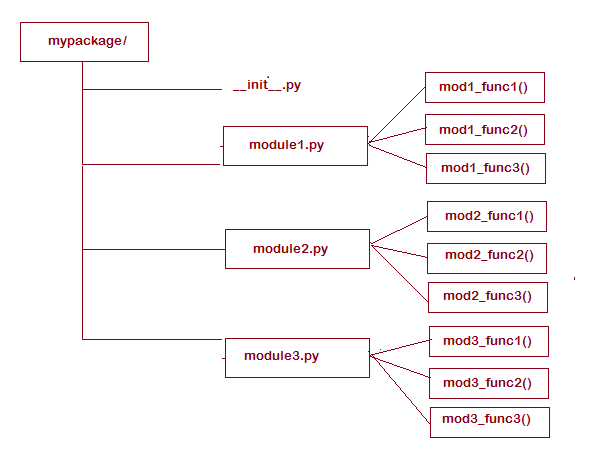
패키지 이름은 내 패키지패키지 사용을 시작하려면 먼저 mypackage/라는 디렉토리를 생성하세요. 해당 디렉토리 안에 __init__.py라는 빈 파일을 만듭니다. 그런 다음 module1.py, module2.py, module3.py 파일을 세 개 더 생성하고 스크린샷에 표시된 대로 함수를 정의합니다. module1.py, module2.py, module3.py 파일에 대한 자세한 내용은 다음과 같습니다.
module1.py
def mod1_func1():
print("Welcome to Module1 function1")

def mod1_func2():
print("Welcome to Module1 function2")

def mod1_func3():
print("Welcome to Module1 function3")
module2.py
def mod2_func1():
print("Welcome to Module2 function1")

def mod2_func2():
print("Welcome to Module2 function2")

def mod2_func3():
print("Welcome to Module2 function3")
module3.py
def mod3_func1():
print("Welcome to Module3 function1")

def mod3_func2():
print("Welcome to Module3 function2")

def mod3_func3():
print("Welcome to Module3 function3")
The 꾸러미 이제 사용할 준비가 되었습니다. 아래 test.py 예시처럼 아무 파일에서나 패키지를 호출하세요.
여기서는 mypackage.module1을 가져오고 별칭 이름을 다음과 같이 지정합니다. 모드1마찬가지로 mypackage에 있는 다른 모듈인 module2.py와 module3.py도 사용할 수 있습니다.
import mypackage.module1 as mod1

print(mod1.mod1_func1())
print(mod1.mod1_func2())
print(mod1.mod1_func2())
출력:
Welcome to Module1 function1
None
Welcome to Module1 function2
None
Welcome to Module1 function2
None
방금 함수가 포함된 간단한 모듈을 사용하여 패키지를 시연해 보았습니다. 프로젝트에 따라 하위 패키지, 즉 클래스가 정의된 모듈이 있는 하위 폴더를 포함하는 패키지를 만들 수도 있습니다.
Python 모듈 검색 경로
실행 중에, Python 마주치다 가져오기 모듈 이름그러면 인터프리터는 해당 모듈을 찾으려고 시도합니다. 내장 모듈 목록에서 모듈을 검색한 다음, sys.path에 정의된 모든 디렉터리에서 모듈을 검색합니다.
요약하자면, 인터프리터는 모듈을 찾기 위해 다음과 같은 검색을 수행합니다.
- 현재 디렉터리에 있습니다.
- 내장 모듈 목록에 있습니다.
- sys.path 디렉터리 내부.
sys 모듈을 임포트하고 sys.path를 출력하면 sys.path의 세부 정보를 얻을 수 있습니다. 아래와 같이 디렉터리 목록이 표시됩니다.
importsys
print(sys.path)
출력:
['Python Latest\\task2', 'Users\\AppData\\Local\\Programs\\Python\
\Python37\\python37.zip', 'Users\\AppData\\Local\\Programs\\Python\\P
ython37\\DLLs']
요구 사항에 따라 경로를 수정하고 디렉터리를 유지할 수도 있습니다.
가져오기에서 모듈 별칭 사용
모듈 이름을 더 짧은 형태로 바꾸려면 별칭을 지정할 수도 있습니다. 별칭은 다음을 사용하여 생성할 수 있습니다. as 예어.
구문 :
import filename as alias name
코드를 테스트하기 위한 폴더 구조는 다음과 같습니다.
Mod test/
	test.py
	display.py
다음은 test.py 내부의 코드입니다.
my_name = "Guru99"
my_address = "Mumbai"

def display_message():
	return "Welcome to Guru99 Tutorials!"

def display_message1():
	return "All about Python!"
이제 display.py에서 test.py에 대한 별칭을 사용하겠습니다.
Import test as t

print(t.display_message())
print(t.display_message1())
print(t.my_name)
print(t.my_address)
테스트 모듈에 사용되는 별칭은 t입니다. 따라서 test.py의 함수와 변수는 t라는 별칭을 사용하여 참조할 수 있습니다.
출력:
Welcome to Guru99 Tutorials!
All about Python!
Guru99
Mumbai
절대 및 상대 수입 Python
이제 파일을 다른 파일 내의 모듈로 가져오는 방법을 알았습니다. 이제 폴더에 있는 파일을 관리하는 방법을 살펴보겠습니다. 폴더의 파일은 절대 가져오기 또는 상대 가져오기를 사용하여 가져올 수 있습니다.
아래와 같이 프로젝트 폴더 구조가 있다고 가정해 보세요.

루트 폴더는 myproject/입니다. 그 안에 package1과 package2라는 두 개의 하위 폴더가 있습니다.
package1 폴더에는 module1.py와 module2.py라는 두 개의 모듈이 있습니다.
package2 폴더에는 하나의 클래스 myclass.py, module3.py가 포함된 하위 패키지 subpkg 및 마지막 module4.py가 있습니다.
- module1.py 파일에는 myfunc1라는 함수가 있습니다.
- module2.py 파일에는 myfunc2라는 함수가 있습니다.
- module3.py 파일에는 myfunc3라는 함수가 있습니다.
- module4.py 파일에는 myfunc4라는 함수가 있습니다.
절대 가져오기 사용
절대 경로를 사용하여 임포트하려면 프로젝트 루트 폴더에서부터 모듈의 전체 경로를 추가해야 합니다.
이제 절대 경로 임포트를 사용하여 각 모듈에 있는 함수를 참조하는 방법을 살펴보겠습니다.
myfunc1 함수를 사용하려면 다음과 같이 임포트해야 합니다.
from package1.module1  import  myfunc1
or
from package1 import module1
module1.myfunc1()
myfunc3 함수를 사용하려면 다음과 같이 임포트해야 합니다.
from package1.subpkg.module3  import  myfunc3
or
from package1.subpkg import module3
module3.myfunc3()
절대 수입품 사용의 장점과 단점
절대 가져오기를 사용하면 다음과 같은 이점이 있습니다.
- 쉬워진다 trac코드 검사를 위해 모듈을 다시 불러오세요.
- 사용하기 쉽고 매우 간단합니다.
- 프로젝트 경로가 변경되더라도 가져오기(import) 내용은 그대로 유지됩니다.
절대 가져오기 사용의 단점
절대 경로 임포트의 단점은 다음과 같습니다.
- 모듈이 중첩되어 있고 모듈 이름이 긴 경우 가져오기 경로가 매우 길어질 수 있습니다.
상대 가져오기 사용
위에서 언급한 것과 동일한 폴더 구조를 고려하여 상대 경로 가져오기를 사용하여 동일한 파일을 가져오는 방법을 살펴보겠습니다.
상대 경로 임포트에서 임포트할 모듈은 현재 위치, 즉 임포트 문이 있는 위치를 기준으로 합니다.
통사론
상대 가져오기에서는 다음을 사용하여 가져올 때 모듈 이름 앞에 마침표(.)를 추가해야 합니다. 에.
현재 위치보다 한 단계 위 모듈인 경우 모듈 이름 앞에 마침표 두 개(..)가 붙습니다.
위에서 언급한 폴더 구조 그림을 참조하면, 우리가 참조해야 할 다음과 같은 모듈과 그 기능들을 확인할 수 있습니다.
- module1.py 파일에는 myfunc1라는 함수가 있습니다.
- module2.py 파일에는 myfunc2라는 함수가 있습니다.
- module3.py 파일에는 myfunc3라는 함수가 있습니다.
- module4.py 파일에는 myfunc4라는 함수가 있습니다.
myfunc1 함수를 사용하려면 다음과 같이 임포트해야 합니다.
from .module1 import myfunc1
myfunc3 함수를 사용하려면 다음과 같이 임포트해야 합니다.
from .subpkg.module3 import myfunc3
상대 수입품의 장점
- 상대 수입품으로 작업하는 것은 쉽습니다.
- 현재 위치에서는 절대 수입에 비해 수입이 단축될 수 있습니다.
상대 수입품의 단점
- 상대적 임포트를 사용하면 어렵습니다. trac코드가 있는 곳으로 돌아가세요.
