---
description: SAP uses Condition Method technique to calculate taxes (except Withholding Tax) in the system.
title: SAP SD Tax Determination Procedure: VK12, OVK1, OVK4
image: https://www.guru99.com/images/sap-sd-tax-determination.png
---


[Skip to content](#main) 

**⚡ Smart Summary**

Tax determination in SAP SD uses the condition technique, combining tax calculation procedures and tax codes to calculate the correct tax on a document. This resource explains the tax code, the tax procedure fields, and the five configuration steps.

* 🧮 **Condition Technique:** SAP uses the condition technique with tax procedures and tax codes to calculate tax.
* 🔑 **Tax Code:** The tax code defines the tax type, amount, GL account, and any additional tax.
* 🌍 **Country Procedure:** Each country has a tax procedure built from steps, condition types, reference steps, and account keys.
* 🪜 **Five Steps:** Configure the tax category, tax types, plant assignment, material taxes, and tax condition records.
* ⌨️ **Transactions:** The steps use OVK3, OVK1, OX10, OVK4, and VK12.
* 🛡️ **Why It Matters:** Correct tax determination keeps invoices compliant and financial postings accurate.

[ Read More ](javascript:void%280%29;) 

![SAP SD Tax Determination Procedure](https://www.guru99.com/images/sap-sd-tax-determination.png)

SAP uses the condition technique to calculate taxes (except withholding tax) in the system. Tax calculation procedures, defined in the system, together with the tax codes are used to calculate the amount of tax.

The tax code is the first step in the tax calculation procedure. The tax code describes the following:

* **Tax type** (the tax type can be defined with T-code OVK1).
* **Amount** of tax calculated or entered.
* **GL account** for tax posting.
* Calculation of **additional tax**.

Each country has a specific tax procedure defined in the standard system. A tax calculation procedure contains the following fields:

* **Steps:** Determine the sequence of lines within the procedure.
* **Condition Types:** Indicate how the tax calculation model works (whether the records are for a fixed amount or percentages, and whether they can be processed automatically).
* **Reference Steps:** The system obtains the amount or value it uses in its calculation (for example, the base amount).
* **Account/Process Keys:** Provide the link between the tax procedure and the GL accounts to which tax data is posted. This supports automatic tax account assignment. To enable it, you define:
* **Posting keys** (unless there is a specific requirement, the standard GL posting keys are sufficient: Debit 40, Credit 50).
* **Rules** to determine which fields the account determination is based on (such as the tax code or country key).

## Step 1) Tax Category

The tax category is used to group and manage similar product or service tax rates. Tax rates are defined for each tax code, are linked to tax types, and are included in the tax procedures. In this relationship, a single tax code can technically have multiple tax rates for various tax types. The tax code is assigned to a tax procedure, which is attached to a GL master record, and that tax procedure is accessed whenever the GL account is used in document processing.

**Step 1.1)**

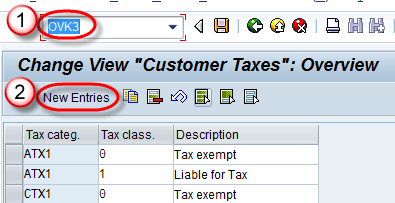
1. Enter T-code OVK3 in the command field.
2. Click on the New Entries button.

[](https://www.guru99.com/images/sap/2013/01/21.png)

**Step 1.2)**

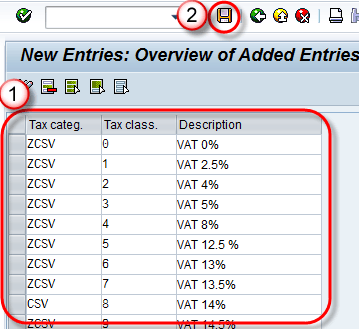
1. Enter the tax category, tax class, and description.
2. Click on the Save button.

[](https://www.guru99.com/images/sap/2013/01/31.png)

A message “Data was saved” is displayed.

## Step 2) Define Tax Types

**Step 2.1)**

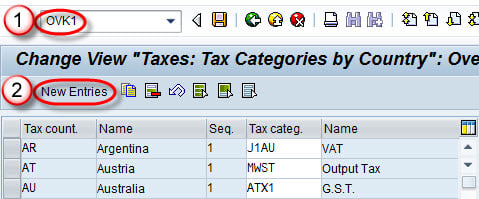
1. Enter T-code OVK1 in the command field.
2. Click on the New Entries button.

[](https://www.guru99.com/images/sap/2013/01/110.jpg)

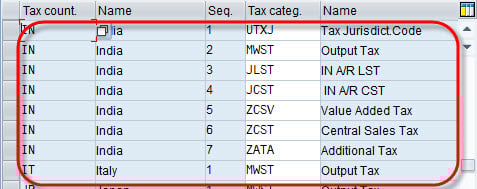
**Step 2.2)** Enter the tax country, sequence, and tax category, then save the data.

[](https://www.guru99.com/images/sap/2013/01/29.jpg)

### RELATED ARTICLES

* [How To Create Debit Memo in SAP ](https://www.guru99.com/create-debit-memo.html "How To Create Debit Memo in SAP")
* [How To Create Credit Memo in SAP ](https://www.guru99.com/credit-memo-request.html "How To Create Credit Memo in SAP")
* [Determine Pricing by Item Category in SAP: OVKO ](https://www.guru99.com/determine-pricing-by-item-category.html "Determine Pricing by Item Category in SAP: OVKO")
* [Top 20 SAP SD Interview Questions & Answers (2026 Update) ](https://www.guru99.com/sap-sd-interview-questions.html "Top 20 SAP SD Interview Questions & Answers (2026 Update)")

## Step 3) Assign the Plant for Tax Determination

**Step 3.1)**

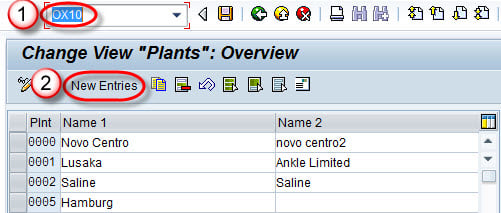
1. Enter T-code OX10 in the command field.
2. Click on the New Entries button.

[](https://www.guru99.com/images/sap/2013/01/OX10.jpg)

**Step 3.2)**

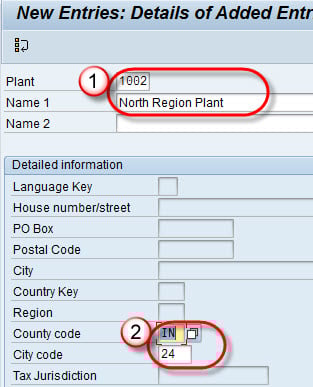
1. Enter the Plant and Name.
2. Enter the country code and city code.

Save the data.

[](https://www.guru99.com/images/sap/2013/01/OX10-2.jpg)

## Step 4) Define the Material Taxes

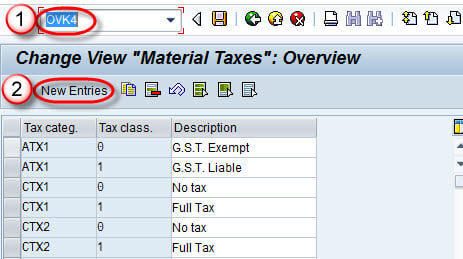
1. Enter T-code OVK4 in the command field.
2. Click on the New Entries button.

[](https://www.guru99.com/images/sap/2013/01/OVK4.jpg)

**Step 4.1)**

* Enter the tax category, tax classification, and description.
* Save the data.

[](https://www.guru99.com/images/sap/2013/01/OVK4-1.jpg)

## Step 5) Define the Tax Determination

**Step 5.1)**

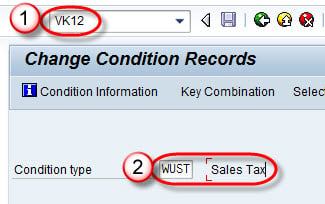
1. Enter T-code VK12 in the command field.
2. Enter the condition type.

[](https://www.guru99.com/images/sap/2013/01/vk12-1.jpg)

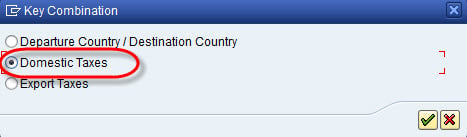
**Step 5.2)** Select Domestic Taxes.

[](https://www.guru99.com/images/sap/2013/01/vk12-2.jpg)

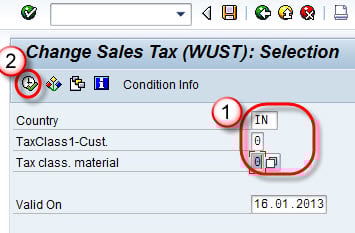
**Step 5.3)**

1. Enter the Country, customer tax class, and material tax class.
2. Run the report.

[](https://www.guru99.com/images/sap/2013/01/vk12-31.jpg)

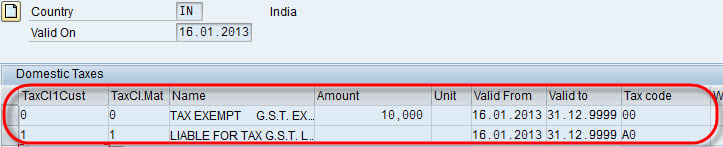
**Step 5.4)** Enter the customer tax class, material tax class, amount, validity period, and tax code.

[](https://www.guru99.com/images/sap/2013/01/vk12-4.jpg)

Save the record.

## FAQs

🔀 What is the difference between a tax procedure and a tax code in SAP?

A tax procedure defines the calculation steps and condition types for a country. A tax code is a specific key within that procedure that carries the actual rates and GL assignment. The procedure is the framework; the tax code is the value applied on a document.

🏷️ Which condition type is used for tax in SAP SD?

The standard output tax condition type in SAP SD is MWST. It is included in the pricing procedure and reads the tax condition records maintained in VK11 or VK12 to bring the correct tax rate onto the sales document.

🧩 What are the customer and material tax classifications used for?

The customer tax classification and the material tax classification combine to determine the tax rate. SAP reads both from the master data, matches them in the condition record, and applies the tax code and rate defined for that combination.

🤖 Can AI help configure tax determination in SAP?

Yes. AI can suggest the right tax category, tax types, and condition records from country rules and similar setups, and flag missing steps. A tax or SD consultant should still validate the configuration before it is transported to production.

🧠 How can AI reduce tax errors in SAP invoices?

AI can check each invoice’s tax rate against the customer, material, and country, and flag mismatches before posting. This catches wrong or missing tax early, reduces compliance risk, and leaves the final review to a finance user.

#### Summarize this post with:

ChatGPT Perplexity Grok Google AI 

**Stay Updated on AI** **Get Weekly AI Skills, Trends, Actionable Advice.** 

##### Sign up for the newsletter

Subscribe for Free 

You have successfully subscribed.  
Please check your inbox. 

![AI-Newsletter]() Chosen by over **350,000+** professionals 

[Scroll to top ](#wrapper)Scroll to top 

× 

Toggle Menu Close 

Search for: 

Search

```json
{"@context":"https://schema.org","@graph":[{"@type":"Organization","@id":"https://www.guru99.com/#organization","name":"Guru99","sameAs":["https://www.facebook.com/Guru99Official","https://twitter.com/guru99com"],"logo":{"@type":"ImageObject","@id":"https://www.guru99.com/#logo","url":"https://www.guru99.com/images/guru99-logo-v1-150x59.png","contentUrl":"https://www.guru99.com/images/guru99-logo-v1-150x59.png","caption":"Guru99","inLanguage":"en-US"}},{"@type":"WebSite","@id":"https://www.guru99.com/#website","url":"https://www.guru99.com","name":"Guru99","publisher":{"@id":"https://www.guru99.com/#organization"},"inLanguage":"en-US"},{"@type":"ImageObject","@id":"https://www.guru99.com/images/sap-sd-tax-determination.png","url":"https://www.guru99.com/images/sap-sd-tax-determination.png","width":"700","height":"250","caption":"SAP SD Tax Determination","inLanguage":"en-US"},{"@type":"BreadcrumbList","@id":"https://www.guru99.com/all-about-tax-determination-procedure-in-sap-sd.html#breadcrumb","itemListElement":[{"@type":"ListItem","position":"1","item":{"@id":"https://www.guru99.com","name":"Home"}},{"@type":"ListItem","position":"2","item":{"@id":"https://www.guru99.com/sap-sd","name":"SAP - SD"}},{"@type":"ListItem","position":"3","item":{"@id":"https://www.guru99.com/all-about-tax-determination-procedure-in-sap-sd.html","name":"SAP SD Tax Determination Procedure: VK12, OVK1, OVK4"}}]},{"@type":"WebPage","@id":"https://www.guru99.com/all-about-tax-determination-procedure-in-sap-sd.html#webpage","url":"https://www.guru99.com/all-about-tax-determination-procedure-in-sap-sd.html","name":"SAP SD Tax Determination Procedure: VK12, OVK1, OVK4","dateModified":"2026-07-07T19:10:52+05:30","isPartOf":{"@id":"https://www.guru99.com/#website"},"primaryImageOfPage":{"@id":"https://www.guru99.com/images/sap-sd-tax-determination.png"},"inLanguage":"en-US","breadcrumb":{"@id":"https://www.guru99.com/all-about-tax-determination-procedure-in-sap-sd.html#breadcrumb"}},{"@type":"Person","@id":"https://www.guru99.com/author/jessica","name":"Jessica Blake","description":"I'm Jessica Blake, an SAP Consultant, dedicated to helping businesses achieve their goals with expert SAP guidance.","url":"https://www.guru99.com/author/jessica","image":{"@type":"ImageObject","@id":"https://www.guru99.com/images/jessica-blake-author.png","url":"https://www.guru99.com/images/jessica-blake-author.png","caption":"Jessica Blake","inLanguage":"en-US"},"worksFor":{"@id":"https://www.guru99.com/#organization"}},{"articleSection":"SAP - SD","headline":"SAP SD Tax Determination Procedure: VK12, OVK1, OVK4","description":"SAP uses Condition Method technique to calculate taxes (except Withholding Tax) in the system.","keywords":"sap-sd, sap","speakable":{"@type":"SpeakableSpecification","cssSelector":[".entry-title",".summary"]},"@type":"Article","author":{"@id":"https://www.guru99.com/author/jessica","name":"Jessica Blake"},"dateModified":"2026-07-07T19:10:52+05:30","image":{"@id":"https://www.guru99.com/images/sap-sd-tax-determination.png"},"copyrightYear":"2026","name":"SAP SD Tax Determination Procedure: VK12, OVK1, OVK4","subjectOf":[{"@type":"FAQPage","mainEntity":[{"@type":"Question","name":"What is the difference between a tax procedure and a tax code in SAP?","acceptedAnswer":{"@type":"Answer","text":"A tax procedure defines the calculation steps and condition types for a country. A tax code is a specific key within that procedure that carries the actual rates and GL assignment. The procedure is the framework; the tax code is the value applied on a document."}},{"@type":"Question","name":"Which condition type is used for tax in SAP SD?","acceptedAnswer":{"@type":"Answer","text":"The standard output tax condition type in SAP SD is MWST. It is included in the pricing procedure and reads the tax condition records maintained in VK11 or VK12 to bring the correct tax rate onto the sales document."}},{"@type":"Question","name":"What are the customer and material tax classifications used for?","acceptedAnswer":{"@type":"Answer","text":"The customer tax classification and the material tax classification combine to determine the tax rate. SAP reads both from the master data, matches them in the condition record, and applies the tax code and rate defined for that combination."}},{"@type":"Question","name":"Can AI help configure tax determination in SAP?","acceptedAnswer":{"@type":"Answer","text":"Yes. AI can suggest the right tax category, tax types, and condition records from country rules and similar setups, and flag missing steps. A tax or SD consultant should still validate the configuration before it is transported to production."}},{"@type":"Question","name":"How can AI reduce tax errors in SAP invoices?","acceptedAnswer":{"@type":"Answer","text":"AI can check each invoice's tax rate against the customer, material, and country, and flag mismatches before posting. This catches wrong or missing tax early, reduces compliance risk, and leaves the final review to a finance user."}}]}],"@id":"https://www.guru99.com/all-about-tax-determination-procedure-in-sap-sd.html#schema-1135864","isPartOf":{"@id":"https://www.guru99.com/all-about-tax-determination-procedure-in-sap-sd.html#webpage"},"publisher":{"@id":"https://www.guru99.com/#organization"},"inLanguage":"en-US","mainEntityOfPage":{"@id":"https://www.guru99.com/all-about-tax-determination-procedure-in-sap-sd.html#webpage"}}]}
```