---
description: Elevate your gaming setup with top sound cards for PC gaming immerse in unparalleled audio clarity and depth for a competitive edge.
title: 8 BEST Sound Card for PC (2026)
image: https://www.guru99.com/images/best-sound-card-pc.png
---

[Skip to content](#main) 

[We are reader](https://www.guru99.com/affiliate-earning-disclaimer) supported and may earn a commission when you buy through links on our site

![Best Sound Card for PC]()

A Sound Card is an input and output device specially made for audio. It translates the analog and digital data through ADC (Analog to Digital Converter). This card then uses PCI or ISA interface to connect it to the motherboard. Moreover, it also utilizes input and output connections for speakers and microphones. Many audio cards also have a decoder chip rather than separate DACs and ADCs.  
  
With 260+ hours of research on 29+ BEST Sound Card for PC options, I bring you an in-depth and trusted guide. This professional article covers free and paid options, with verified details on their features, pros and cons, and pricing. This may help you make an informed choice. Do not miss the full article to discover must-see recommendations. [ Read more…](javascript:myFunction%28%29)

#### Best PC Sound Cards

 Top Pick 

[ ](https://geni.us/WRU424 "Asus Xonar AE") 

[ Asus Xonar AE ](https://geni.us/WRU424 "Asus Xonar AE") 

 4.5 

$79.99 

  
[ Check Amazon ](https://geni.us/WRU424 "Asus Xonar AE") 

 05/15/2024 09:23 pm GMT 

 1st Runner 

[ ](https://geni.us/NCPaM "Sound Blaster Z") 

[ Sound Blaster Z ](https://geni.us/NCPaM "Sound Blaster Z") 

 4.5 

  
[ Check Amazon ](https://geni.us/NCPaM "Sound Blaster Z") 

 2nd Runner 

[ ](https://geni.us/WUHBLD "Sabrent USB") 

[ Sabrent USB ](https://geni.us/WUHBLD "Sabrent USB") 

 4.5 

$8.99 

  
[ Check Amazon ](https://geni.us/WUHBLD "Sabrent USB") 

 02/18/2024 07:24 pm GMT 

![]() 

29 Sound Cards Tested

![]() 

260+ Hours of Research

![]() 

1.7k+ Reviews Examined

![]() 

Unbiased Reviews

## Best Sound Card for PC and Gaming: Top Picks!

| Product                                                                         | Type     | Signal-to-Noise | Digital audio/data | Product Link                          |
| ------------------------------------------------------------------------------- | -------- | --------------- | ------------------ | ------------------------------------- |
| [](https://geni.us/WRU424)[Asus Xonar AE](https://geni.us/WRU424)               | Internal | 110 dB          | Good               | [Learn More](https://geni.us/WRU424)  |
| [](https://geni.us/NCPaM)[Sound Blaster Z](https://geni.us/NCPaM)               | Internal | 116dB           | Good               | [Learn More](https://geni.us/NCPaM)   |
| [](https://geni.us/WUHBLD)[Sabrent USB](https://geni.us/WUHBLD)                 | USB      | 116dB           | Good               | [Learn More](https://geni.us/WUHBLD)  |
| [](https://geni.us/bGSwxY)[EVGA Nu Audio Card](https://geni.us/bGSwxY)          | Internal | 122 dB          | Good               | [Learn More](https://geni.us/bGSwxY)  |
| [](https://geni.us/y0gtCe)[ASUS Essence STX II](https://geni.us/y0gtCe)         | Internal | 124dB           | Good               | [Learn More](https://geni.us/y0gtCe)  |
| [](https://geni.us/ic7dt)[AudioQuest](https://geni.us/ic7dt)                    | USB      | 96db            | Good               | [Learn More](https://geni.us/ic7dt)   |
| [](https://geni.us/px82bgf)[Audioengine D1 24-Bit DAC](https://geni.us/px82bgf) | Internal | \>110db         | Good               | [Learn More](https://geni.us/px82bgf) |
| [](https://geni.us/qeOST4)[Creative Sound Blaster G3](https://geni.us/qeOST4)   | USB      | 122dB           | Good               | [Learn More](https://geni.us/qeOST4)  |

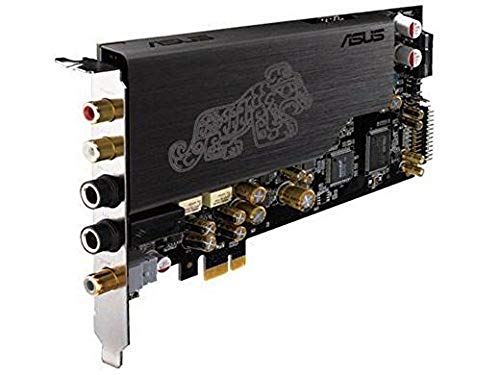
### 1) [Asus Xonar AE](https://geni.us/WRU424)

**Spec:** | **Color:** Black | **Weight:** 70.8 Grams | **Hardware Interface:** PCI Express x4 | **Item Dimensions LxWxH:** 6.4 x 1.8 x 17 Centimeters | 

[Asus Xonar AE](https://geni.us/WRU424) impressed me with its amazing features as an internal sound card. I could enjoy 3D audio effects and awesome 7.1 surround sound that transformed my gaming experience. It offered me seamless connectivity with its impressive jack-sensing panel and adjustable audio settings. I personally recommend it for anyone who needs one of the best solutions for HD sound quality.

 #1 Top Pick 

[ ](https://geni.us/WRU424 "Asus Xonar AE Sound Board") 

[ Asus Xonar AE Sound Board ](https://geni.us/WRU424 "Asus Xonar AE Sound Board") 

 4.9 

**Channel:** 7.1

**Connector Type:** 3.5mm

**Audio Output:** Surround

**Platform:** Windows 10 

[ Check on Amazon ](https://geni.us/WRU424 "Asus Xonar AE Sound Board") 

Asus Xonar AE is one of the best sound cards for music that has a signal-to-noise ratio of 110 dB, enabling you to listen to clear audio. The good thing about this sound card is that it has a built-in 150ohm headphone amplifier, which provides you with a rich and detailed sound.

This device has a weight of just 2.50 ounces and a dimension of 2.52×0.71x 6.69, which is very easy to fit in your CPU. With this card, you will get a wide range of driver options like 44.1K, 48K, 96K, and 192KHz. It can be the best gaming sound card for audio enthusiasts.

#### Pros

* I found it crafted from high-quality material
* Easy to install drivers with the Windows operating system.
* Provides a good surround sound effect.
* Available at a low price.

#### Cons

* Its sound performance did not meet my expectations
* Low volume output.

[🔍 Check Latest Price and User Reviews on Amazon](https://geni.us/WRU424)

---

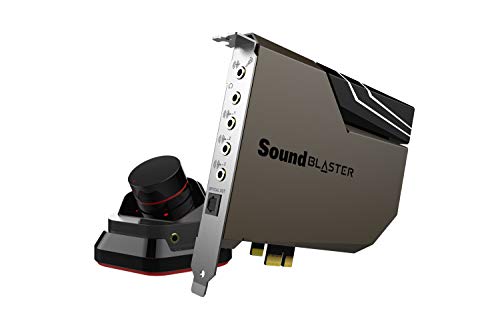
### 2) [Sound Blaster Z](https://geni.us/NCPaM)

**Spec:** | **Color:** Uniform gold | **Weight:** 348 Grams | **Hardware Interface:** PCI Express x1 | **Item Dimensions LxWxH:** 13.6 x 12.7 x 2.2 Centimeters |

[Sound Blaster Z](https://geni.us/NCPaM) stands out as a top-rated option among the best sound cards in the market. In my experience, it allowed me to enjoy detailed and phenomenal audio for gaming. The I/O panel ensured excellent sound output and provided consistent audio quality, making it ideal for gamers who need high-performing sound cards.

 #2 

[ ](https://geni.us/NCPaM "Sound Blaster Z PCIe Gaming Sound Card") 

[ Sound Blaster Z PCIe Gaming Sound Card ](https://geni.us/NCPaM "Sound Blaster Z PCIe Gaming Sound Card") 

 4.8 

**Channel:** 7.1

**Connector Type:** 3.5mm

**Audio Output:** Surround

**Platform:** Windows 10/8/7

[ Check on Amazon ](https://geni.us/NCPaM "Sound Blaster Z PCIe Gaming Sound Card") 

Sound Blaster Z includes a good dual-microphone array standard. It is compatible with various versions of Windows operating systems. The device uses a Sound Core3D audio processor that can easily accelerate advanced voice and audio technology.

It is one of the best pc sound cards that use SBX Pro Studio sound technology to create a good level of 3D surround sound effect for [headphones](https://www.guru99.com/best-gaming-earbuds.html) and speakers. It offers easy to use Sound Blaster control panel that enables you to manage output audio devices.

Sound Blaster Z provides you great bit rate of 24-bit 192 kHz for ideal listening experience. It has an excellent 3.5mm gold plated headphone and microphone jack with 5.1 channel connection slot.

#### Pros

* I found it crafted from high-quality material
* Offers an easy-to-navigate driver suite.
* Crystal clear voice quality.
* Reduces CPU overhead with no hassle.
* Easily used with optical connectors.

#### Cons

* Its sound performance did not meet my expectations

[🔍 Check Latest Price and User Reviews on Amazon](https://geni.us/NCPaM)

---

### 3) [Sabrent USB](https://geni.us/WUHBLD)

**Spec:** | **Color:** Black | **Weight:** 8.49 Grams | **Hardware Interface:** USB | **Item Dimensions LxWxH:** 38 x 10 x 23 Millimeters |

[Sabrent USB](https://geni.us/WUHBLD) is a top-rated choice for delivering simple connectivity. Over the course of my evaluation, I could easily convert a USB port into a mic jack and headset. Its compatibility with Windows, Linux, and Mac helps you work across different platforms. I recommend it as a superior choice for reliable sound card solutions.

 #3 

[ ](https://geni.us/WUHBLD "SABRENT USB External Stereo Sound Adapter") 

[ SABRENT USB External Stereo Sound Adapter ](https://geni.us/WUHBLD "SABRENT USB External Stereo Sound Adapter") 

 4.7 

**Channel:** 5.1

**Connector Type:** 3.1mm

**Audio Output:** Surround

**Platform:** Windows & macOS

[ Check on Amazon ](https://geni.us/WUHBLD "SABRENT USB External Stereo Sound Adapter") 

It is one of the best and cheap sound cards with a USB 2.0 hi-speed specification that can be easily attached to your computer. It has a USB type A connector, stereo output, and Microsoft input jack. The plus point about this sound card is that you do not require any external power.

The Sabrent USB is one of the best USB sound cards, measuring 1.50 x 0.40 x 0.90 inches in size. It offers a highly flexible audio interface, making it suitable for both desktop systems and laptops. Its compact design ensures portability, while its compatibility provides seamless integration with various devices, enhancing your audio experience effortlessly.

#### Pros

* I could easily use it without installing drivers.
* This amplifier has plenty of useful features.
* It is portable and lightweight.
* Produces clear quality sound.

#### Cons

* I could not fit it into the PlayStation USB port

[🔍 Check Latest Price and User Reviews on Amazon](https://geni.us/WUHBLD)

---

### 4) [EVGA Nu Audio Card](https://geni.us/bGSwxY)

**Spec:** | **Color:** Black | **Weight:** 348 Grams | **Hardware Interface:** PCI Express x1 | **Item Dimensions LxWxH:** 13.6 x 12.7 x 2.2 Centimeters |

[EVGA Nu Audio Card](https://geni.us/bGSwxY) gave me amazing results with its ability to deliver the best PC sound. I could connect it to high-end output devices and enjoy remarkable audio clarity. The input and output options allowed me to experience DSD audio up to x256, making it perfect for audiophiles seeking quality sound.

 #4 

[ ](https://geni.us/bGSwxY "EVGA Nu Audio Card") 

[ EVGA Nu Audio Card ](https://geni.us/bGSwxY "EVGA Nu Audio Card") 

 4.6 

**Channel:** 7.1

**Connector Type:** 3.5mm

**Audio Output:** Surround

**Platform:** Windows 10

[ Check on Amazon ](https://geni.us/bGSwxY "EVGA Nu Audio Card") 

EVGA Nu Audio Card audio card provides protection through a copper shield and gold-plated PCB. It offers 10 modes RGB audio-reactive lighting, which can be controlled through EVGA NU audio software. This audio card has a weight of 1.60 lbs and dimensions of 3.03 x 10.59 x 15.04 inches. It is one of the best sound cards that is worth to install on your PC.

The EVGA Nu Audio Card delivers an impressive audio experience with 51 audio channels and a maximum sample rate of 48 KHz. With a signal-to-noise ratio of 123 dB, it ensures crystal-clear sound quality for immersive listening. This audio card is designed for superior performance, catering to audiophiles and gamers alike.

#### Pros

* It allowed me to work effortlessly with its simplicity
* Simple to configure.
* Produces good sound with Atmos, DTS, and Dolby.
* Stable software interaction with Windows 10.

#### Cons

* I experienced issues with the tool’s quality control feature

[🔍 Check Latest Price and User Reviews on Amazon](https://geni.us/bGSwxY)

---

### 5) [ASUS Essence STX II](https://geni.us/y0gtCe)

**Spec:** | **Color:** Black | **Weight:** 708 Grams | **Hardware Interface:** PCIE x 1 | **Item Dimensions LxWxH:** 16.8 x 10.7 Centimeters |

[ASUS Essence STX II](https://geni.us/y0gtCe) impressed me with its amazing ability to deliver the best sound cards experience. I particularly liked its 124 dB SNR, which ensures remarkable audio clarity. It is perfect for Windows users as it supports versions starting from Windows 7 and newer.

 #5 

[ ](https://geni.us/y0gtCe "ASUS Sound Card Essence STX II") 

[ ASUS Sound Card Essence STX II ](https://geni.us/y0gtCe "ASUS Sound Card Essence STX II") 

 4.5 

**Channel:** 5.1

**Connector Type:** 6.3mm

**Audio Output:** Surround

**Platform:** Windows 10/8/7

[ Check on Amazon ](https://geni.us/y0gtCe "ASUS Sound Card Essence STX II") 

The device offers effortless sound adjustment tailored to your preferences, ensuring a personalized audio experience. It comes with a comprehensive kit that includes three additional op-amps, two versatile instruments, and a practical clamp tool for added convenience. With dimensions measuring 6.61 x 4.21 x 0.00 inches, this device is compact yet packed with features to enhance your setup.

The ASUS Xonar SE 5.1 sound card offers 192kHz/24-bit Hi-Res audio with a 116dB signal-to-noise ratio, ensuring rich and detailed sound. Its 300ohm headphone amplifier delivers immersive audio with punchy bass. With Hyper Grounding technology reducing distortion, and front panel connectivity for convenience, it is an excellent choice for premium audio performance.

#### Pros

* It provided me with high-quality sound for speakers and headphones
* Compatible with a variety of operating systems.

#### Cons

* I felt the card was priced on the higher side

[🔍 Check Latest Price and User Reviews on Amazon](https://geni.us/y0gtCe)

---

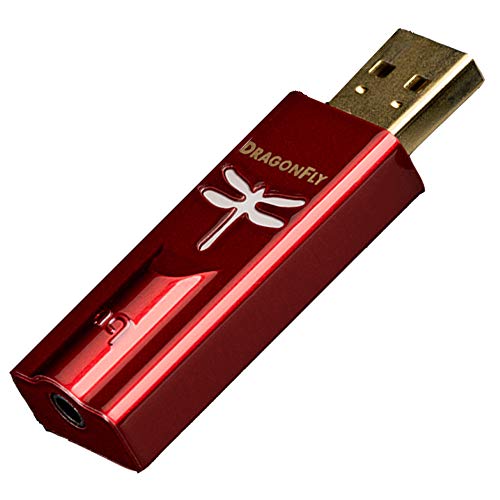
### 6) [AudioQuest](https://geni.us/ic7dt)

**Spec:** | **Color:** Red | **Weight:** 99 Grams | **Hardware Interface:** USB | **Item Dimensions LxWxH:** 6.2 x 1.9 x 1.2 Centimeters |

[AudioQuest](https://geni.us/ic7dt) is a top-notch choice for anyone seeking the best USB sound cards. I found it supports audio formats from MP3 to 24-bit/96kHz high-resolution files. Its 2.1v output drives ensure impressive sound quality. Connecting it to Android and Apple devices is hassle-free, and its asynchronous transfer ensures the most accurate sound reproduction.

 #6 

[ ](https://geni.us/ic7dt "AudioQuest - DragonFly Red USB DAC/Headphone Amplifier") 

[ AudioQuest - DragonFly Red USB DAC/Headphone Amplifier ](https://geni.us/ic7dt "AudioQuest - DragonFly Red USB DAC/Headphone Amplifier") 

 4.5 

**Channel:** 5.1

**Connector Type:** USB

**Audio Output:** Surround

**Platform:** Windows, macOS, Linux, Apple iOS, Android

[ Check on Amazon ](https://geni.us/ic7dt "AudioQuest - DragonFly Red USB DAC/Headphone Amplifier") 

AudioQuest is available for Windows and Linux operating systems. This amplifier has a black soft-touch finish with a protective endcap and leather travel pouch. AudioQuest feature provides you with perfect digital control with minimal effort. It is compatible with Apple iOS 5 and Android 5.0 later versions.

AudioQuest offers a premium audio experience with its compact and durable design. Measuring 2.32 x 0.73 x 0.47 inches, this device delivers crystal-clear sound quality. Its user-friendly interface ensures seamless compatibility with desktop systems and laptops. Perfect for audiophiles, AudioQuest enhances your listening experience with reliable performance and exceptional versatility.

#### Pros

* I found it lightweight, compact, and simple to operate
* Provides good power output.
* Compatible with a wide range of devices.
* It produces a clear sound.
* The device quality is good.
* This is one of the best budget sound cards.

#### Cons

* I noticed it lacked an independent volume control feature

[🔍 Check Latest Price and User Reviews on Amazon](https://geni.us/ic7dt)

---

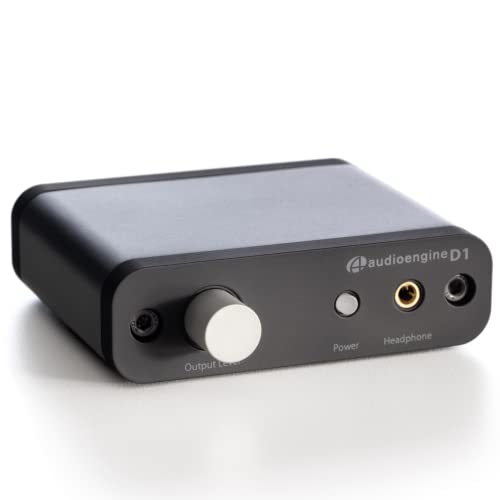
### 7) [Audioengine D1 24-Bit DAC](https://geni.us/px82bgf)

**Spec:** | **Color:** Black | **Weight:** 36.3 Grams | **Hardware Interface:** USB | **Item Dimensions LxWxH:** 13 x 2.5 x 14 Centimeters |

[Audioengine D1 24-bit DAC](https://geni.us/px82bgf) is a superior choice among audiophile sound cards. During my evaluation, I noticed how it helps you bypass the standard sound card output to deliver audio through USB or optical wire. Its compatibility with TVs and computers is ideal for anyone seeking premium sound quality.

 #7 

[ ](https://geni.us/px82bgf "Audioengine D1 Portable Desktop Headphone Amp and DAC") 

[ Audioengine D1 Portable Desktop Headphone Amp and DAC ](https://geni.us/px82bgf "Audioengine D1 Portable Desktop Headphone Amp and DAC") 

 4.4 

**Channel:** 5.1

**Connector Type:** USB

**Audio Output:** Surround

**Platform:** TV, Apple TV, DVD/BluRay player or CD player

[ Check on Amazon ](https://geni.us/px82bgf "Audioengine D1 Portable Desktop Headphone Amp and DAC") 

The sound card is compatible with various operating systems like Windows, Linux, and Mac OS. It can convert a digital signal into an analog signal and produce clear sound quality. This product comes with a 1x DAC, 1×0.6m USB cable, Cloth travel bag, setup guide and brochure.

Audioengine D1 24-Bit DAC front panels provide options to control your volume, power indicator, and headphone output. This is one of the best sound cards that can process digital audio/data up to 24 bits. The rear panel has stereo RCA outputs and one USB input. One impressive thing about this amplifier is that it can be used without installing heavy drivers.

#### Pros

* I found it compact and convenient for everyday tasks
* Size is compact.
* Value for money amplifier.
* Provides access to control the volume on each side of the amplifier.

#### Cons

* I realized it required an additional amplifier for headphones

[🔍 Check Latest Price and User Reviews on Amazon](https://geni.us/px82bgf)

---

### 8) [Creative Sound Blaster G3](https://geni.us/qeOST4)

**Spec:** | **Color:** Black | **Weight:** 142 Grams | **Hardware Interface:** USB | **Item Dimensions LxWxH:** 7.6 x 7.6 x 5.1 Centimeters |

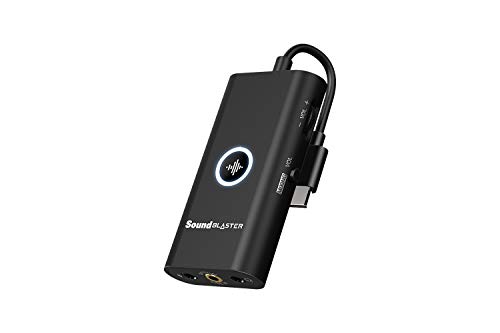
[Creative Sound Blaster G3](https://geni.us/qeOST4) impressed me as an amazing USB-C external gaming DAC and amplifier. I could connect it effortlessly to my PS4 and Windows computer without any drivers. Its GameVoice Mix feature allowed me to balance chat and game audio through a built-in scroll wheel, making it great for gamers who need clear sound control.

 #8 

[ ](https://geni.us/qeOST4 "Creative Sound Blaster G3 USB-C External Gaming USB DAC and Amp for PS4") 

[ Creative Sound Blaster G3 USB-C External Gaming USB DAC and Amp for PS4 ](https://geni.us/qeOST4 "Creative Sound Blaster G3 USB-C External Gaming USB DAC and Amp for PS4") 

 4.4 

**Channel:** 5.1

**Connector Type:** USB

**Audio Output:** Surround

**Platform:** PlayStation 5,4, Nintendo Switch, Windows, macOS

[ Check on Amazon ](https://geni.us/qeOST4 "Creative Sound Blaster G3 USB-C External Gaming USB DAC and Amp for PS4") 

Creative Sound Blaster G3 enables you to control everything with just one hand. This is one of the best gaming sound cards that provides you direct access to independent volume and mic control. It has a dimension of 5.12 x 0.98 x 5.51 inches, and its weight is 3.67 ounces.

It is one of the best sound cards for music that can be easily paired with your mobile device. It has the capability to drive headphones up to 300 omega. If you want to customize the features of this device, then you must have the Sound Blaster Command app.

#### Pros

* I experienced exceptional sound clarity and impressive audio output
* This sound card offers a range of customization that suits your needs.
* Can elevate any pair of wired headphones.

#### Cons

* I felt the build quality did not meet my expectations

[🔍 Check Latest Price and User Reviews on Amazon](https://geni.us/qeOST4)

## What is a Sound Card, and why do you need one?

A sound card is an expansion IC that produces sound on a PC that can be heard through headphones or speakers.

Here are the reasons of using a sound card:

* A sound card is basically needed to improve the audio quality of your system.
* It helps you to reduce load and CPU usage.
* Surround sound effects in the game enables gamers to identify the location of enemies easily.
* High-end audio card can prevent the electrical interference from other components.

## Why you should upgrade your Gaming Sound Card?

Here are the advantages that you will gain when you purchase a sound card:

* Amplified Gaming: Most of the games available in the market support 5.1 and 7.1 3D surround sound effects. However, if your card does not support such features, you will miss a realistic experience while playing games.
* Musician: This point is important for musicians. It will help you to improve the audio performance of the PC. However, this requires you to use your desktop to capture performance. You have to upgrade your sound card with an additional MIDI port to enhance the sound experience.
* Music & Entertainment: If you are listening to music on earphones, then your computer may not produce good sound quality. You have to choose a sound card with a built-in headphone amplifier so that you can enjoy songs without any interference.

## How to check if I need to replace my Sound Card?

Here are the steps to check Sound card in Windows:

* Step 1: Go to the control panel and click on “System Maintenance”.
* Step 2: Click on the “Device Manager” button.
* Step 3: Click on the plus sign or the arrow next to Sound, Video, and Game controllers.
* Step 4: Right-click on your sound card and click on “Properties”.
* Step 5: Cross-check the Window’s contents with the driver of the sound card’s descriptions in the information that is available.
* Step 6: On the General tab, ensure that the device status message says, “This device is working properly.”

## How Did We Choose BEST Sound Card for PC?

[](https://www.guru99.com/images/select-best-sound-card-pc.png)

Check out below important factors. At Guru99, we prioritize delivering accurate and unbiased product reviews through meticulous research and real-world testing. With a focus on transparency and trustworthiness, our team provides credible insights to help you make informed choices with confidence. After 260+ hours of research on 29+ BEST Sound Card for PC options, this guide covers free and paid choices, including features, pros and cons, and pricing. Choosing the right sound card can elevate your audio experience significantly. It is important to consider key aspects to match your preferences.

* **Compatibility:** Ensure the sound card is compatible with your PC and supports your operating system.
* **Audio Quality:** Look for a card that delivers clear, high-resolution sound for an immersive experience.
* **Features:** Pay attention to features like surround sound and customizable settings for enhanced performance.
* **Budget:** It is a good idea to set a budget and find a sound card with great value for money.
* **Use Case:** Consider your primary need, whether gaming, music production, or general use, to find the perfect solution.
* **Ports:** Make sure you have the needed inputs and outputs for your audio devices.

## Verdict:

In this review, I delved into some top-notch options for sound cards. Each provides impressive features for gamers and audiophiles alike. Based on my observations, here is my verdict:

* [Asus Xonar AE](https://geni.us/WRU424) offers powerful 7.1 surround sound and built-in 150ohm headphone amplification, ensuring a robust gaming and audio experience.
* [Sound Blaster Z](https://geni.us/NCPaM) boasts a superior dual-microphone array and SBX Pro Studio technology, providing remarkable 3D surround sound for immersive gameplay.
* [Sabrent USB](https://geni.us/WUHBLD) is a user-friendly, cost-effective solution with high-speed USB 2.0 connectivity, perfect for quick and reliable plug-and-play setups.

#### Summarize this post with:

ChatGPT Perplexity Grok Google AI 

**Stay Updated on AI** **Get Weekly AI Skills, Trends, Actionable Advice.** 

##### Sign up for the newsletter

Subscribe for Free 

 You have successfully subscribed.  
Please check your inbox.

![AI-Newsletter]() Chosen by over **350,000+** professionals 

[Scroll to top ](#wrapper)Scroll to top 

Toggle Menu Close 

Search for: 

Search 

```json
{"@context":"https://schema.org","@graph":[{"@type":"Organization","@id":"https://www.guru99.com/#organization","name":"Guru99","sameAs":["https://www.facebook.com/Guru99Official","https://twitter.com/guru99com"],"logo":{"@type":"ImageObject","@id":"https://www.guru99.com/#logo","url":"https://www.guru99.com/images/guru99-logo-v1-150x59.png","contentUrl":"https://www.guru99.com/images/guru99-logo-v1-150x59.png","caption":"Guru99","inLanguage":"en-US"}},{"@type":"WebSite","@id":"https://www.guru99.com/#website","url":"https://www.guru99.com","name":"Guru99","publisher":{"@id":"https://www.guru99.com/#organization"},"inLanguage":"en-US"},{"@type":"ImageObject","@id":"https://www.guru99.com/images/best-sound-card-pc.png","url":"https://www.guru99.com/images/best-sound-card-pc.png","width":"750","height":"250","inLanguage":"en-US"},{"@type":"BreadcrumbList","@id":"https://www.guru99.com/best-sound-card.html#breadcrumb","itemListElement":[{"@type":"ListItem","position":"1","item":{"@id":"https://www.guru99.com","name":"Home"}},{"@type":"ListItem","position":"2","item":{"@id":"https://www.guru99.com/review","name":"Review"}},{"@type":"ListItem","position":"3","item":{"@id":"https://www.guru99.com/best-sound-card.html","name":"8 BEST Sound Card for PC (2026)"}}]},{"@type":"WebPage","@id":"https://www.guru99.com/best-sound-card.html#webpage","url":"https://www.guru99.com/best-sound-card.html","name":"8 BEST Sound Card for PC (2026)","dateModified":"2024-11-29T16:32:31+05:30","isPartOf":{"@id":"https://www.guru99.com/#website"},"primaryImageOfPage":{"@id":"https://www.guru99.com/images/best-sound-card-pc.png"},"inLanguage":"en-US","breadcrumb":{"@id":"https://www.guru99.com/best-sound-card.html#breadcrumb"}},{"@type":"Person","@id":"https://www.guru99.com/author/finn","name":"Finn Breeze","description":"I'm Finn Breeze, a dedicated product reviewer, focused on providing insightful evaluations to help you make informed purchasing decisions.","url":"https://www.guru99.com/author/finn","image":{"@type":"ImageObject","@id":"https://www.guru99.com/images/finn-breeze-author.png","url":"https://www.guru99.com/images/finn-breeze-author.png","caption":"Finn Breeze","inLanguage":"en-US"},"worksFor":{"@id":"https://www.guru99.com/#organization"}},{"image":{"@id":"https://www.guru99.com/images/best-sound-card-pc.png"},"headline":"8 BEST Sound Card for PC (2026)","description":"Elevate your gaming setup with top sound cards for PC gaming immerse in unparalleled audio clarity and depth for a competitive edge.","keywords":"bigdata, programming, database, server","@type":"Article","author":{"@id":"https://www.guru99.com/author/finn","name":"Finn Breeze"},"dateModified":"2024-11-29T16:32:31+05:30","name":"8 BEST Sound Card for PC (2026)","articleSection":"Review","subjectOf":[{"@type":"FAQPage","mainEntity":[{"@type":"Question","name":"\u2753 What is a Sound Card, and why do you need one?","acceptedAnswer":{"@type":"Answer","text":"<p>A sound card is an expansion IC that produces sound on a PC that can be heard through headphones or speakers.  <p>Here are the reasons of using a sound card: <ul><li>A sound card is basically needed to improve the audio quality of your system. <li>It helps you to reduce load and CPU usage. <li>Surround sound effects in the game enables gamers to identify the location of enemies easily. <li>High-end audio card can prevent the electrical interference from other components."}},{"@type":"Question","name":"\ud83d\ude80 Which are the Best Sound Card for PC?","acceptedAnswer":{"@type":"Answer","text":"<p>Below are some of the Best Sound Card for PC and Gaming: <ul> <li>Asus Xonar AE <li>Sound Blaster Z <li>EVGA Nu Audio Card <li>ASUS Essence STX II <li>AudioQuest <li>Sabrent USB <li>Audioengine D1 24-Bit DAC <li>Creative Sound Blaster G3 "}},{"@type":"Question","name":"\u26a1 How does Sound Card work?","acceptedAnswer":{"@type":"Answer","text":"<p>A sound card is a basic printed circuit board. It can translate the analog and digital data through ADC (Analog to Digital Converter). This card then uses PCI or ISA interface to connect it to the motherboard. Moreover, it also utilizes input and output connections for speakers and microphones. Many audio cards also have a decoder chip rather than separate DACs and ADCs. "}},{"@type":"Question","name":"\ud83d\udc49 Do you want an internal or external Sound Card?","acceptedAnswer":{"@type":"Answer","text":"<p>It depends on your need. Casual users and gamers generally go for the internal sound card, which is cheaper and conserves many processing resources. However, if you are a streamer, musician, or podcast producer, it is good that you choose the external sound card. This is needed to improve the sound quality in the recording you make."}},{"@type":"Question","name":"\ud83c\udfc5 Does the Sound Card affect sound quality?","acceptedAnswer":{"@type":"Answer","text":"<p>Yes. The sound card converts the analog signal into a digital one and vice versa. This process helps you to get a good quality sound for speakers or headphones. "}},{"@type":"Question","name":"\ud83c\udf1f How do I choose a gaming Sound Card?","acceptedAnswer":{"@type":"Answer","text":"<p>Here are the important points that help you to choose the best gaming sound cards: <ul><li><strong>Compatibility: The sound card you are going to purchase should be compatible with your computer. If your PC does not support your audio card standards, then you cannot utilize its features. Therefore, you need to choose a sound card that is compatible with your desktop PC. <li><strong>Channels: It is another important feature you must consider before purchasing a gaming sound card. If you check 5.1 or 7.1, then both are good for gaming. However, you have to ensure that the chosen sound card must be compatible with the speaker channel to get a full sound experience. <li><strong>Sample Rate: The sample rate is an important component that decides the quality of audio. It is basically a rate at which the sound stream sends data to the PC over a period of time. You have to choose higher kHz as it provides better audio quality. <strong>  <li><strong>Signal to Noise Ratio: Signal to Noise Ratio (SNR) is a sound coming from the audio card. If SNR is 50 dB, then the audio signals coming from your card is fifty decibels higher compared to the noise signal. You have to search for sound cards with a minimum of 100 dB SNR. <li><strong>5.1 Vs. 7.1 Sound Cards: <p>Number 5.1 means your sound card supports 6 audio channels. On the other hand, 7.1 supports 8 audio channels. You have to choose a sound card according to the configuration of the speaker. If you have 5.1 speakers and 2.1 headphones or a system, it is ideal to purchase 4.1 sound card. <li><strong>USB Vs. PCIe Sound Cards: USB audio cards are basically external cards that can be easily attached to your computer via a USB port. It is good if you have a limit of cable. <p>PCIe sound card is an internal card that is mounted inside the case of your PC. They offer you a lower latency compared to USB cards. However, such sound cards can utilize high power from the PCIe port.  <li><strong>Gaming Vs. Audiophile Sound Cards: This is another point that you need to keep in mind while choosing a sound card. If you want a good listening experience, then it is preferable to choose a high-end gaming audio card. On the other hand, audiophile sound cards are ideal to choose for audio equipment like headphones and speakers. "}},{"@type":"Question","name":"\u2757 Why you should upgrade your Gaming Sound Card?","acceptedAnswer":{"@type":"Answer","text":"<p>Here are the advantages that you will gain when you purchase a sound card: <ul><li><strong>Amplified Gaming: Most of the games available in the market support 5.1 and 7.1 3D surround sound effects. However, if your card does not support such features, you will miss a realistic experience while playing games.<strong>  <li><strong>Musician: This point is important for musicians. It will help you to improve the audio performance of the PC. However, this requires you to use your desktop to capture performance. You have to upgrade your sound card with an additional MIDI port to enhance the sound experience.<strong>  <li><strong>Music &amp; Entertainment: If you are listening to music on earphones, then your computer may not produce good sound quality. You have to choose a sound card with a built-in headphone amplifier so that you can enjoy songs without any interference."}},{"@type":"Question","name":"\u2753 How to check if I need to replace my Sound Card?","acceptedAnswer":{"@type":"Answer","text":"<p>Here are the steps to check Sound card in Windows: <p><strong>Step 1: Go to the control panel and click on \"System Maintenance\". <p><strong>Step 2: Click on the \"Device Manager\" button. <p><strong>Step 3: Click on the plus sign or the arrow next to Sound, Video, and Game controllers. <p><strong>Step 4: Right-click on your sound card and click on \"Properties\". <p><strong>Step 5: Cross-check the Window's contents with the driver of the sound card's descriptions in the information that is available. <p><strong>Step 6: On the General tab, ensure that the device status message says, \"This device is working properly.\""}}]}],"@id":"https://www.guru99.com/best-sound-card.html#schema-25051","isPartOf":{"@id":"https://www.guru99.com/best-sound-card.html#webpage"},"publisher":{"@id":"https://www.guru99.com/#organization"},"inLanguage":"en-US","mainEntityOfPage":{"@id":"https://www.guru99.com/best-sound-card.html#webpage"}}]}
```