
Python Достъп до Интернет чрез Urllib.Request и urlopen()
 Редакционен екип
⚡ Умно обобщение
urllib е стандартът Python модул за достъп до интернет данни, позволяващ отварянето на програми URLи извлича HTML, JSON или двоично съдържание. Функцията urllib.request.urlopen() се свързва с уеб адрес и чете отговора на сървъра директно в Python.
Разделите по-долу обясняват какво е urllib, как да отворите URL и да прочетете HTML кода му, както и как да се справяте с грешки, да изтегляте файлове и да избирате между urllib и библиотеката за заявки.
Какво е urllib?
urllib е a Python модул, който може да се използва за отваряне URLс. Той дефинира функции и класове, които помагат в URL действия.
с Python, можете също да осъществявате достъп и да извличате данни от интернет, като XML, HTML и JSON, и след това да работите директно с тези данни. В разделите по-долу ще видим как да извличаме данни от мрежата. Например, тук използваме Guru99 видео URL, достъп до него чрез Pythonи отпечатайте HTML файла на това URL.
Пакетът urllib групира няколко модула: urllib.request за отваряне URLs, urllib.error за изключенията, които заявките могат да генерират, urllib.parse за изграждане и парсиране URLs и urllib.robotparser за четене на robots.txt файлове.
Как да отворите URL използване на Urllib
Преди да изпълним кода за свързване с интернет данни, трябва да импортираме URL библиотечен модул или „urllib“.
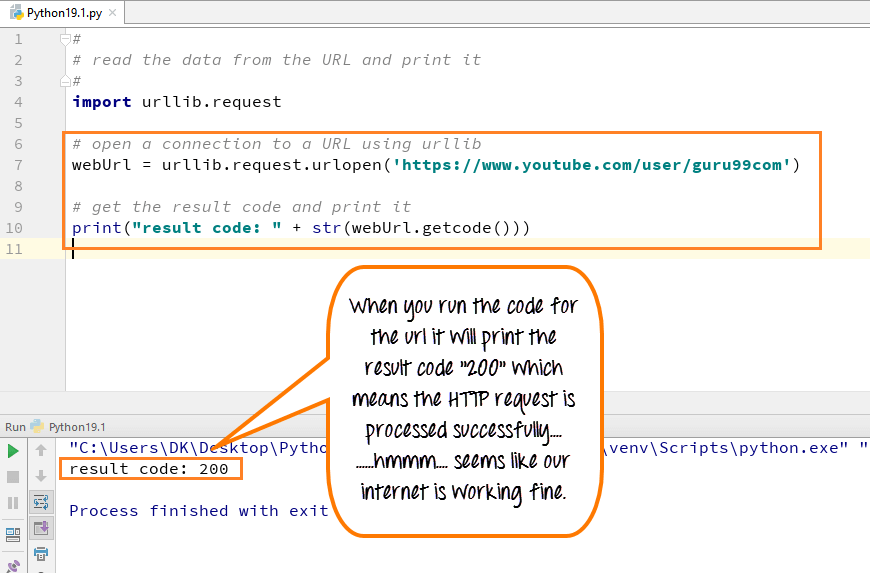
- Импортиране на urllib
- Определете вашата основна функция
- Декларирайте променливата webUrl
- След това извикайте функцията urlopen в библиотеката urllib
- - URL отваряме е Guru99 урок по YouTube
- След това отпечатваме кода на резултата
- Резултатният код се извлича чрез извикване на функцията getcode на променливата webUrl, която сме създали.
- Преобразуваме това в низ, така че да може да се свърже с нашия низ „резултатен код“.
- Това ще бъде обикновен HTTP код „200“, което показва, че HTTP заявката е обработена успешно.
Как да получите HTML файл от URL in Python
Можете също да прочетете HTML файла, като използвате функцията read() в PythonКогато изпълните кода, HTML файлът ще се появи в конзолата.
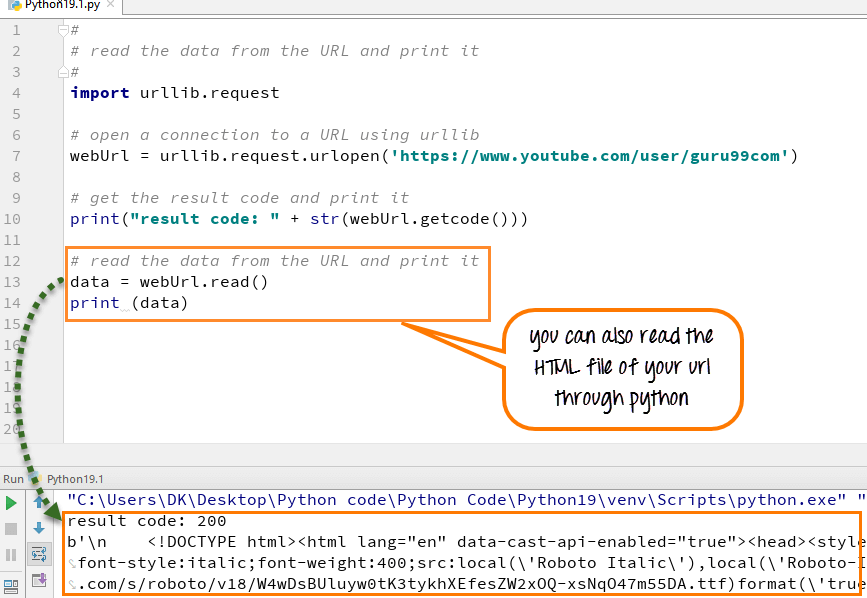
- Извикайте функцията read() на променливата webUrl
- Методът read() ви позволява да четете съдържанието на файлове с данни
- Прочетете цялото съдържание на URL в променлива, наречена данни
- Изпълнете кода и той ще отпечата данните в HTML формат
Ето пълния код:
Python 2 Пример
#
# read the data from the URL and print it
#
import urllib2

def main():
# open a connection to a URL using urllib2
   webUrl = urllib2.urlopen("https://www.youtube.com/user/guru99com")

#get the result code and print it
   print "result code: " + str(webUrl.getcode())

# read the data from the URL and print it
   data = webUrl.read()
   print data

if __name__ == "__main__":
  main()
Python 3 Пример
#
# read the data from the URL and print it
#
import urllib.request
# open a connection to a URL using urllib
webUrl  = urllib.request.urlopen('https://www.youtube.com/user/guru99com')

#get the result code and print it
print ("result code: " + str(webUrl.getcode()))

# read the data from the URL and print it
data = webUrl.read()
print (data)
Как да се справяме с грешки в urllib: URLГрешка и HTTP грешка
Заявката не винаги е успешна. Когато нещо се обърка, urllib повдига изключение вместо да връща данни, така че е важно да се обработват тези грешки. Модулът urllib.error дефинира два основни класа изключения.
- HTTP грешка се генерира, когато сървърът върне код за състояние на грешка, като например 404 Не е намерен или 500 Вътрешна грешка на сървъра. Той съдържа кода на състоянието и тялото на отговора.
- URLгрешка се повдига, когато сървърът изобщо не може да бъде достигнат, например поради грешно име на домейн или липса на интернет връзка. Той съдържа атрибут reason, който обяснява неуспеха.
Тъй като HTTPError е подклас на URLГрешка, винаги първо се улавя HTTPError, така че всеки тип грешка да се обработва отделно:
from urllib.request import urlopen
from urllib.error import HTTPError, URLError

try:
    response = urlopen("https://www.guru99.com/no-such-page.html")
    data = response.read()
except HTTPError as error:
    print("HTTP error:", error.code)
except URLError as error:
    print("URL error:", error.reason)
Обработката на тези изключения предпазва програмата ви от срив и ви позволява да регистрирате проблема, да опитате отново заявката или да се върнете към кеширани данни.
Как да изтеглите файл от URL Използване на urllib
Четене на a URL Записването в паметта работи за малки страници, но за изображения, PDF документи или набори от данни е по-лесно отговорът да се запише директно на диск. Модулът urllib.request предлага два прости начина за това.
Функцията urlretrieve() изтегля URL директно към локален файл в един ред:
from urllib.request import urlretrieve

urlretrieve("https://www.python.org/static/img/python-logo.png", "logo.png")
За по-голям контрол отворете URL и сами запишете байтовете. Отворете локалния файл в двоичен режим, защото urlopen() връща байтове, а не текст:
from urllib.request import urlopen

with urlopen("https://example.com/data.zip") as response:
    with open("data.zip", "wb") as file:
        file.write(response.read())
За много големи файлове, четенето и записването се извършват в цикъл, използвайки response.read(8192), така че целият файл никога да не се съхранява в паметта наведнъж.
urllib срещу библиотеката за заявки в Python
urllib е част от Python стандартна библиотека, така че работи навсякъде без инсталация. Библиотеката за заявки от трети страни не е вградена, но много разработчици я предпочитат за ежедневна HTTP работа, защото синтаксисът ѝ е по-кратък и по-четлив.
Основните разлики са:
- Монтаж: urllib се доставя с Python, докато заявките трябва да бъдат инсталирани с pip.
- Декодирането: urllib връща сурови байтове, които декодирате сами, докато requests декодира текст и JSON автоматично.
- Удобство: Заявките обработват сесии, бисквитки и персонализирани заглавки с по-малко код.
- Зависимости: urllib не добавя нищо, докато requests разчита на urllib3 отдолу.
Изберете urllib, когато искате нулеви зависимости или се нуждаете само от бърза, еднократна заявка. Изберете заявки за по-големи проекти, които включват удостоверяване, сесии или чести API извиквания. И двете изпращат едни и същи HTTP заявки, така че решението се свежда до удобство спрямо по-малък списък със зависимости.
