---
description: Cookie Testing is a testing method that checks Cookies created in a web browser. In this tutorial, you will learn How to Test Cookies in a Website.
title: Cookie Testing: How to Test Cookies in Website
image: https://www.guru99.com/images/cookie-testing.png
---


[Skip to content](#main) 

**⚡ Smart Summary**

Cookie testing verifies the small text files a web server stores in the browser to track sessions, preferences, and user identity. It confirms cookies are created, encrypted, deleted, and read correctly across browsers without exposing sensitive data.

* 🍪 **Definition:** A cookie is a small text file storing user data for the web server.
* 🧩 **Cookie contents:** Each cookie holds the source server name, lifetime, and a unique value.
* 🔀 **Two types:** Session cookies clear on close; persistent cookies last months or years.
* ✅ **Test checklist:** Disable, corrupt, encrypt, and delete cookies to confirm correct behavior.
* 🧰 **Editor plugins:** Cookie-Editor and Edit This Cookie view and modify cookies directly.
* 🔐 **Security focus:** Cookies must never store passwords or sensitive details unencrypted.

[ Read More ](javascript:void%280%29;) 

![Cookie Testing]()

## What is Cookie Testing?

Cookie Testing is defined as a Software Testing type that checks Cookie created in your web browser. A cookie is a small piece of information that is stored in a text file on user’s (client) hard drive by the web server. This piece of information is then sent back to the server each time the browser requests a page from the server. Usually, cookie contains personalized user data or information that is used to communicate between different web pages. The screen-shot below shows cookies for different websites.

[](https://www.guru99.com/images/6-2015/052515%5F0916%5FCookieTesti1.png)

In other words, cookies are nothing but a user’s identity and used to track where the user navigated throughout the pages of the website. The purpose of a cookie is to make rapid interaction between users and websites. Applications, where cookies can be used, is to implement a shopping cart, personalized web experience, user tracking, marketing, user sessions etc.

## What is the Content of Cookie?

The cookie consists of mainly three things:

1. The name of the server the cookie was sent from
2. Cookies Lifetime
3. A value. This is usually a randomly generated unique number

## Types of Cookies

[](https://www.guru99.com/images/6-2015/052515%5F0916%5FCookieTesti2.png)

Types of Cookies

Usually, there are two types of cookies written on user machines:

* **Session Cookies:** These cookies are active till the browser that triggers the cookie is open. When we close the browser this session cookie gets deleted
* **Persistent Cookies:** These cookies are written permanently on the user machine and it lasts for months or years

## Where Cookies are stored?

When any web page application writes a cookie, it is stored in a text file on user hard disk drive. The path where the cookies are saved depends on the browser. **Different browsers store cookie in different paths.**

For example, in **Mozilla Firefox** browser you can see the cookies in browser options. To view this click on Tools **\->** Options **\->** Privacy and then click on “Remove Individual Cookies”.

[](https://www.guru99.com/images/6-2015/052515%5F0916%5FCookieTesti3.png)

While in **Internet Explorer** browser it stores cookies on path **“**C:\\Documents and Settings\\Default User\\Cookies”

With the fundamentals clear, the following checklist shows how to test cookies in practice.

## How to Test Cookies in Website

Following is an important checklist and steps on **How to test Cookies** in website:

**Step 1) Disabling cookies**

Disable all cookies and attempt to use the site’s major functions

**Step 2) Corrupting cookies**

Manually edit the cookie in notepad and change the parameters with some random values

**Step 3) Cookies encryption**

Sensitive information like passwords and usernames should be encrypted before it is sent to our computer

**Step 4) Cookie testing with multiple browsers**

Check your website page is writing the cookies properly on a different browser as expected

**Step 5) Checking the deletion from your web application page**

Check whether the cookies are deleted from your web application or not

**Step 6) Selectively rejecting cookies**

Delete all the cookies for the websites and see how the website reacts to it

**Step 7) Access to cookies**

Cookies written by one website should not be accessible by others

**Step 8) No overuse of cookies**

If the application under test is a public website, there should not be overuse of cookies

**Step 9) Testing with the different setting**

Testing should be done properly to check that website is working well with different cookie setting

**Step 10) Categorize cookies separately**

Cookies should not be kept in the same category of the viruses, spam or spyware

### RELATED ARTICLES

* [Use Case Testing with Examples ](https://www.guru99.com/use-case-testing.html "Use Case Testing with Examples")
* [Do Testers Have to Write Code? Skills & Career Guide ](https://www.guru99.com/testers-write-code.html "Do Testers Have to Write Code? Skills & Career Guide")
* [Mainframe Testing – Complete Tutorial ](https://www.guru99.com/mainframe-testing.html "Mainframe Testing – Complete Tutorial")
* [6 BEST Software Testing Companies (2026) ](https://www.guru99.com/software-testing-company.html "6 BEST Software Testing Companies (2026)")

## Plugins for Cookie Test

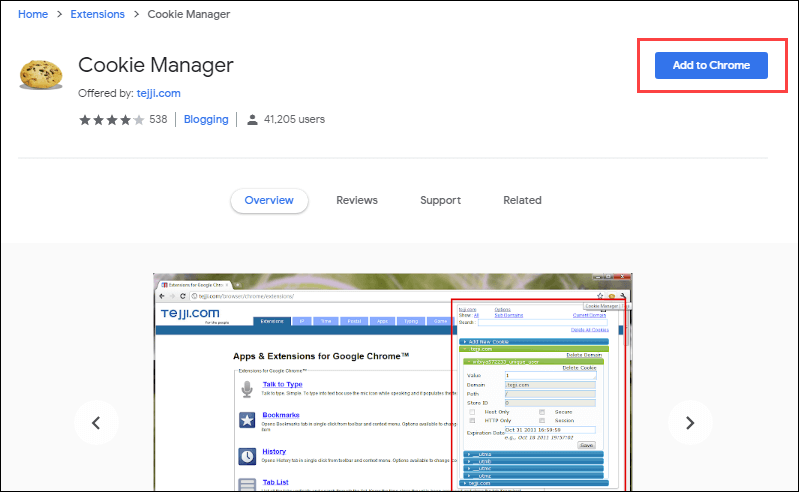
Modern browsers allow viewing/editing of the cookies in the browser itself. There are cookie tester plugins in Mozilla and Google Chrome both.

### 1\. [Cookie-Editor](https://chromewebstore.google.com/detail/cookie-editor/hlkenndednhfkekhgcdicdfddnkalmdm)

[](https://www.guru99.com/images/1/cookie%5Fmanager.png)

### 2\. For Google Chrome browser: [Edit This Cookie](http://www.editthiscookie.com/)

[](https://www.guru99.com/images/6-2015/052515%5F0916%5FCookieTesti5.png)

## Cookie Modification in Action

Following are the steps to modify or edit the cookie using plugin for Chrome:

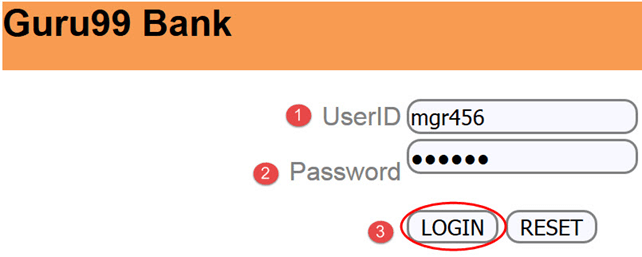
**Step 1)** Enter the userID & password to login into the <https://demo.guru99.com/V4/>

[](https://www.guru99.com/images/6-2015/052515%5F0916%5FCookieTesti6.png)

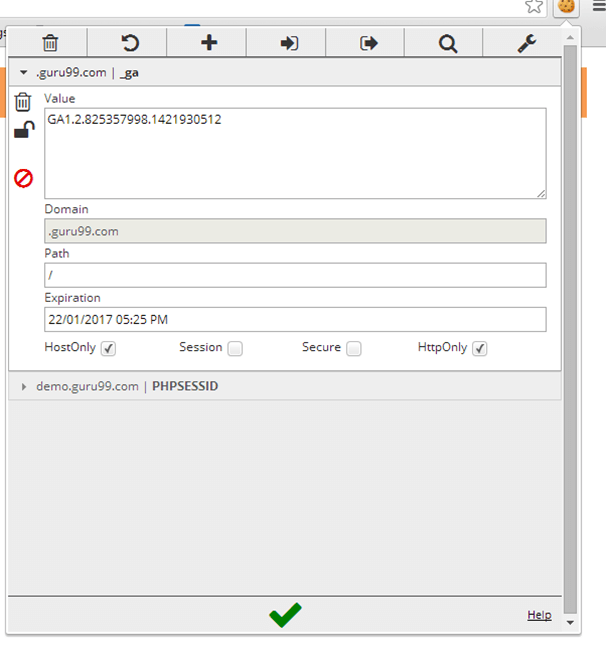
**Step 2)**  Click on the plugin icon ![Cookie Modification in Action]() and it will open another window as shown below

[](https://www.guru99.com/images/6-2015/052515%5F0916%5FCookieTesti8.png)

**Step 3)** Change the value of the cookie to **“guru99”** and then click on ![Cookie Modification in Action]() to save the changes

[](https://www.guru99.com/images/6-2015/052515%5F0916%5FCookieTesti10.png)

## Difference between Cookie and Session

Here is the main difference between Cookie and Session:

| Cookie                                                               | Session                                                                                                                                                                |
| -------------------------------------------------------------------- | ---------------------------------------------------------------------------------------------------------------------------------------------------------------------- |
| Cookies are client-side files that contain user information          | Sessions are server-side files which contain user information                                                                                                          |
| Cookie ends depending on the lifetime you set for it                 | A session ends when a user closes his browser                                                                                                                          |
| You don’t need to start cookie as it is stored in your local machine | In [PHP](https://www.guru99.com/what-is-php-first-php-program.html), before using $\_SESSION, you have to write session\_start(); Likewise for other languages         |
| The official maximum cookie size is 4KB                              | Within-session you can store as much data as you like. The only limits you can reach is the maximum memory a script can consume at one time, which is 128MB by default |
| A cookie is not dependent on Session                                 | A session is dependent on Cookie                                                                                                                                       |
| There is no function named unsetcookie()                             | Session\_destroy(); is used to destroy all registered data or to unset some                                                                                            |

## FAQs

🔐 Are cookies a security risk?

Cookies are text files and cannot run code, but poorly secured cookies can expose session data. Use the Secure and HttpOnly flags, and never store passwords or sensitive information inside them.

🍪 What is the difference between first-party and third-party cookies?

First-party cookies are set by the site you visit, mainly for sessions and preferences. Third-party cookies come from other domains for advertising and cross-site tracking, and are increasingly blocked by browsers.

🧪 Can cookie testing be automated with Selenium?

Yes. Selenium WebDriver can add, read, and delete cookies using methods like addCookie, getCookies, and deleteCookieNamed, allowing automated validation of cookie creation, expiry, and deletion across browsers.

🤖 How can AI improve cookie testing?

AI tools generate cookie test cases, detect missing Secure or HttpOnly flags, and flag privacy-compliance issues automatically. This intelligent analysis speeds up coverage across many browsers and sessions.

🤖 Does AI help with cookie-consent and GDPR compliance checks?

Yes. AI-powered scanners crawl pages, classify cookies, and verify that consent banners block non-essential cookies until users opt in, helping teams automate GDPR and privacy compliance validation.

🌐 Why test cookies across different browsers?

Each browser stores and manages cookies differently, so cross-browser testing confirms that login, preferences, and tracking work everywhere. It also catches cases where a browser blocks or clears cookies unexpectedly.

#### Summarize this post with:

ChatGPT Perplexity Grok Google AI 

**Stay Updated on AI** **Get Weekly AI Skills, Trends, Actionable Advice.** 

##### Sign up for the newsletter

Subscribe for Free 

You have successfully subscribed.  
Please check your inbox. 

![AI-Newsletter]() Chosen by over **350,000+** professionals 

[Scroll to top ](#wrapper)Scroll to top 

× 

Toggle Menu Close 

Search for: 

Search

```json
{"@context":"https://schema.org","@graph":[{"@type":"Organization","@id":"https://www.guru99.com/#organization","name":"Guru99","sameAs":["https://www.facebook.com/Guru99Official","https://twitter.com/guru99com"],"logo":{"@type":"ImageObject","@id":"https://www.guru99.com/#logo","url":"https://www.guru99.com/images/guru99-logo-v1-150x59.png","contentUrl":"https://www.guru99.com/images/guru99-logo-v1-150x59.png","caption":"Guru99","inLanguage":"en-US"}},{"@type":"WebSite","@id":"https://www.guru99.com/#website","url":"https://www.guru99.com","name":"Guru99","publisher":{"@id":"https://www.guru99.com/#organization"},"inLanguage":"en-US"},{"@type":"ImageObject","@id":"https://www.guru99.com/images/cookie-testing.png","url":"https://www.guru99.com/images/cookie-testing.png","width":"700","height":"250","caption":"Cookie Testing","inLanguage":"en-US"},{"@type":"BreadcrumbList","@id":"https://www.guru99.com/cookie-testing-tutorial-with-sample-test-cases.html#breadcrumb","itemListElement":[{"@type":"ListItem","position":"1","item":{"@id":"https://www.guru99.com","name":"Home"}},{"@type":"ListItem","position":"2","item":{"@id":"https://www.guru99.com/softwaretesting","name":"Software Testing"}},{"@type":"ListItem","position":"3","item":{"@id":"https://www.guru99.com/cookie-testing-tutorial-with-sample-test-cases.html","name":"Cookie Testing: How to Test Cookies in Website"}}]},{"@type":"WebPage","@id":"https://www.guru99.com/cookie-testing-tutorial-with-sample-test-cases.html#webpage","url":"https://www.guru99.com/cookie-testing-tutorial-with-sample-test-cases.html","name":"Cookie Testing: How to Test Cookies in Website","dateModified":"2026-06-29T12:13:56+05:30","isPartOf":{"@id":"https://www.guru99.com/#website"},"primaryImageOfPage":{"@id":"https://www.guru99.com/images/cookie-testing.png"},"inLanguage":"en-US","breadcrumb":{"@id":"https://www.guru99.com/cookie-testing-tutorial-with-sample-test-cases.html#breadcrumb"}},{"@type":"Person","@id":"https://www.guru99.com/author/thomas","name":"Thomas Hamilton","description":"I am Thomas Hamilton, a seasoned professional in software testing, specializing in crafting comprehensive guides to help you master your software testing skills.","url":"https://www.guru99.com/author/thomas","image":{"@type":"ImageObject","@id":"https://www.guru99.com/images/thomas-hamilton-author-v2-120x120.png","url":"https://www.guru99.com/images/thomas-hamilton-author-v2-120x120.png","caption":"Thomas Hamilton","inLanguage":"en-US"},"worksFor":{"@id":"https://www.guru99.com/#organization"}},{"articleSection":"Software Testing","headline":"Cookie Testing: How to Test Cookies in Website","description":"Cookie Testing is a testing method that checks Cookies created in a web browser. In this tutorial, you will learn How to Test Cookies in a Website.","keywords":"testing","speakable":{"@type":"SpeakableSpecification","cssSelector":[".entry-title",".summary"]},"@type":"Article","author":{"@id":"https://www.guru99.com/author/thomas","name":"Thomas Hamilton"},"dateModified":"2026-06-29T12:13:56+05:30","image":{"@id":"https://www.guru99.com/images/cookie-testing.png"},"copyrightYear":"2026","name":"Cookie Testing: How to Test Cookies in Website","subjectOf":[{"@type":"HowTo","name":"How to Test Cookies in Website","description":"Following is an important checklist and steps on How to test Cookies in website:","step":[{"@type":"HowToStep","name":"Step 1) Disabling cookies","text":"Disable all cookies and attempt to use the site\u2019s major functions","url":"https://www.guru99.com/cookie-testing-tutorial-with-sample-test-cases.html#step1"},{"@type":"HowToStep","name":"Step 2) Corrupting cookies","text":"Manually edit the cookie in notepad and change the parameters with some random values","url":"https://www.guru99.com/cookie-testing-tutorial-with-sample-test-cases.html#step2"},{"@type":"HowToStep","name":"Step 3) Cookies encryption","text":"Sensitive information like passwords and usernames should be encrypted before it is sent to our computer","url":"https://www.guru99.com/cookie-testing-tutorial-with-sample-test-cases.html#step3"},{"@type":"HowToStep","name":"Step 4) Cookie testing with multiple browsers","text":"Check your website page is writing the cookies properly on a different browser as expected","url":"https://www.guru99.com/cookie-testing-tutorial-with-sample-test-cases.html#step4"},{"@type":"HowToStep","name":"Step 5) Checking the deletion from your web application page","text":"Check whether the cookies are deleted from your web application or not","url":"https://www.guru99.com/cookie-testing-tutorial-with-sample-test-cases.html#step5"},{"@type":"HowToStep","name":"Step 6) Selectively rejecting cookies","text":"Delete all the cookies for the websites and see how the website reacts to it","url":"https://www.guru99.com/cookie-testing-tutorial-with-sample-test-cases.html#step6"},{"@type":"HowToStep","name":"Step 7) Access to cookies","text":"Cookies written by one website should not be accessible by others","url":"https://www.guru99.com/cookie-testing-tutorial-with-sample-test-cases.html#step7"},{"@type":"HowToStep","name":"Step 8) No overuse of cookies","text":"If the application under test is a public website, there should not be overuse of cookies","url":"https://www.guru99.com/cookie-testing-tutorial-with-sample-test-cases.html#step8"},{"@type":"HowToStep","name":"Step 9) Testing with the different setting","text":"Testing should be done properly to check that website is working well with different cookie setting","url":"https://www.guru99.com/cookie-testing-tutorial-with-sample-test-cases.html#step9"},{"@type":"HowToStep","name":"Step 10) Categorize cookies separately","text":"Cookies should not be kept in the same category of the viruses, spam or spyware","url":"https://www.guru99.com/cookie-testing-tutorial-with-sample-test-cases.html#step10"}]},{"@type":"FAQPage","mainEntity":[{"@type":"Question","name":"Are cookies a security risk?","acceptedAnswer":{"@type":"Answer","text":"Cookies are text files and cannot run code, but poorly secured cookies can expose session data. Use the Secure and HttpOnly flags, and never store passwords or sensitive information inside them."}},{"@type":"Question","name":"What is the difference between first-party and third-party cookies?","acceptedAnswer":{"@type":"Answer","text":"First-party cookies are set by the site you visit, mainly for sessions and preferences. Third-party cookies come from other domains for advertising and cross-site tracking, and are increasingly blocked by browsers."}},{"@type":"Question","name":"Can cookie testing be automated with Selenium?","acceptedAnswer":{"@type":"Answer","text":"Yes. Selenium WebDriver can add, read, and delete cookies using methods like addCookie, getCookies, and deleteCookieNamed, allowing automated validation of cookie creation, expiry, and deletion across browsers."}},{"@type":"Question","name":"How can AI improve cookie testing?","acceptedAnswer":{"@type":"Answer","text":"AI tools generate cookie test cases, detect missing Secure or HttpOnly flags, and flag privacy-compliance issues automatically. This intelligent analysis speeds up coverage across many browsers and sessions."}},{"@type":"Question","name":"Does AI help with cookie-consent and GDPR compliance checks?","acceptedAnswer":{"@type":"Answer","text":"Yes. AI-powered scanners crawl pages, classify cookies, and verify that consent banners block non-essential cookies until users opt in, helping teams automate GDPR and privacy compliance validation."}},{"@type":"Question","name":"Why test cookies across different browsers?","acceptedAnswer":{"@type":"Answer","text":"Each browser stores and manages cookies differently, so cross-browser testing confirms that login, preferences, and tracking work everywhere. It also catches cases where a browser blocks or clears cookies unexpectedly."}}]}],"@id":"https://www.guru99.com/cookie-testing-tutorial-with-sample-test-cases.html#schema-45730","isPartOf":{"@id":"https://www.guru99.com/cookie-testing-tutorial-with-sample-test-cases.html#webpage"},"publisher":{"@id":"https://www.guru99.com/#organization"},"inLanguage":"en-US","mainEntityOfPage":{"@id":"https://www.guru99.com/cookie-testing-tutorial-with-sample-test-cases.html#webpage"}}]}
```