---
description: Are you confused about how to install IPTV Smarters Pro on Firestick? It is no rocket science, but it surely can be slightly confusing.
title: IPTV Smarters Pro for FireStick — How to Download &#038; Install
image: https://www.guru99.com/images/iptv-smarters-pro-for-firestick.png
---


[Skip to content](#main) 

![IPTV Smarters Pro for FireStick](https://www.guru99.com/images/iptv-smarters-pro-for-firestick.png)

Are you confused about how to install IPTV Smarters Pro on Firestick? It is no rocket science, but it surely can be slightly confusing. Hence, I installed the IPTV Smarters Pro on my Firestick firsthand to help you understand how to do it. However, without proper guidance, you may end up installing the unofficial app and exposing your device to malware. Moreover, installing it the wrong way can lead to login and activation errors, playback failures, and frequent crashing.  
  
 Additionally, a wrong setup process could result in heavy buffering, missing EPG and content, security issues, etc. Therefore, you can read this article that is **backed by** my hands-on experience to understand IPTV Smarters Pro installation better. 

![Disclaimer]() **Disclaimer:** This tutorial article is purely for educational purposes only. Guru99 does not own or resell any of the apps mentioned in the article. We encourage using only verified sources and do not support installing illegal apps. The reader is solely responsible for the sources that they use to download the items or stream.

[ Read more…](javascript:myFunction%28%29)

To install IPTV Smarters Pro, you must use a **Downloader App** and enable “**Apps from Unknown Sources**“. Once downloaded, you can set up the device option for **TV**. There are multiple ways to add a playlist, mainly **M3U URL** and an **Xtreme Code**. You must select a [reliable IPTV provider](https://www.guru99.com/best-iptv-for-firestick.html) to stream content, as IPTV Smarters Pro is only a media player. It includes several features such as EPG, web player, multi-screen, parental control, etc. It’s a secure app that focuses on privacy. However, users who do not want to use the Downloader app can also try **alternative methods** to install this media player. 

## What You Should Know Before Installing IPTV Smarters Pro on Firestick

Before installing [IPTV Smarters Pro](https://www.iptvsmarters.com/) on Firestick you should keep some things in mind. Especially if you are a beginner switching to a new media player app, here’s what you must know:

* First, make sure that your Firestick **has enough space** to install the IPTV Smarters Pro. You will also need enough storage for the playlists and EPG.
* Find out if your device is **compatible** with IPTV Smarters Pro and if your Firestick is **updated**. Updating the app can help avoid installation issues.
* **Never download the app from untrusted sources**– just use IPTV Smarter’s official website. That’s because unverified sources pose a risk of malicious files and malware.
* You must enable the “**Apps from Unknown Sources**” in your Firestick settings. That’s because IPTV Smarters Pro isn’t available on the Amazon App Store, and it will be restricted from being downloaded.
* Yourinternet **connection should be stable and reliable** with enough bandwidth for installing without any disturbances.
* Get a **valid playlist from a verified provider** since IPTV Smarters Pro doesn’t offer VODs and channels.
* Consider using a **VPN for privacy and to bypass any geo-restrictions**. It also helps prevent ISP throttling, especially if you are accessing blocked IPTV services.
* Note down your **IPTV provider’s login credentials or M3U URL**. This will help you to set up the app after the installation.
* Some of the IPTV services are illegal and provide **content without proper licensing**. You do not want your streaming service to shut down midway or pay fines for accessing illegal content.

## Preparing Firestick to Sideload IPTV Smarters Pro

Pay close attention, since people trying to locate IPTV Smarter’s Pro on the Amazon app might miss this step. Firestick doesn’t allow you to install unknown apps by default. Therefore, I had to sideload the third-party apps that I wanted to download. I also had to use the Downloader app to download IPTV Smarters.

#### Here’s how you can prepare your Firestick to sideload IPTV Smarters:

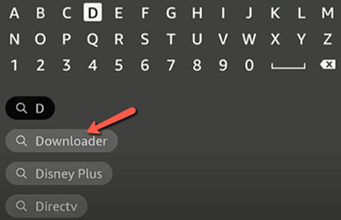
**Step 1)** Go to your Fire TV, open the search option, and type **Downloader**.

[](https://www.guru99.com/images/screenshots/iptv-smarters-pro-on-firestick.png)

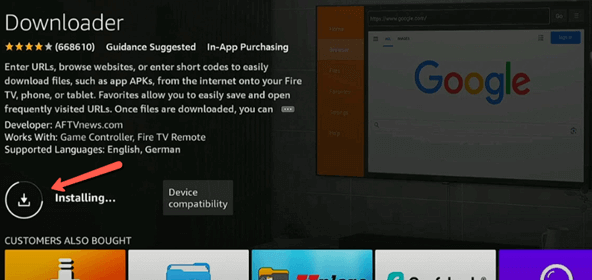
**Step 2)** Then select the Downloader App and install it.

[](https://www.guru99.com/images/screenshots/iptv-smarters-pro-on-firestick-1.png)

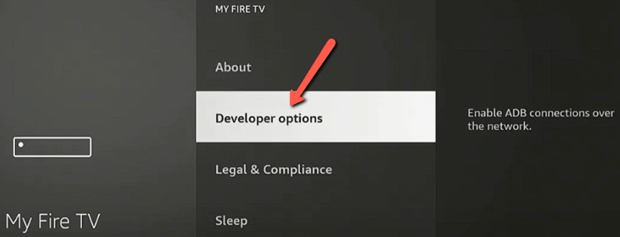
**Step 3)** Now go to home and select **Settings** menu, then go to **My Fire TV** and scroll to **Developer Options**. (If you don’t see Developer Options, go to **About** and select Fire TV Stick and **click on it 7 to 8 times** to make yourself a Developer)

[](https://www.guru99.com/images/screenshots/iptv-smarters-pro-on-firestick-2.png)

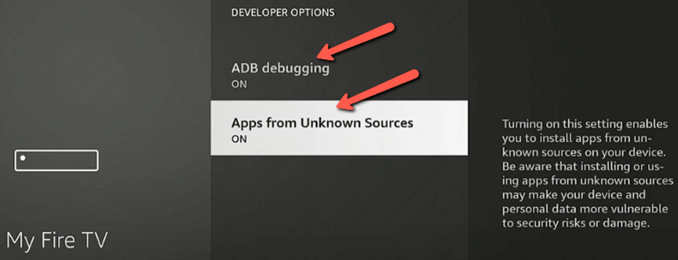
**Step 4)** In the Developer’s Options, turn on **ADB Debugging** and **Apps from Unknown Sources**.

[](https://www.guru99.com/images/screenshots/iptv-smarters-pro-on-firestick-3.png)

Now you are ready to install IPTV Smarters Pro.

## How to Install IPTV Smarters Pro on Firestick

Users switching from other players or people looking for an alternative to cable can try [IPTV Smarters Pro](https://www.iptvsmarters.com/). You also do not have to be tech-savvy to install it. Now that you have enabled the Apps from Unknown Sources, you can install IPTV Smarters Pro player.

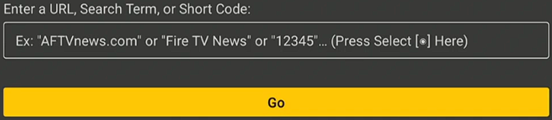
**Step 1)** Go to **Home,** select **Apps,** then choose the **Downloader** app that you just installed

Next, launch the app, where you will see a space to enter a URL or a code.

[](https://www.guru99.com/images/screenshots/iptv-smarters-pro-on-firestick-install.png)

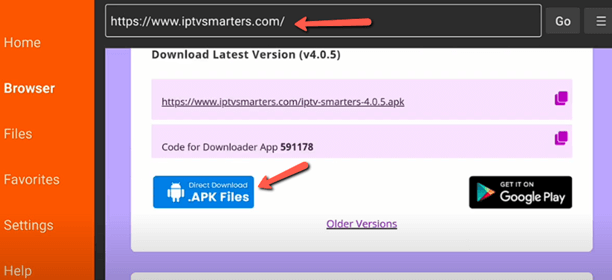
**Step 2)** Tap on it and enter the [official URL](https://www.iptvsmarters.com/)

This will lead you to its website. There, find the **Download APK Files** and get the latest version of IPTV Smarters Pro and hit **Go**.

[](https://www.guru99.com/images/screenshots/iptv-smarters-pro-on-firestick-install-1.png)

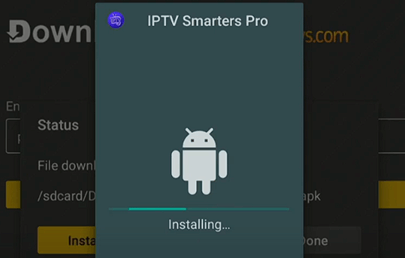
**Step 3)** This will download the IPTV Smarters Pro

Once the download is complete, the **Installation** pop-up will automatically appear on the screen, so just hit **Install**.

[](https://www.guru99.com/images/screenshots/iptv-smarters-pro-on-firestick-install-2.png)

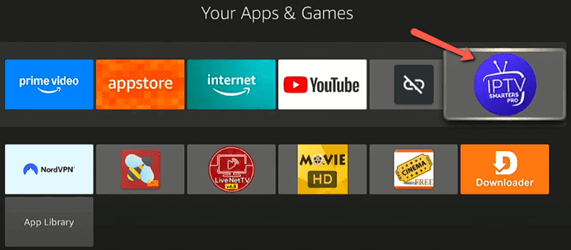
**Step 4)** Select IPTV Smarters Pro App

Once the app is installed, I delete the APK file to clear the space. Now, go to your **Home** page and select **Apps** to find the IPTV Smarters Pro.

[](https://www.guru99.com/images/screenshots/iptv-smarters-pro-on-firestick-install-3.png)

## How to Setup IPTV Smarters Pro

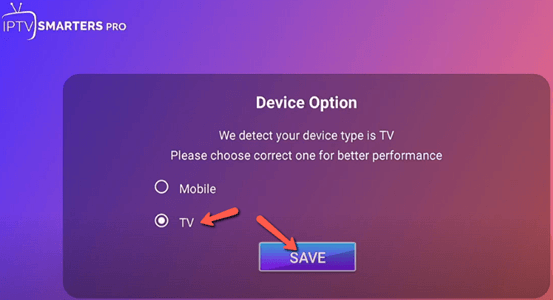
Once you have installed IPTV Smarters Pro, it’s time to set it up. I could launch it easily by clicking on the app, but setting it up required little work. Cord-cutters and individuals looking for budget options will find this app helpful, as you can get started without paying any fee. The first time you launch the app, you will have to select the device you are watching it on. For example, in this case, it’s a Firestick, hence, select **TV** and tap on **Save.** 

[](https://www.guru99.com/images/screenshots/iptv-smarters-pro-on-firestick-setup.png)

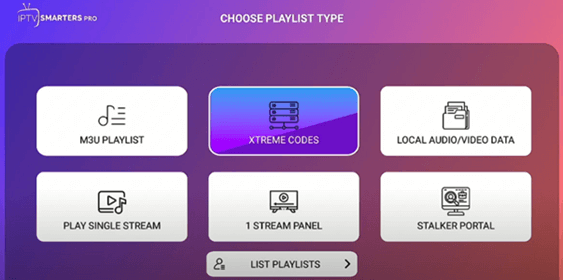
Then you can accept the terms and conditions. Once I agreed to the terms and conditions, I had to choose the type of Playlist I wanted to proceed with. It includes options like M3U Playlist, Xtreme Codes, Local Audio/Video Data, Play Single Streams, 1 Stream Panel, Stalker Portal, and more. You should consider using **Xtreme Codes** if you are not good with too many manual setups.

[](https://www.guru99.com/images/screenshots/iptv-smarters-pro-on-firestick-setup-1.png)

## How to use IPTV Smarters Pro on Firestick

After launching the [IPTV Smarters Pro](https://www.iptvsmarters.com/) on Firestick, you can then add the playlist, set up EPG, record, backup, etc. Now, if you are wondering how to do that, let me take you through its features and explain how to access them.

### Add Playlists

To add a playlist, I recommend choosing an IPTV carefully. That’s because there are many playlist providers that offer unlicensed content for streaming. This can lead to copyright issues, and your services may stop mid-streaming or lead to hefty fines due to serious violations.

#### In this setup process, I shall take you through two ways of adding a playlist – Xtreme Codes and M3U URL:

**1) Xtreme Codes**

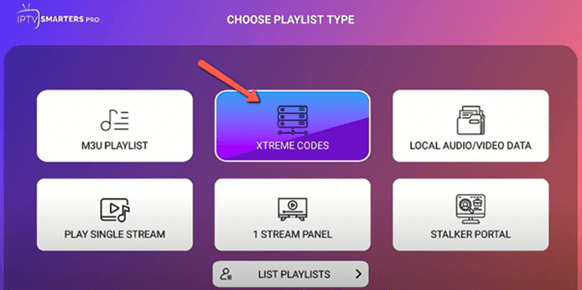
**Step 1)** Launch your IPTV Smarters Pro and choose the type of Playlist you want to add after you select an IPTV.

[](https://www.guru99.com/images/screenshots/iptv-smarters-pro-on-firestick-xtreme-codes.png)

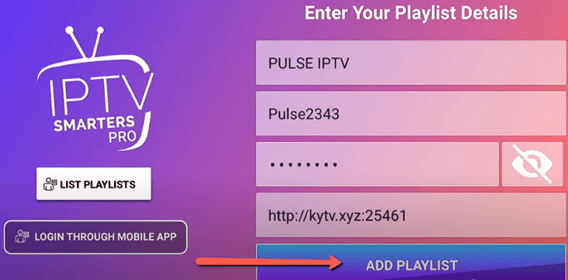
**Step 2)** Now, enter a name for your Playlist, then add the details that were sent by the IPTV provider in the credentials field. The details include username, password, and Xtreme Codes API URL. Once added, just tap on **Add Playlist**.

[](https://www.guru99.com/images/screenshots/iptv-smarters-pro-on-firestick-playlist.png)

**Step 3)** After you are logged in, the app will begin loading the categories in your playlist.

[](https://www.guru99.com/images/screenshots/iptv-smarters-on-firestick-download.png)

**Step 4)** Once the downloading is complete, you can explore the channels and VODs. In the case of Xtreme Codes API, the **EPG will already be available to download** with the Channels and VODs.

**2) M3U URL**

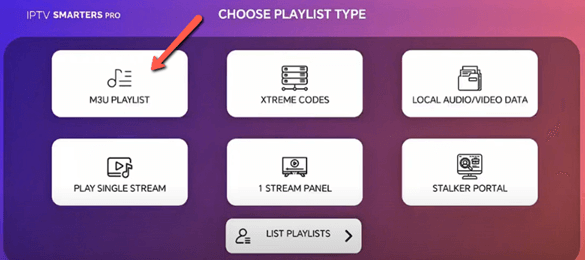
**Step 1)** Select the **M3U Playlist** for the playlist type given on the screen.

[](https://www.guru99.com/images/screenshots/iptv-smarters-on-firestick-ma3-playlist.png)

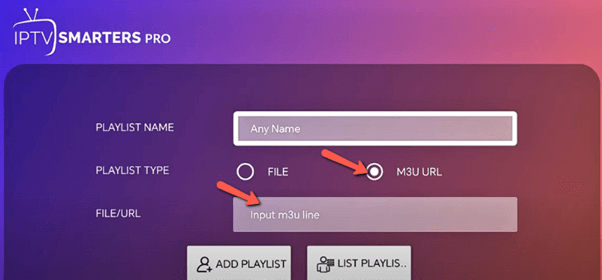
**Step 2)** Now, add any name you like for the playlist. Then add the M3U URL in the given field.

[](https://www.guru99.com/images/screenshots/iptv-smarters-on-firestick-ma3-playlist-1.png)

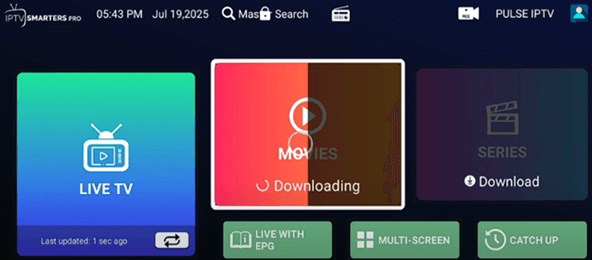
**Step 3)** Then click on **Add user** or **Login** to continue. This will download your movies and series. Once downloaded, you will be able to access the movies, channels, and shows.

[](https://www.guru99.com/images/screenshots/iptv-smarters-on-firestick-ma3-playlist-2.png)

The best part of using IPTV Smarters Pro is that I could add more than one playlist. It’s something that entertainment enthusiasts looking for more advanced streaming will enjoy.

### Electronic Program Guide

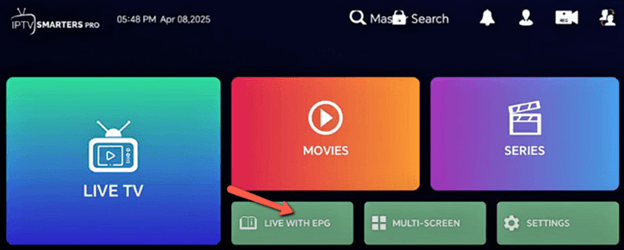
In case of Xtreme Codes API, your EPG will automatically populate, while for the M3U URL, you will have to add it manually. To add the EPG for M3U, I had to go to the page that shows all my channels and VODs.

**Step 1)** Select the **Live with EPG** or **Upload EPG** option shown on the screen.

[](https://www.guru99.com/images/screenshots/iptv-smarters-pro-on-firestick-epg.png)

**Step 2)** Now, get the EPG URL provided by the IPTV service, and enter it in the blank URL field and tap on **Add EPG**.

### Web Player

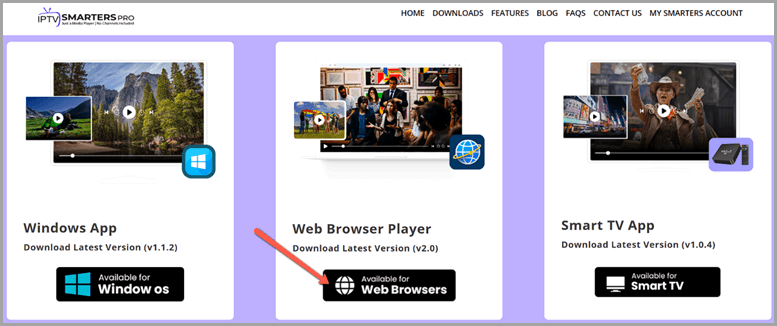
Users who are struggling to access IPTV Smarters Pro will enjoy using its Web Player feature. It helps you access live channels from any device that can open a browser. Just go to the official website of [IPTV Smarters Pro](https://www.iptvsmarters.com/) and select the web browser player.

[](https://www.guru99.com/images/screenshots/iptv-smarters-pro-on-firestick-web-player.png)

I was then able to integrate it with Xtreme Codes and an M3U URL playlist. Once it was integrated, I could access all my channels and other playlists just like the usual TV screen. Additionally, you can tap like/ favorites on what you watch to save them in the **Favorites** section. The Favorites is a completely different category that isn’t affected by newly added content or watch history.

### Multi-Screen

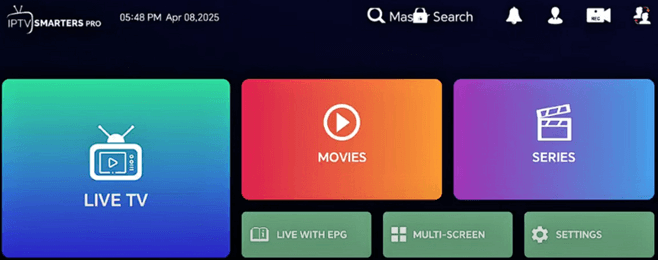
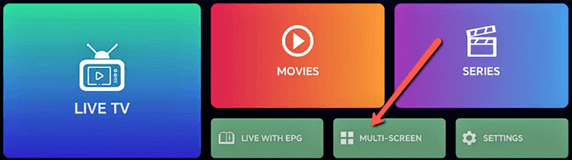
Multi-screen is a built-in option that is readily available on IPTV Smarters Pro. You will notice that the Multi-Screen feature is given on the page where the Channels and VODs options are displayed.

[](https://www.guru99.com/images/screenshots/iptv-smarters-on-firestick-multi-screen.png)

However, at times, the additional screen may appear blank. This could be an issue with the IPTV provider. Thus, check if the IPTV service supports multi-screen viewing in your current subscription. Let me now show you how to use it:

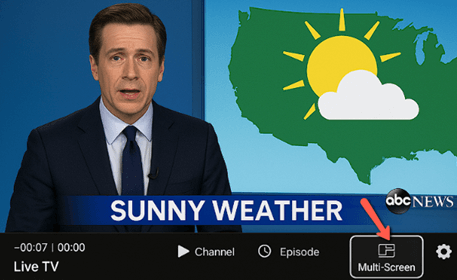
**Step 1)** You can either select it beforehand from the page that has the multi-screen option (mentioned above). On the other hand, you can also do so while accessing a Live TV.

[](https://www.guru99.com/images/screenshots/iptv-smarters-on-firestick-multi-screen-1.png)

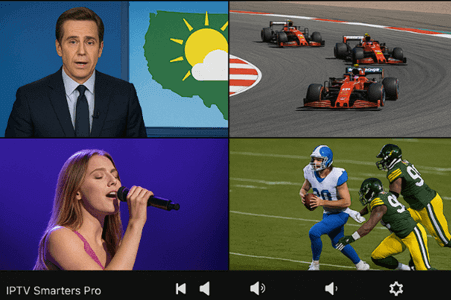
**Step 2)** When watching the live channel, bring up the controls using the remote and tap on the **Multi-Screen** feature. Choose the number of splits you want (maximum of 4) and then tap on the panels to add the channels.

[](https://www.guru99.com/images/screenshots/iptv-smarters-on-firestick-multi-screen-2.png)

### Recording

The recording feature of IPTV Smarters Pro makes it convenient for users who have a tight schedule. This way, I was able to view all the live shows in my own sweet time. Here’s how I usually record content on IPTV Smarters Pro:

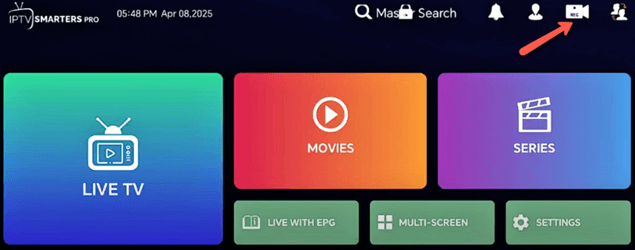
**Step 1)** Open the IPTV Smarters Pro app and then access the **Record** or the video camera option given above.

[](https://www.guru99.com/images/screenshots/iptv-smarters-pro-on-firestick-recording.png)

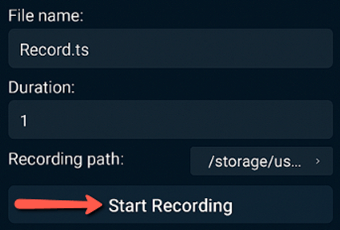
**Step 2)** You can change the path of the recording directory, whether you want an **Internal Storage** or a **USB**. (Firestick users who have low storage or performance issues can use a USB.) Next, add a new folder and name it for easy access, and click **OK**.

**Step 3)** Once the folder is created, select it and tap **OK**. Now, return to the channel that you want to record and start the recording.

[](https://www.guru99.com/images/screenshots/iptv-smarters-pro-on-firestick-recording-1.png) [](https://www.guru99.com/images/screenshots/iptv-smarters-pro-on-firestick-recording-2.png)

### Parental Control

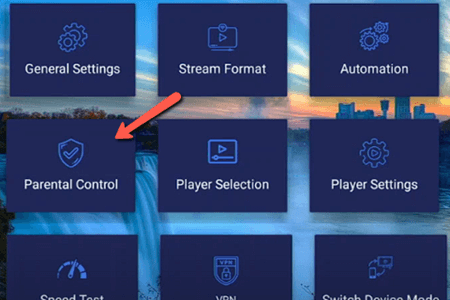
People looking for advanced features, such as child lock/ parental control, can use IPTV Smarters Pro. It helped me prevent my kids from accessing A-rated and R-rated content. I was also able to set a productive routine for them by reducing their screen time. Here’s how I set up the parental control feature:

**Step 1)** Go to the **Settings** menu and select the **Parental Control** feature.

[](https://www.guru99.com/images/screenshots/iptv-smarters-on-firestick-parental-control.png)

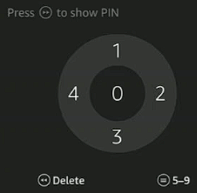
**Step 2)** This will lead you to the parental control setup, where you can set up a 5-digit PIN code.

[](https://www.guru99.com/images/screenshots/iptv-smarters-on-firestick-parental-control-1.png)

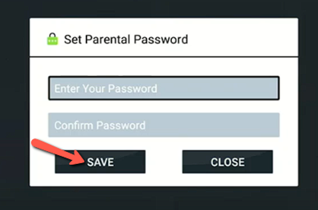
**Step 3)** After you are done setting up the passcode, tap on **Save.** This will prevent your kids from accessing any content that you want to restrict.

[](https://www.guru99.com/images/screenshots/iptv-smarters-on-firestick-parental-control-2.png)

### Backup and Restore

I recommend using the backup feature of IPTV Smarters to save your playlists, favorites, EPG URLs, API UI settings, etc. The restore feature also lets you rebuild your setup just like it was before when you change your Firestick. Let me now show you how you can back up and restore:

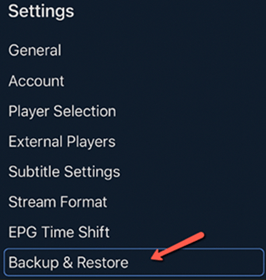
**Step 1)** Open the IPTV Smarters Pro on Fire TV Stick and go to the **Settings** menu.

[](https://www.guru99.com/images/screenshots/iptv-smarters-on-firestick-backup-restore.png)

**Step 2)** Now, navigate to the **Backup & Restore** given in the menu. Then select Backup or Restore as per your requirement. It will then back up your content, EPG, etc. On the other hand, restore will allow you to get back your UI and settings as it was earlier when you launch it on a new Fire TV.

### External Video Players By IPTV Smarters Pro

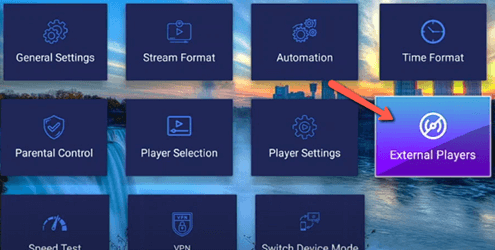
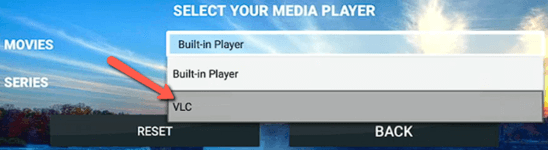
You can add external video players for streaming using IPTV Smarters Pro. (IPTV Smarters Pro now offers external players.) I tested this feature by using various types of players, including MX Player, VLC, Wuffy, etc. Let us now look at how you can use external video players on IPTV Smarters Pro:

**Step 1)** Install the external player that you want to use on Fire TV. However, ensure that it’s compatible with your app and device if it isn’t offered by IPTV Smarters Pro. Then go to the Settings and tap on **External Players**.

[](https://www.guru99.com/images/screenshots/iptv-smarters-on-firestick-video-players.png)

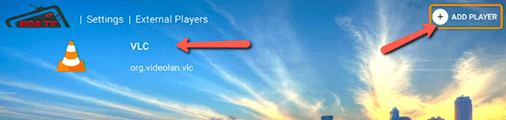
**Step 2)** Here, you will find your downloaded external players. Now, click on **Add Player** and select your external player app to add it.

[](https://www.guru99.com/images/screenshots/iptv-smarters-on-firestick-video-players-1.png)

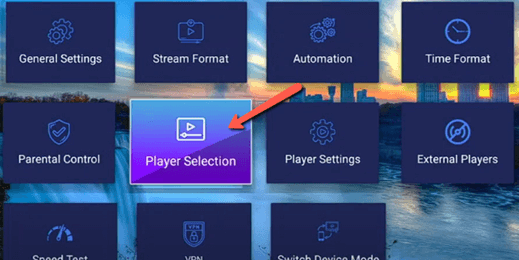
**Step 3)** Once it’s added, go to the **Player Settings** option and set up the buffer size, etc. Then come back to the menu and go to **Player Selection**.

[](https://www.guru99.com/images/screenshots/iptv-smarters-on-firestick-video-players-2.png)

**Step 4)** Here, you can select the player and then stream your movies or series in your choice of app.

[](https://www.guru99.com/images/screenshots/iptv-smarters-on-firestick-video-players-3.png)

### General Settings

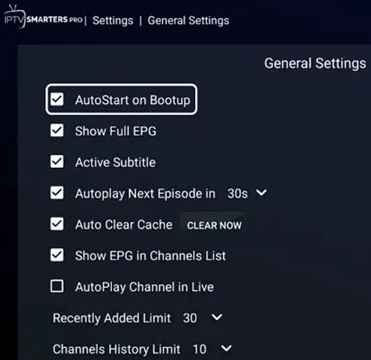
The general settings of IPTV Smarters Pro are easy to understand and enhance the viewing experience. This settings section includes the following features:

[](https://www.guru99.com/images/screenshots/iptv-smarters-on-firestick-general-settings.png)

* **AutoStart on Boot:** This allows the app to launch as soon as the Fire TV is switched on.
* **Active Subtitle:** The Active Subtitle keeps the CC (closed caption) on for all the channels and programs on.
* **Autoplay:** Turning on this feature ensures that the next episode of the series that you are watching starts playing within 30 seconds. This makes sure that as soon as you are done watching an episode, the app will automatically switch to the next without manual intervention.
* **Auto Clear Cache:** With the help of this feature, you can clear the cache whenever you want. You can either do it manually or set it up to clean them itself.
* **AutoPlay Channel in Live:** This setting lets you come back to where you left off. It plays the last live network you were streaming when the TV is switched on again.
* **Recently Added Limit:** In this section, you will find the Recently Added Content. The number is shown with a limit since the app doesn’t want to overwhelm you with all the new channels and VODs added at once.
* **Channel History Limit:** Here, you will find your previously watched channels and programs.

[Visit IPTV Smarters Pro >>](https://www.iptvsmarters.com/)

## Security and Privacy

Users who are worried about trying a new media player can rest assured that IPTV Smarters Pro offers reliable security and privacy. It provides a transparent Privacy Policy on its website where you can see what data is collected, how they are processed, etc.

To safeguard your app, you can follow the tips that I have given below:

* Use a **strong password** to protect the app from unauthorized access.
* To ensure that the app is secure, you need to **update it regularly** by checking for updates.
* Do not use any **public Wi-Fi or unverified** **connections** to stream content.
* Use all the **privacy features offered** by IPTV Smarters Pro, since it will help protect your personal data.
* Users who want to access blocked or restricted content can **use a VPN**. However, ensure that you are using a reliable VPN that doesn’t log user activities.

## How to Update IPTV Smarters Pro on Firestick

As mentioned earlier, keeping IPTV Smarters Pro updated helps the app run smoothly and protects you from security issues and bugs. Updating IPTV Smarters Pro also provides you with its latest features.

Before you update IPTV Smarters Pro on Firestick you must find out if there are any Firestick updates. Thus, this makes both of them more compatible with each other. Let me now show you how to update IPTV Smarters Pro:

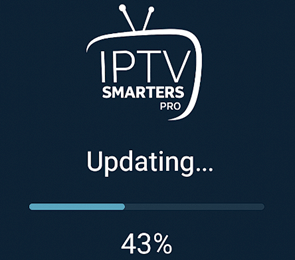
**Step 1)** After you update the Firestick go to the Settings of IPTV Smarters Pro and click on **Check for Updates**.

**Step 2)** Once you click on it, you can follow the straightforward instructions to update it if there’s any update available.

[](https://www.guru99.com/images/screenshots/iptv-smarters-pro-on-firestick-update.png)

**Step 3)** Note that you must download the update from trusted sources only.

## How to Troubleshoot Common Installation Issues

There’s a possibility that you may come across some installation issues during the process. The following troubleshooting techniques can be helpful, especially for people using an [IPTV player](https://www.guru99.com/best-iptv-players-for-windows.html) for the first time or someone who isn’t tech-savvy.

1. **Issue: The app is not downloading, even if you are using the right Downloader app**  
**Solution:** Users facing app installation errors must make sure that they have the right URL. You may have to enable JavaScript in the Downloader’s settings.
2. **Issue: Firestick may show some security warnings and block the installation**  
**Solution:** You might have missed my top instruction and didn’t enable **Apps from Unknown Sources**. If you weren’t able to find Developer Options, click on **About** and tap on the Fire TV Stick for about 7 to 8 times to access it.
3. **Issue:** **You are receiving a parsing error when you are installing the app**  
**Solution:** This could mean that APK is corrupted or isn’t compatible with the Firestick. Your Fire TV could be outdated, or you might be installing a duplicate APK, which isn’t the official IPTV Smarters Pro. I also suggest clearing the Downloader cache and redownloading the APK from a reliable source.
4. **Issue: The IPTV Smarters Pro crashes after you install and launch it**  
**Solution:** You might have installed a corrupt app, or there’s a cache issue. It is also possible that you may not have sufficient storage in the device, so clear some space to accommodate it.
5. **Issue: App opens, but it shows a black screen or doesn’t respond after you launch it**  
**Solution:** You can wait for 30 to 60 seconds to see if it loads, and if it doesn’t, you will need to clear the app cache. However, if the issue persists, then reinstall the app and see if your network is stable.
6. **Issue: The app isn’t found on the Home Screen even after the installation is complete**  
**Solution:** Just hold the **Home** button on the Firestick remote and go to the Apps and scroll through to see if it’s located below. If it isn’t available here, go back and reinstall the app. This time, check if the APK is an official app.
7. **Issue: The IPTV Smarters Pro installs, but you aren’t able to log in or load the content**  
**Solution:** I suggest double-checking the playlist URL or the login credentials sent by your IPTV service. Additionally, check if the content you are accessing is geo-blocked. If yes, then use a VPN such as [ExpressVPN](https://go.expressvpn.com/c/1359419/1462842/16063?sharedid=iptv-smarters-pro-on-firestick), which is a reliable service provider. Especially international users and frequent travelers who need region-restricted content can use a VPN.

## What are the Other Methods to Install IPTV Smarters Pro on Firestick

Not every user wants to use a Downloader, and I understand that. Hence, let me introduce you to some other alternatives if you are still wondering how to install IPTV Smarters Pro on Firestick:

* **Use FileLinked:** If FileLinked is available, you can install IPTV Smarters Pro by entering its code. This code contains the APK, which can be downloaded directly to the Fire TV.
* **Apps2Fire from an Android Phone:** If you own an Android smartphone, you can use the Apps2Fire app. It helps you send the IPTV Smarters Pro APK to your Firestick and install it without using a Downloader app.
* **USB Drive:** The USB drive is also helpful if you use it with a File Explorer app. You can download the APK to your USB and then plug it into your Fire TV with an OTG cable, and then use the File Explorer to install the APK.

## Beware of These Posers

Here are some known **fake or scammy links** that impersonate the IPTV Smarters Pro, and you should avoid them at all costs:

* [iptv.smarters.pro](http://iptv.smarters.pro)
* Iptv-smarters-pro.site
* [smarters-pro-iptv.us](http://smarters-pro-iptv.us)

Note that sites that are using free email, such as Gmail, Hotmail, etc., for their contact or admin can also be scammers.

[Visit IPTV Smarters Pro >>](https://www.iptvsmarters.com/)

## FAQs:

⚡ Is IPTV Smarters Pro legal to use on Firestick?

Yes. IPTV Smarters Pro is legal to use on Firestick. However, you must not use it to stream unlicensed [IPTV services](https://www.guru99.com/legal-iptv-providers.html), which makes the act of streaming itself illegal due to the choice of content.

🚀 Is IPTV Smarters Pro available on the Amazon App Store?

No. The IPTV Smarters Pro isn’t available on the Amazon App Store. You must use a Downloader app to sideload it.

🔒 Do I need a VPN to use IPTV Smarters Pro on Firestick?

No. You don’t usually need a VPN to use IPTV Smarters Pro on Firestick. The VPN is required only to bypass ISP throttling, geo-restrictions, and, if you want more privacy and security.

📺 Can I use IPTV Smarters Pro without an IPTV subscription?

No. You cannot use IPTV Smarters Pro without an [IPTV subscription](https://www.guru99.com/best-iptv-subscription-services.html) since it is only a media player and not a streaming content provider.

🎯 What are the top alternatives to IPTV Smarters Pro?

Some of the top alternatives to IPTV Smarters Pro are [TiviMate](https://www.guru99.com/how-to-install-tivimate-on-firestick.html), Smart IPTV, XCIPTV, and Flix IPTV.

## Conclusion

Installing and setting up IPTV Smarters Pro isn’t a challenging task. It can be slightly confusing due to the sideloading process and some setup. But if you **follow the process carefully**, you won’t need anyone to do it for you. However, there are some important key points that you must remember before installing the app. Without taking care of these issues before the installation, you may face restrictions and other app issues. Overall, you just need to pay attention to the steps, and you are good to go. Additionally, I have also mentioned the **alternate routes** that you can take if the Downloader app process is too overwhelming for you.

#### Summarize this post with:

ChatGPT Perplexity Grok Google AI 

**Stay Updated on AI** **Get Weekly AI Skills, Trends, Actionable Advice.** 

##### Sign up for the newsletter

Subscribe for Free 

You have successfully subscribed.  
Please check your inbox. 

![AI-Newsletter]() Chosen by over **350,000+** professionals 

[Scroll to top ](#wrapper)Scroll to top 

Toggle Menu Close 

Search for: 

Search

```json
{"@context":"https://schema.org","@graph":[{"@type":"Organization","@id":"https://www.guru99.com/#organization","name":"Guru99","sameAs":["https://www.facebook.com/Guru99Official","https://twitter.com/guru99com"],"logo":{"@type":"ImageObject","@id":"https://www.guru99.com/#logo","url":"https://www.guru99.com/images/guru99-logo-v1-150x59.png","contentUrl":"https://www.guru99.com/images/guru99-logo-v1-150x59.png","caption":"Guru99","inLanguage":"en-US"}},{"@type":"WebSite","@id":"https://www.guru99.com/#website","url":"https://www.guru99.com","name":"Guru99","publisher":{"@id":"https://www.guru99.com/#organization"},"inLanguage":"en-US"},{"@type":"ImageObject","@id":"https://www.guru99.com/images/iptv-smarters-pro-for-firestick.png","url":"https://www.guru99.com/images/iptv-smarters-pro-for-firestick.png","width":"700","height":"250","inLanguage":"en-US"},{"@type":"BreadcrumbList","@id":"https://www.guru99.com/iptv-smarters-pro-on-firestick.html#breadcrumb","itemListElement":[{"@type":"ListItem","position":"1","item":{"@id":"https://www.guru99.com","name":"Home"}},{"@type":"ListItem","position":"2","item":{"@id":"https://www.guru99.com/iptv-main","name":"\ud83d\udcfa IPTV"}},{"@type":"ListItem","position":"3","item":{"@id":"https://www.guru99.com/iptv-main/guide-iptv","name":"Guide"}},{"@type":"ListItem","position":"4","item":{"@id":"https://www.guru99.com/iptv-smarters-pro-on-firestick.html","name":"IPTV Smarters Pro for FireStick \u2014 How to Download &#038; Install"}}]},{"@type":"WebPage","@id":"https://www.guru99.com/iptv-smarters-pro-on-firestick.html#webpage","url":"https://www.guru99.com/iptv-smarters-pro-on-firestick.html","name":"IPTV Smarters Pro for FireStick \u2014 How to Download &#038; Install","dateModified":"2026-02-13T12:43:35+05:30","isPartOf":{"@id":"https://www.guru99.com/#website"},"primaryImageOfPage":{"@id":"https://www.guru99.com/images/iptv-smarters-pro-for-firestick.png"},"inLanguage":"en-US","breadcrumb":{"@id":"https://www.guru99.com/iptv-smarters-pro-on-firestick.html#breadcrumb"}},{"@type":"Person","@id":"https://www.guru99.com/author/elizabeth","name":"Elizabeth Jackson","description":"I'm Elizabeth Jackson, an NYFA graduate and Specialist in VOD and OTT platforms, offering insights into the latest trends and innovations in streaming technology.","url":"https://www.guru99.com/author/elizabeth","image":{"@type":"ImageObject","@id":"https://www.guru99.com/images/elizabeth-jackson-author.png","url":"https://www.guru99.com/images/elizabeth-jackson-author.png","caption":"Elizabeth Jackson","inLanguage":"en-US"},"worksFor":{"@id":"https://www.guru99.com/#organization"}},{"articleSection":"Guide, \ud83d\udcfa IPTV","headline":"IPTV Smarters Pro for FireStick \u2014 How to Download &#038; Install","description":"Are you confused about how to install IPTV Smarters Pro on Firestick? It is no rocket science, but it surely can be slightly confusing.","keywords":"entertainment","speakable":{"@type":"SpeakableSpecification","cssSelector":[".entry-title",".summary"]},"@type":"Article","author":{"@id":"https://www.guru99.com/author/elizabeth","name":"Elizabeth Jackson"},"dateModified":"2026-02-13T12:43:35+05:30","image":{"@id":"https://www.guru99.com/images/iptv-smarters-pro-for-firestick.png"},"copyrightYear":"2026","name":"IPTV Smarters Pro for FireStick \u2014 How to Download &#038; Install","subjectOf":[{"@type":"FAQPage","mainEntity":[{"@type":"Question","name":"Is IPTV Smarters Pro legal to use on Firestick?","acceptedAnswer":{"@type":"Answer","text":"Yes. IPTV Smarters Pro is legal to use on Firestick. However, you must not use it to stream unlicensed IPTV services, which makes the act of streaming itself illegal due to the choice of content."}},{"@type":"Question","name":"Is IPTV Smarters Pro available on the Amazon App Store?","acceptedAnswer":{"@type":"Answer","text":"No. The IPTV Smarters Pro isn\u2019t available on the Amazon App Store. You must use a Downloader app to sideload it."}},{"@type":"Question","name":"Do I need a VPN to use IPTV Smarters Pro on Firestick?","acceptedAnswer":{"@type":"Answer","text":"No. You don\u2019t usually need a VPN to use IPTV Smarters Pro on Firestick. The VPN is required only to bypass ISP throttling, geo-restrictions, and, if you want more privacy and security."}},{"@type":"Question","name":"Can I use IPTV Smarters Pro without an IPTV subscription?","acceptedAnswer":{"@type":"Answer","text":"No. You cannot use IPTV Smarters Pro without an IPTV subscription since it is only a media player and not a streaming content provider."}},{"@type":"Question","name":"What are the top alternatives to IPTV Smarters Pro?","acceptedAnswer":{"@type":"Answer","text":"Some of the top alternatives to IPTV Smarters Pro are TiviMate, Smart IPTV, XCIPTV, and Flix IPTV."}}]},{"@type":"HowTo","name":"How to Install IPTV Smarters Pro on Firestick","description":"Step-by-step guide to installing IPTV Smarters Pro on Firestick, including using the Downloader app, downloading the APK file, and completing the installation process.","url":"https://www.guru99.com/iptv-smarters-pro-on-firestick.html","step":[{"@type":"HowToStep","name":"Go to Home, select Apps, then choose the Downloader app","text":"Go to Home, select Apps, then choose the Downloader app that you just installed. Next, launch the app, where you will see a space to enter a URL or a code.","image":{"@type":"ImageObject","url":"https://www.guru99.com/images/screenshots/iptv-smarters-pro-on-firestick-install.png"},"url":"https://www.guru99.com/iptv-smarters-pro-on-firestick.html#step1"},{"@type":"HowToStep","name":"Tap on it and enter the official URL","text":"Tap on it and enter the official URL. This will lead you to its website. There, find the Download APK Files and get the latest version of IPTV Smarters Pro and hit Go.","image":{"@type":"ImageObject","url":"https://www.guru99.com/images/screenshots/iptv-smarters-pro-on-firestick-install-1.png"},"url":"https://www.guru99.com/iptv-smarters-pro-on-firestick.html#step2"},{"@type":"HowToStep","name":"This will download the IPTV Smarters Pro","text":"This will download the IPTV Smarters Pro. Once the download is complete, the Installation pop-up will automatically appear on the screen, so just hit Install.","image":{"@type":"ImageObject","url":"https://www.guru99.com/images/screenshots/iptv-smarters-pro-on-firestick-install-2.png"},"url":"https://www.guru99.com/iptv-smarters-pro-on-firestick.html#step3"},{"@type":"HowToStep","name":"Select IPTV Smarters Pro App","text":"Once the app is installed, I delete the APK file to clear the space. Now, go to your Home page and select Apps to find the IPTV Smarters Pro.","image":{"@type":"ImageObject","url":"https://www.guru99.com/images/screenshots/iptv-smarters-pro-on-firestick-install-3.png"},"url":"https://www.guru99.com/iptv-smarters-pro-on-firestick.html#step4"}]}],"@id":"https://www.guru99.com/iptv-smarters-pro-on-firestick.html#schema-944026","isPartOf":{"@id":"https://www.guru99.com/iptv-smarters-pro-on-firestick.html#webpage"},"publisher":{"@id":"https://www.guru99.com/#organization"},"inLanguage":"en-US","mainEntityOfPage":{"@id":"https://www.guru99.com/iptv-smarters-pro-on-firestick.html#webpage"}}]}
```