
JSP文件上传和下载
 编辑团队
编辑团队
⚡ 智能摘要
JSP 文件上传和下载是核心的输入输出操作,使 Web 应用程序能够接收用户上传的文件并将其返回给用户。本资源使用 JSP 操作表单、Apache Commons FileUpload 和 Servlet 类,并附有完整的可运行代码,详细解释了这两种流程。
JSP文件上传
- 我们可以使用 JSP 上传任何文件。
- 它可以是文本文件、二进制文件、图像文件或任何其他文档。
- 此处,如果是文件上传,则仅使用 POST 方法,而不使用 GET 方法。
- Enctype 属性应该设置为 multipart/form-data。
示例:使用 Action
在这个例子中,我们使用 IO 对象上传文件。
动作文件.jsp
<%@ page language="java" contentType="text/html; charset=ISO-8859-1"
    pageEncoding="ISO-8859-1"%>
<!DOCTYPE html PUBLIC "-//W3C//DTD HTML 4.01 Transitional//EN" "http://www.w3.org/TR/html4/loose.dtd">
<html>
<head>
<meta http-equiv="Content-Type" content="text/html; charset=ISO-8859-1">
<title>Guru File</title>
</head>
<body>
<a>Guru File Upload:</a>
Select file: <br />
<form action="action_file_upload.jsp" method="post"
                        enctype="multipart/form-data">
<input type="file" name="file" size="50" />
<br />
<input type="submit" value="Upload File" />
</form>
</body>
</html>
动作文件上传.jsp
<%@ page language="java" contentType="text/html; charset=ISO-8859-1"
    pageEncoding="ISO-8859-1"%>
<%@ page import="java.io.*,java.util.*, javax.servlet.*" %>
<%@ page import="javax.servlet.http.*" %>
<%@ page import="org.apache.commons.fileupload.*" %>
<%@ page import="org.apache.commons.fileupload.disk.*" %>
<%@ page import="org.apache.commons.fileupload.servlet.*" %>
<%@ page import="org.apache.commons.io.output.*" %>
<!DOCTYPE html PUBLIC "-//W3C//DTD HTML 4.01 Transitional//EN" "http://www.w3.org/TR/html4/loose.dtd">
<html>
<head>
<meta http-equiv="Content-Type" content="text/html; charset=ISO-8859-1">
<title>Guru File Upload</title>
</head>
<body>
<%
   File file ;
   int maxFileSize = 5000 * 1024;
   int maxMemSize = 5000 * 1024;
   String filePath = "E:/guru99/data";

   String contentType = request.getContentType();
   if ((contentType.indexOf("multipart/form-data") >= 0)) {

      DiskFileItemFactory factory = new DiskFileItemFactory();
      factory.setSizeThreshold(maxMemSize);
      factory.setRepository(new File("c:\\temp"));
      ServletFileUpload upload = new ServletFileUpload(factory);
      upload.setSizeMax( maxFileSize );
      try{
         List fileItems = upload.parseRequest(request);
         Iterator i = fileItems.iterator();
         out.println("<html>");
         out.println("<body>");
         while ( i.hasNext () )
         {
            FileItem fi = (FileItem)i.next();
            if ( !fi.isFormField () )  {
                String fieldName = fi.getFieldName();
                String fileName = fi.getName();
                boolean isInMemory = fi.isInMemory();
                long sizeInBytes = fi.getSize();
                file = new File( filePath + "yourFileName") ;
                fi.write( file ) ;
                out.println("Uploaded Filename: " + filePath + fileName + "<br>");
            }
         }
         out.println("</body>");
         out.println("</html>");
      }catch(Exception ex) {
         System.out.println(ex);
      }
   }else{
      out.println("<html>");
      out.println("<body>");
      out.println("<p>No file uploaded</p>");
      out.println("</body>");
      out.println("</html>");
   }
%>
</body>
</html>
代码说明:
动作文件.jsp
Code 第 12-18 行: 在这里,我们创建了一个带有文件字段的表单,该字段会将文件上传到服务器,并将操作传递给 action_file_upload.jsp。
动作文件上传.jsp
Code 线20: 这里我们指定了文件路径到特定路径。
Code 第 23-38 行: 这里我们检查内容类型是否为 multipart/form-data。如果是,则内容类型为文件,并对其进行读取。读取文件后,将其写入临时文件,然后将临时文件转换为主文件。
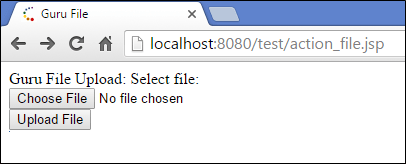
执行上述代码时,您将获得以下输出:
输出:
我们使用“选择文件”按钮选项上传文件,“上传文件”按钮会将文件上传到服务器指定的路径。
示例:使用 JSP 操作
在这个例子中,我们将使用JSP操作上传文件。我们会创建一个表单,其中包含一个“上传”按钮,点击该按钮后,文件就会被上传。
上传_1.jsp
<%@ page language="java" contentType="text/html; charset=ISO-8859-1"
    pageEncoding="ISO-8859-1"%>
<!DOCTYPE html PUBLIC "-//W3C//DTD HTML 4.01 Transitional//EN" "http://www.w3.org/TR/html4/loose.dtd">
<html>
<head>
<meta http-equiv="Content-Type" content="text/html; charset=ISO-8859-1">
<title>Guru Uploading File</title>
</head>
<body>
File: <br />
<form action="guru_upload" method="post"
                        enctype="multipart/form-data">
<input type="file" name="guru_file" size="50" />
<br />
<input type="submit" value="Upload" />
</form>
</body>
</html>
代码说明:
Code 第 11-12 行: 这里我们使用一个表单,该表单通过 servlet guru_upload 执行一个 action,该 action 会使用 POST 方法。此外,enctype 属性指定表单数据应如何编码并发送到服务器,它仅用于 POST 方法。这里我们将其设置为 multipart/form-data,因为数据量较大,所以需要上传文件。
Code 线13: 这里我们指定了 guru_file 元素,类型为 file,大小为 50。
Code 线15: 这是一个名为“上传”的提交按钮,通过该按钮将调用操作 servlet,请求将在该 servlet 中进行处理,文件将被读取并写入该 servlet。
Guru_upload.java
package demotest;

import java.io.File;
import java.io.IOException;
import java.util.List;

import javax.servlet.ServletException;
import javax.servlet.http.HttpServlet;
import javax.servlet.http.HttpServletRequest;
import javax.servlet.http.HttpServletResponse;

import org.apache.commons.fileupload.FileItem;
import org.apache.commons.fileupload.disk.DiskFileItemFactory;
import org.apache.commons.fileupload.servlet.ServletFileUpload;

public class guru_upload extends HttpServlet {
	private static final long serialVersionUID = 1L;

    public guru_upload() {
        super();
        // TODO Auto-generated constructor stub
    }
	protected void doPost(HttpServletRequest request, HttpServletResponse response) throws ServletException, IOException {
		        if(ServletFileUpload.isMultipartContent(request)){
		            try {
		                List <FileItem> multiparts = new ServletFileUpload(new DiskFileItemFactory()).parseRequest(request);
		                for(FileItem item : multiparts){
		                    if(!item.isFormField()){
		                        String name = new File(item.getName()).getName();
		                        item.write( new File("c:/guru/upload" + File.separator + name));
		                    }
		                }
		               //File uploaded successfully
		               request.setAttribute("gurumessage", "File Uploaded Successfully");
		            } catch (Exception ex) {
		               request.setAttribute("gurumessage", "File Upload Failed due to " + ex);
		            }
		        }else{

		            request.setAttribute("gurumessage","No File found");
 }
		        request.getRequestDispatcher("/result.jsp").forward(request, response);

		    }


}
代码说明:
Code 第 12-14 行: 这里我们需要将org.apache.commons库导入到代码配置中。我们需要从org.apache.commons库中导入fileupload类。
Code 线23: 这里我们有 doPost() 方法,当我们在 JSP 中传递 POST 方法时,它将被调用,并将请求和响应对象作为其参数。
Code 线26: 这里我们创建了一个 org.apache.commons 库 fileUpload 包中的 ServletFileUpload 类的对象,它将检查 JSP 中是否存在任何文件对象。如果找到任何文件对象,则会从请求中获取这些文件对象。
Code 第 27-32 行: 我们将遍历文件数量,检查 multiparts 对象(一个列表对象,如果我们上传多个文件)中存在的文件项数量,并将其保存到 c:/guru/upload 文件夹中,文件名已指定。我们使用文件对象的 write 方法将文件写入到指定的文件夹中。
Code 线34: 如果没有例外情况,则在请求中设置一个名为 gurumessage 的属性,其值为“文件上传成功”。
Code 第 35-36 行: 如果发生异常,则显示“文件上传失败”的消息。
Code 线40: 如果找不到文件,则将消息设置为“未找到文件”。
Code 线42: 使用 requestdispatcher 对象将请求转发到 result.jsp,并传递请求和响应对象。
结果.jsp
<%@ page language="java" contentType="text/html; charset=ISO-8859-1"
    pageEncoding="ISO-8859-1"%>
<!DOCTYPE html PUBLIC "-//W3C//DTD HTML 4.01 Transitional//EN" "http://www.w3.org/TR/html4/loose.dtd">
<html>
<head>
<meta http-equiv="Content-Type" content="text/html; charset=ISO-8859-1">
<title>Guru Result</title>
</head>
<body>
<% String msg = (String)request.getAttribute("message");
   out.println(msg);
%>
</body>
</html>
代码说明:
Code 线10: 这里我们将请求对象中值为 gurumessage 的属性获取到一个字符串对象中。
Code 线11: 我们在这里打印该消息。
当我们执行上述代码时,我们得到以下输出:
输出:
我们会看到一个表单,其中包含用于从目录中选择文件的字段。选择文件后,我们需要点击上传按钮。

点击上传按钮后,我们会收到文件上传成功的消息。

从下图可以看出,该文件已上传到 c:/guru/upload 文件夹。

JSP文件下载
在这个例子中,我们将通过单击按钮从目录下载文件。
下载_1.jsp
<%@ page language="java" contentType="text/html; charset=ISO-8859-1"
    pageEncoding="ISO-8859-1"%>
<!DOCTYPE html PUBLIC "-//W3C//DTD HTML 4.01 Transitional//EN" "http://www.w3.org/TR/html4/loose.dtd">
<html>
<head>
<meta http-equiv="Content-Type" content="text/html; charset=ISO-8859-1">
<title>Downloading Guru Example</title>
</head>
<body>
Guru Downloading File<a href="guru_download">Download here!!!</a>
</body>
</html>
代码说明:
Code 线10: 这里我们提供了一个链接,可以使用 servlet guru_download 从文件夹 c:/guru/upload 下载文件。
Guru_download.java
package demotest;

import java.io.FileInputStream;
import java.io.IOException;
import java.io.PrintWriter;

import javax.servlet.ServletException;
import javax.servlet.http.HttpServlet;
import javax.servlet.http.HttpServletRequest;
import javax.servlet.http.HttpServletResponse;

/**
 * Servlet implementation class guru_download
 */
public class guru_download extends HttpServlet {
	private static final long serialVersionUID = 1L;

	protected void doGet(HttpServletRequest request, HttpServletResponse response) throws ServletException, IOException {
		response.setContentType("text/html");
		PrintWriter out = response.getWriter();
		String gurufile = "test.txt";
		String gurupath = "c:/guru/upload/";
		response.setContentType("APPLICATION/OCTET-STREAM");
		response.setHeader("Content-Disposition", "attachment; filename=\""
				+ gurufile + "\"");

		FileInputStream fileInputStream = new FileInputStream(gurupath
				+ gurufile);

		int i;
		while ((i = fileInputStream.read()) != -1) {
			out.write(i);
		}
		fileInputStream.close();
		out.close();
	}


	/**
	 * @see HttpServlet#doPost(HttpServletRequest request, HttpServletResponse response)
	 */
	protected void doPost(HttpServletRequest request, HttpServletResponse response) throws ServletException, IOException {
		// TODO Auto-generated method stub
	}

}
代码说明:
Code 第 3-5 行: 这里我们导入了 FileInputStream、IOException 和 Print 函数。Writer 来自 java.io 包。
Code 线15: 我们正在定义 guru_download 小服务程序 它扩展了 HttpServlet。
Code 线18: 由于我们已经定义了一个 href,它将被包含在一个 URL因此,GET 方法将被处理(servlet 中将调用 doGet),其中也包含了请求和响应对象。
Code 第 19-20 行: 我们正在响应对象中设置内容类型,并且还从响应中获取写入器对象。
Code 第 21-22 行: 定义一个名为 gurufile 的变量,其值为 test.txt,gurupath 为 c:/guru/upload/。
Code 第 23-25 行: 我们使用响应对象设置内容类型,并使用 setHeader 方法将标头设置为已上传的文件名。
Code 第 27-28 行: 我们正在创建一个 FileInputStream,并将 gurupath+gurufile 添加到其中。
Code 第 31-33 行: 在这里我们采取了 while循环 这段代码会一直运行直到文件被读取完毕,因此我们设定了条件 != -1。在这个条件下,我们使用 printwriter 对象向外写入数据。
执行上述代码后,您将得到以下输出:
输出:

我们需要点击 downloading_1.jsp,然后会看到一个“点击此处下载”的超链接。点击此超链接后,文件就会下载到系统中。
