
什么是 BDD 测试?行为驱动开发框架
 编辑团队
编辑团队
⚡ 智能摘要
BDD 测试使用简单的 Given-When-Then 语言描述应用程序行为,以便分析师、开发人员和测试人员共享同一份规范。本演练将这种方法应用于使用 Behave 进行 REST API 测试。 Python 框架涵盖设置、功能文件、步骤实现、执行和报告。
什么是 BDD(行为驱动开发)测试?
BDD(行为驱动开发)测试 BDD 是一种敏捷软件开发技术,是 TDD(测试驱动开发)的扩展。在 BDD 中,测试用例使用自然语言编写,即使非程序员也能阅读。
BDD 测试如何工作?
假设你被指派在网银应用程序中创建一个资金转账模块。
有多种方法可以测试它:
- 如果汇款账户余额充足,则应进行资金转账。
- 如果目的地账户详细信息正确,则应进行资金转账
- 如果用户输入的交易密码/RSA码/安全认证信息正确,则应进行资金转账。
- 即使是银行假日,资金转账也应该进行。
- 资金转账应在账户持有人设定的未来日期进行
此 测试场景 随着我们考虑诸如在Y天或Y个月的时间间隔内转账X金额、停止等附加功能,情况会变得更加复杂精细。ping 当总额达到 Z 时进行预定转账,依此类推。
开发人员的普遍倾向是先开发功能,然后再编写测试代码。正如上面的案例所示, 测试用例 这里的开发很复杂,所以开发商会推迟。 测试与验证 直到发布时,才会进行快速但无效的测试。
为了解决这个问题,行为驱动开发(BDD)应运而生。它简化了开发人员的整个测试过程。
在 BDD 中,无论你写什么都必须进入 给定-何时-然后 步骤。让我们用 BDD 来考虑上面的例子:
Given that a fund transfer module in net banking application has been developed
And I am accessing it with proper authentication

When I shall transfer with enough balance in my source account
Or I shall transfer on a Bank Holiday
Or I shall transfer on a future date
And destination a/c details are correct
And transaction password / rsa code / security authentication for the transaction is correct
And press or click send button

Then amount must be transferred
And the event will be logged in log file
这种表单易于编写、阅读和理解。它涵盖了资金转移模块的所有可能测试用例,并且可以快速修改以适应更多用例。它也像模块的动态文档一样。由于 BDD 源于 TDD,因此在讨论工具之前,有必要先弄清楚两者之间的区别。
BDD 与 TDD:主要区别
这两种实践都采用测试优先的方式,并且都能缩短反馈周期。它们的区别在于谁编写测试、测试使用的语言以及测试描述的是应用程序的哪一层。
| 方面 | TDD(测试驱动开发) | BDD(行为驱动开发) |
|---|---|---|
| 专注 | 代码单元内部的工作原理 | 从用户角度看系统的行为方式 |
| 语言 | 编程语言断言 | 自然语言 Given-When-Then 场景 |
| 第一作者 | 开发商 | 业务分析师、产品负责人、测试人员和开发人员共同协作。 |
| Readable 由非程序员撰写 | 没有 | 是 |
| 典型范围 | 单位级别 | 功能、API 和接受程度 |
| 常用工具 | JUnitpytest、NUnit | 表现, CucumberSpecFlow、JBehave |
两者是互补的,而不是竞争的。团队通常会保留 TDD 对于单元级设计,可以在此基础上添加 BDD 场景来描述利益相关者实际认可的行为。由于 REST 端点恰好位于验收层,因此它们非常适合 BDD。
什么是 REST API 测试?
随着 REST 成为构建 API 的流行风格,自动化 REST API 测试用例与自动化 UI 测试用例变得同等重要。 API测试 包括分别使用 POST、GET、PUT 和 DELETE 方法测试 CRUD(创建-读取-更新-删除)操作。
Behave 是什么?
Behave 是最受欢迎的 Python BDD 测试框架。以下是 Behave 函数的工作原理:
- 功能文件由您的业务分析师、发起人或负责行为场景的人员编写。功能文件使用自然语言格式描述功能或功能的一部分,并提供预期结果的代表性示例。
- 这些场景步骤映射到用以下语言编写的步骤实现: Python.
- 环境控制程序可以选择性地在步骤、场景、功能或整个运行之前和之后运行代码。
明确了每个文件的作用后,现在可以安装该框架了。
设置 BDD 测试框架 Behave on Windows
安装方式:
- 下载并安装 Python 3从 https://www.python.org/
- 在命令提示符下执行以下命令来安装 Behave
pip install behave- IDE: PyCharm 这里使用的是社区版—— https://www.jetbrains.com/pycharm/download/
项目设置:
- 创建一个新项目
- 创建以下目录结构

上面的屏幕截图显示了 Behave 期望的布局:a 功能 包含功能文件的目录,以及一个嵌套的 步骤 包含目录 Python 实现方式。Behave 通过名称发现两者,因此文件夹名称必须完全匹配。
功能文件:
现在让我们来构建特征文件 Sample_REST_API_Testing.feature其特点是对“posts”服务执行 CRUD 操作。
这个例子使用了 https://jsonplaceholder.typicode.com/ posts 示例 REST 服务,一个免费的模拟 API,接受写入请求并返回逼真的响应,但不持久化更改。
POST 场景示例
Scenario: POST post example -> creating a new post item using the 'posts' service
Given I set post posts API endpoint          -> prerequisite: sets the URL of the posts service
When I set HEADER param request content type as "application/json"
And set request body
And send POST HTTP request                    -> the actual test step
Then I receive valid HTTP response code 201
And Response body "POST" is non-empty       -> verification of the response body
同样地,其余场景可以写成如下形式:

Sample_REST_API_Testing.feature
Feature: Test CRUD methods in Sample REST API testing framework

Background:
    Given I set sample REST API url

Scenario: POST post example
    Given I Set POST posts api endpoint
    When I Set HEADER param request content type as "application/json"
    And Set request Body
    And Send a POST HTTP request
    Then I receive valid HTTP response code 201
    And Response BODY "POST" is non-empty

Scenario: GET posts example
    Given I Set GET posts api endpoint "1"
    When I Set HEADER param request content type as "application/json"
    And Send GET HTTP request
    Then I receive valid HTTP response code 200 for "GET"
    And Response BODY "GET" is non-empty

Scenario: UPDATE posts example
    Given I Set PUT posts api endpoint for "1"
    When I Set Update request Body
    And Send PUT HTTP request
    Then I receive valid HTTP response code 200 for "PUT"
    And Response BODY "PUT" is non-empty

Scenario: DELETE posts example
    Given I Set DELETE posts api endpoint for "1"
    When I Send DELETE HTTP request
    Then I receive valid HTTP response code 200 for "DELETE"
步骤实施
现在,对于上述场景中使用的功能步骤,您可以编写实现。 Python “steps”目录下的文件。
Behave 框架通过将装饰器与特性文件谓词进行匹配来识别步骤函数。例如, 特定 在特征文件场景中,谓词会搜索携带该谓词的阶跃函数。 @given 装饰器也存在同样的匹配情况。 日期 和 然后对于“但是”和“并且”,步骤函数会使用与其前一步相同的装饰器。例如,如果“并且”紧跟在“给定”之后,则匹配的步骤函数装饰器为: @given.
例如,POST 请求的 When 步骤可以按如下方式实现。请注意如何 "application/json" 从功能文件传递到带花括号的占位符中——这称为参数化。
# Decorator: the braced name captures a value from the feature file
@when(u'I Set HEADER param request content type as "{header_content_type}"')
def step_impl(context, header_content_type):
    # Step implementation: set the content type on the request header
    request_headers['Content-Type'] = header_content_type
同样,步骤中其他步骤的实施也类似。 Python 文件将如下所示:

示例步骤实现.py
from behave import given, when, then, step
import requests

api_endpoints = {}
request_headers = {}
response_codes = {}
response_texts = {}
request_bodies = {}
api_url = None

@given(u'I set sample REST API url')
def step_impl(context):
    global api_url
    api_url = 'https://jsonplaceholder.typicode.com'

# START POST Scenario
@given(u'I Set POST posts api endpoint')
def step_impl(context):
    api_endpoints['POST_URL'] = api_url + '/posts'
    print('url :' + api_endpoints['POST_URL'])

@when(u'I Set HEADER param request content type as "{header_content_type}"')
def step_impl(context, header_content_type):
    request_headers['Content-Type'] = header_content_type

# "And" or "But" steps are renamed by behave to match their preceding step
@when(u'Set request Body')
def step_impl(context):
    request_bodies['POST'] = {"title": "foo", "body": "bar", "userId": "1"}

@when(u'Send POST HTTP request')
def step_impl(context):
    # send the request and save the response object
    response = requests.post(url=api_endpoints['POST_URL'],
                             json=request_bodies['POST'],
                             headers=request_headers)
    response_texts['POST'] = response.text
    print("post response :" + response.text)
    response_codes['POST'] = response.status_code

@then(u'I receive valid HTTP response code 201')
def step_impl(context):
    print('Post rep code ;' + str(response_codes['POST']))
    assert response_codes['POST'] == 201
# END POST Scenario

# START GET Scenario
@given(u'I Set GET posts api endpoint "{id}"')
def step_impl(context, id):
    api_endpoints['GET_URL'] = api_url + '/posts/' + id
    print('url :' + api_endpoints['GET_URL'])

@when(u'Send GET HTTP request')
def step_impl(context):
    response = requests.get(url=api_endpoints['GET_URL'], headers=request_headers)
    response_texts['GET'] = response.text
    response_codes['GET'] = response.status_code

@then(u'I receive valid HTTP response code 200 for "{request_name}"')
def step_impl(context, request_name):
    print('Get rep code for ' + request_name + ':' + str(response_codes[request_name]))
    assert response_codes[request_name] == 200

@then(u'Response BODY "{request_name}" is non-empty')
def step_impl(context, request_name):
    print('request_name: ' + request_name)
    print(response_texts)
    assert response_texts[request_name] is not None
# END GET Scenario

# START PUT/UPDATE
@given(u'I Set PUT posts api endpoint for "{id}"')
def step_impl(context, id):
    api_endpoints['PUT_URL'] = api_url + '/posts/' + id
    print('url :' + api_endpoints['PUT_URL'])

@when(u'I Set Update request Body')
def step_impl(context):
    request_bodies['PUT'] = {"title": "foo", "body": "bar",
                             "userId": "1", "id": "1"}

@when(u'Send PUT HTTP request')
def step_impl(context):
    response = requests.put(url=api_endpoints['PUT_URL'],
                            json=request_bodies['PUT'],
                            headers=request_headers)
    response_texts['PUT'] = response.text
    print("update response :" + response.text)
    response_codes['PUT'] = response.status_code
# END PUT/UPDATE

# START DELETE
@given(u'I Set DELETE posts api endpoint for "{id}"')
def step_impl(context, id):
    api_endpoints['DELETE_URL'] = api_url + '/posts/' + id
    print('url :' + api_endpoints['DELETE_URL'])

@when(u'I Send DELETE HTTP request')
def step_impl(context):
    response = requests.delete(url=api_endpoints['DELETE_URL'])
    response_texts['DELETE'] = response.text
    print("DELETE response :" + response.text)
    response_codes['DELETE'] = response.status_code
# END DELETE
⚠️ 注意: 将状态码与 == 而非 is 事情。 is 运算符测试对象的身份,而不是相等性,并且 Python 3.8 及之后提出 SyntaxWarning: “is” 与字面量一起使用 对于该模式。任何断言都写成这样 assert code is 201 应改写为 assert code == 201.
运行测试
测试脚本开发已完成,现在让我们运行测试。在命令提示符下执行以下命令来运行功能文件:
:: Run a single feature file with the pretty formatter
behave -f pretty features\feature_files_folder\Sample_REST_API_Testing.feature

:: Run every feature in the project
behave
测试执行结果显示如下:

控制台上显示报告
控制台输出在开发过程中很方便,但利益相关者通常更喜欢易于阅读的报告,而 Allure 正好提供了这种报告。
报告
首先,安装 Allure Behave 格式化程序和 Allure 命令行工具。该格式化程序是一个 Python 软件包;命令行工具是单独下载的,详情请参见…… Allure报告文档.
:: 1. Install the formatter
pip install allure-behave

:: 2. Run the tests and write raw results to a folder
behave -f allure_behave.formatter:AllureFormatter -o reports/allure-results features/

:: 3. Render and open the HTML report
allure serve reports/allure-results
这将生成如下所示的、易于理解且信息丰富的测试结果报告:
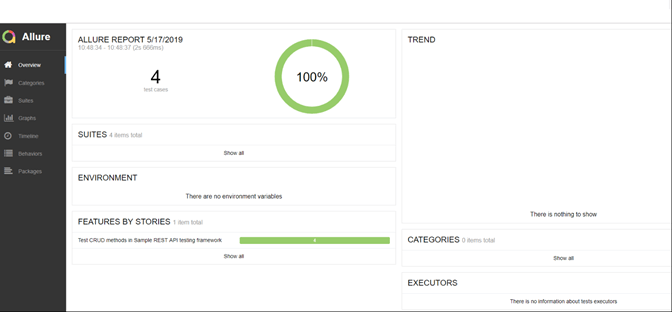
HTML 格式的测试报告

测试报告显示个别场景结果
一个功能套件只有在 API 不断增长的情况下仍然保持可读性时才有用,而这正是功能文件规范发挥作用的地方。
编写 Behave 功能文件的最佳实践
当场景描述的是点击和有效负载而不是行为时,Behave 套件的性能会迅速下降。以下实践可确保功能文件对业务利益相关者易于阅读,同时保持……ping 这个 Python 可供工程师维护的层。
- 描述行为,而不是实现方式。 请写成“假设客户账户余额充足”,而不是“假设余额列等于 500”。功能文件描述了系统执行的操作;步骤文件描述了如何进行检查。
- 每个场景只保留一种行为。 一个包含状态码、响应体和数据库行的场景实际上包含了三个场景。将它们拆分开来,就能让故障直接指向原因。
- 将共享设置移至后台运行。 上面的例子使用了
Background: Given I set sample REST API url因此每个场景都继承了基础 URL 无需重复。 - 使用参数化代替重复。 带括号的占位符,例如
"{request_name}"让一个步骤函数来处理 GET、PUT 和 DELETE 断言,这就是为什么示例需要的步骤定义比场景少得多。 - 使用场景大纲来描述数据变化。 当需要证明同一行为对多个输入都适用时,
Examples:表格比复制的场景描述更清晰。 - 避免场景间依赖关系。 Behave 并不保证在每种配置下 POST 请求都会在 GET 请求之前执行。每个请求都应该创建其所需的状态。
- 将模块级全局变量替换为上下文。 为了简洁起见,示例中将端点和响应存储在模块字典中。在生产环境中,应将它们存储在 Behave 的
context对象状态可以在不同场景之间干净利落地重置。 - 针对特定运行情况的标签场景。 例如标签
@smokeor@regression让behave --tags=@smoke这样可以保持管道反馈快速。
从第一个特性文件开始就应用这些习惯,可以使 BDD 套件的价值远远超出最初的 CRUD 示例。进一步扩展这种方法的团队通常会将其与以下方法结合使用: Cucumber 对于 JVM 项目或 Postman 用于探索性 API 检查。
