
如何在 Excel 中读取/写入数据 Selenium 使用 Apache POI
 Krishna 伦塔
⚡ 智能摘要
Excel 文件驱动器 Selenium 数据驱动测试,而 Apache POI 就是其中之一。 Java 该库用于读取和写入这些文件。以下各节将介绍依赖项、核心类、读写示例以及 JXL。
文件 IO 是任何软件流程的关键部分。我们经常在计算机中创建文件、打开文件并更新或删除文件。 Selenium 自动化。我们需要一个流程来处理文件 Selenium.
Java 为我们提供不同的文件操作类 Selenium在本教程中,我们将学习如何在 Excel 文件的帮助下 Java IO 包和 Apache (阿帕奇) POI 库。
Apache POI Selenium
此 Apache POI Selenium 是一个广泛使用的 API,用于 Selenium 数据驱动测试这是一个用以下语言编写的 POI 库: Java 它为用户提供了操作 API Microsoft 文档类型包括 .xls 和 .xlsx。用户可以轻松创建、修改和读写 Excel 文件。POI 代表“糟糕的混淆实现”。
如何使用 POI 处理 Excel 文件(Maven POM 依赖项)
POI链接 Selenium 请在下方工作簿中进行测试。

读写 Excel 文件 JavaApache 提供了一个非常著名的库 POI。该库能够读写 Excel 的 XLS 和 XLSX 文件格式。
POI 库提供了 HSSF 实现来读取 XLS 文件。
要读取 XLSX 文件,我们将选择 POI 库的 XSSF 实现。接下来,我们将详细研究这些实现。
如果你的项目中使用了 Maven,Maven 依赖项将被添加到 pom.xml 文件中,如下所示。

<dependency>
<groupId>org.apache.poi</groupId>
<artifactId>poi</artifactId>
<version>4.1.1</version>
</dependency>
版本说明: 4.1.1 是原始示例;当前项目声明 poi-ooxml 5.5.1,这是 XLSX 所必需的。
或者你也可以直接下载最新版本的 POI jars http://poi.apache.org/download.html & 下载最新的 zip 文件

当您下载此 jar 的 zip 文件时,您需要解压缩它并将所有这些 jar 添加到项目的类路径中。

POI 中的类和接口
以下是不同的列表 Java 下面展示了 POI 中用于读取 XLS 和 XLSX 文件的接口和类——
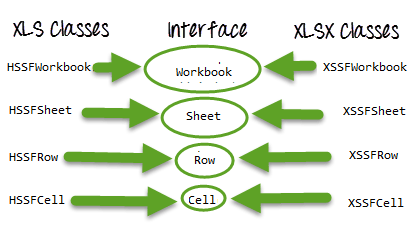
- 练习册: XSSFWorkbook 和 HSSFWorkbook 类实现了此接口。
- XSSF工作簿: 是 XLSX 文件的类表示。
- HSSF工作簿: 是 XLS 文件的类表示。
- 片: XSSFSheet 和 HSSFSheet 类实现了此接口。
- XSSFSheet: 这是一个表示 XLSX 文件中工作表的类。
- HSSFSheet: 这是一个表示 XLS 文件中工作表的类。
- 行: XSSFRow 和 HSSFRow 类实现了此接口。
- XSSFRow: 是一个表示 XLSX 文件工作表中一行的类。
- HSSFRow: 是一个表示 XLS 文件工作表中一行的类。
- 手机: XSSFCell 和 HSSFCell 类实现了此接口。
- XSSFCell: 是一个表示 XLSX 文件行中单元格的类。
- [0177] HSSFCell: 是一个代表 XLS 文件某一行中单元格的类。
读/写 OperaTION
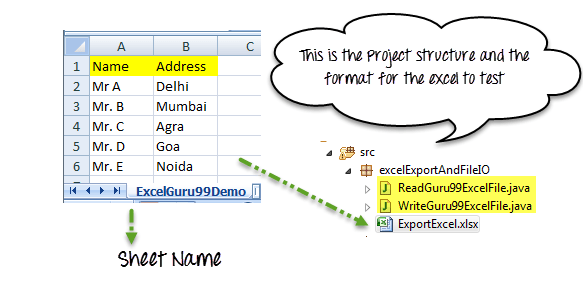
为了举个例子,我们将考虑下面给出的 Excel 文件格式
从 Excel 文件读取数据
完整示例: 这里我们尝试从 Excel 中读取数据。 Selenium:
package excelExportAndFileIO;

import java.io.File;

import java.io.FileInputStream;

import java.io.IOException;

import org.apache.poi.hssf.usermodel.HSSFWorkbook;

import org.apache.poi.ss.usermodel.Row;

import org.apache.poi.ss.usermodel.Sheet;

import org.apache.poi.ss.usermodel.Workbook;

import org.apache.poi.xssf.usermodel.XSSFWorkbook;

public class ReadGuru99ExcelFile {

    public void readExcel(String filePath,String fileName,String sheetName) throws IOException{

    //Create an object of File class to open xlsx file

    File file =    new File(filePath+"\\"+fileName);

    //Create an object of FileInputStream class to read excel file

    FileInputStream inputStream = new FileInputStream(file);

    Workbook guru99Workbook = null;

    //Find the file extension by splitting file name in substring  and getting only extension name

    String fileExtensionName = fileName.substring(fileName.indexOf("."));

    //Check condition if the file is xlsx file

    if(fileExtensionName.equals(".xlsx")){

    //If it is xlsx file then create object of XSSFWorkbook class

    guru99Workbook = new XSSFWorkbook(inputStream);

    }

    //Check condition if the file is xls file

    else if(fileExtensionName.equals(".xls")){

        //If it is xls file then create object of HSSFWorkbook class

        guru99Workbook = new HSSFWorkbook(inputStream);

    }

    //Read sheet inside the workbook by its name

    Sheet guru99Sheet = guru99Workbook.getSheet(sheetName);

    //Find number of rows in excel file

    int rowCount = guru99Sheet.getLastRowNum()-guru99Sheet.getFirstRowNum();

    //Create a loop over all the rows of excel file to read it

    for (int i = 0; i < rowCount+1; i++) {

        Row row = guru99Sheet.getRow(i);

        //Create a loop to print cell values in a row

        for (int j = 0; j < row.getLastCellNum(); j++) {

            //Print Excel data in console

            System.out.print(row.getCell(j).getStringCellValue()+"|| ");

        }

        System.out.println();
    }

    }

    //Main function is calling readExcel function to read data from excel file

    public static void main(String...strings) throws IOException{

    //Create an object of ReadGuru99ExcelFile class

    ReadGuru99ExcelFile objExcelFile = new ReadGuru99ExcelFile();

    //Prepare the path of excel file

    String filePath = System.getProperty("user.dir")+"\\src\\excelExportAndFileIO";

    //Call read file method of the class to read data

    objExcelFile.readExcel(filePath,"ExportExcel.xlsx","ExcelGuru99Demo");

    }

}
注意: 我们没有使用 TestNG 框架。运行类 Java 使用函数读取 Excel 中的应用程序 Selenium 如上例所示。
然后控制台逐行逐单元格地打印出来。

将数据写入 Excel 文件
完整示例: 我们尝试通过在 Excel 文件中添加新行来写入数据。
package excelExportAndFileIO;

import java.io.File;

import java.io.FileInputStream;

import java.io.FileOutputStream;

import java.io.IOException;

import org.apache.poi.hssf.usermodel.HSSFWorkbook;

import org.apache.poi.ss.usermodel.Cell;

import org.apache.poi.ss.usermodel.Row;

import org.apache.poi.ss.usermodel.Sheet;

import org.apache.poi.ss.usermodel.Workbook;

import org.apache.poi.xssf.usermodel.XSSFWorkbook;

public class WriteGuru99ExcelFile {

    public void writeExcel(String filePath,String fileName,String sheetName,String[] dataToWrite) throws IOException{

        //Create an object of File class to open xlsx file

        File file =    new File(filePath+"\\"+fileName);

        //Create an object of FileInputStream class to read excel file

        FileInputStream inputStream = new FileInputStream(file);

        Workbook guru99Workbook = null;

        //Find the file extension by splitting  file name in substring and getting only extension name

        String fileExtensionName = fileName.substring(fileName.indexOf("."));

        //Check condition if the file is xlsx file

        if(fileExtensionName.equals(".xlsx")){

        //If it is xlsx file then create object of XSSFWorkbook class

        guru99Workbook = new XSSFWorkbook(inputStream);

        }

        //Check condition if the file is xls file

        else if(fileExtensionName.equals(".xls")){

            //If it is xls file then create object of XSSFWorkbook class

            guru99Workbook = new HSSFWorkbook(inputStream);

        }

    //Read excel sheet by sheet name

    Sheet sheet = guru99Workbook.getSheet(sheetName);

    //Get the current count of rows in excel file

    int rowCount = sheet.getLastRowNum()-sheet.getFirstRowNum();

    //Get the first row from the sheet

    Row row = sheet.getRow(0);

    //Create a new row and append it at last of sheet

    Row newRow = sheet.createRow(rowCount+1);

    //Create a loop over the cell of newly created Row

    for(int j = 0; j < row.getLastCellNum(); j++){

        //Fill data in row

        Cell cell = newRow.createCell(j);

        cell.setCellValue(dataToWrite[j]);

    }

    //Close input stream

    inputStream.close();

    //Create an object of FileOutputStream class to create write data in excel file

    FileOutputStream outputStream = new FileOutputStream(file);

    //write data in the excel file

    guru99Workbook.write(outputStream);

    //close output stream

    outputStream.close();

    }

    public static void main(String...strings) throws IOException{

        //Create an array with the data in the same order in which you expect to be filled in excel file

        String[] valueToWrite = {"Mr. E","Noida"};

        //Create an object of current class

        WriteGuru99ExcelFile objExcelFile = new WriteGuru99ExcelFile();

        //Write the file using file name, sheet name and the data to be filled

        objExcelFile.writeExcel(System.getProperty("user.dir")+"\\src\\excelExportAndFileIO","ExportExcel.xlsx","ExcelGuru99Demo",valueToWrite);

    }

}
工作簿随后会继承追加的行。

使用 JXL API 进行 Excel 操作
JXL 也是另一个著名的用于读取 Excel 文件的 jar Java 和写入文件。如今,POI 已用于大多数项目,但在 POI 之前,JXL 仅用于 Java Excel 操作 API。这是一个非常小巧简单的 Excel 读取 API Selenium.

TIPS: 我的建议是不要在任何新项目中使用 JXL,因为该库自 2010 年以来就没有积极开发过——2.6.12 仍然是其最新版本——并且与 POI API 相比,它缺少一些功能。
下载JXL:
如果你想使用 JXL,你可以从此链接下载
https://sourceforge.net/projects/jexcelapi/files/jexcelapi/2.6.12/
您还可以在此压缩文件中找到 JXL 的演示示例,例如trac以下显示 ted 内容。

一些功能:
- JXL 能够读取 Excel 文件 Selenium 适用于 95、97、2000、XP、2003 工作簿。
- 我们可以使用英语、法语、西班牙语、德语。
- 可以复制图表并在 Excel 中插入图像
退税:
- 我们只能写入 Excel 97 及更高版本(不支持写入 Excel 95)。
- JXL不支持XLSX格式的excel文件。
- 它生成 Excel 2000 格式的电子表格。
