
XPath містить: текст, наступний брат і предок у Selenium
 Krishna Рунгта
🚀 Розумний підсумок
XPath містить, брата/сестру та предка в Selenium забезпечують точну ідентифікацію веб-елементів за допомогою структурованих зв'язків та текстових шаблонів. Ці функції XPath підвищують надійність, гнучкість та зручність обслуговування автоматизації в складних ієрархіях DOM.

Що таке XPath містить?
XPath містить — це функція всередині виразу XPath, яка використовується для пошуку веб-елементів, що містять певний текст. Ми можемо напр.tracЗнайти всі елементи, що відповідають заданому текстовому значенню, за допомогою функції XPath contains() на всій веб-сторінці. Contains у XPath має можливість знаходити елемент з частковим текстом.
Приклад – містить текст
Тут ми шукаємо прив’язку .містить текст як 'SAP М'.
"//h4/a[contains(text(),'SAP M')]"

ПРИМІТКА. Ви можете виконати наведену нижче вправу XPath щодо цього https://demo.guru99.com/test/selenium-xpath.html
Якщо простий XPath не може знайти складний веб-елемент для нашого тестового скрипта, нам потрібно використовувати функції з бібліотеки XPath 1.0. Завдяки поєднанню цих функцій ми можемо створити більш специфічний XPath.
👉 Зареєструйтесь для безкоштовного прямого ефіру Selenium Проект тестування
Слідкуйте за братом у XPath
A Брат і сестра в Selenium Веб-драйвер — це функція, яка використовується для отримання веб-елемента, що є братом батьківського елемента. Якщо батьківський елемент відомий, то веб-елемент можна легко знайти або визначити його місцезнаходження за допомогою атрибута sibling виразу XPath у Selenium WebDriver.
Приклад брата в XPath:
Тут, на основі спорідненого елемента 'a', ми знаходимо 'h4'
"//div[@class='canvas- graph']//a[@href='/accounting.html'][i[@class='icon-usd']]/following-sibling::h4"

ПредкаЩоб знайти елемент на основі батьківського елемента, ми можемо використовувати атрибут ancestry у XPath.

Давайте розглянемо ці 3 функції на прикладі –
Кроки тесту:
Примітка: З дати створення навчального посібника, домашня сторінка GuruВерсію 99 оновлено, тому для тестування використовуйте демонстраційний сайт.
- Перейдіть до https://demo.guru99.com/test/guru99home/
- У розділі «Деякі з наших найпопулярніших курсів» знайдіть усі веб-елементи, що є братами та сестринськими елементами веб-елементу, текст якого — «SELENIUM».
- Ми знайдемо елементи за допомогою функцій XPath text contains, ancestry та sibling.

ВИКОРИСТАННЯ Містить Text і XPath Sibling
import java.time.Duration;
import java.util.List;
import org.openqa.selenium.By;
import org.openqa.selenium.WebDriver;
import org.openqa.selenium.WebElement;
import org.openqa.selenium.chrome.ChromeDriver;
import org.openqa.selenium.chrome.ChromeOptions;
import org.testng.annotations.Test;

// If you prefer WebDriverManager (optional):
// import io.github.bonigarcia.wdm.WebDriverManager;

public class SiblingAndParentInXpath_Chrome {
    @Test
    public void testSiblingAndParentInXpath() {

        // === Option A: Use local ChromeDriver binary path ===
        // Update this path to your chromedriver location:
        System.setProperty("webdriver.chrome.driver", "C:\\chromedriver.exe");

        // === Option B: Use WebDriverManager (uncomment next line and remove Option A lines) ===
        // WebDriverManager.chromedriver().setup();

        ChromeOptions options = new ChromeOptions();
        // Add any flags you need, e.g. headless:
        // options.addArguments("--headless=new");

        WebDriver driver = new ChromeDriver(options);
        try {

            driver.manage().timeouts().implicitlyWait(Duration.ofSeconds(10));
            driver.manage().window().maximize();
            driver.get("https://demo.guru99.com/test/guru99home/");

            // Find all siblings (divs) next to the 'SELENIUM' tile within
            // the "A few of our most popular courses" section.
            // Steps encoded in XPath:
            // 1) Locate the H2 that contains the section title
            // 2) Move to its parent DIV
            // 3) Inside it, locate the link with text 'SELENIUM'
            // 4) From the SELENIUM tile's parent DIV, get following sibling tiles

            List<WebElement> dateBox = driver.findElements(By.xpath(
                "//h2[contains(., 'A few of our most popular courses')]/parent::div" +
                "//a[normalize-space(.)='SELENIUM']/parent::div" +
                "/following-sibling::div[contains(@class,'rt-grid-2')]"
            ));

            // Print the text of each sibling element
            for (WebElement el : dateBox) {
                System.out.println(el.getText());
            }

        } finally {
            driver.quit();
        }
    }
}
Вихід буде таким:

Предок XPath в Selenium
Предок XPath в Selenium — це функція, яка використовується для пошуку предка певного елемента на заданому шарі. Рівень предка, який потрібно повернути, або рівень предка відносно рівня елемента можна явно вказати. Вона повертає кількість ієрархічних кроків від предка, знаходячи заданого предка, якого шукає користувач.
Тепер, припустимо, нам потрібно знайти всі елементи в розділі «Популярний курс» за допомогою предка якоря, текст якого — «SELENIUM».
Ось такий наш запит xpath
"//div[.//a[text()='SELENIUM']]/ancestor::div[@class='rt-grid-2 rt-omega']/following-sibling::div"
Цілковита Code
import java.time.Duration;
import java.util.List;
import org.openqa.selenium.By;
import org.openqa.selenium.WebDriver;
import org.openqa.selenium.WebElement;
import org.openqa.selenium.chrome.ChromeDriver;
import org.openqa.selenium.chrome.ChromeOptions;
import org.testng.annotations.Test;

public class AncestorInXpath_Chrome {

@Test

    public void testAncestorInXpath() {

        // Set path to your ChromeDriver executable
        System.setProperty("webdriver.chrome.driver", "C:\\chromedriver.exe");

        ChromeOptions options = new ChromeOptions();
        WebDriver driver = new ChromeDriver(options);

        try {

            driver.manage().timeouts().implicitlyWait(Duration.ofSeconds(10));
            driver.manage().window().maximize();
            driver.get("https://demo.guru99.com/test/guru99home/");

            // Search all elements in 'Popular course' section
            // using the ancestor of the 'SELENIUM' link

            List <WebElement> dateBox = driver.findElements(
                By.xpath("//div[.//a[text()='SELENIUM']]/ancestor::div[@class='rt-grid-2 rt-omega']/following-sibling::div")
            );

            // Print all sibling elements of the 'SELENIUM' tile

            for (WebElement element : dateBox) {
                System.out.println(element.getText());
            }

        } finally {
            driver.quit();
        }
    }
}
Вихід виглядатиме як-

Використання І та АБО
Використовуючи оператори «І» та «АБО», ви можете помістити 2 умови у наш вираз XPath.
- У випадку оператора "І", обидві умови повинні бути істинними, тільки тоді елемент знайдено.
- У випадку АБО, будь-яка з двох умов має бути істинною, тільки тоді елемент знаходить.
Тут наш XPath-запит буде виглядати так
Xpath=//*[@type='submit' OR @name='btnReset']
Xpath=//input[@type='submit' and @name='btnLogin']

Кроки тесту:
- Перейдіть до https://demo.guru99.com/
- У цьому розділі ми використовуватимемо вищезгаданий демонстраційний сайт для пошуку елементів з різними функціями XPath.
Ви знайдете елемент за допомогою осей І та АБО, батьківського елемента, осі починається з і XPath
І АБО Приклад
import org.openqa.selenium.By;
import org.openqa.selenium.WebDriver;
import org.openqa.selenium.WebElement;
import org.openqa.selenium.chrome.ChromeDriver;

public class AND_OR {
	public static void main(String[] args) {
		WebDriver driver;
		WebElement w,x;
		System.setProperty("webdriver.chrome.driver","E://Selenium//Selenium_Jars//chromedriver.exe");
		 driver= new ChromeDriver();

         // Launch the application
     	 driver.get("https://www.guru99.com/");

     	//Search element using OR in the xpath
     	 w=driver.findElement(By.xpath("//*[@type='submit' OR @name='btnReset']"));

     	 //Print the text of the element
			System.out.println(w.getText());

		//Search element using AND in the xpath
			x=driver.findElement(By.xpath("//input[@type='submit' and @name='btnLogin']"));

		//Print the text of the searched element
			System.out.println(x.getText());

	//Close the browser
     driver.quit();
	}

}
XPath Parent in Selenium
Батько в Selenium — це метод, який використовується для отримання батьківського вузла поточного вузла, вибраного на веб-сторінці. Він дуже корисний у ситуаціях, коли ви вибираєте елемент і вам потрібно отримати батьківський елемент за допомогою XPath. Цей метод також використовується для отримання батьківського елемента батьківського елемента.
Тут наш XPath-запит буде виглядати так
Xpath=//*[@id='rt-feature']//parent::div

XPath використовує Parent
import org.openqa.selenium.By;
import org.openqa.selenium.WebDriver;
import org.openqa.selenium.WebElement;
import org.openqa.selenium.chrome.ChromeDriver;


public class Parent {
	public static void main(String[] args) {
		WebDriver driver;
		WebElement w;

		System.setProperty("webdriver.chrome.driver","E://Selenium//Selenium_Jars//chromedriver.exe");
		 driver= new ChromeDriver();

         // Launch the application
     	 driver.get("https://www.guru99.com/");

     	 //Search the element by using PARENT
     	 w=driver.findElement(By.xpath("//*[@id='rt-feature']//parent::div"));

		//Print the text of the searched element
     	 System.out.println(w.getText());

	//Close the browser
     driver.quit();
	}
}
Починається-з
Використовуючи функцію Starts-with, ви можете знайти елемент, атрибут якого динамічно змінюється під час оновлення або інших операцій, таких як клік, надсилання тощо.
Ось такий наш запит XPath
Xpath=//label[starts-with(@id,'message')]

import org.openqa.selenium.By;
import org.openqa.selenium.WebDriver;
import org.openqa.selenium.WebElement;
import org.openqa.selenium.chrome.ChromeDriver;


public class StartsWith {
	public static void main(String[] args) {
		WebDriver driver;
		WebElement w;

		System.setProperty("webdriver.chrome.driver","E://Selenium//Selenium_Jars//chromedriver.exe");
		 driver= new ChromeDriver();

         // Launch the application
     	 driver.get("https://www.guru99.com/");

     	 //Search the element by using starts-with
     	 w=driver.findElement(By.xpath("//label[starts-with(@id,'message')]"));

     	 //Print the text of the searched element
     	System.out.println(w.getText());

     	//Close the browser
	        driver.quit();
	}
}
Осі Xpath
Використовуючи осі XPath, ви можете знайти динамічні та дуже складні елементи на веб-сторінці. Осі XPath містять кілька методів пошуку елемента. Тут ми обговоримо кілька методів.
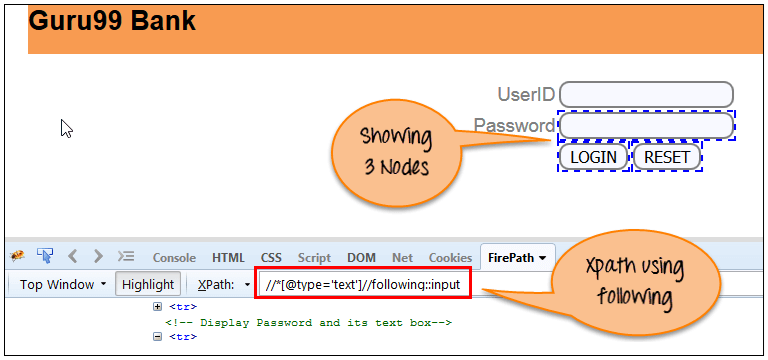
після: Ця функція повертає безпосередній елемент певного компонента.
Ось такий наш запит XPath
Xpath=//*[@type='text']//following::input
import org.openqa.selenium.By;
import org.openqa.selenium.WebDriver;
import org.openqa.selenium.WebElement;
import org.openqa.selenium.chrome.ChromeDriver;


public class Following {
	public static void main(String[] args) {
		WebDriver driver;
		WebElement w;

		System.setProperty("webdriver.chrome.driver","E://Selenium//Selenium_Jars//chromedriver.exe");
		 driver= new ChromeDriver();

         // Launch the application
     	 driver.get("https://www.guru99.com/");

     	 //Search the element by using Following method
     	 w=driver.findElement(By.xpath("//*[@type='text']//following::input"));

		//Print the text of the searched element
     	 System.out.println(w.getText());

	//Close the browser
     driver.quit();
	}
}
Попередній: Ця функція повертає попередній елемент певного елемента.
Ось такий наш запит XPath
Xpath= //*[@type='submit']//preceding::input

import org.openqa.selenium.By;
import org.openqa.selenium.WebDriver;
import org.openqa.selenium.WebElement;
import org.openqa.selenium.chrome.ChromeDriver;


public class Preceding {
	public static void main(String[] args) {

		WebDriver driver;
		WebElement w;

		System.setProperty("webdriver.chrome.driver","E://Selenium//Selenium_Jars//chromedriver.exe");
		 driver= new ChromeDriver();

         // Launch the application
     	 driver.get("https://www.guru99.com/");

     	 //Search the element by using preceding method
     	 w=driver.findElement(By.xpath("//*[@type='submit']//preceding::input"));

		//Print the searched element
     	 System.out.println(w.getText());

	//Close the browser
     driver.quit();

	}
}
d) Нащадок: Ця функція повертає елемент-нащадок конкретного елемента.
Ось такий наш запит XPath
Xpath= //*[@id='rt-feature']//descendant::a

import org.openqa.selenium.By;
import org.openqa.selenium.WebDriver;
import org.openqa.selenium.WebElement;
import org.openqa.selenium.chrome.ChromeDriver;


public class Descendant {
	public static void main(String[] args) {
		WebDriver driver;
		WebElement w;
		System.setProperty("webdriver.chrome.driver","E://Selenium//Selenium_Jars//chromedriver.exe");
		 driver= new ChromeDriver();

         // Launch the application
     	 driver.get("https://www.guru99.com/");

     	 //Search the element by using descendant method
     	 w=driver.findElement(By.xpath("//*[@id='rt-feature']//descendant::a"));

		//Print the searched element
     	 System.out.println(w.getText());

	//Close the browser
     driver.quit();
	}
}
