
10 Best FREE Salesforce Alternatives (2026)
 Editoryal Takım
Açıklama: Guru99 okuyucu desteğiyle ayakta durmaktadır. Bu sayfadaki bağlantılar aracılığıyla satın alma yaptığınızda komisyon kazanabiliriz. Devamını okuyunuz

People seek a CRM alternative when Salesforce feels costly, difficult to administer, or excessive for their actual sales process. Poor adoption leaves records incomplete, unreliable automations waste follow-up time, cluttered interfaces slow representatives, hidden add-ons inflate budgets, and inconsistent integrations fragment customer context. Buyers often overlook migration effort and governance until implementation begins. A focused platform can simplify selling, restore data confidence, improve forecasting, and make daily customer work feel manageable again.
I spent 105+ hours researching 30+ CRM solutions, checking current plans, features, integrations, security, AI capabilities, and recurring customer feedback. My in-depth research shortlisted ten Best Salesforce Alternatives with different strengths and trade-offs. This guide combines structured feature evaluation with clear pros and cons, backed-by current official evidence. Continue reading to identify the most practical fit. Daha fazla oku…

Zoho, iş faaliyetlerine yönelik kesin çözümler sunan tasarımlarla ekiplerin üretkenliğini artırmanıza yardımcı olan bir Satış CRM aracıdır. Başlangıç şirketleri için en iyi CRM'lerden biridir ve temel ölçümleri izlemek ve aylık hedefleri yönetmek için kolay bir yol sağlar.
Best Salesforce Competitors
| araç | Zoho CRM |
 Monday CRM |
 HubSpot CRM'si |
 Pipedrive |
| Özellikler | ✔️ Bir sorun bildirebilirsiniz ve tracOnlar tamir edilip test edilirken onları takip edin. ✔️ Ekip her zaman tüm proje belgelerinin en son sürümüne erişecektir. |
✔️ Her şeyi tek bir çalışma alanında yönetin ✔️ Dakikalar içinde kurulum |
✔️ Tamamen görsel satış hattına sahip ücretsiz CRM | ✔️ Performansınızı tahmin etmenize yardımcı olur. ✔️ Web formlarınızdan ve chatbot'unuzdan fırsatlar elde edebilirsiniz. |
| Fiyat | 15 Günlük Ücretsiz Deneme (Kredi kartı gerekmez) | Ücretsiz Sonsuza Kadar Plan | Ücretsiz Sonsuza Kadar Plan | 30 Günlük Ücretsiz Deneme (Kredi Kartı Gerekli Değil) |
| Revgörünüm/derecelendirme |  4.7 4.7 |
4.5 |
4.5 |
4.5 |
| Link | Web sitesini ziyaret | Web sitesini ziyaret | Web sitesini ziyaret | Web sitesini ziyaret |
1) Zoho CRM
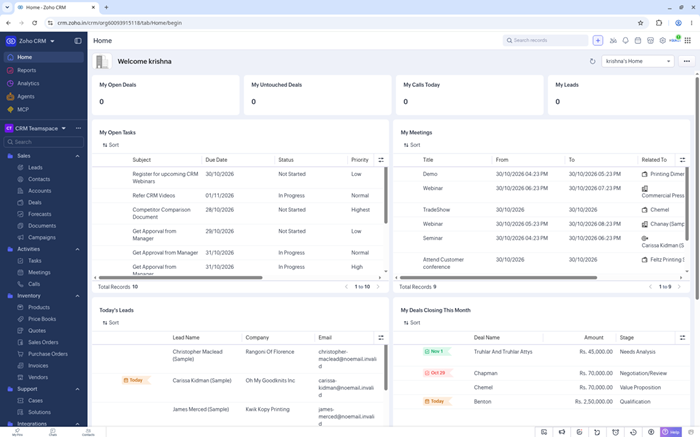
Zoho CRM gives growing teams broad sales automation without Salesforce-level costs. Its Blueprint builder standardizes lead stages, approvals, and handoffs. Canvas reshapes record layouts, while dashboards connect activity with forecasts. A free edition supports three users managing leads, contacts, and deals.
Sales teams can connect email, telephone, social channels, and Zoho applications. Zia adds scoring, predictions, summaries, and recommendations on eligible editions. The setup depth rewards careful planning, since advanced workflows contain many choices. Companies wanting configurable processes and predictable entry pricing should find substantial room to grow.
Özellikler
- Boru Hattı Kontrolü: Track leads, contacts, accounts, and deals through configurable stages. Forecasts and probability settings give managers a practical view of expected revenue.
- Taslak: Define required steps, approvals, and field updates for each process stage. Reps follow consistent actions without memorizing internal operating rules.
- Canvas: Rearrange fields, components, and record layouts through a visual editor. Teams can present role-specific information without rebuilding the underlying CRM data.
- Zia AI: Score opportunities, summarize records, detect anomalies, and suggest suitable actions. Availability and usage limits vary across Professional, Enterprise, and Ultimate editions.
- İş Akışı Kuralları: Trigger assignments, notifications, field changes, webhooks, or custom functions from record events. Automation reduces repetitive updates across recurring sales processes.
- Çok Kanallı Satışlar: Connect email, calling, social messages, meetings, and customer portals with CRM records. Shared context helps representatives continue conversations without searching separate tools.
- Analytics: Build reports, dashboards, cohorts, and forecasting views around live sales data. Managers can examine conversion patterns by owner, source, territory, or stage.
- Entegrasyonlar: Connect Zoho applications, marketplace extensions, APIs, and common productivity platforms. Teams can keep finance, marketing, support, and sales records coordinated.
Artılar
Eksiler
Fiyatlar
Zoho CRM offers three free seats and a 15-day trial; annual paid editions begin at $14 monthly.
| Plan | Fiyatlar |
|---|---|
| Ücretsiz | $0; up to 3 users; core lead, contact, and deal management |
| Standart | $14/user/month billed annually; workflows, cadences, and forecasting |
| PROFESSIONAL | $23/user/month billed annually; Blueprint, CPQ, and inventory management |
Free for 3 users; 15-Day Trial
2) Monday CRM
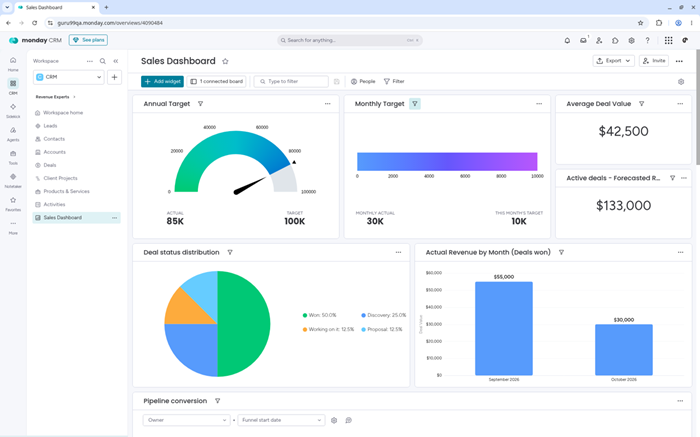
Monday CRM turns leads, accounts, activities, and deals into configurable visual boards. Teams can shape columns, stages, dashboards, and otomasyonlar around their sales method. Email tracking and centralized activity records keep customer context beside each opportunity. New accounts receive a free 14-day trial.
Revenue teams already working in monday.com gain familiar navigation and shared data. AI agents can source leads, prepare meetings, summarize calls, and flag deal risks. Standard and Pro plans add stronger automation, communication, and reporting capacity. Seat minimums and contact limits deserve review before larger rollout.
Özellikler
- Anlaşma Panoları: Arrange contacts and opportunities through customizable stages, owners, values, and dates. Multiple views expose pipeline movement without imposing a rigid sales structure.
- İletişim Merkezi: Sync Gmail or Outlook, log activities, track engagement, and reuse templates. Every message remains connected with its matching contact or deal.
- Sales Sequences: Combine scheduled emails, calls, and tasks into repeatable outreach paths. Engagement history updates automatically so representatives can see each completed touchpoint.
- Yapay Zeka Aracıları: Source and enrich leads, prepare meeting briefs, or qualify prospects through specialized agents. Available functions and credits depend on the selected plan.
- Otomasyonu: Trigger ownership changes, reminders, status updates, and follow-up steps from board events. Monthly action allowances increase across Standard, Pro, and Ultimate.
- Panolar: Combine pipeline, activity, target, and forecast widgets into live management views. Higher plans expand the number of boards included within one dashboard.
- Alıntı: Create quotes and invoices from CRM records while preserving customer and deal context. Monthly document limits differ across subscription levels.
- Açık Ekosistem: Connect APIs, MCP, and more than 200 supported integrations with revenue workflows. Shared data can span marketing, service, and work management products.
Artılar
Eksiler
Fiyatlar
Monday CRM starts with a 14-day trial; annual Basic pricing begins at $12 per seat monthly.
| Plan | Fiyatlar |
|---|---|
| Temel | $12/seat/month billed annually; 1,000 active contacts and deals |
| Standart | $17/seat/month billed annually; 250 automations and centralized communications |
| başına | $28/seat/month billed annually; sequences, mass email, and deeper reporting |
14-Day Ücretsiz Deneme
3) HubSpot CRM'si
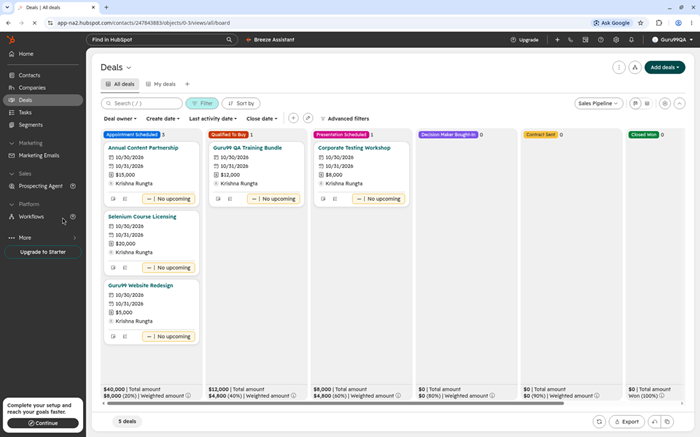
HubSpot CRM combines contact records, deal pipelines, email tracking, meetings, and live chat. Its free tools support two users without requiring payment details. The Akıllı CRM also connects sales, marketing, service, content, and data products through one customer record.
Growing teams benefit from approachable navigation and a large integration marketplace. Sales Hub adds sequences, forecasting, calling, coaching, and advanced workflows across paid tiers. Breeze and credit-based agents assist prospecting, research, and record management. Costs rise sharply when teams require Professional automation, added seats, or formal onboarding.
Özellikler
- Akıllı CRM: Centralize contacts, companies, deals, tickets, and engagement history within shared records. Teams can coordinate revenue activity without maintaining separate customer databases.
- E-posta Araçları: Track opens, reuse templates, schedule meetings, and log conversations from connected inboxes. Limits increase as teams move from free tools upward.
- Sales Workspace: Organize prospects, tasks, sequences, and guided actions within one selling view. Representatives can prioritize follow-ups using current engagement and pipeline context.
- Breeze AI: Research companies, summarize records, draft communication, and run specialized agents. Some actions consume HubSpot Credits or require paid product editions.
- Otomasyon: Create stage-based tasks, notifications, lead routing, sequences, and workflows. Professional and Enterprise provide substantially deeper automation than free or Starter access.
- Raporlama: Monitor pipeline, activity, forecasting, and revenue metrics through configurable dashboards. Advanced report construction and custom objects remain tied to higher editions.
- Uygulama Pazarı: Bağlantı Kurun Gmail, Outlook, LinkedIn tools, ecommerce services, and thousands of marketplace applications. Data Sync supports bidirectional information exchange across compatible systems.
- Customer Platform: Combine sales, marketing, service, content, commerce, and operations around shared records. Bundled adoption reduces handoffs but increases packaging and governance decisions.
Artılar
Eksiler
Fiyatlar
HubSpot provides two free seats and a 14-day premium trial; paid sales tiers add automation and credits.
| Plan | Fiyatlar |
|---|---|
| Ücretsiz | $0; up to 2 users; core contact, deal, email, and meeting tools |
| marş | From $7/seat/month promotional annual pricing; $20 list price |
| PROFESSIONAL | $90/seat/month billed annually; $1,500 required onboarding fee |
Free for 2 users; 14-Day Premium Trial
4) Pipedrive
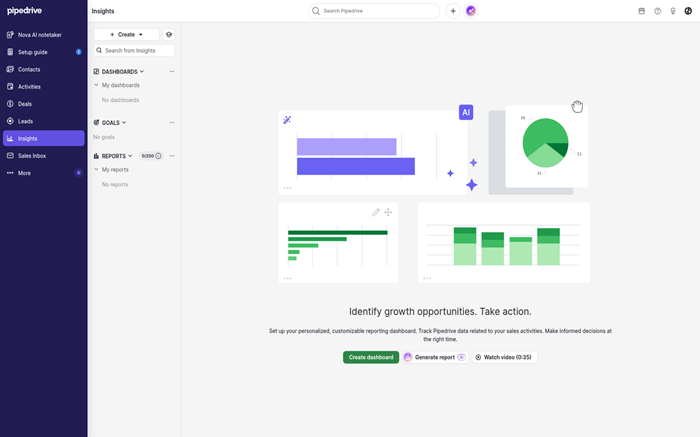
Pipedrive centers daily work on a visual pipeline designed for sales activity. Representatives drag deals between stages, schedule the next action, and review contact timelines. The activity-based workflow keeps calls, meetings, and proposals visible. Every plan begins with a free 14-day trial.
Managers can build reports, forecasts, automations, and custom fields without enterprise administration. Growth adds email sync and sequences, while Premium expands permissions, scoring, and enrichment. Nova supplies meeting intelligence and report creation. Teams needing extensive marketing, service, or bespoke data models may eventually outgrow its sales-first scope.
Özellikler
- Görsel İşlem Hattı: Move deal cards through custom stages with values, owners, and expected dates visible. Status signals make stalled or overdue activity easier to notice.
- Aktivite Bazlı Satış: Schedule calls, meetings, emails, and follow-ups as each deal progresses. The system emphasizes controllable actions instead of relying only on final revenue.
- E-posta Sync: Gelen kutularını birbirine bağlayın, track opens, send templates, and preserve messages beside contact timelines. Full synchronization and sequences begin above the Lite plan.
- Nova AI: Generate reports from text, prepare meeting briefs, transcribe calls, and suggest record updates. Specific intelligence functions vary by subscription level.
- Otomasyonu: Build event-driven follow-ups, assignments, and multistep sequences through workflow rules. Growth introduces automation, while higher plans increase monthly capacity and controls.
- Insights: Create dashboards, reports, goals, and revenue forecasts from pipeline data. Premium expands reporting limits, custom fields, team filters, and scoring.
- Mobile Selling: Update deals, log activities, access contacts, and record notes through mobile applications. Field representatives can keep records current between customer visits.
- Pazarı: Connect more than 500 applications, including productivity and communication systems. APIs and MCP extend workflows when a native connection does not fit.
Artılar
Eksiler
Fiyatlar
Pipedrive offers full access for 14 days; annual Lite pricing starts at $14 per seat monthly.
| Plan | Fiyatlar |
|---|---|
| Lite | $14/seat/month billed annually; core lead, deal, and pipeline management |
| Büyüme | $39/seat/month billed annually; email sync, automations, and sequences |
| Premium | $59/seat/month billed annually; scoring, enrichment, and team controls |
14-Day Free Trial; No Credit Card
5) kreasyon
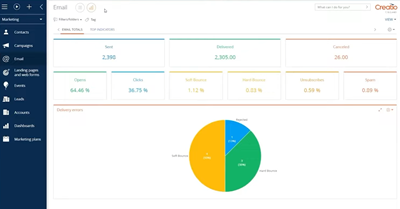
Creatio combines sales CRM with a no-code platform for building complex customer workflows. Its composable architecture covers leads, opportunities, forecasts, orders, contracts, and customer histories. Freedom UI Designer helps business teams reshape screens and processes without conventional application development.
Enterprise buyers can automate multistep sales journeys through a visual process engine. Predictive, generative, and agentic AI support scoring, recommendations, content, and custom agents. The platform also connects service and marketing products. Implementation demands stronger governance than a lightweight CRM, while current pricing includes platform, product, and annual minimum considerations.
Özellikler
- Müşteri Görünümü: Combine account details, contacts, documents, activities, and interaction history inside unified profiles. Sales teams can understand relationships before planning their next engagement.
- Hayır-Code Stüdyo: Design pages, data models, applications, and workflows through visual tools. Business teams can adapt CRM behavior without waiting for every developer change.
- İşlem Motoru: Model approvals, assignments, branching steps, and cross-department workflows. Ready processes cover common lead, opportunity, order, and contract stages from initial setup.
- Yapay Zeka Stüdyosu: Configure predictive scoring, generative actions, recommendations, and custom agents. AI packages and action allowances affect the final cost of larger deployments.
- Revenue Intelligence: Evaluate pipeline movement, opportunity health, forecast categories, and sales activity. Managers can identify risk using current CRM signals instead of delayed reports.
- Satış Katılımı: Build structured outreach sequences combining email, calls, and representative tasks. Analytics show which engagement patterns produce movement across the pipeline.
- Pazarı: Add connectors, industry components, and ready applications from the Creatio ecosystem. APIs also support integration with specialized internal and external systems.
- Mobile Sales: Access customer records, leads, opportunities, meetings, and dashboards through mobile applications. Offline work synchronizes when a connection becomes available again.
Artılar
Eksiler
Fiyatlar
Creatio combines platform and CRM product charges; current public terms include a $10,000 annual minimum.
| Plan | Fiyatlar |
|---|---|
| Büyüme | $40/user/month platform plus $15/user/month for Creatio Sales |
| Enterprise | $75/user/month platform plus $15/user/month for Creatio Sales |
| Limitsiz | Custom pricing; includes the platform and all CRM products |
Guided Demo; Trial Duration Not Stated
6) Hızlı taban
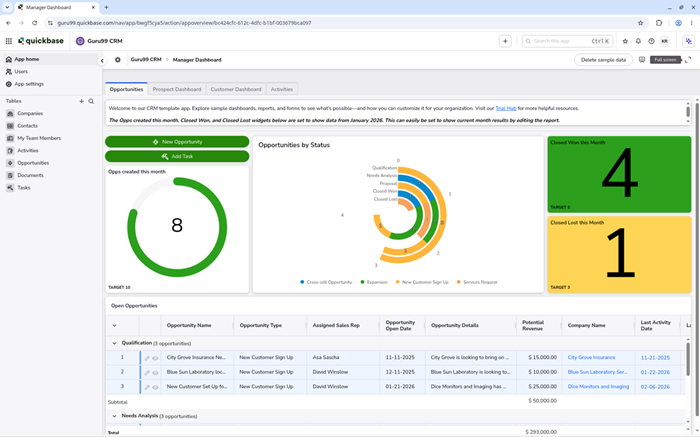
Quickbase is a no-code application platform that can replace rigid CRM structures. Teams model customer, project, asset, and operational data inside relational applications. Forms, reports, permissions, and Boru Hatları create workflows around the organization rather than forcing one standard sales model.
Operations groups benefit when customer work crosses delivery, field service, or internal approvals. More than 40 connectors and APIs link external systems with Quickbase data. Dashboards can differ by role, while audit and governance controls support organizations. Builders still need training, and platform minimums weaken its appeal for small teams.
Özellikler
- Uygulama Oluşturucu: Create relational tables, forms, formulas, rules, and interfaces through visual configuration. Teams can model customer operations that exceed conventional CRM record structures.
- Boru hatları: Connect triggers, conditions, transformations, and external systems inside a visual workflow. Reusable steps automate work between Quickbase applications and connected services.
- Role Dashboards: Combine reports, charts, buttons, and relevant records for each audience. Sales, operations, and leadership can view different information from shared data.
- Smart Builder: Describe an application or connected workflow through a prompt, then review generated structure. Human validation remains important before activating business-critical logic.
- Connected Tables: Mirror selected datasets from cloud services, files, or other Quickbase applications. Teams can reference external information without creating uncontrolled duplicate spreadsheets.
- Yönetim: Control roles, permissions, encryption, audit logs, and application changes effectively across teams. Business adds single sign-on, provisioning, sandboxing, and regulated-industry options.
- Raporlama: Build tables, charts, summaries, calendars, and dashboards around live operational data. More than thirteen report types support different management questions.
- Mobil Erişim: Open configured applications on mobile devices without separate development. Field teams can review records, complete forms, and update workflows outside offices.
Artılar
Eksiler
Fiyatlar
Quickbase provides a 30-day Business trial; annual subscriptions include per-user pricing and a platform minimum.
| Plan | Fiyatlar |
|---|---|
| Ücretsiz deneme | 30 gün boyunca ücretsiz; İşletme planı özelliklerini içerir. |
| Team | Yıllık faturalandırma ile kullanıcı başına aylık 35$'dan başlayan fiyatlarla; platform minimum şartları geçerlidir. |
| İşletme | From $55/user/month billed annually; SSO, sandbox, and compliance controls |
30-Day Free Business Trial
7) Taze Satış
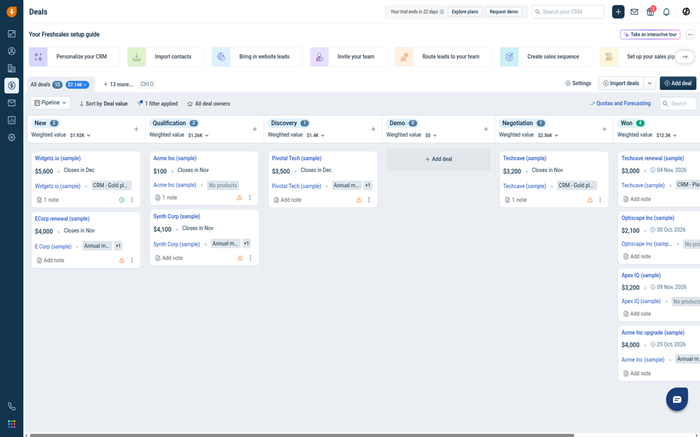
Freshsales organizes contacts, accounts, deals, activities, and conversations for sales teams. A free plan supports three users, while every signup can begin with a 21-day trial. Built-in email, phone, chat, and Kanban pipelines reduce switching between everyday communication tools.
Smaller teams gain approachable setup, custom fields, tasks, and basic workflows. Pro adds scoring, sequences, territory management, and deal insights. Freddy AI helps prioritize contacts, detect duplicates, and identify promising opportunities. Reporting and customization become stronger on higher plans, so buyers should map required controls before migrating.
Özellikler
- Contact Context: Combine profiles, lifecycle stages, activities, conversations, and account relationships within one record. Representatives can review recent engagement before contacting a prospect.
- İşlem Hattı Görünümleri: Manage opportunities through Kanban stages and relevant deal fields. Multiple pipelines, products, goals, and forecasting support growing sales operations on paid plans.
- Çok Kanallı Satışlar: Connect email, calling, chat, WhatsApp, and supported messaging services together. Communication history remains attached to customer records for better handoffs.
- Freddy Yapay Zekası: Score contacts, flag duplicate records, detect absence messages, and surface deal insights quickly. Advanced predictions and agents depend on the selected package.
- Sales Sequences: Coordinate scheduled emails, calls, and SMS steps for repeatable outreach. Teams can personalize interactions while reducing repetitive manual follow-up planning.
- İş akışları: Automate assignments, notifications, field updates, and business actions from defined triggers. Basic rules start on Growth, with deeper capacity above it.
- Analytics: Review standard, conversion, attribution, win-loss, and custom reports. Managers can build dashboards around pipeline performance, activities, territories, and sales outcomes.
- Mobil CRM: Access records, check into meetings, record voice notes, and work offline. Gmail hem de Outlook add-ons keep account context available during communication.
Artılar
Eksiler
Fiyatlar
Freshsales offers three free seats and a 21-day trial; annual Growth pricing starts at $9 monthly.
| Plan | Fiyatlar |
|---|---|
| Ücretsiz | $0; up to 3 users; core contact and account management |
| Büyüme | $9/user/month billed annually; email, phone, chat, and basic workflows |
| başına | $39/user/month billed annually; scoring, sequences, territories, and deal insights |
Free for 3 users; 21-Day Trial
8) Pipeline CRM
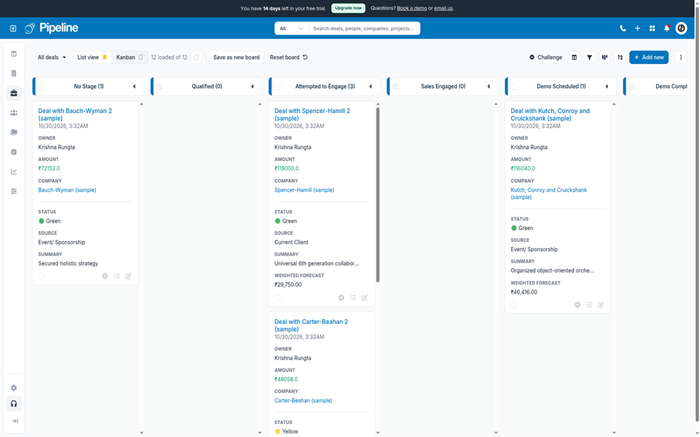
Pipeline CRM is a sales-focused platform for B2B teams. Its drag-and-drop pipeline shows deal value, stage, owner, and next action. Email tracking, tasks, reports, and stage-weighted forecasting keep daily selling connected. A free 14-day Grow trial requires no card.
Practical tools include custom fields, campaigns, document generation, forms, mobile applications, and QuickBooks integration. Pipeline Copilot can build fields, automations, reports, and records from plain language during beta. Start limits active deals and pipelines, while advanced email and project functions require Grow or separate services.
Özellikler
- Pipeline Board: Drag opportunities through custom stages while viewing values and next steps. Stage probabilities feed weighted forecasting and help reveal stalled work.
- E-posta Entegrasyonu: Bağlantı Kurun Gmail or Outlook, track engagement, reuse templates, and log messages. Grow adds campaigns and broader email capabilities for larger outreach programs.
- Pipeline Copilot: Create pipelines, fields, automations, reports, dashboards, and everyday records through plain language. Administrators can restrict access and review structural changes.
- Öngörü: Compare weighted pipeline values, win rates, activity, and quiet deals. Shared dashboards help managers challenge assumptions before committing revenue numbers.
- Instant Docs: Generate proposals or agreements from existing Word templates and CRM fields. Electronic signatures keep document status connected with the originating deal.
- Lead Forms: Publish linked or embedded forms that create records and deals automatically. Custom fields capture relevant information without requiring a separate form system.
- Mobile Sales: Log visits, scan business cards, update deals, and plan routes through native applications. Field activity reaches shared records before details are forgotten.
- Entegrasyonlar: Connect QuickBooks Online, Gmail, Outlook, Mailchimp, APIs, and Zapier. Managed Pipeline Connect services are available when teams need maintained custom connections.
Artılar
Eksiler
Fiyatlar
Pipeline CRM includes a 14-day Grow trial; annual Start pricing begins at $25 per user monthly.
| Plan | Fiyatlar |
|---|---|
| Ana Sayfa | $25/user/month billed annually; 1 pipeline and 250 active deals |
| Geliştirme | $33/user/month billed annually; 2 pipelines and 2,500 active deals |
| Büyümek | $49/user/month billed annually; 5 pipelines and unlimited active deals |
14-Day Grow Trial; No Credit Card
9) Kapsül
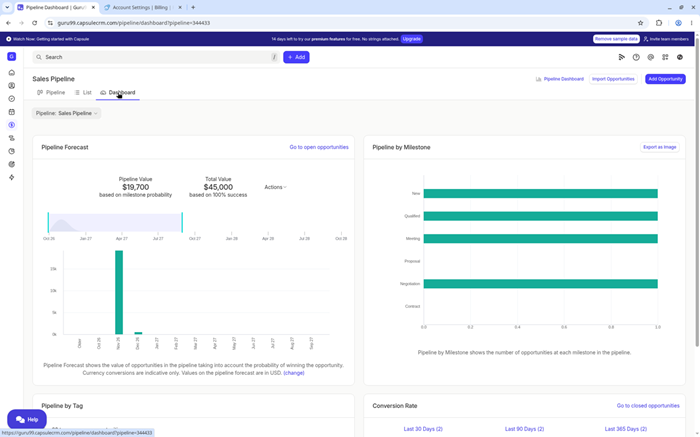
Capsule keeps contacts, opportunities, projects, tasks, and communication in a clean CRM. Its free plan supports two users, 250 contacts, and one sales pipeline. Custom fields and tags organize relationship details, while the Kanban pipeline makes opportunity movement easy to follow.
Small businesses can connect Gmail, Outlook, accounting tools, and marketing applications. Growth introduces workflow automation, multiple pipelines, dashboards, enrichment, and AI summaries. The interface favors quick adoption over enterprise depth. Teams needing complex permissions, forecasting, or sophisticated automation should compare higher tiers carefully before committing.
Özellikler
- İletişim Kayıtları: Store people, organizations, notes, files, emails, tasks, and opportunity history together. Full-text search helps teams retrieve relationship context without opening separate systems.
- Satış Hattı: Drag opportunities between custom milestones and filter them by owner, status, tag, or value. Dashboards summarize conversion, forecast, and pipeline movement.
- Görev Tracks: Create repeatable task sequences for common sales or delivery processes. Each completed action activates the next responsibility at the appropriate time.
- Capsule AI: Generate pipelines, summarize recent activity, draft follow-ups, and enrich company details. Stronger enrichment and meeting preparation appear on higher paid plans.
- E-posta Araçları: Üzerinde çalış Gmail, Outlook, shared inboxes, templates, and connected mailboxes. Conversation history stays attached automatically to relevant contacts and opportunities.
- Project Boards: Track post-sale delivery through stages, tasks, and linked customer records. Multiple project boards become available as teams move beyond Starter.
- Raporlama: Analyze sales outcomes, activity, forecasts, task efficiency, and contact health. Growth introduces dashboards and more detailed sales reporting for managers.
- Bağlantı: Connect more than 60 supported applications, Zapier, and Capsule APIs. Accounting, marketing, productivity, and communication data can follow customer relationships.
Artılar
Eksiler
Fiyatlar
Capsule provides two free seats and 14-day paid trials; annual Starter pricing begins at $18 monthly.
| Plan | Fiyatlar |
|---|---|
| Ücretsiz | $0; up to 2 users; 250 contacts and 1 sales pipeline |
| marş | $18/user/month billed annually; 30,000 contacts and basic reporting |
| Büyüme | $36/user/month billed annually; automation, dashboards, and multiple pipelines |
Free for 2 users; 14-Day Paid Trial
10) Tek SayfaCRM
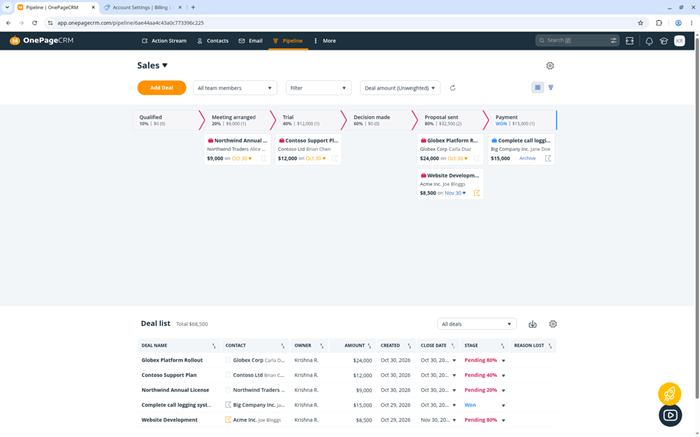
OnePageCRM structures selling around a clear next action for every contact. The Action Stream gathers due follow-ups, calls, and tasks into one prioritized list. Unlimited contacts, custom fields, tags, and deals appear on every paid plan. A 21 günlük ücretsiz deneme includes full CRM access.
Small teams can manage pipelines, email sync, quotes, web forms, dashboards, and mobile work without administration. Autoflows create recurring actions, while AI summarizes records and enriches contacts. Professional remains focused. Organizations requiring complex service operations, deep segmentation, or enterprise analytics may find its streamlined approach limiting.
Özellikler
- Sonraki Eylemler: Attach a specific follow-up and due date to every important contact. The Action Stream turns relationship management into a prioritized daily agenda.
- Contact View: Review communication, notes, deals, tasks, tags, and custom fields without excessive navigation. Split-pane layouts keep important context beside the current activity.
- Satış Hatları: Manage deals through customizable Kanban stages and forecast views. Business supports ten pipelines, while Max removes the pipeline limit for complex teams.
- Autoflows: Trigger repeatable actions, reminders, and email steps for contacts or deals. Plan limits range from fifteen workflows to unlimited automation on Max.
- E-posta Sync: Connect mailboxes, send personalized bulk messages, and preserve conversation history. Tracking, scheduling, sequences, and higher volumes depend on the selected edition.
- AI Asistanı: Summarize activity histories, enrich contact information, and support route planning. Every plan includes practical AI, although usage limits differ across mobile functions.
- Web Formları: Capture new prospects through hosted or embedded forms that create records automatically. Submitted contacts can arrive with assigned tasks for immediate follow-up.
- Mobil CRM: Scan business cards, plan routes, call contacts, and update opportunities through native applications. Changes synchronize across devices for field sales continuity.
Artılar
Eksiler
Fiyatlar
OnePageCRM provides a 21-day full trial; annual Professional pricing begins at $9.95 per user monthly.
| Plan | Fiyatlar |
|---|---|
| PROFESSIONAL | $9.95/user/month billed annually; one pipeline and 15 Autoflows |
| İşletme | $19.95/user/month billed annually; 10 pipelines and email trackral |
| maksimum | $29.95/user/month billed annually; unlimited pipelines and Autoflows |
21-Day Full Trial; No Credit Card
Salesforce Alternatives Comparison Table
What Is a Salesforce Alternative and How Does It Work?
A Salesforce alternatifi is another CRM managing customer and revenue data. It usually includes contacts, leads, opportunities, tasks, reports, and automation. Teams consider replacements when Salesforce costs or administration exceed practical needs. The chosen platform becomes their shared customer system after data migration. Salespeople record activities and move deals through clearly defined pipeline stages. Managers review forecasts, conversions, workloads, and representative activity from dashboards. A suitable option preserves necessary processes while reducing unnecessary operational complexity. That balance improves adoption, data quality, and daily sales visibility.
Why Do Companies Look for Alternatives to Salesforce?
Companies usually reconsider Salesforce because ownership extends beyond license prices. Administration, consultants, add-ons, training, and integrations can enlarge the final bill. Smaller teams may also struggle with unused fields and complicated screens. That friction reduces CRM benimsenmesi and weakens reporting accuracy over time. A focused alternative can shorten setup and simplify common sales actions. However, changing platforms creates meaningful migration and employee retraining work. Buyers should identify which Salesforce processes genuinely matter before switching platforms. The replacement must still support essential controls, integrations, and growth.
What Features Should You Look for in Salesforce Alternatives?
Start with the sales process rather than the longest feature list.
- Boru hattı yönetimi: Custom stages, activities, probability, and forecasting should match real selling.
- Otomasyon: Rules should assign records, schedule follow-ups, and enforce required steps.
- Entegrasyonlar: Email, accounting, marketing, support, and data tools need reliable connections.
- Yönetim: Permissions, audit history, exports, and security controls must fit company risk.
- Raporlama: Managers need clear understandable dashboards without constant spreadsheet rebuilding.
- Ölçeklenebilirlik: Review plan limits for users, records, workflows, storage, and API calls.
AI matters when it improves workflows, not when it adds chatbots.
How Much Should a Salesforce Alternative Cost?
CRM pricing ranges from free plans to costly enterprise contracts. Small teams often find capable tools between ten and forty dollars. Advanced automation, forecasting, permissions, and AI can raise costs significantly. Compare toplam sahip olma maliyeti, not only the advertised seat price. Include minimum seats, platform fees, migration, training, support, and integrations. Annual discounts reduce subscriptions but create longer contractual commitments for buyers. Entry plans may also restrict records, automation, storage, and reporting. A short pilot confirms whether premium features reduce operational effort.
How Do You Migrate from Salesforce Without Losing CRM Data?
A controlled migration starts with data cleanup and a complete dependency map.
- Envanter: List Salesforce objects, fields, automations, reports, users, and integrations.
- Temizleyin: Remove duplicates, close obsolete records, and standardize ownership before export.
- Harita: Match every required field with the destination CRM data structure.
- Pilot: Import a representative sample and test relationships, dates, permissions, and reports.
- Uzlaştır: Compare record counts and totals after the final migration.
- Koruyun: Keep a secure Salesforce export until stakeholders approve the replacement.
Run both systems briefly when revenue work cannot tolerate missing history.
Can Salesforce Alternatives Integrate with Your Existing Sales Stack?
Established alternatives usually connect email, calendars, accounting, marketing, and communication. Native connections generally require less maintenance than custom middleware solutions. APIs, webhooks, MCP, and automation services cover specialized workflows effectively. Buyers should test the complete veri akışı between connected systems. Check field mapping, update direction, duplicates, permissions, delays, and alerts. Some connectors require higher plans or separate recurring charges from providers. A pilot should create, update, and remove representative customer records. Confirm every critical system receives accurate information before the final migration.
How Secure Are Modern Salesforce Alternatives?
Security varies across providers, product editions, and customer deployment requirements. Buyers should verify encryption, multifactor authentication, permissions, logs, and backups. Larger organizations may require single sign-on, provisioning, sandboxes, or regional hosting. Review independent compliance reports through each provider's published trust center. Never assume every güvenlik kontrolü exists within an entry plan. Internal configuration still determines how safely the CRM operates daily. Excessive administrator access and unmanaged integrations can weaken strong protections. Document ownership and review user access at regular scheduled intervals.
How Can AI Improve Salesforce Alternative Workflows?
CRM AI can summarize records, prepare meetings, and draft customer messages. Predictive models can score leads or recommend suitable follow-up timing. These functions reduce searching and repetitive entry when records remain accurate. Buyers should examine Yapay zeka sınırları, credits, data handling, and approvals. Generated content still requires review before reaching customers or prospects. AI cannot repair a poorly designed sales pipeline independently today. Clear stages and reliable data improve every automated recommendation significantly. Focused automation should already support the underlying sales process properly.
Can AI Replace CRM Administrators and Manual Sales Work?
AI can complete selected configuration, reporting, research, and communication tasks. It cannot own governance, permissions, process design, or business accountability. Administrators still decide which customer data matters for daily work. Salespeople still interpret intent, negotiate terms, and manage sensitive relationships. AI agents need monitoring because records and business rules change frequently. Treat CRM yapay zekası as controlled assistance, not unattended business management. Require approval for structural changes, data deletion, and customer messages. Human administrators remain accountable for automation affecting revenue or compliance.
How Do You Choose a Salesforce Alternative for a Small Business?
Small businesses should begin with one representative end-to-end sales workflow. Test lead capture, qualification, follow-up, quoting, closing, and reporting together. Count every editing user and each required business integration carefully. Then compare free limits, paid jumps, onboarding, and available support. A simpler CRM often delivers stronger takım benimseme than complexity. Avoid buying for distant possibilities while ignoring immediate daily work. Choose the smallest system that handles current processes reliably today. Confirm the selected plan offers a credible path for growth.
How Do We Select the Best Salesforce Alternatives?

Guru99 invests extensive research effort into current CRM comparisons, checking official plans, product capabilities, customer patterns, and practical buying risks before publishing each recommendation for readers across growing organizations today.
- Fiyatlandırma ve Değer: We compared free access, trial periods, annual rates, minimum seats, onboarding charges, add-ons, and contract conditions. This revealed the practical cost beyond headline subscription figures.
- Benimseme Kolaylığı: Our team examined interface structure, setup requirements, migration paths, training resources, and recurring learning concerns. Products needed a realistic path from trial account to regular sales activity.
- Core CRM Work: The researchers checked contact management, pipelines, activities, email history, forecasting, reporting, and mobile access. Each recommendation had to support a defined sales audience.
- Otomasyon ve Yapay Zeka: The team reviewed workflow triggers, sequences, assignments, scoring, summaries, agents, credit limits, and approval controls. AI received credit only when it completed a useful CRM task.
- Entegrasyonlar: Our testers mapped native applications, APIs, webhooks, accounting tools, inbox connections, and automation services. They also noted where higher plans or paid services affected connectivity.
- Güvenlik ve Yönetişim: Our experts checked permissions, audit capabilities, multifactor authentication, enterprise controls, backups, exports, and published compliance information. Requirements were matched with available plan levels.
- Ölçeklenebilirlik: The experts reviewed record limits, workflow capacity, dashboards, storage, API allowances, user models, and support options. This helped distinguish small-team tools from enterprise workflow platforms.
- Customer Patterns: We synthesized recurring feedback across reputable review platforms. Common praise and complaints shaped the Pros and Cons without copying isolated opinions or treating one review as universal.
How Do You Troubleshoot Common Salesforce Migration and CRM Problems?
CRM changes often fail through configuration or data problems rather than missing features. Diagnose one workflow at a time before expanding the rollout.
- Konu: Imported records lose company relationships or activity history after Salesforce migration.
Çözüm: The administrator should verify object mapping, relationship identifiers, and import order before rerunning a smaller controlled batch. - Konu: Duplicate contacts appear when forms, inboxes, and imports create records differently.
Çözüm: The team should define matching rules, standardize required fields, and merge records before activating additional lead sources. - Konu: Automations suddenly assign opportunities incorrectly after stages or ownership rules change.
Çözüm: The administrator should inspect rule order, conditions, inactive users, and recent edits using a test record. - Konu: Email synchronization misses messages or attaches conversations to incorrect customer records.
Çözüm: The team should reconnect mailboxes, confirm address matching, review permissions, and test messages through supported inbox configurations. - Konu: Dashboards disagree with finance totals near month-end forecasting and reporting deadlines.
Çözüm: The analyst should align date fields, currencies, probability rules, filters, and closed-stage definitions across both systems. - Konu: Representatives avoid the new CRM and continue maintaining separate private spreadsheets.
Çözüm: Management should simplify required fields, train around real workflows, and review adoption indicators during weekly sales meetings. - Konu: Integrations stop updating records without producing visible errors for responsible CRM administrators.
Çözüm: The owner should check credentials, API limits, field changes, failure logs, and retry behavior before rebuilding connections.
Karar
After comparing ten CRM platforms, I found three options that balanced adoption, pricing clarity, automation, and growth potential particularly well.
- Zoho CRM: I preferred its broad customization, free entry point, and practical pricing across increasingly capable editions.
- Monday CRM: Its visual boards and flexible automations gave revenue teams an approachable path away from rigid CRM structures.
- HubSpot CRM'si: The connected customer platform impressed me for combining sales, marketing, and service context around shared records.
