---
description: Shell Script Tutorial - Shell Scripting is an open-source computer program designed to be run by the Unix/Linux shell. Learn the basics to advance shell scripting in this tutorial.
title: Shell Scripting Tutorial
image: https://www.guru99.com/images/shell-scripting-tutorial.png
---


[Skip to content](#main) 

**⚡ Smart Summary**

Shell Scripting Tutorial introduces how to automate Linux and Unix tasks using shell command files. Lessons cover shells, writing your first script, comments, and shell variables.

* 🐚 **Shell Basics:** The shell interprets commands and runs programs on the kernel.
* 📜 **Script Structure:** A shell script is a text file executed top to bottom.
* 🧩 **Popular Shells:** Bash, Zsh, sh, Ksh, and Csh offer slightly different syntax.
* ✍️ **First Script:** Add shebang, chmod +x, then run ./script.sh.
* 📦 **Variables:** NAME=value assigns; $NAME expands; quote for safety.
* 🤖 **AI Shell Help:** AI generates one-liners and explains regex inside scripts.

[ Read More ](javascript:void%280%29;) 

![Shell Scripting Tutorial](https://www.guru99.com/images/shell-scripting-tutorial.png)

## Shell Scripting

**Shell Scripting** is an open-source computer program designed to be run by the Unix/Linux shell. Shell Scripting is a program to write a series of commands for the shell to execute. It can combine lengthy and repetitive sequences of commands into a single and simple script that can be stored and executed anytime which, reduces programming efforts.

This Shell Scripting tutorial helps to learn a basic understanding of the Linux/Unix shell scripting program to advanced concepts of Shell Scripting. This Shell Script tutorial designed for beginners and professionals who want to learn What is Shell Scripting? How shell scripting works, types of shell, and more.

## What is Shell?

**Shell** is a UNIX term for an interface between a user and an operating system service. Shell provides users with an interface and accepts human-readable commands into the system and executes those commands which can run automatically and give the program’s output in a shell script.

An Operating is made of many components, but its two prime components are –

* Kernel
* Shell

[](https://www.guru99.com/images/2/ShellScripting-v1.png)

Components of Shell Program

A Kernel is at the nucleus of a computer. It makes the communication between the hardware and software possible. While the Kernel is the innermost part of an operating system, a shell is the outermost one.

A shell in a Linux operating system takes input from you in the form of commands, processes it, and then gives an output. It is the interface through which a user works on the programs, commands, and scripts. A shell is accessed by a terminal which runs it.

When you run the terminal, the Shell issues **a command prompt (usually $),** where you can type your input, which is then executed when you hit the Enter key. The output or the result is thereafter displayed on the terminal.

The Shell wraps around the delicate interior of an Operating system protecting it from accidental damage. Hence the name **Shell**.

This Unix/Linux Shell Script tutorial helps understand shell scripting basics to advanced levels.

Click [here](https://www.guru99.com/faq#faq1) if the video is not accessible   

## Types of Shell

There are two main shells in Linux:

**1**. The **Bourne Shell**: The prompt for this shell is $ and its derivatives are listed below:

* POSIX shell also is known as ‘sh’
* Korn Shell also knew as ‘ksh’
* **B**ourne **A**gain **SH**ell also knew as bash (most popular)

**2.** **The C shell**: The prompt for this shell is %, and its subcategories are:

* C shell also is known as csh
* Tops C shell also is known as tcsh

We will discuss bash shell based shell scripting in this tutorial.

### RELATED ARTICLES

* [Linux Commands with Examples & Syntax ](https://www.guru99.com/must-know-linux-commands.html "Linux Commands with Examples & Syntax")
* [File Permissions in Linux / Unix: How to Read, Write & Change ](https://www.guru99.com/file-permissions.html "File Permissions in Linux / Unix: How to Read, Write & Change")
* [Input Output Redirection in Linux/Unix Examples ](https://www.guru99.com/linux-redirection.html "Input Output Redirection in Linux/Unix Examples")
* [Linux Tutorial for Beginners – Guru99 ](https://www.guru99.com/unix-linux-tutorial.html "Linux Tutorial for Beginners – Guru99")

## How to Write Shell Script in Linux/Unix

**Shell Scripts** are written using text editors. On your Linux system, open a text editor program, open a new file to begin typing a shell script or shell programming, then give the shell permission to execute your shell script and put your script at the location from where the shell can find it.

Let us understand the steps in creating a Shell Script:

1. **Create a file using a [vi editor](https://www.guru99.com/the-vi-editor.html)** (or any other editor). Name script file with **extension .sh**
2. **Start** the script with **#! /bin/sh**
3. Write some code.
4. Save the script file as filename.sh
5. For **executing** the script type **bash filename.sh**

“#!” is an operator called shebang which directs the script to the interpreter location. So, if we use”#! /bin/sh” the script gets directed to the bourne-shell.

Let’s create a small script –

#!/bin/sh
ls

Let’s see the steps to create Shell Script Programs in Linux/Unix –

[](https://www.guru99.com/images/vi%5Fscriptsample%282%29.png) 

Components of Shell Program

Command ‘ls’ is executed when we execute the scrip sample.sh file.

## Adding shell comments

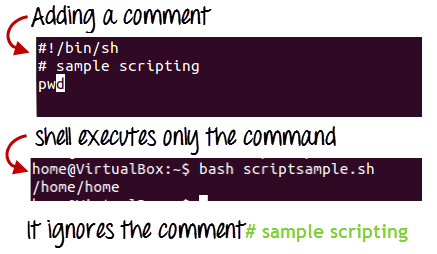
Commenting is important in any program. In Shell programming, the syntax to add a comment is

#comment

Let understand this with an example.

[](https://www.guru99.com/images/adding%5Fcomment.png)

## What are Shell Variables?

As discussed earlier, Variables store data in the form of characters and numbers. Similarly, Shell variables are used to store information and they can by the shell only.

For example, the following creates a shell variable and then prints it:

variable ="Hello"
echo $variable

Below is a small script which will use a variable.

#!/bin/sh echo "what is your name?" read name echo "How lkw">do you lkw">do, $name?" read remark echo "I am $remark too!" 

Let’s understand, the steps to create and execute the script

[](https://www.guru99.com/images/program.jpg)

As you see, the program picked the value of the variable ‘name’ as Joy and ‘remark’ as excellent.

This is a simple script. You can develop advanced scripts which contain conditional statements, loops, and functions. Shell scripting will make your life easy and Linux administration a breeze.

[](https://www.guru99.com/images/Shell%281%29.jpg)

## FAQs

⚡ sh vs bash scripts?

sh follows POSIX. Bash adds arrays, brace expansion, and substitution. Scripts often use #!/bin/bash.

🤖 How does AI help write shell scripts?

AI tools generate scripts from plain language, explain pipes, and convert between bash and zsh.

💡 Can AI debug failing shell scripts?

Yes. AI interprets errors, suggests set -euo pipefail, and recommends shellcheck.

✍️ How to make a script executable?

chmod +x script.sh, then run ./script.sh or place it in PATH.

📦 Read user input in shell?

Use read -p “Prompt: ” varname. Add -s for password masking.

🛡️ Safe to run downloaded scripts?

No. Inspect every script first. Curl-piped installs may hide malicious code.

🐚 Best shell for beginners?

Bash. It ships everywhere and has the most tutorials and Stack Overflow help.

📚 What is the shebang line?

#!/bin/bash tells the OS which interpreter runs the file.

#### Summarize this post with:

ChatGPT Perplexity Grok Google AI 

**Stay Updated on AI** **Get Weekly AI Skills, Trends, Actionable Advice.** 

##### Sign up for the newsletter

Subscribe for Free 

You have successfully subscribed.  
Please check your inbox. 

![AI-Newsletter]() Chosen by over **350,000+** professionals 

[Scroll to top ](#wrapper)Scroll to top 

× 

Toggle Menu Close 

Search for: 

Search

```json
{"@context":"https://schema.org","@graph":[{"@type":"Organization","@id":"https://www.guru99.com/#organization","name":"Guru99","sameAs":["https://www.facebook.com/Guru99Official","https://twitter.com/guru99com"],"logo":{"@type":"ImageObject","@id":"https://www.guru99.com/#logo","url":"https://www.guru99.com/images/guru99-logo-v1-150x59.png","contentUrl":"https://www.guru99.com/images/guru99-logo-v1-150x59.png","caption":"Guru99","inLanguage":"en-US"}},{"@type":"WebSite","@id":"https://www.guru99.com/#website","url":"https://www.guru99.com","name":"Guru99","publisher":{"@id":"https://www.guru99.com/#organization"},"inLanguage":"en-US"},{"@type":"ImageObject","@id":"https://www.guru99.com/images/shell-scripting-tutorial.png","url":"https://www.guru99.com/images/shell-scripting-tutorial.png","width":"700","height":"250","caption":"Shell Scripting Tutorial","inLanguage":"en-US"},{"@type":"BreadcrumbList","@id":"https://www.guru99.com/introduction-to-shell-scripting.html#breadcrumb","itemListElement":[{"@type":"ListItem","position":"1","item":{"@id":"https://www.guru99.com","name":"Home"}},{"@type":"ListItem","position":"2","item":{"@id":"https://www.guru99.com/linux","name":"Linux"}},{"@type":"ListItem","position":"3","item":{"@id":"https://www.guru99.com/introduction-to-shell-scripting.html","name":"Shell Scripting Tutorial"}}]},{"@type":"WebPage","@id":"https://www.guru99.com/introduction-to-shell-scripting.html#webpage","url":"https://www.guru99.com/introduction-to-shell-scripting.html","name":"Shell Scripting Tutorial","dateModified":"2026-06-23T16:11:19+05:30","isPartOf":{"@id":"https://www.guru99.com/#website"},"primaryImageOfPage":{"@id":"https://www.guru99.com/images/shell-scripting-tutorial.png"},"inLanguage":"en-US","breadcrumb":{"@id":"https://www.guru99.com/introduction-to-shell-scripting.html#breadcrumb"}},{"@type":"Person","@id":"https://www.guru99.com/author/emily","name":"Emily Carter","description":"I'm Emily Carter, a Linux Development Specialist with expertise in kernel development, system architecture, and performance tuning.","url":"https://www.guru99.com/author/emily","image":{"@type":"ImageObject","@id":"https://www.guru99.com/images/emily-carter-author-120x120.png","url":"https://www.guru99.com/images/emily-carter-author-120x120.png","caption":"Emily Carter","inLanguage":"en-US"},"worksFor":{"@id":"https://www.guru99.com/#organization"}},{"articleSection":"Linux","headline":"Shell Scripting Tutorial","description":"Shell Script Tutorial - Shell Scripting is an open-source computer program designed to be run by the Unix/Linux shell. Learn the basics to advance shell scripting in this tutorial.","keywords":"linux, perl, apache, bigdata","speakable":{"@type":"SpeakableSpecification","cssSelector":[".entry-title",".summary"]},"@type":"Article","author":{"@id":"https://www.guru99.com/author/emily","name":"Emily Carter"},"dateModified":"2026-06-23T16:11:19+05:30","image":{"@id":"https://www.guru99.com/images/shell-scripting-tutorial.png"},"copyrightYear":"2026","name":"Shell Scripting Tutorial","subjectOf":[{"@type":"FAQPage","mainEntity":[{"@type":"Question","name":"sh vs bash scripts?","acceptedAnswer":{"@type":"Answer","text":"sh follows POSIX. Bash adds arrays, brace expansion, and substitution. Scripts often use #!/bin/bash."}},{"@type":"Question","name":"How does AI help write shell scripts?","acceptedAnswer":{"@type":"Answer","text":"AI tools generate scripts from plain language, explain pipes, and convert between bash and zsh."}},{"@type":"Question","name":"Can AI debug failing shell scripts?","acceptedAnswer":{"@type":"Answer","text":"Yes. AI interprets errors, suggests set -euo pipefail, and recommends shellcheck."}},{"@type":"Question","name":"How to make a script executable?","acceptedAnswer":{"@type":"Answer","text":"chmod +x script.sh, then run ./script.sh or place it in PATH."}},{"@type":"Question","name":"Read user input in shell?","acceptedAnswer":{"@type":"Answer","text":"Use read -p \"Prompt: \" varname. Add -s for password masking."}},{"@type":"Question","name":"Safe to run downloaded scripts?","acceptedAnswer":{"@type":"Answer","text":"No. Inspect every script first. Curl-piped installs may hide malicious code."}},{"@type":"Question","name":"Best shell for beginners?","acceptedAnswer":{"@type":"Answer","text":"Bash. It ships everywhere and has the most tutorials and Stack Overflow help."}},{"@type":"Question","name":"What is the shebang line?","acceptedAnswer":{"@type":"Answer","text":"#!/bin/bash tells the OS which interpreter runs the file."}}]}],"@id":"https://www.guru99.com/introduction-to-shell-scripting.html#schema-20839","isPartOf":{"@id":"https://www.guru99.com/introduction-to-shell-scripting.html#webpage"},"publisher":{"@id":"https://www.guru99.com/#organization"},"inLanguage":"en-US","mainEntityOfPage":{"@id":"https://www.guru99.com/introduction-to-shell-scripting.html#webpage"}},{"@type":"VideoObject","embedUrl":"https://www.youtube.com/embed/9y5TCwVU8iE","name":"Shell Scripting Tutorial","description":"Shell Script Tutorial - Shell Scripting is an open-source computer program designed to be run by the Unix/Linux shell. Learn the basics to advance shell scripting in this tutorial.","uploadDate":"2020-03-16T00:00:00+05:30","thumbnailUrl":"https://www.guru99.com/images/2/ShellScripting-v1.png","hasPart":[],"width":"560","height":"315","@id":"https://www.guru99.com/introduction-to-shell-scripting.html#schema-511912","isPartOf":{"@id":"https://www.guru99.com/introduction-to-shell-scripting.html#webpage"},"publisher":{"@id":"https://www.guru99.com/#organization"},"inLanguage":"en-US"}]}
```