
아파치 ANT 튜토리얼
 Krishna 룽타
⚡ 스마트 요약
Apache Ant는 오픈 소스입니다. Java컴파일, 테스트, 패키징 및 배포를 단일 build.xml 파일을 통해 자동화하는 빌드 도구입니다. 다음 항목과 통합되어 있습니다. Selenium TestNG이를 통해 테스트 실행을 반복 가능하고 체계적이며 어디서든 쉽게 실행할 수 있습니다.
아파치 개미란 무엇입니까?
완전한 소프트웨어 제품을 만드는 동안 다양한 타사 API, 해당 클래스 경로, 이전 실행 가능 바이너리 파일 정리, 소스 코드 컴파일, 소스 코드 실행, 보고서 생성 및 배포 코드 베이스 등을 관리해야 합니다. 이러한 작업이 다음과 같은 경우 하나씩 수동으로 수행하면 엄청난 시간이 걸리고 프로세스에 오류가 발생하기 쉽습니다.
Ant와 같은 빌드 도구의 중요성이 여기에 있습니다. Ant의 구성 파일(보통 build.xml)에 언급된 순차적 순서로 모든 프로세스를 저장, 실행 및 자동화합니다.

Ant 빌드의 이점
- Ant는 정리, 컴파일, 종속성 설정, 실행, 보고 등의 애플리케이션 수명 주기를 생성합니다.
- 타사 API 종속성은 Ant에 의해 설정될 수 있습니다. 즉, 다른 Jar 파일의 클래스 경로는 Ant 빌드 파일에 의해 설정됩니다.
- 엔드투엔드 제공 및 배포를 위해 완전한 애플리케이션이 생성됩니다.
- XML 파일을 사용하여 모든 구성을 수행하고 명령줄에서 실행할 수 있는 간단한 빌드 도구입니다.
- 구성이 실제 애플리케이션 로직과 분리되어 있으므로 코드가 깔끔해집니다.
개미 설치 방법
Ant를 설치하는 단계 Windows 다음과 같다
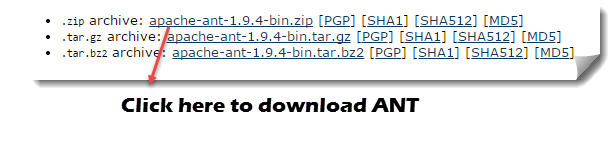
단계 1) We Buy Orders 신청서를 클릭하세요. https://ant.apache.org/bindownload.cgi 또는 다음에서 .zip 파일을 다운로드하세요. 아파치-개미-1.9.4-bin.zip
단계 2) 폴더의 압축을 풀고 압축을 푼 폴더의 루트로 이동하여 경로를 복사하세요.

단계 3) 시작 -> 컴퓨터 -> 여기를 마우스 오른쪽 버튼으로 클릭하고 '속성'을 선택한 다음 고급 시스템 설정을 클릭하세요.

단계 4) 새 창이 열립니다. '환경 변수…' 버튼을 클릭하세요.

단계 5) '새로 만들기…' 버튼을 클릭하고 변수 이름을 'ANT_HOME'으로, 변수 값을 압축이 풀린 폴더의 루트 경로로 설정하고 확인을 클릭합니다.

단계 6) 이제 목록에서 '경로' 변수를 선택하고 '편집'을 클릭한 후 추가하세요. %ANT_HOME%\bin.

시스템을 한 번 다시 시작하면 이제 Ant 빌드 도구를 사용할 수 있습니다.
단계 7) 명령줄을 사용하여 Ant 버전을 확인하려면 다음을 수행하세요.
개미 – 버전

Build.xml 이해
Build.xml은 Ant 빌드 도구의 가장 중요한 구성 요소입니다. 에 대한 Java 프로젝트, 모든 정리, 설정, 컴파일 및 배포 관련 작업이 이 파일에 XML 형식으로 언급되어 있습니다. 명령줄이나 IDE 플러그인을 사용하여 이 XML 파일을 실행하면 이 파일에 기록된 모든 명령이 순차적으로 실행됩니다.
샘플 build.XML 내의 코드를 이해해 보겠습니다.
-
프로젝트 태그는 프로젝트 이름과 basedir 속성을 언급하는 데 사용됩니다. basedir은 애플리케이션의 루트 디렉터리입니다.
<project name="YTMonetize" basedir=".">
- 속성 태그는 추가 단계에서 사용하기 위해 build.XML 파일의 변수로 사용됩니다.
<property name="build.dir" value="${basedir}/build"/>
		<property name="external.jars" value=".\resources"/>
	<property name="ytoperation.dir" value="${external.jars}/YTOperation"/>
<property name="src.dir"value="${basedir}/src"/>
- Target 순차적으로 실행되는 단계로 사용되는 태그입니다. Name 속성은 대상의 이름입니다. 단일 build.xml에 여러 대상을 가질 수 있습니다.
<target name="setClassPath"> - 경로 태그는 공통 위치에 있는 모든 파일을 논리적으로 묶는 데 사용됩니다.
<path id="classpath_jars"> - pathelement 태그는 모든 파일이 저장되는 공통 위치의 루트에 대한 경로를 설정합니다.
<pathelement path="${basedir}/"/> - pathconvert 태그는 path 태그 내의 모든 공통 파일 경로를 시스템의 클래스 경로 형식으로 변환하는 데 사용됩니다.
<pathconvert pathsep=";" property="test.classpath" refid="classpath_jars"/>
- 프로젝트의 다른 타사 jar에 대한 클래스 경로를 설정하는 데 사용되는 파일 세트 태그
<fileset dir="${ytoperation.dir}" includes="*.jar"/>
- Echo 태그는 콘솔에 텍스트를 인쇄하는 데 사용됩니다.
<echo message="deleting existing build directory"/>
- 태그 삭제는 해당 폴더의 데이터를 정리합니다.
<delete dir="${build.dir}"/>
- mkdir 태그는 새 디렉토리를 생성합니다
<mkdir dir="${build.dir}"/>
- java 소스 코드를 컴파일하고 .class 파일을 새 폴더로 이동하는 데 사용되는 javac 태그
        <javac destdir="${build.dir}" srcdir="${src.dir}">
	<classpath refid="classpath_jars"/>
</javac>
- jar 태그는 .class 파일에서 jar 파일을 생성합니다.
<jar destfile="${ytoperation.dir}/YTOperation.jar" basedir="${build.dir}">
- 매니페스트 태그는 실행할 기본 클래스를 설정합니다.
<manifest>
		<attribute name="Main-Class" value="test.Main"/>
</manifest>
- 하나의 대상이 다른 대상에 종속되도록 하는 데 사용되는 '의존' 속성
<target name="run" depends="compile">
- java 태그는 컴파일 대상 섹션에서 생성된 jar에서 기본 기능을 실행합니다.
<java jar="${ytoperation.dir}/YTOperation.jar" fork="true"/>
다음을 사용하여 Ant를 실행합니다. Eclipse 플러그인
Eclipse에서 Ant를 실행하려면 build.xml 파일로 이동 -> 파일을 마우스 오른쪽 버튼으로 클릭 -> 실행… -> 빌드 파일을 클릭합니다.

예시
Ant 기능을 매우 명확하게 설명하는 작은 샘플 프로그램을 사용하겠습니다. 우리 프로젝트 구조는 다음과 같습니다.

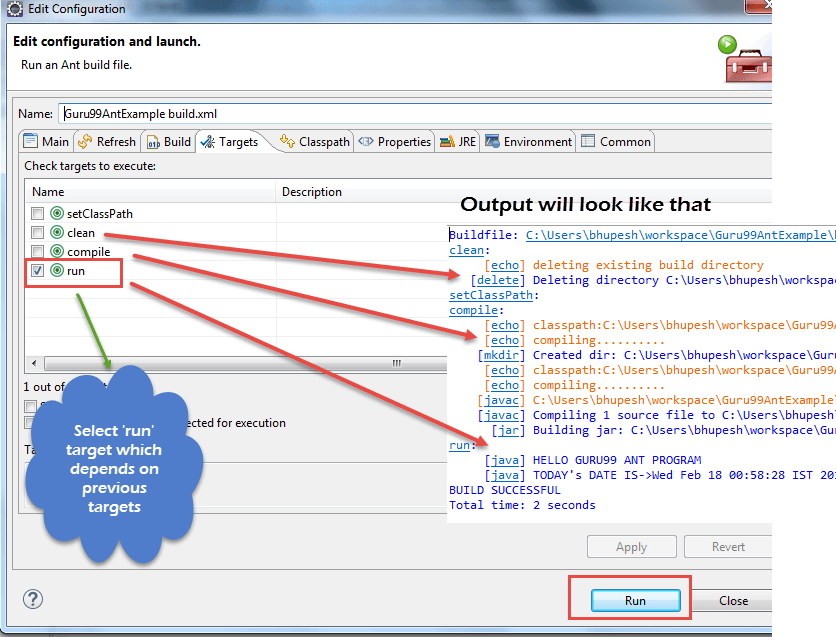
이 예에는 4개의 타겟이 있습니다.
- 외부 jar의 클래스 경로를 설정합니다.
- 이전에 컴파일한 코드 정리
- 기존 Java 코드 컴파일
- 코드 실행
Guru99AntClass.class
package testAnt;
import java.util.Date;

public class Guru99AntClass {
   public static void main(String...s){
		System.out.println("HELLO GURU99 ANT PROGRAM");
		System.out.println("TODAY's DATE IS->"+ currentDate() );
}
public static String currentDate(){
	return new Date().toString();
	}
}
Build.xml
<?xml version="1.0" encoding="UTF-8"	standalone="no"?>
<!--Project tag used to mention the project name, and basedir attribute will be the root directory of the application-->

<project name="YTMonetize" basedir=".">
     <!--Property tags will be used as variables in build.xml file to use in further steps-->

	<property name="build.dir" value="${basedir}/build"/>
    <property name="external.jars" value=".\resources"/>
		<property name="ytoperation.dir" value="${external.jars}/YTOperation"/>
<property name="src.dir"value="${basedir}/src"/>
<!--Target tags used as steps that will execute in sequential order. name attribute will be the name  of the target and < a name=OLE_LINK1 >'depends' attribute used to make one target to depend on another target -->
	       <target name="setClassPath">
			<path id="classpath_jars">
				<pathelement	path="${basedir}/"/>
			</path>
<pathconvert	pathsep=";"property="test.classpath" refid="classpath_jars"/>
</target>
	<target name="clean">
		<!--echo tag will use to print text on console-->
		<echo message="deleting existing build directory"/>
		<!--delete tag will clean data from given folder-->
		<delete dir="${build.dir}"/>
	</target>
<target name="compile" depends="clean,setClassPath">
	<echo message="classpath:${test.classpath}"/>
			<echo message="compiling.........."/>
	<!--mkdir tag will create new director-->
	<mkdir dir="${build.dir}"/>
		<echo message="classpath:${test.classpath}"/>
		<echo message="compiling.........."/>
	<!--javac tag used to compile java source code and move .class files to a new folder-->
	<javac destdir="${build.dir}" srcdir="${src.dir}">
			<classpath refid="classpath_jars"/>
	</javac>
	<!--jar tag will create jar file from .class files-->
	<jar	destfile="${ytoperation.dir}/YTOperation.jar"basedir="${build.dir}">
	            <!--manifest tag will set your main class for execution-->
						<manifest>
							<attribute name="Main-Class" value="testAnt.Guru99AntClass"/>
</manifest>
</jar>
    </target>
	<target name="run" depends="compile">
		<!--java tag will execute main function from the jar created in compile target section-->
<java jar="${ytoperation.dir}/YTOperation.jar"fork="true"/>
</target>
	</project>
실행 방법 TestNG Ant를 사용한 코드

여기서 우리는 다음을 사용하여 클래스를 만들 것입니다. 테스트 중 메소드 및 클래스 경로 설정 지원 build.xml에 있습니다.
이제 testng 메서드를 실행하기 위해 또 다른 testng.xml 파일을 만들고 이 파일을 build.xml 파일에서 호출합니다.
단계 1) 우리는 "Guru99AntClass.class” 패키지에 테스트개미
Guru99AntClass.class
package testAnt;
import java.util.Date;
import org.testng.annotations.Test;
public class Guru99AntClass {
    @Test
	public void Guru99AntTestNGMethod(){
		System.out.println("HELLO GURU99 ANT PROGRAM");
		System.out.println("TODAY's DATE IS->"+ currentDate() );
	}
	public static String currentDate(){
		return new Date().toString();
	}
}
2단계) Build.xml에서 이 클래스를 로드할 대상을 만듭니다.
<!-- Load testNG and add to the class path of application -->
	<target name="loadTestNG" depends="setClassPath">
<!—using taskdef  tag we can add a task to run on the current project. In below line, we are adding testing task in this project. Using testing task here now we can run testing code using the ant script -->
		<taskdef resource="testngtasks" classpath="${test.classpath}"/>
</target>
단계 3) testng.xml을 만듭니다
테스트ng.xml
<?xml version="1.0"encoding="UTF-8"?>
<!DOCTYPE suite SYSTEM "http://testng.org/testng-1.0.dtd">
<suite name="YT"thread-count="1">
			<test name="GURU99TestNGAnt">
			<classes>
			   <class name="testAnt.Guru99AntClass">
	</class>
</classes>
</test>
</suite>
단계 4) 만들기 Target 이것을 실행하려면 Build.xml에서 TestNG 암호
<target name="runGuru99TestNGAnt" depends="compile">
<!-- testng tag will be used to execute testng code using corresponding testng.xml file. Here classpath attribute is setting classpath for testng's jar to the project-->
	<testng classpath="${test.classpath};${build.dir}">
<!—xmlfileset tag is used here to run testng's code using testing.xml file. Using includes tag we are mentioning path to testing.xml file-->
	 <xmlfileset dir="${basedir}" includes="testng.xml"/>
</testng>
단계 5) 전체 Build.xml
<?xml version="1.0"encoding="UTF-8"standalone="no"?>
<!--Project tag used to mention the project name, and basedir attribute will be the root directory of the application-->
			<project name="YTMonetize" basedir=".">
		       <!--Property tags will be used as variables in build.xml file to use in further steps-->
			<property name="build.dir"value="${basedir}/build"/>
<!-- put  testng related jar in the resource  folder -->
	      <property name="external.jars" value=".\resource"/>
				<property name="src.dir" value="${basedir}/src"/>
<!--Target tags used as steps that will execute in  sequential order. name attribute will be the name
    of the target and 'depends' attribute used to make one target to depend on another target-->
<!-- Load testNG and add to the class path of application -->
         <target name="loadTestNG"depends="setClassPath">
				<taskdef resource="testngtasks"classpath="${test.classpath}"/>
		</target>
		<target name="setClassPath">
		       <path id="classpath_jars">
					<pathelement path="${basedir}/"/>
					<fileset dir="${external.jars}" includes="*.jar"/>
         </path>
        <pathconvert pathsep=";"property="test.classpath"refid="classpath_jars"/>
	</target>
	<target name="clean">
              <!--echo tag will use to print text on console-->
	               <echo message="deleting existing build directory"/>
               <!--delete tag will clean data from given folder-->
	               <delete				dir="${build.dir}"/>
			</target>
<target name="compile"depends="clean,setClassPath,loadTestNG">
	         <echo message="classpath:${test.classpath}"/>
	               <echo	message="compiling.........."/>
		       <!--mkdir tag will create new director-->
		        <mkdir dir="${build.dir}"/>
					<echo message="classpath:${test.classpath}"/>
			<echo message="compiling.........."/>
	<!--javac tag used to compile java source code and move .class files to a new folder-->
	        <javac destdir="${build.dir}"srcdir="${src.dir}">
	             <classpath refid="classpath_jars"/>
		</javac>
  </target>
<target name="runGuru99TestNGAnt"depends="compile">
		<!-- testng tag will be used to execute testng code using corresponding testng.xml file -->
			<testng classpath="${test.classpath};${build.dir}">
               <xmlfileset dir="${basedir}"includes="testng.xml"/>
	</testng>
</target>
</project>
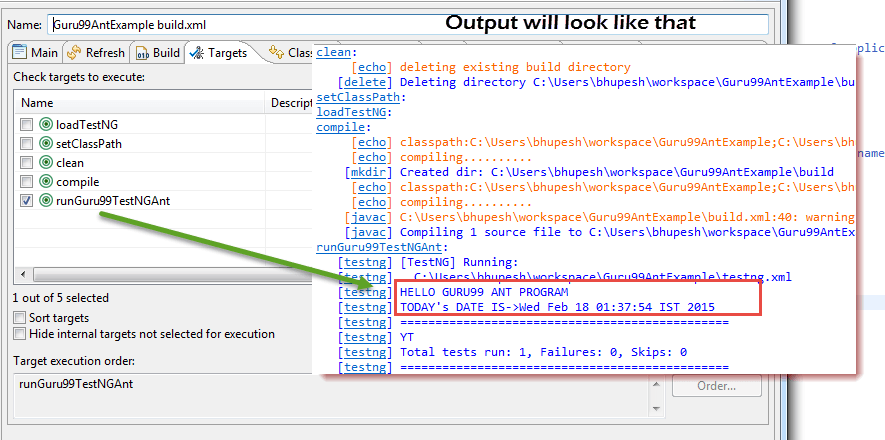
단계 6) 산출
Ant가 빌드를 관리하고 TestNG 배선이 완료되면 다음 단계는 Ant를 직접 연결하는 것입니다. Selenium 웹드라이버.
개미와 Selenium 웹드라이버
지금까지 우리는 Ant를 사용하여 모든 서드파티 JAR 파일을 시스템의 특정 위치에 배치하고 프로젝트의 경로를 설정할 수 있다는 것을 배웠습니다. 이 방법을 사용하면 프로젝트의 모든 종속성을 한 곳에 설정하여 컴파일, 실행 및 배포를 더욱 안정적으로 만들 수 있습니다.
마찬가지로, 셀레늄을 사용하는 테스트 프로젝트의 경우 build.xml에서 셀레늄 종속성을 쉽게 언급할 수 있으며, 애플리케이션에 수동으로 클래스 경로를 추가할 필요가 없습니다.
이제 프로젝트의 클래스 경로를 설정하는 아래 언급된 전통적인 방법을 무시할 수 있습니다.

예:
이전 예제를 수정하겠습니다.
단계 1) 리소스 폴더에서 selenium.jars 속성을 selenium 관련 jar로 설정합니다.
<property name="selenium.jars" value=".\selenium"/>
단계 2) 대상 setClassPath에 Selenium 파일을 추가합니다.
<target name="setClassPath">
	        <path id="classpath_jars">
				<pathelement path="${basedir}/"/>
				<fileset dir="${external.jars}" includes="*.jar"/>
	            <!-- selenium jar added here -->
  		            <fileset dir="${selenium.jars}" includes="*.jar"/>
         </path>
단계 3) Build.xml을 완료하세요.
<?xml version="1.0" encoding="UTF-8" standalone="no"?>

<!--Project tag used to mention the project name, and basedir attribute will be the root directory of the application-->
			<project name="YTMonetize" basedir=".">
                  <!--Property tags will be used as variables in build.xml file to use in further steps-->
				<property name="build.dir" value="${basedir}/build"/>
      <!-- put  testng related jar in the resource  folder -->
	       <property name="external.jars" value=".\resource"/>
<!-- put  selenium related jar in resource  folder -->
     <property name="selenium.jars" value=".\selenium"/>
			<property name="src.dir" value="${basedir}/src"/>
				<!--Target tags used as steps that will execute in  sequential order. name attribute will be the name
of the target and 'depends' attribute used to make one target to depend on another target-->
      <!-- Load testNG and add to the class path of application -->
       <target name="loadTestNG" depends="setClassPath">
				<taskdef resource="testngtasks" classpath="${test.classpath}"/>
		</target>
<target name="setClassPath">
	        <path id="classpath_jars">
				<pathelement path="${basedir}/"/>
					<fileset dir="${external.jars}" includes="*.jar"/>
			<!-- selenium jar added here -->
	            <fileset dir="${selenium.jars}"includes="*.jar"/>
        </path>
   <pathconvert pathsep=";" property="test.classpath" refid="classpath_jars"/>
</target>
<target name="clean">
<!--echo tag will use to print text on console-->
               <echo message="deleting existing build directory"/>
	                <!--delete tag will clean data from given folder-->
		               <delete dir="${build.dir}"/>
				</target>
<target name="compile" depends="clean,setClassPath,loadTestNG">
         <echo message="classpath:${test.classpath}"/>
                <echo message="compiling.........."/>
        <!--mkdir tag will create new director-->
	        <mkdir dir="${build.dir}"/>
          			<echo message="classpath:${test.classpath}"/>
			<echo message="compiling.........."/>
	<!--javac tag used to compile java source code and move .class files to new folder-->
     <javac destdir="${build.dir}"srcdir="${src.dir}">
             <classpath refid="classpath_jars"/>
	</javac>
</target>
<target name="runGuru99TestNGAnt" depends="compile">
		<!-- testng tag will be used to execute testng code using corresponding testng.xml file -->
			<testng classpath="${test.classpath};${build.dir}">
               <xmlfileset dir="${basedir}" includes="testng.xml"/>
		</testng>
	</target>
</project>
단계 4) 이제 이전에 생성한 클래스를 변경하세요. Guru99AntClass.java 파일에 새로운 코드가 추가되었습니다.
이 예에서는 다음 단계를 사용합니다. Selenium 위치 :
- We Buy Orders 신청서를 클릭하세요. https://demo.guru99.com/test/guru99home/
- 모든 강좌 링크를 하나씩 읽어보세요.
- 콘솔에 모든 강좌 하이퍼링크를 인쇄합니다.
Guru99AntClass.java:
package testAnt;
import java.util.List;
import org.openqa.selenium.By;
import org.openqa.selenium.WebDriver;
import org.openqa.selenium.WebElement;
import org.openqa.selenium.firefox.FirefoxDriver;
import org.testng.annotations.Test;

public class Guru99AntClass {

	@Test
		public void Guru99AntTestNGMethod(){
	      WebDriver driver = new FirefoxDriver();
		  driver.get("https://demo.guru99.com/test/guru99home/");
		  List<WebElement> listAllCourseLinks = driver.findElements(By.xpath("//div[@class='canvas-middle']//a"));
          for(WebElement webElement : listAllCourseLinks) {
			System.out.println(webElement.getAttribute("href"));
      	  }
		}
}
단계 5) 성공적인 실행 후 출력은 다음과 같습니다.

