
PyTest 튜토리얼: PyTest란 무엇일까요? (예제 포함)
 편집 팀
편집 팀
⚡ 스마트 요약
Pytest는 Python 데이터베이스, API 및 사용자 인터페이스에 대한 간단하고 확장 가능한 테스트를 작성하는 데 도움이 되는 테스트 프레임워크입니다. 기본 단위 테스트부터 복잡한 기능 테스트까지 픽스처, 파라미터화, 마커, 병렬 실행 및 상세한 어설션 보고를 지원합니다.
파이테스트 이는 가장 널리 사용되는 테스트 프레임워크 중 하나입니다. Python 이 생태계는 테스트 코드를 간결하고 읽기 쉽게 유지하며, 테스트를 자동으로 검색하고, 첫 번째 어설션부터 데이터베이스, API 및 사용자 인터페이스에 대한 전체 테스트 스위트로 확장할 수 있도록 지원합니다. 아래 섹션에서는 설치, 어설션, 픽스처, 마커, 파라미터화 및 병렬 실행에 대한 실제 예제를 제공합니다.
Pytest란 무엇인가요?
파이테스트 는 테스트 코드를 작성할 수 있도록 해주는 테스트 프레임워크입니다. Python PyTorches는 프로그래밍 언어입니다. 데이터베이스, API, 심지어 사용자 인터페이스에 대한 간단하고 확장 가능한 테스트 케이스를 작성하는 데 도움이 됩니다. PyTorches는 주로 API 테스트 작성에 사용되며, 간단한 단위 테스트부터 복잡한 기능 테스트까지 확장 가능합니다.
Pytest를 사용하는 이유는 무엇일까요?
pytest의 장점은 다음과 같습니다.
- 간단하고 깔끔한 구문 덕분에 시작하기가 매우 쉽습니다.
- 테스트를 병렬로 실행할 수 있습니다.
- 특정 테스트 또는 테스트의 하위 집합을 실행할 수 있습니다.
- 테스트를 자동으로 감지합니다.
- 시험을 건너뛸 수 있습니다.
- 오픈 소스.
Pytest 설치 방법
다음은 pytest를 설치하는 과정입니다.
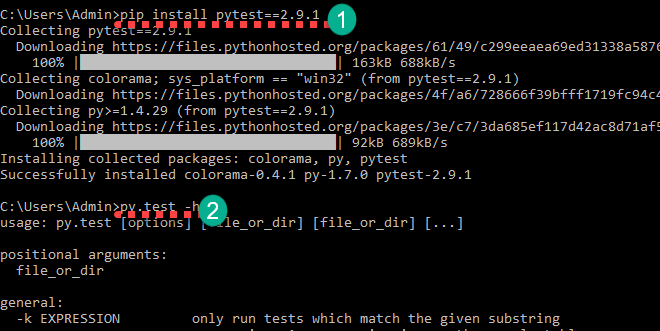
단계 1) 아래 명령어를 사용하여 pytest를 설치할 수 있습니다.
pip install pytest==2.9.1
설치가 완료되면 다음 명령어를 사용하여 확인할 수 있습니다.
py.test -h
이렇게 하면 도움말이 표시됩니다.
첫 번째 기본 Pytest 예제
이제 기본적인 pytest 예제를 통해 pytest 사용법을 배우게 됩니다.
study_pytest라는 폴더를 생성하세요. 이 폴더 안에 테스트 파일을 만들 것입니다. 명령줄에서 해당 폴더로 이동하세요. 폴더 안에 test_sample1.py라는 파일을 생성하세요.

아래 코드를 추가하고 저장하세요.
import pytest
def test_file1_method1():
	x=5
	y=6
	assert x+1 == y,"test failed"
	assert x == y,"test failed"
def test_file1_method2():
	x=5
	y=6
	assert x+1 == y,"test failed"
아래 명령어를 사용하여 테스트를 실행하세요.
py.test
다음과 같은 결과가 나타납니다.
test_sample1.py F.
============================================== FAILURES ========================================
____________________________________________ test_sample1 ______________________________________
    def test_file1_method1():
    	x=5
    	y=6
       	assert x+1 == y,"test failed"
>      	assert x == y,"test failed"
E       AssertionError: test failed
E       assert 5 == 6
test_sample1.py:6: AssertionError
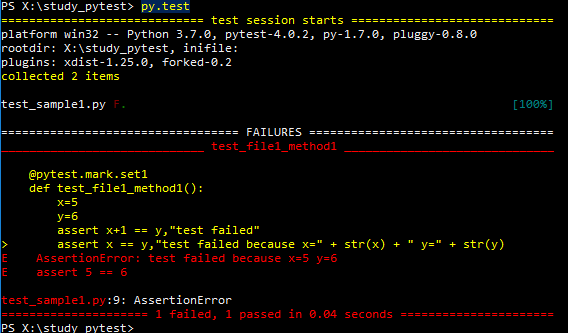
여기 test_sample1.py의 F.에서 문자 F는 실패를, 점(.)은 성공을 의미합니다. 실패 섹션에서는 실패한 메서드와 실패가 발생한 줄을 확인할 수 있습니다. 여기서 x==y는 5==6을 의미하며, 이는 거짓입니다.
다음으로는 pytest의 어설션에 대해 알아보겠습니다.
Pytest의 어설션
Pytest의 어설션은 참(True) 또는 거짓(False) 상태를 반환하는 검사입니다. Pytest에서 테스트 메서드 내의 어설션이 실패하면 해당 메서드의 실행이 중단됩니다. 해당 테스트 메서드의 나머지 코드는 실행되지 않고, Pytest는 다음 테스트 메서드로 넘어갑니다.
Pytest assert 예시:
assert "hello" == "Hai" is an assertion failure.
assert 4==4 is a successful assertion
assert True is a successful assertion
assert False is an assertion failure.
다음을 고려하세요.
assert x == y,"test failed because x=" + str(x) + " y=" + str(y)
아래의 어설션 대신 이 코드를 test_file1_method1() 함수에 넣으세요.
assert x == y,"test failed"
테스트를 실행하면 다음과 같은 실패가 발생합니다. AssertionError: 테스트 실패 x=5 y=6.
Pytest는 어떻게 테스트 파일과 테스트 메서드를 식별할까요?
기본적으로 pytest는 로 시작하는 파일 이름만 식별합니다. 시험_ 또는로 끝나는 _테스트 테스트 파일과 같은 이름으로 지정합니다. 다른 파일 이름을 명시적으로 지정할 수도 있습니다(자세한 내용은 나중에 설명). Pytest는 테스트 메서드 이름이 특정 문자열로 시작해야 합니다. test다른 모든 메서드 이름은 명시적으로 실행을 요청하더라도 무시됩니다.
유효한 pytest 파일 이름과 유효하지 않은 pytest 파일 이름의 예시를 참조하세요.
test_login.py - valid
login_test.py - valid
testlogin.py -invalid
logintest.py -invalid
참고: 네, pytest에게 testlogin.py와 logintest.py를 선택하도록 명시적으로 요청할 수 있습니다.
유효한 pytest 테스트 메서드와 유효하지 않은 테스트 메서드의 몇 가지 예를 살펴보세요.
def test_file1_method1(): - valid
def testfile1_method1(): - valid
def file1_method1(): - invalid
참고: file1_method1()을 명시적으로 언급하더라도 pytest는 이 메서드를 실행하지 않습니다.
특정 파일 및 여러 파일에서 여러 테스트 실행
현재 study_pytest 폴더 안에는 test_sample1.py 파일이 있습니다. 만약 test_sample2.py, test_sample3.py와 같이 여러 개의 파일이 있다고 가정해 보겠습니다. 해당 폴더와 하위 폴더에 있는 모든 파일의 모든 테스트를 실행하려면 pytest 명령만 실행하면 됩니다.
py.test
이 명령은 해당 폴더와 그 하위 폴더에 있는 파일 중 test_로 시작하고 _test로 끝나는 모든 파일을 실행합니다.
특정 파일에서만 테스트를 실행하려면 `py.test`를 사용할 수 있습니다. .
py.test test_sample1.py
Pytest를 사용하여 전체 테스트의 일부를 실행합니다.
때로는 전체 테스트 스위트를 실행하고 싶지 않을 때가 있습니다. Pytest를 사용하면 특정 테스트만 실행할 수 있습니다. 두 가지 방법이 있습니다.
- Grouping 부분 문자열 일치를 통해 테스트 이름을 찾습니다.
- Grouping 마커에 의한 테스트.
이미 test_sample1.py 파일이 있습니다. test_sample2.py 파일을 생성하고 아래 코드를 추가하세요.
def test_file2_method1():
	x=5
	y=6
	assert x+1 == y,"test failed"
	assert x == y,"test failed because x=" + str(x) + " y=" + str(y)
def test_file2_method2():
	x=5
	y=6
	assert x+1 == y,"test failed"
현재 저희는 다음과 같은 상황을 가지고 있습니다.
• test_sample1.py
• test_file1_method1()
• test_file1_method2()
• test_sample2.py
• test_file2_method1()
• test_file2_method2()
옵션 1) 부분 문자열 일치를 이용한 테스트 실행
여기서, 이름에 method1이 포함된 모든 테스트를 실행하려면 아래 명령어를 실행해야 합니다.
py.test -k method1 -v
-k <expression> is used to represent the substring to match
-v increases the verbosity
따라서 `py.test -k method1 -v`를 실행하면 다음과 같은 결과가 나옵니다.
test_sample2.py::test_file2_method1 FAILED
test_sample1.py::test_file1_method1 FAILED

============================================== FAILURES ==============================================
_________________________________________ test_file2_method1 _________________________________________
    def test_file2_method1():
    	x=5
    	y=6
       	assert x+1 == y,"test failed"
>      	assert x == y,"test failed because x=" + str(x) + " y=" + str(y)
E       AssertionError: test failed because x=5 y=6
E       assert 5 == 6
test_sample2.py:5: AssertionError

_________________________________________ test_file1_method1 _________________________________________
    @pytest.mark.only
    def test_file1_method1():
    	x=5
    	y=6
       	assert x+1 == y,"test failed"
>      	assert x == y,"test failed because x=" + str(x) + " y=" + str(y)
E       AssertionError: test failed because x=5 y=6
E       assert 5 == 6
test_sample1.py:8: AssertionError

================================= 2 tests deselected by '-kmethod1' ==================================
=============================== 2 failed, 2 deselected in 0.02 seconds ===============================
여기서는 끝부분을 보시면, '-kmethod2'에 의해 선택 취소된 테스트 1개이는 test_file1_method2와 test_file2_method2입니다.
다음과 같은 다양한 조합으로 실행해 보세요.
py.test -k method -v - will run all the four methods
py.test -k methods -v – will not run any test as there is no test name matches the substring 'methods'
옵션 2) 마커로 테스트 실행
Pytest는 `@pytest.mark` 마커를 사용하여 테스트 메서드에 다양한 속성을 설정할 수 있도록 합니다. 테스트 파일에서 마커를 사용하려면 테스트 파일에 `pytest`를 임포트해야 합니다. 여기서는 테스트 메서드에 서로 다른 마커 이름을 적용하고 마커 이름에 따라 특정 테스트를 실행합니다. 다음과 같이 각 테스트 이름에 마커를 정의할 수 있습니다.
@pytest.mark.<name>.
테스트 메서드에 set1과 set2라는 마커를 정의하고, 이 마커 이름을 사용하여 테스트를 실행합니다. 다음 코드를 테스트 파일에 추가하세요.
test_sample1.py
import pytest
@pytest.mark.set1
def test_file1_method1():
	x=5
	y=6
	assert x+1 == y,"test failed"
	assert x == y,"test failed because x=" + str(x) + " y=" + str(y)

@pytest.mark.set2
def test_file1_method2():
	x=5
	y=6
	assert x+1 == y,"test failed"
test_sample2.py
import pytest
@pytest.mark.set1
def test_file2_method1():
	x=5
	y=6
	assert x+1 == y,"test failed"
	assert x == y,"test failed because x=" + str(x) + " y=" + str(y)

@pytest.mark.set1
def test_file2_method2():
	x=5
	y=6
	assert x+1 == y,"test failed"
아래 명령어를 사용하여 표시된 테스트를 실행할 수 있습니다.
py.test -m <name>
-m <name> mentions the marker name
`py.test -m set1`을 실행하면 `test_file1_method1`, `test_file2_method1`, `test_file2_method2` 메서드가 실행됩니다. `py.test -m set2`를 실행하면 `test_file1_method2` 메서드가 실행됩니다.
Pytest를 사용하여 테스트를 병렬로 실행하세요
일반적으로 테스트 스위트는 여러 개의 테스트 파일과 수백 개의 테스트 메서드로 구성되어 있어 실행하는 데 상당한 시간이 소요됩니다. Pytest를 사용하면 테스트를 병렬로 실행할 수 있습니다. 이를 위해서는 먼저 아래 명령어를 실행하여 pytest-xdist를 설치해야 합니다.
pip install pytest-xdist

다음 명령어를 사용하여 지금 바로 테스트를 실행할 수 있습니다.
py.test -n 4
여기서, -n 이 명령은 여러 워커를 사용하여 테스트를 실행합니다. 위 명령에서는 테스트를 실행하는 데 네 개의 워커가 사용됩니다.
Pytest 설비
픽스처는 모든 테스트 메서드 실행 전에 특정 코드를 실행하고 싶을 때 사용됩니다. 즉, 모든 테스트에서 동일한 코드를 반복하는 대신 픽스처를 정의하는 것입니다. 일반적으로 픽스처는 데이터베이스 연결 초기화, 기본 전달 등에 사용됩니다. URL등등. 메서드는 다음과 같이 표시하여 pytest 픽스처로 표시됩니다.
@pytest.fixture
테스트 메서드는 입력 매개변수로 pytest 픽스처를 지정하여 사용할 수 있습니다. 다음 코드를 포함하는 test_basic_fixture.py라는 새 파일을 생성하세요.
import pytest
@pytest.fixture
def supply_AA_BB_CC():
	aa=25
	bb =35
	cc=45
	return [aa,bb,cc]

def test_comparewithAA(supply_AA_BB_CC):
	zz=35
	assert supply_AA_BB_CC[0]==zz,"aa and zz comparison failed"

def test_comparewithBB(supply_AA_BB_CC):
	zz=35
	assert supply_AA_BB_CC[1]==zz,"bb and zz comparison failed"

def test_comparewithCC(supply_AA_BB_CC):
	zz=35
	assert supply_AA_BB_CC[2]==zz,"cc and zz comparison failed"
이리:
- supply_AA_BB_CC라는 이름의 설비가 있습니다. 이 메서드는 세 개의 값으로 이루어진 리스트를 반환합니다.
- 우리는 각 값과 비교하는 세 가지 테스트 방법을 가지고 있습니다.
각 테스트 함수는 사용 가능한 픽스처와 이름이 일치하는 입력 인수를 갖습니다. Pytest는 해당 픽스처 메서드를 호출하고, 반환된 값은 입력 인수에 저장됩니다. 여기서는 리스트 [25, 35, 45]가 저장됩니다. 이 리스트 항목들은 테스트 메서드에서 비교에 사용됩니다. 이제 테스트를 실행하고 결과를 확인해 보세요.
py.test test_basic_fixture
test_basic_fixture.py::test_comparewithAA FAILED
test_basic_fixture.py::test_comparewithBB PASSED
test_basic_fixture.py::test_comparewithCC FAILED

============================================== FAILURES ==============================================
_________________________________________ test_comparewithAA _________________________________________
supply_AA_BB_CC = [25, 35, 45]
    def test_comparewithAA(supply_AA_BB_CC):
    	zz=35
>   	assert supply_AA_BB_CC[0]==zz,"aa and zz comparison failed"
E    AssertionError: aa and zz comparison failed
E    assert 25 == 35
test_basic_fixture.py:10: AssertionError

_________________________________________ test_comparewithCC _________________________________________
supply_AA_BB_CC = [25, 35, 45]
    def test_comparewithCC(supply_AA_BB_CC):
    	zz=35
>   	assert supply_AA_BB_CC[2]==zz,"cc and zz comparison failed"
E    AssertionError: cc and zz comparison failed
E    assert 45 == 35
test_basic_fixture.py:16: AssertionError
================================= 2 failed, 1 passed in 0.05 seconds =================================
zz=BB=35이므로 test_comparewithBB 테스트는 통과하고 나머지 두 테스트는 실패합니다.
fixture 메서드는 정의된 테스트 파일 내에서만 사용 가능합니다. 다른 테스트 파일에서 fixture에 접근하려고 하면 fixture 관련 오류가 발생합니다. 'supply_AA_BB_CC'를 찾을 수 없습니다. 다른 파일에 있는 테스트 메서드에 대해서입니다.
여러 테스트 파일에 동일한 픽스처를 사용하려면 conftest.py라는 파일에 픽스처 메서드를 생성합니다. 아래 pytest 예제를 통해 살펴보겠습니다. 다음 코드를 사용하여 conftest.py, test_basic_fixture.py, test_basic_fixture2.py라는 세 개의 파일을 생성하세요.
conftest.py
import pytest
@pytest.fixture
def supply_AA_BB_CC():
	aa=25
	bb =35
	cc=45
	return [aa,bb,cc]
test_basic_fixture.py
import pytest
def test_comparewithAA(supply_AA_BB_CC):
	zz=35
	assert supply_AA_BB_CC[0]==zz,"aa and zz comparison failed"

def test_comparewithBB(supply_AA_BB_CC):
	zz=35
	assert supply_AA_BB_CC[1]==zz,"bb and zz comparison failed"

def test_comparewithCC(supply_AA_BB_CC):
	zz=35
	assert supply_AA_BB_CC[2]==zz,"cc and zz comparison failed"
test_basic_fixture2.py
import pytest
def test_comparewithAA_file2(supply_AA_BB_CC):
	zz=25
	assert supply_AA_BB_CC[0]==zz,"aa and zz comparison failed"

def test_comparewithBB_file2(supply_AA_BB_CC):
	zz=25
	assert supply_AA_BB_CC[1]==zz,"bb and zz comparison failed"

def test_comparewithCC_file2(supply_AA_BB_CC):
	zz=25
	assert supply_AA_BB_CC[2]==zz,"cc and zz comparison failed"
Pytest는 먼저 테스트 파일에서 픽스처를 찾고, 찾지 못하면 conftest.py에서 찾습니다. 아래와 같은 결과를 얻으려면 `py.test -k test_comparewith -v` 명령으로 테스트를 실행하세요.
test_basic_fixture.py::test_comparewithAA FAILED
test_basic_fixture.py::test_comparewithBB PASSED
test_basic_fixture.py::test_comparewithCC FAILED
test_basic_fixture2.py::test_comparewithAA_file2 PASSED
test_basic_fixture2.py::test_comparewithBB_file2 FAILED
test_basic_fixture2.py::test_comparewithCC_file2 FAILED
Pytest 매개변수화된 테스트
테스트를 매개변수화하는 목적은 여러 인수 집합에 대해 테스트를 실행하는 것입니다. `@pytest.mark.parametrize`를 사용하면 이를 수행할 수 있습니다. 아래 pytest 예제를 통해 살펴보겠습니다. 이 예제에서는 테스트 메서드에 세 개의 인수를 전달합니다. 이 테스트 메서드는 첫 번째와 두 번째 인수를 더한 후 그 결과를 세 번째 인수와 비교합니다. 아래 코드를 사용하여 `test_addition.py`라는 테스트 파일을 생성하세요.
import pytest
@pytest.mark.parametrize("input1, input2, output",[(5,5,10),(3,5,12)])
def test_add(input1, input2, output):
	assert input1+input2 == output,"failed"
여기서 테스트 메서드는 input1, input2, output 세 개의 인수를 받습니다. 이 메서드는 input1과 input2를 더하고 그 합을 output과 비교합니다. py.test -k test_add -v 명령어로 테스트를 실행하고 결과를 확인해 보겠습니다.
test_addition.py::test_add[5-5-10] PASSED
test_addition.py::test_add[3-5-12] FAILED
============================================== FAILURES ==============================================
__________________________________________ test_add[3-5-12] __________________________________________
input1 = 3, input2 = 5, output = 12
    @pytest.mark.parametrize("input1, input2, output",[(5,5,10),(3,5,12)])
    def test_add(input1, input2, output):
>   	assert input1+input2 == output,"failed"
E    AssertionError: failed
E    assert (3 + 5) == 12
test_addition.py:5: AssertionError
테스트가 두 번 실행된 것을 볼 수 있습니다. 한 번은 5+5==10을 확인하고, 다른 한 번은 3+5==12를 확인합니다.
test_addition.py::test_add[5-5-10] 합격
test_addition.py::test_add[3-5-12] 실패
Pytest Xfail 및 테스트 건너뛰기
테스트를 실행하고 싶지 않거나, 특정 상황에서는 실행하지 않는 것이 더 나을 수도 있습니다. 테스트 사례 특정 시점에 관련이 없는 경우, 해당 테스트를 실패 처리하거나 건너뛸 수 있습니다. 실패 처리된 테스트는 실행되지만, 실패 또는 통과 테스트 수에 포함되지 않습니다. 따라서 실패 또는 통과 테스트 수에는 포함되지 않습니다. trac해당 테스트가 실패하면 뒤로 가기 버튼이 표시됩니다. `@pytest.mark.xfail`을 사용하여 테스트에 실패 표시를 할 수 있습니다. 건너뛰기ping `@pytest.mark.skip`을 사용하면 해당 테스트가 실행되지 않습니다. `@pytest.mark.skip`을 사용하여 테스트를 건너뛸 수 있습니다. `test_addition.py` 파일을 아래 코드로 수정하세요.
import pytest
@pytest.mark.skip
def test_add_1():
	assert 100+200 == 400,"failed"

@pytest.mark.skip
def test_add_2():
	assert 100+200 == 300,"failed"

@pytest.mark.xfail
def test_add_3():
	assert 15+13 == 28,"failed"

@pytest.mark.xfail
def test_add_4():
	assert 15+13 == 100,"failed"

def test_add_5():
	assert 3+2 == 5,"failed"

def test_add_6():
	assert 3+2 == 6,"failed"
이리:
- test_add_1 및 test_add_2는 건너뛰어 실행되지 않습니다.
- test_add_3 및 test_add_4 테스트는 실패했습니다. 이 테스트들은 실행될 것이며, 실패한 테스트(xfailed) 또는 통과한 테스트(xpassed)에 포함될 것입니다. 추가 테스트는 없을 것입니다. trac실패 시 eback을 사용하세요.
- test_add_5와 test_add_6이 실행되고, test_add_6은 실패를 보고합니다. tractest_add_5가 통과하는 동안 뒤로 돌아갑니다.
py.test test_addition.py -v 명령어를 사용하여 테스트를 실행하고 결과를 확인하세요.
test_addition.py::test_add_1 SKIPPED
test_addition.py::test_add_2 SKIPPED
test_addition.py::test_add_3 XPASS
test_addition.py::test_add_4 xfail
test_addition.py::test_add_5 PASSED
test_addition.py::test_add_6 FAILED

============================================== FAILURES ==============================================
_____________________________________________ test_add_6 _____________________________________________
    def test_add_6():
>   	assert 3+2 == 6,"failed"
E    AssertionError: failed
E    assert (3 + 2) == 6
test_addition.py:24: AssertionError

================ 1 failed, 1 passed, 2 skipped, 1 xfailed, 1 xpassed in 0.07 seconds =================
결과는 XML 형식으로 제공됩니다.
테스트 결과를 XML 형식으로 생성하여 지속적 통합(CI) 서버에 전송하여 추가 처리를 할 수 있습니다. `py.test test_sample1.py -v –junitxml=”result.xml”` 명령어를 사용하면 됩니다. `result.xml` 파일에는 테스트 실행 결과가 기록됩니다. 아래에서 샘플 `result.xml` 파일을 확인할 수 있습니다.
<?xml version="1.0" encoding="UTF-8"?>
<testsuite errors="0" failures="1" name="pytest" skips="0" tests="2" time="0.046">
   <testcase classname="test_sample1" file="test_sample1.py" line="3" name="test_file1_method1" time="0.001384973526">
     <failure message="AssertionError:test failed because x=5 y=6 assert 5 ==6">
    @pytest.mark.set1
    def test_file1_method1():
    	x=5
    	y=6
       	assert x+1 == y,"test failed"
>      	assert x == y,"test failed because x=" + str(x) + " y=" + str(y)
E       AssertionError: test failed because x=5 y=6
E       assert 5 == 6
         test_sample1.py:9: AssertionError
    </failure>
   </testcase>
   <testcase classname="test_sample1" file="test_sample1.py" line="10" name="test_file1_method2" time="0.000830173492432" />
</testsuite>
에서 총 두 개의 테스트가 진행되었으며, 그중 하나가 실패했습니다. 그 아래에서 각 테스트에 대한 자세한 내용을 확인할 수 있습니다. 꼬리표.
API 테스트를 위한 Pytest 프레임워크
이제 API를 테스트하기 위한 간단한 pytest 프레임워크를 만들어 보겠습니다. 여기서 사용하는 API는 무료 API입니다. 요구 사항.인이 웹사이트는 테스트 가능한 API만 제공하며 데이터를 저장하지 않습니다. 여기서는 다음과 같은 항목에 대한 테스트를 작성하겠습니다.
- 일부 사용자를 나열합니다.
- 사용자로 로그인하세요.
아래 파일들을 제공된 코드로 생성하세요. 먼저, conftest.py 파일에는 기본 설정을 제공하는 픽스처가 포함되어 있습니다. URL 모든 테스트 방법에 대해.
import pytest
@pytest.fixture
def supply_url():
	return "https://reqres.in/api"
다음으로, test_list_user.py 파일에는 유효한 사용자와 유효하지 않은 사용자를 나열하는 테스트 메서드가 포함되어 있습니다.
- test_list_valid_user는 유효한 사용자 정보를 가져오는지 확인하고 응답을 검증하는 테스트입니다.
- test_list_invaliduser는 유효하지 않은 사용자 가져오기를 테스트하고 응답을 검증합니다.
import pytest
import requests
import json
@pytest.mark.parametrize("userid, firstname",[(1,"George"),(2,"Janet")])
def test_list_valid_user(supply_url,userid,firstname):
	url = supply_url + "/users/" + str(userid)
	resp = requests.get(url)
	j = json.loads(resp.text)
	assert resp.status_code == 200, resp.text
	assert j['data']['id'] == userid, resp.text
	assert j['data']['first_name'] == firstname, resp.text

def test_list_invaliduser(supply_url):
	url = supply_url + "/users/50"
	resp = requests.get(url)
	assert resp.status_code == 404, resp.text
test_login_user.py 파일에는 로그인 기능을 테스트하기 위한 테스트 메서드가 포함되어 있습니다.
- test_login_valid는 이메일과 비밀번호를 사용한 유효한 로그인 시도를 테스트합니다.
- test_login_no_password는 비밀번호를 입력하지 않고 잘못된 로그인 시도를 테스트합니다.
- test_login_no_email은 이메일을 전달하지 않고 잘못된 로그인 시도를 테스트합니다.
import pytest
import requests
import json
def test_login_valid(supply_url):
	url = supply_url + "/login/"
	data = {'email':'test@test.com','password':'something'}
	resp = requests.post(url, data=data)
	j = json.loads(resp.text)
	assert resp.status_code == 200, resp.text
	assert j['token'] == "QpwL5tke4Pnpja7X", resp.text

def test_login_no_password(supply_url):
	url = supply_url + "/login/"
	data = {'email':'test@test.com'}
	resp = requests.post(url, data=data)
	j = json.loads(resp.text)
	assert resp.status_code == 400, resp.text
	assert j['error'] == "Missing password", resp.text

def test_login_no_email(supply_url):
	url = supply_url + "/login/"
	data = {}
	resp = requests.post(url, data=data)
	j = json.loads(resp.text)
	assert resp.status_code == 400, resp.text
	assert j['error'] == "Missing email or username", resp.text
py.test -v 명령어를 사용하여 테스트를 실행하고 다음과 같은 결과를 확인하세요.
test_list_user.py::test_list_valid_user[1-George] PASSED
test_list_user.py::test_list_valid_user[2-Janet] PASSED
test_list_user.py::test_list_invaliduser PASSED
test_login_user.py::test_login_valid PASSED
test_login_user.py::test_login_no_password PASSED
test_login_user.py::test_login_no_email PASSED
테스트를 업데이트하고 다양한 출력값을 시도해 보세요.
