
PyTestチュートリアル:PyTestとは?(例付き)
 編集チーム
⚡ スマートサマリー
Pytestは Python データベース、API、ユーザーインターフェース向けのシンプルで拡張性の高いテストを作成するのに役立つテストフレームワークです。基本的な単体テストから複雑な機能テストまで、フィクスチャ、パラメータ化、マーカー、並列実行、詳細なアサーションレポートをサポートしています。
パイテスト は、最も広く使用されているテストフレームワークの 1 つです。 Python エコシステム。テストコードを短く読みやすく保ち、テストを自動的に検出し、最初のアサーションからデータベース、API、ユーザーインターフェース向けの完全なテストスイートへと拡張します。以下のセクションでは、インストール、アサーション、フィクスチャ、マーカー、パラメータ化、並列実行について、実践的な例を交えて解説します。
Pytestとは何ですか?
パイテスト は、テストコードを書くことができるテストフレームワークです。 Python プログラミング言語。データベース、API、さらにはユーザーインターフェース向けのシンプルで拡張性の高いテストケースを作成するのに役立ちます。Pytestは主にAPIのテスト作成に使用され、シンプルな単体テストから複雑な機能テストまで幅広く対応できます。
Pytestを使う理由とは?
pytestの利点には以下のようなものがあります。
- シンプルで分かりやすい構文なので、非常に簡単に始められます。
- テストを並行して実行できます。
- 特定のテスト、またはテストの一部のみを実行できます。
- テストを自動的に検出します。
- テストを免除できます。
- オープンソース。
Pytestのインストール方法
以下にpytestのインストール手順を示します。
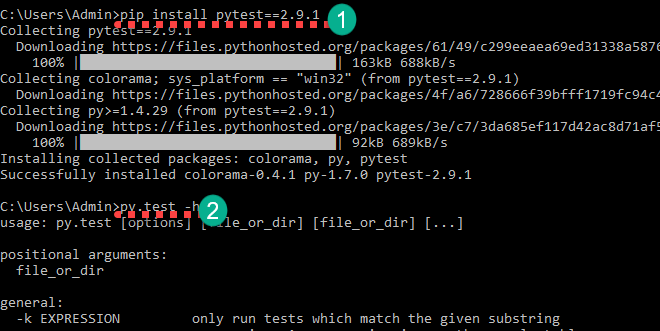
ステップ1) 以下のコマンドでpytestをインストールできます。
pip install pytest==2.9.1
インストールが完了したら、以下のコマンドで確認できます。
py.test -h
これによりヘルプが表示されます。
最初の基本的なPytestの例
それでは、基本的なpytestの例を通して、pytestの使い方を学びましょう。
study_pytest というフォルダを作成してください。このフォルダ内にテストファイルを作成します。コマンドラインでそのフォルダに移動してください。フォルダ内に test_sample1.py という名前のファイルを作成してください。

以下のコードを追加して保存してください。
import pytest
def test_file1_method1():
	x=5
	y=6
	assert x+1 == y,"test failed"
	assert x == y,"test failed"
def test_file1_method2():
	x=5
	y=6
	assert x+1 == y,"test failed"
以下のコマンドを使用してテストを実行してください。
py.test
以下のような出力が得られます。
test_sample1.py F.
============================================== FAILURES ========================================
____________________________________________ test_sample1 ______________________________________
    def test_file1_method1():
    	x=5
    	y=6
       	assert x+1 == y,"test failed"
>      	assert x == y,"test failed"
E       AssertionError: test failed
E       assert 5 == 6
test_sample1.py:6: AssertionError
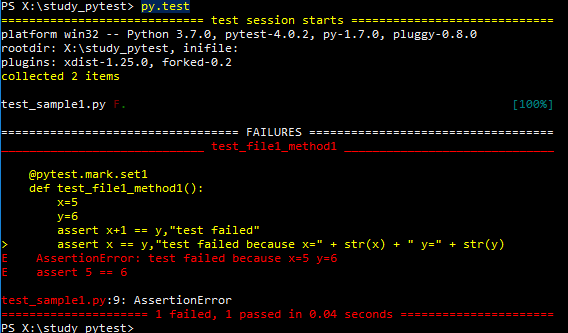
ここで、test_sample1.py F. では、文字 F は失敗、ドット (.) は成功を表します。失敗セクションでは、失敗したメソッドと失敗した行を確認できます。ここで、x==y は 5==6 を意味し、これは偽です。
次に、pytestにおけるアサーションについて学びます。
Pytestにおけるアサーション
Pytestのアサーションは、TrueまたはFalseのいずれかを返すチェックです。Pytestでは、テストメソッド内でアサーションが失敗した場合、そのメソッドの実行はそこで停止します。そのテストメソッド内の残りのコードは実行されず、Pytestは次のテストメソッドに進みます。
Pytestのassertの例:
assert "hello" == "Hai" is an assertion failure.
assert 4==4 is a successful assertion
assert True is a successful assertion
assert False is an assertion failure.
次のことを考慮してください。
assert x == y,"test failed because x=" + str(x) + " y=" + str(y)
以下のアサーションの代わりに、このコードをtest_file1_method1()の中に配置してください。
assert x == y,"test failed"
テストを実行すると次のように失敗します。 AssertionError: テストが失敗しました x=5 y=6.
Pytestがテストファイルとテストメソッドを識別する方法
デフォルトでは、pytest は、ファイル名が次の文字列で始まるもののみを識別します。 テスト_ またはで終わる _テスト テストファイルとして。ただし、他のファイル名を明示的に指定することもできます(後述)。 Pytest では、テストメソッド名は次のように始まる必要があります。 testそれ以外のメソッド名は、明示的に実行を要求した場合でもすべて無視されます。
有効なpytestファイル名と無効なpytestファイル名の例をいくつか示します。
test_login.py - valid
login_test.py - valid
testlogin.py -invalid
logintest.py -invalid
注:はい、pytestにtestlogin.pyとlogintest.pyを選択するように明示的に指示できます。
有効なpytestテストメソッドと無効なpytestテストメソッドの例をいくつか示します。
def test_file1_method1(): - valid
def testfile1_method1(): - valid
def file1_method1(): - invalid
注: file1_method1() を明示的に指定した場合でも、pytest はこのメソッドを実行しません。
特定のファイルおよび複数のファイルから複数のテストを実行する
現在、study_pytestフォルダ内にtest_sample1.pyというファイルがあります。test_sample2.pyやtest_sample3.pyなど、複数のファイルがあるとします。フォルダとそのサブフォルダ内のすべてのファイルからすべてのテストを実行するには、pytestコマンドを実行するだけで済みます。
py.test
これにより、そのフォルダおよびその下のサブフォルダにある、test_ で始まるファイル名と _test で終わるファイル名すべてが実行されます。
特定のファイルからのみテストを実行するには、py.test を使用できます。 。
py.test test_sample1.py
Pytestを使用してテスト全体の一部を実行する
テストスイート全体を実行したくない場合もあります。Pytestでは、特定のテストのみを実行できます。その方法は2つあります。
- グロウping 部分文字列一致によるテスト名の抽出。
- グロウping マーカーによる検査。
test_sample1.py は既に存在します。test_sample2.py というファイルを作成し、以下のコードを追加してください。
def test_file2_method1():
	x=5
	y=6
	assert x+1 == y,"test failed"
	assert x == y,"test failed because x=" + str(x) + " y=" + str(y)
def test_file2_method2():
	x=5
	y=6
	assert x+1 == y,"test failed"
現在、以下の状況です。
• test_sample1.py
• test_file1_method1()
• test_file1_method2()
• test_sample2.py
• test_file2_method1()
• test_file2_method2()
オプション1)部分文字列マッチングによるテストの実行
ここで、名前にmethod1が含まれるすべてのテストを実行するには、以下のコマンドを実行する必要があります。
py.test -k method1 -v
-k <expression> is used to represent the substring to match
-v increases the verbosity
したがって、py.test -k method1 -v を実行すると、次の結果が得られます。
test_sample2.py::test_file2_method1 FAILED
test_sample1.py::test_file1_method1 FAILED

============================================== FAILURES ==============================================
_________________________________________ test_file2_method1 _________________________________________
    def test_file2_method1():
    	x=5
    	y=6
       	assert x+1 == y,"test failed"
>      	assert x == y,"test failed because x=" + str(x) + " y=" + str(y)
E       AssertionError: test failed because x=5 y=6
E       assert 5 == 6
test_sample2.py:5: AssertionError

_________________________________________ test_file1_method1 _________________________________________
    @pytest.mark.only
    def test_file1_method1():
    	x=5
    	y=6
       	assert x+1 == y,"test failed"
>      	assert x == y,"test failed because x=" + str(x) + " y=" + str(y)
E       AssertionError: test failed because x=5 y=6
E       assert 5 == 6
test_sample1.py:8: AssertionError

================================= 2 tests deselected by '-kmethod1' ==================================
=============================== 2 failed, 2 deselected in 0.02 seconds ===============================
ここで、最後の方に、 2 つのテストが「-kmethod1」によって選択解除されましたこれらはtest_file1_method2とtest_file2_method2です。
以下のような様々な組み合わせで試してみてください。
py.test -k method -v - will run all the four methods
py.test -k methods -v – will not run any test as there is no test name matches the substring 'methods'
オプション 2) マーカーによるテストの実行
Pytest では、pytest マーカー (@pytest.mark) を使用して、テスト メソッドにさまざまな属性を設定できます。テスト ファイルでマーカーを使用するには、テスト ファイルに pytest をインポートする必要があります。ここでは、テスト メソッドに異なるマーカー名を適用し、マーカー名に基づいて特定のテストを実行します。各テスト名にマーカーを定義するには、次のようにします。
@pytest.mark.<name>.
テストメソッドにマーカーset1とset2を定義し、これらのマーカー名を使用してテストを実行します。テストファイルを以下のコードで更新してください。
テストサンプル1.py
import pytest
@pytest.mark.set1
def test_file1_method1():
	x=5
	y=6
	assert x+1 == y,"test failed"
	assert x == y,"test failed because x=" + str(x) + " y=" + str(y)

@pytest.mark.set2
def test_file1_method2():
	x=5
	y=6
	assert x+1 == y,"test failed"
テストサンプル2.py
import pytest
@pytest.mark.set1
def test_file2_method1():
	x=5
	y=6
	assert x+1 == y,"test failed"
	assert x == y,"test failed because x=" + str(x) + " y=" + str(y)

@pytest.mark.set1
def test_file2_method2():
	x=5
	y=6
	assert x+1 == y,"test failed"
以下のコマンドで、マークされたテストを実行できます。
py.test -m <name>
-m <name> mentions the marker name
`py.test -m set1` を実行すると、`test_file1_method1`、`test_file2_method1`、および `test_file2_method2` というメソッドが実行されます。`py.test -m set2` を実行すると、`test_file1_method2` が実行されます。
Pytestでテストを並列実行する
通常、テストスイートには複数のテストファイルと数百ものテストメソッドが含まれており、実行にはかなりの時間がかかります。Pytestではテストを並列実行できます。そのためには、まず以下のコマンドを実行してpytest-xdistをインストールする必要があります。
pip install pytest-xdist

以下のコマンドでテストを実行できます。
py.test -n 4
ここで、-n複数のワーカーを使用してテストを実行します。上記のコマンドでは、4つのワーカーがテストを実行します。
Pytest フィクスチャ
フィクスチャは、各テストメソッドの前に特定のコードを実行したい場合に使用します。つまり、各テストで同じコードを繰り返す代わりに、フィクスチャを定義します。通常、フィクスチャはデータベース接続の初期化、ベースラインの受け渡しなどに使用されます。 URLなど。メソッドは、次のようにマークすることで pytest フィクスチャとしてマークされます。
@pytest.fixture
テストメソッドは、入力パラメータとしてフィクスチャを指定することで、pytestフィクスチャを使用できます。以下のコードを含む新しいファイル test_basic_fixture.py を作成してください。
import pytest
@pytest.fixture
def supply_AA_BB_CC():
	aa=25
	bb =35
	cc=45
	return [aa,bb,cc]

def test_comparewithAA(supply_AA_BB_CC):
	zz=35
	assert supply_AA_BB_CC[0]==zz,"aa and zz comparison failed"

def test_comparewithBB(supply_AA_BB_CC):
	zz=35
	assert supply_AA_BB_CC[1]==zz,"bb and zz comparison failed"

def test_comparewithCC(supply_AA_BB_CC):
	zz=35
	assert supply_AA_BB_CC[2]==zz,"cc and zz comparison failed"
ここに:
- supply_AA_BB_CCという名前の器具があります。このメソッドは3つの値のリストを返します。
- それぞれの値と比較するためのテスト方法が3つあります。
各テスト関数には、使用可能なフィクスチャと名前が一致する入力引数があります。Pytestは対応するフィクスチャメソッドを呼び出し、返された値が入力引数(ここではリスト[25,35,45])に格納されます。リストの項目は、比較のためにテストメソッドで使用されます。それでは、テストを実行して結果を確認してください。
py.test test_basic_fixture
test_basic_fixture.py::test_comparewithAA FAILED
test_basic_fixture.py::test_comparewithBB PASSED
test_basic_fixture.py::test_comparewithCC FAILED

============================================== FAILURES ==============================================
_________________________________________ test_comparewithAA _________________________________________
supply_AA_BB_CC = [25, 35, 45]
    def test_comparewithAA(supply_AA_BB_CC):
    	zz=35
>   	assert supply_AA_BB_CC[0]==zz,"aa and zz comparison failed"
E    AssertionError: aa and zz comparison failed
E    assert 25 == 35
test_basic_fixture.py:10: AssertionError

_________________________________________ test_comparewithCC _________________________________________
supply_AA_BB_CC = [25, 35, 45]
    def test_comparewithCC(supply_AA_BB_CC):
    	zz=35
>   	assert supply_AA_BB_CC[2]==zz,"cc and zz comparison failed"
E    AssertionError: cc and zz comparison failed
E    assert 45 == 35
test_basic_fixture.py:16: AssertionError
================================= 2 failed, 1 passed in 0.05 seconds =================================
zz=BB=35であるため、テストtest_comparewithBBは合格し、残りの2つのテストは失敗します。
フィクスチャメソッドのスコープは、それが定義されているテストファイル内でのみ有効です。他のテストファイルでフィクスチャにアクセスしようとすると、「フィクスチャが見つかりません」というエラーが表示されます。 「supply_AA_BB_CC」が見つかりません 他のファイルにあるテストメソッドについて。
複数のテストファイルに対して同じフィクスチャを使用するには、conftest.py というファイルにフィクスチャメソッドを作成します。以下の pytest の例でこれを見てみましょう。conftest.py、test_basic_fixture.py、test_basic_fixture2.py という 3 つのファイルを作成し、それぞれに以下のコードを記述します。
conftest.py
import pytest
@pytest.fixture
def supply_AA_BB_CC():
	aa=25
	bb =35
	cc=45
	return [aa,bb,cc]
test_basic_fixture.py
import pytest
def test_comparewithAA(supply_AA_BB_CC):
	zz=35
	assert supply_AA_BB_CC[0]==zz,"aa and zz comparison failed"

def test_comparewithBB(supply_AA_BB_CC):
	zz=35
	assert supply_AA_BB_CC[1]==zz,"bb and zz comparison failed"

def test_comparewithCC(supply_AA_BB_CC):
	zz=35
	assert supply_AA_BB_CC[2]==zz,"cc and zz comparison failed"
test_basic_fixture2.py
import pytest
def test_comparewithAA_file2(supply_AA_BB_CC):
	zz=25
	assert supply_AA_BB_CC[0]==zz,"aa and zz comparison failed"

def test_comparewithBB_file2(supply_AA_BB_CC):
	zz=25
	assert supply_AA_BB_CC[1]==zz,"bb and zz comparison failed"

def test_comparewithCC_file2(supply_AA_BB_CC):
	zz=25
	assert supply_AA_BB_CC[2]==zz,"cc and zz comparison failed"
Pytest はまずテスト ファイル内でフィクスチャを探し、見つからない場合は conftest.py 内を探します。以下の結果を得るには、py.test -k test_comparewith -v でテストを実行してください。
test_basic_fixture.py::test_comparewithAA FAILED
test_basic_fixture.py::test_comparewithBB PASSED
test_basic_fixture.py::test_comparewithCC FAILED
test_basic_fixture2.py::test_comparewithAA_file2 PASSED
test_basic_fixture2.py::test_comparewithBB_file2 FAILED
test_basic_fixture2.py::test_comparewithCC_file2 FAILED
Pytest パラメータ化テスト
テストをパラメータ化する目的は、複数の引数セットに対してテストを実行することです。これは、@pytest.mark.parametrize を使用して行うことができます。以下の pytest の例でこれを見てみましょう。ここでは、3 つの引数をテスト メソッドに渡します。このテスト メソッドは、最初の 2 つの引数を加算し、その結果を 3 番目の引数と比較します。以下のコードでテスト ファイル test_addition.py を作成してください。
import pytest
@pytest.mark.parametrize("input1, input2, output",[(5,5,10),(3,5,12)])
def test_add(input1, input2, output):
	assert input1+input2 == output,"failed"
このテストメソッドは、input1、input2、output の 3 つの引数を受け取ります。input1 と input2 を加算し、その合計を output と比較します。py.test -k test_add -v でテストを実行して結果を見てみましょう。
test_addition.py::test_add[5-5-10] PASSED
test_addition.py::test_add[3-5-12] FAILED
============================================== FAILURES ==============================================
__________________________________________ test_add[3-5-12] __________________________________________
input1 = 3, input2 = 5, output = 12
    @pytest.mark.parametrize("input1, input2, output",[(5,5,10),(3,5,12)])
    def test_add(input1, input2, output):
>   	assert input1+input2 == output,"failed"
E    AssertionError: failed
E    assert (3 + 5) == 12
test_addition.py:5: AssertionError
テストが2回実行されたことがわかります。1回目は5+5==10を検証し、2回目は3+5==12を検証しています。
test_addition.py::test_add[5-5-10] 合格
test_addition.py::test_add[3-5-12] 失敗しました
PytestのXfailとテストのスキップ
テストを実行したくない状況や、 テストケース 特定の時点では関係ありません。そのような状況では、テストを xfail するか、テストをスキップするオプションがあります。xfail されたテストは実行されますが、失敗したテストまたは合格したテストの一部としてカウントされません。 tracそのテストが失敗した場合、ebackが表示されます。@pytest.mark.xfailを使用してテストをxfailできます。スキップping `@pytest.mark.skip` を使用すると、テストは実行されません。テストをスキップするには、`@pytest.mark.skip` を使用します。以下のコードで test_addition.py を編集してください。
import pytest
@pytest.mark.skip
def test_add_1():
	assert 100+200 == 400,"failed"

@pytest.mark.skip
def test_add_2():
	assert 100+200 == 300,"failed"

@pytest.mark.xfail
def test_add_3():
	assert 15+13 == 28,"failed"

@pytest.mark.xfail
def test_add_4():
	assert 15+13 == 100,"failed"

def test_add_5():
	assert 3+2 == 5,"failed"

def test_add_6():
	assert 3+2 == 6,"failed"
ここに:
- test_add_1 と test_add_2 はスキップされ、実行されません。
- test_add_3 と test_add_4 は xfailed です。これらのテストは実行され、xfailed (テスト失敗時) または xpassed (テスト合格時) テストの一部となります。 trac失敗時のeBack。
- test_add_5とtest_add_6が実行され、test_add_6は失敗を報告します。 tractest_add_5 が合格するまで eback します。
py.test test_addition.py -v でテストを実行し、結果を確認してください。
test_addition.py::test_add_1 SKIPPED
test_addition.py::test_add_2 SKIPPED
test_addition.py::test_add_3 XPASS
test_addition.py::test_add_4 xfail
test_addition.py::test_add_5 PASSED
test_addition.py::test_add_6 FAILED

============================================== FAILURES ==============================================
_____________________________________________ test_add_6 _____________________________________________
    def test_add_6():
>   	assert 3+2 == 6,"failed"
E    AssertionError: failed
E    assert (3 + 2) == 6
test_addition.py:24: AssertionError

================ 1 failed, 1 passed, 2 skipped, 1 xfailed, 1 xpassed in 0.07 seconds =================
結果はXML形式で表示されます
テスト結果はXML形式で生成でき、それを継続的インテグレーションサーバーに渡してさらに処理することができます。これは、`py.test test_sample1.py -v –junitxml=”result.xml”`というコマンドで実行できます。result.xmlファイルにはテスト実行結果が記録されます。以下にresult.xmlのサンプルを示します。
<?xml version="1.0" encoding="UTF-8"?>
<testsuite errors="0" failures="1" name="pytest" skips="0" tests="2" time="0.046">
   <testcase classname="test_sample1" file="test_sample1.py" line="3" name="test_file1_method1" time="0.001384973526">
     <failure message="AssertionError:test failed because x=5 y=6 assert 5 ==6">
    @pytest.mark.set1
    def test_file1_method1():
    	x=5
    	y=6
       	assert x+1 == y,"test failed"
>      	assert x == y,"test failed because x=" + str(x) + " y=" + str(y)
E       AssertionError: test failed because x=5 y=6
E       assert 5 == 6
         test_sample1.py:9: AssertionError
    </failure>
   </testcase>
   <testcase classname="test_sample1" file="test_sample1.py" line="10" name="test_file1_method2" time="0.000830173492432" />
</testsuite>
から合計 2 つのテストが表示され、そのうち 1 つが失敗しています。その下には、実行された各テストの詳細が表示されます。タグ。
APIテストのためのPytestフレームワーク
次に、APIをテストするための小さなpytestフレームワークを作成します。ここで使用するAPIは、 要件このウェブサイトはテスト可能なAPIを提供するだけであり、データは保存しません。ここでは、以下の項目についてテストを作成します。
- ユーザー一覧を表示します。
- ユーザーでログインしてください。
指定されたコードを使用して以下のファイルを作成します。まず、conftest.py にはベースを提供するフィクスチャがあります。 URL すべてのテスト方法に対して。
import pytest
@pytest.fixture
def supply_url():
	return "https://reqres.in/api"
次に、test_list_user.pyには、有効なユーザーと無効なユーザーを一覧表示するためのテストメソッドが含まれています。
- test_list_valid_user は有効なユーザー取得をテストし、応答を検証します。
- test_list_invaliduser は、無効なユーザー取得をテストし、応答を検証します。
import pytest
import requests
import json
@pytest.mark.parametrize("userid, firstname",[(1,"George"),(2,"Janet")])
def test_list_valid_user(supply_url,userid,firstname):
	url = supply_url + "/users/" + str(userid)
	resp = requests.get(url)
	j = json.loads(resp.text)
	assert resp.status_code == 200, resp.text
	assert j['data']['id'] == userid, resp.text
	assert j['data']['first_name'] == firstname, resp.text

def test_list_invaliduser(supply_url):
	url = supply_url + "/users/50"
	resp = requests.get(url)
	assert resp.status_code == 404, resp.text
次に、test_login_user.pyには、ログイン機能をテストするためのテストメソッドが含まれています。
- test_login_validは、メールアドレスとパスワードを使用した有効なログイン試行をテストします。
- test_login_no_password は、パスワードを渡さずに無効なログインを試みるテストです。
- test_login_no_emailは、メールアドレスを渡さずに無効なログインを試みるテストです。
import pytest
import requests
import json
def test_login_valid(supply_url):
	url = supply_url + "/login/"
	data = {'email':'test@test.com','password':'something'}
	resp = requests.post(url, data=data)
	j = json.loads(resp.text)
	assert resp.status_code == 200, resp.text
	assert j['token'] == "QpwL5tke4Pnpja7X", resp.text

def test_login_no_password(supply_url):
	url = supply_url + "/login/"
	data = {'email':'test@test.com'}
	resp = requests.post(url, data=data)
	j = json.loads(resp.text)
	assert resp.status_code == 400, resp.text
	assert j['error'] == "Missing password", resp.text

def test_login_no_email(supply_url):
	url = supply_url + "/login/"
	data = {}
	resp = requests.post(url, data=data)
	j = json.loads(resp.text)
	assert resp.status_code == 400, resp.text
	assert j['error'] == "Missing email or username", resp.text
py.test -v を使用してテストを実行すると、次の結果が得られます。
test_list_user.py::test_list_valid_user[1-George] PASSED
test_list_user.py::test_list_valid_user[2-Janet] PASSED
test_list_user.py::test_list_invaliduser PASSED
test_login_user.py::test_login_valid PASSED
test_login_user.py::test_login_no_password PASSED
test_login_user.py::test_login_no_email PASSED
テストを更新し、さまざまな出力を試してみてください。
