
Višenitnost u Python s primjerom: Naučite GIL u Python
 Uredništvo
⚡ Pametni sažetak
Višenitnost u Python pokreće nekoliko niti unutar jednog procesa tako da dijele memoriju i rade istovremeno. Modul za niti stvara i upravlja tim nitima, dok Global Interpreter Lock ograničava pravi paralelizam, što tehniku čini najboljom za zadatke vezane uz ulaz/izlaz.
The Python Programski jezik vam omogućuje korištenje višestruke obrade ili višenitnosti. U ovom tutorialu naučit ćete kako pisati višenitne aplikacije u Python.
Što je nit?
Nit je jedinica izvršavanja u konkurentnom programiranju. Višenitnost je tehnika koja omogućuje CPU-u da istovremeno izvršava više zadataka jednog procesa. Te niti mogu se izvršavati pojedinačno dok dijele svoje procesne resurse.
Što je proces?
Proces je u osnovi program koji se izvršava. Kada pokrenete aplikaciju na računalu (poput preglednika ili uređivača teksta), operativni sustav stvara proces.
U čemu je Multithreading Python?
Višenitnost u Python Programiranje je dobro poznata tehnika u kojoj više niti u procesu dijeli svoj podatkovni prostor s glavnom niti, što olakšava i čini učinkovitim dijeljenje informacija i komunikaciju unutar niti. Niti su lakše od procesa. Više niti može se izvršavati pojedinačno dok dijeli resurse procesa. Svrha višenitnosti je istovremeno izvršavanje više zadataka i funkcija.
Što je višeprocesiranje?
višeobradbeni omogućuje vam pokretanje više nepovezanih procesa istovremeno. Ovi procesi ne dijele svoje resurse i komuniciraju putem IPC-a.
Python Multithreading vs Multiprocessing
Za razumijevanje procesa i niti, razmotrite ovaj scenarij: .exe datoteka na vašem računalu je program. Kada je otvorite, OS je učitava u memoriju, a CPU je izvršava. Instanca programa koja se sada izvršava naziva se proces.
Svaki proces ima dvije osnovne komponente:
- The Code
- Podatak
Sada, proces može sadržavati jedan ili više poddijelova tzv teme. To ovisi o arhitekturi operacijskog sustava. Nit možete zamisliti kao dio procesa koji operacijski sustav može zasebno izvršiti.
Drugim riječima, to je niz instrukcija koje OS može izvršavati neovisno. Niti unutar jednog procesa dijele podatke tog procesa i dizajnirane su za zajednički rad kako bi olakšale paralelizam.
Zašto koristiti Multithreading?
Multithreading vam omogućuje rastavljanje aplikacije na više podzadataka i pokretanje tih zadataka istovremeno. Ako pravilno koristite multithreading, brzina vaše aplikacije, performanse i renderiranje mogu se poboljšati.
Python Višenitnost
Python podržava konstrukcije za višestruku obradu i višenitnost. U ovom vodiču ćete se prvenstveno usredotočiti na implementaciju višenitni aplikacije sa PythonPostoje dva glavna modula koja se mogu koristiti za rukovanje nitima u Python:
- The nit modul, i
- The threading modul
Međutim, u Python, postoji i nešto što se zove globalno zaključavanje interpretera (GIL). Ne dopušta veliko poboljšanje performansi i može čak smanjiti performanse nekih višenitnih aplikacija. Naučit ćete sve o tome u sljedećim odjeljcima ovog vodiča.
Moduli Thread i Threading
Dva modula o kojima ćete naučiti u ovom vodiču su modul niti i modul navoja.
Međutim, modul niti je odavno zastario. Počevši od Python 3, označen je kao zastario i dostupan je samo kao _nit za kompatibilnost unazad.
Trebali biste koristiti višu razinu threading modul za aplikacije koje namjeravate implementirati. Modul niti ovdje je obrađen samo u obrazovne svrhe.
Modul niti
Sintaksa za stvaranje nove niti pomoću ovog modula je sljedeća:
thread.start_new_thread(function_name, arguments)
U redu, sada ste pokrili osnovnu teoriju za početak kodiranja. Dakle, otvorite svoje IDLE ili bilježnicu i upišite sljedeće:
import time
import _thread

def thread_test(name, wait):
   i = 0
   while i <= 3:
      time.sleep(wait)
      print("Running %s\n" %name)
      i = i + 1

   print("%s has finished execution" %name)

if __name__ == "__main__":

    _thread.start_new_thread(thread_test, ("First Thread", 1))
    _thread.start_new_thread(thread_test, ("Second Thread", 2))
    _thread.start_new_thread(thread_test, ("Third Thread", 3))
Spremite datoteku i pritisnite F5 za pokretanje programa. Ako je sve učinjeno ispravno, ovo je rezultat koji biste trebali vidjeti:
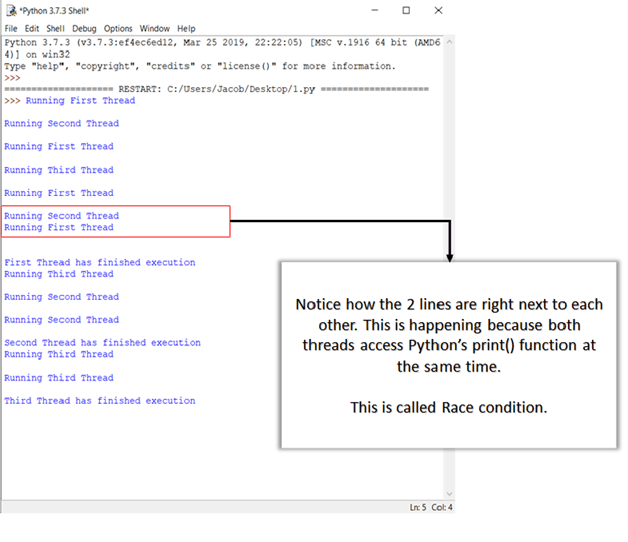
Više o uvjetima utrke i kako se s njima nositi saznat ćete u sljedećim odjeljcima.
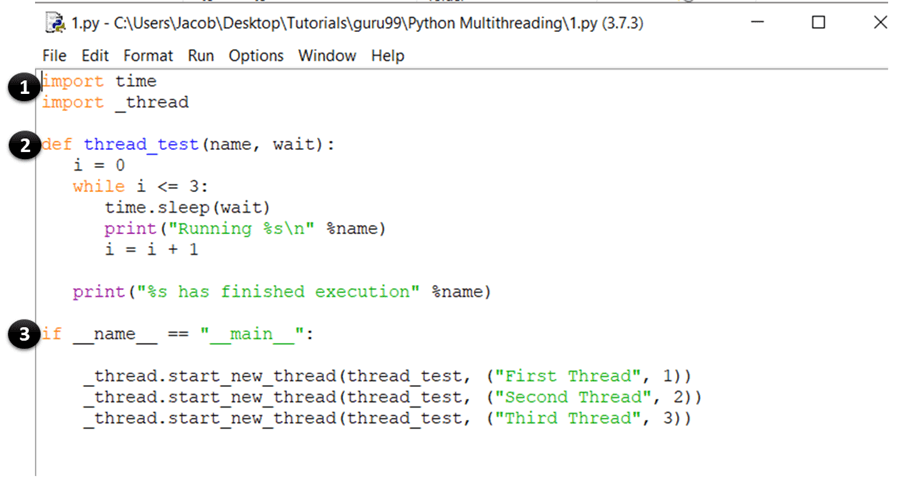
OBJAŠNJENJE ŠIFRE
- Ove naredbe uvoze module vremena i niti, koji se koriste za rukovanje izvršavanjem i odgađanjem Python teme.
- Ovdje ste definirali funkciju tzv test_niti, koji će biti pozvan od strane započeti_novu_nit metoda. Funkcija izvršava while petlju tijekom četiri iteracije i ispisuje naziv niti koja ju je pozvala. Nakon što je iteracija završena, ispisuje poruku da je nit završila izvršavanje.
- Ovo je glavni dio vašeg programa. Ovdje jednostavno nazovete započeti_novu_nit metoda s test_niti funkciju kao argument. Ovo će stvoriti novu nit za funkciju koju prosljeđujete kao argument i početi je izvršavati. Imajte na umu da ovo (thread_test) možete zamijeniti bilo kojom drugom funkcijom koju želite pokrenuti kao nit.
Modul Threading
Ovaj modul je implementacija visoke razine niti u Python i de facto standard za upravljanje višenitnim aplikacijama. Pruža širok raspon značajki u usporedbi s modulom thread.
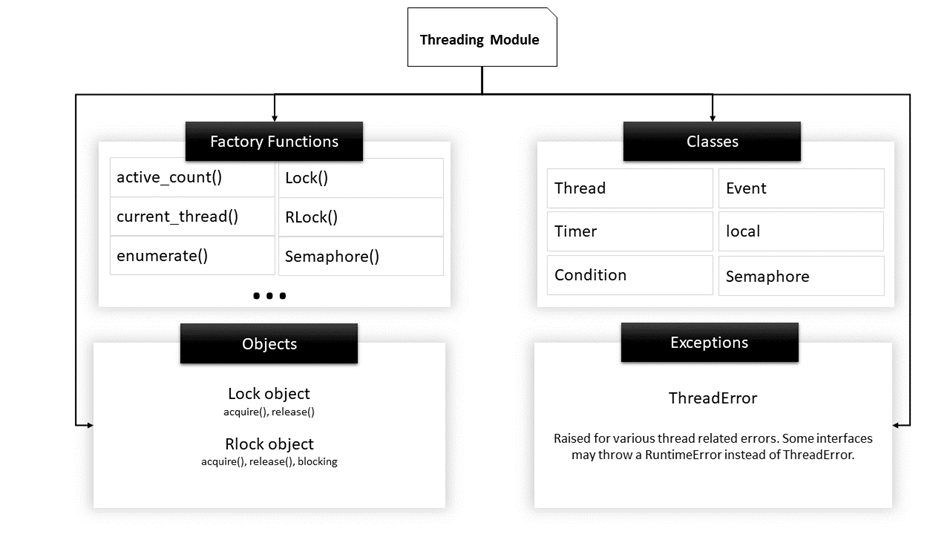
Struktura Threading modula
Ovdje je popis nekih korisnih funkcija definiranih u ovom modulu:
| Naziv funkcije | Description |
|---|---|
| activeCount() | Vraća broj od Nit predmeti koji su još uvijek živi. |
| trenutna nit() | Vraća trenutni objekt klase Thread. |
| nabrojati() | Ispisuje sve aktivne Thread objekte. |
| isDaemon() | Vraća true ako je nit demon. |
| živ je() | Vraća true ako je nit još živa. |
| Thread Metode klase | |
| početak() | Pokreće aktivnost niti. Mora se pozvati samo jednom za svaku nit jer će izbaciti pogrešku vremena izvođenja ako se pozove više puta. |
| trčanje() | Ova metoda označava aktivnost niti i može je nadjačati klasa koja proširuje klasu Thread. |
| pridružiti() | Blokira izvođenje drugog koda sve dok se nit na kojoj je pozvana metoda join() ne prekine. |
Backstory: The Thread Class
Prije nego što počnete kodirati višenitne programe pomoću modula za threading, ključno je razumjeti klasu Thread. Klasa thread je primarna klasa koja definira predložak i operacije niti u Python.
Najčešći način stvaranja višenitnog Python Cilj aplikacije je deklarirati klasu koja proširuje klasu Thread i nadjačava njezinu metodu run().
Klasa Thread, ukratko, označava sekvencu koda koja se izvodi zasebno nit kontrole.
Dakle, kada pišete višenitnu aplikaciju, učinit ćete sljedeće:
- definirajte klasu koja proširuje klasu Thread
- Nadjačaj __init__ konstruktor
- Nadjačaj trčanje() način
Nakon što je objekt niti napravljen, početak() metoda se može koristiti za početak izvršavanja ove aktivnosti i pridružiti() metoda se može koristiti za blokiranje svih ostalih kodova dok se trenutna aktivnost ne završi.
Sada pokušajmo upotrijebiti modul za threading kako bismo implementirali vaš prethodni primjer. Ponovno pokrenite IDLE i upišite sljedeće:
import time
import threading

class threadtester (threading.Thread):
    def __init__(self, id, name, i):
       threading.Thread.__init__(self)
       self.id = id
       self.name = name
       self.i = i

    def run(self):
       thread_test(self.name, self.i, 5)
       print ("%s has finished execution " %self.name)

def thread_test(name, wait, i):

    while i:
       time.sleep(wait)
       print ("Running %s \n" %name)
       i = i - 1

if __name__=="__main__":
    thread1 = threadtester(1, "First Thread", 1)
    thread2 = threadtester(2, "Second Thread", 2)
    thread3 = threadtester(3, "Third Thread", 3)

    thread1.start()
    thread2.start()
    thread3.start()

    thread1.join()
    thread2.join()
    thread3.join()
Ovo će biti rezultat kada izvršite gornji kod:

OBJAŠNJENJE ŠIFRE
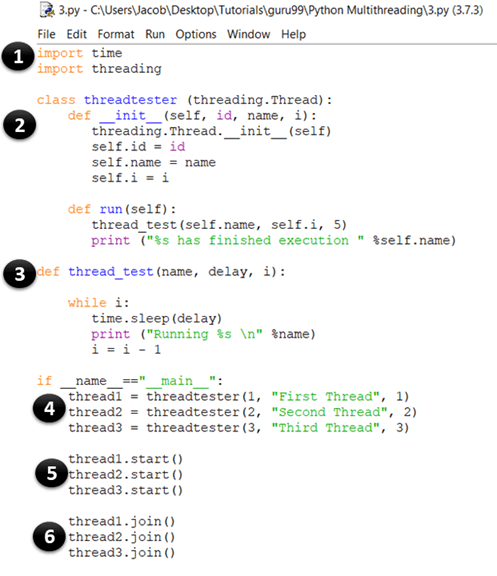
- Ovaj dio je isti kao i naš prethodni primjer. Ovdje uvozite modul vremena i niti, koji se koriste za rukovanje izvršavanjem i kašnjenjima Python teme.
- U ovom dijelu stvarate klasu koja se zove threadtester, koja nasljeđuje ili proširuje Nit klasa modula za izradu niti. Ovo je jedan od najčešćih načina stvaranja niti u PythonMeđutim, trebali biste samo nadjačati konstruktor i trčanje() način u vašoj aplikaciji. Kao što možete vidjeti u gornjem uzorku koda, __init__ metoda (konstruktor) je nadjačana. Slično tome, također ste nadjačali trčanje() metoda. Sadrži kod koji želite izvršiti unutar niti. U ovom primjeru pozvali ste funkciju thread_test().
- Ovo je metoda thread_test() koja uzima vrijednost i kao argument, smanjuje ga za 1 u svakoj iteraciji i prolazi kroz ostatak koda dok i ne postane 0. U svakoj iteraciji ispisuje naziv niti koja se trenutno izvršava i miruje nekoliko sekundi čekanja (što se također uzima kao argument).
- thread1 = threadtester(1, “First Thread”, 1) Ovdje stvaramo nit i prosljeđujemo tri parametra koja smo deklarirali u __init__. Prvi parametar je ID niti, drugi parametar je naziv niti, a treći parametar je brojač, koji određuje koliko puta bi se trebala pokrenuti while petlja.
- thread2.start() Metoda start se koristi za pokretanje izvršavanja niti. Interno, funkcija start() poziva metodu run() vaše klase.
- thread3.join() Metoda join() blokira izvođenje drugog koda i čeka dok nit na kojoj je pozvana završi.
Kao što već znate, niti koje su u istom procesu imaju pristup memoriji i podacima tog procesa. Kao rezultat toga, ako više niti pokuša istovremeno promijeniti ili pristupiti podacima, mogu se pojaviti pogreške.
U sljedećem odjeljku vidjet ćete različite vrste komplikacija koje se mogu pojaviti kada niti pristupaju podacima i kritičnom dijelu bez provjere postojećih transakcija pristupa.
Uvjeti zastoja i utrke
Prije učenja o zastojima i uvjetima utrke, korisno je razumjeti nekoliko osnovnih definicija vezanih uz konkurentno programiranje:
- Kritični odjeljak: To je fragment koda koji pristupa ili mijenja dijeljene varijable i mora se izvršiti kao atomska transakcija.
- Prekidač konteksta: To je proces koji CPU slijedi kako bi pohranio stanje niti prije promjene s jednog zadatka na drugi, tako da se kasnije može nastaviti s iste točke.
Zastoji
Zastoji su najopasniji problem s kojim se programeri suočavaju prilikom pisanja istovremenih/višenitnih aplikacija u PythonNajbolji način za razumijevanje zastoja je korištenje klasičnog primjera računalnog problema poznatog kao Objed Philosophers Problem.
Izjava o problemu za filozofe objedovanja je sljedeća:
Pet filozofa sjedi za okruglim stolom s pet tanjura špageta (vrsta tjestenine) i pet vilica, kao što je prikazano na dijagramu.

Objed Philosophers Problem
U bilo kojem trenutku, filozof mora ili jesti ili razmišljati.
Štoviše, filozof mora uzeti dvije vilice koje su mu susjedne (tj. lijevu i desnu vilicu) prije nego što može jesti špagete. Problem zastoja javlja se kada svih pet filozofa istovremeno podignu svoje desne vilice.
Budući da svaki od filozofa ima jednu vilicu, svi će čekati da ostali odlože vilicu. Kao rezultat toga, nitko od njih neće moći jesti špagete.
Slično, u konkurentnom sustavu, zastoj se događa kada različite niti ili procesi (filozofi) pokušavaju steći dijeljene resurse sustava (forkovi) u isto vrijeme. Kao rezultat toga, niti jedan od procesa nema priliku za izvršenje jer čekaju drugi resurs koji drži neki drugi proces.
Uvjeti utrke
Uvjet utrke je neželjeno stanje programa koje se javlja kada sustav istovremeno izvršava dvije ili više operacija. Na primjer, razmotrimo ovu jednostavnu for petlju:
i=0; # a global variable
for x in range(100):
    print(i)
    i+=1;
Ako stvarate n Broj niti koje istovremeno izvršavaju ovaj kod, ne možete odrediti vrijednost i (koju dijele niti) kada program završi s izvršavanjem. To je zato što se u stvarnom okruženju s više niti niti mogu preklapati, a vrijednost i koju je nit dohvatila i izmijenila može se promijeniti između kada joj pristupi neka druga nit.
Ovo su dvije glavne klase problema koje se mogu pojaviti u višenitnom ili distribuiranom Python aplikacija. U sljedećem odjeljku naučit ćete kako prevladati ovaj problem sinkronizacijom niti.
Synchronizirajući niti
Za rješavanje uvjeta utrke, zastoja i drugih problema temeljenih na nitima, modul za niti pruža Zaključati objekt. Ideja je da kada nit želi pristup određenom resursu, dobiva zaključavanje za taj resurs. Jednom kada nit zaključa određeni resurs, nijedna druga nit mu ne može pristupiti dok se zaključavanje ne oslobodi. Kao rezultat toga, promjene resursa bit će atomske, a uvjeti utrke bit će izbjegnuti.
Zaključavanje je primitiv sinkronizacije niske razine implementiran od strane _nit modul. U bilo kojem trenutku, brava može biti u jednom od dva stanja: zaključan or otključan. Podržava dvije metode:
- steći(): Kada je stanje zaključavanja otključano, pozivanje metode acquire() promijenit će stanje u zaključano i vratiti . Međutim, ako je stanje zaključano, poziv metode acquire() je blokiran dok neka druga nit ne pozove metodu release().
- otpuštanje(): Metoda release() koristi se za postavljanje stanja na otključano, tj. za otključavanje. Može se pozvati bilo kojom niti, ne nužno onom koja je stekla zaključavanje.
Evo primjera korištenja brava u vašim aplikacijama. Pokrenite IDLE i upišite sljedeće:
import threading
lock = threading.Lock()

def first_function():
    for i in range(5):
        lock.acquire()
        print ('lock acquired')
        print ('Executing the first funcion')
        lock.release()

def second_function():
    for i in range(5):
        lock.acquire()
        print ('lock acquired')
        print ('Executing the second funcion')
        lock.release()

if __name__=="__main__":
    thread_one = threading.Thread(target=first_function)
    thread_two = threading.Thread(target=second_function)

    thread_one.start()
    thread_two.start()

    thread_one.join()
    thread_two.join()
Sada pritisnite F5. Trebali biste vidjeti ovakav izlaz:

OBJAŠNJENJE ŠIFRE
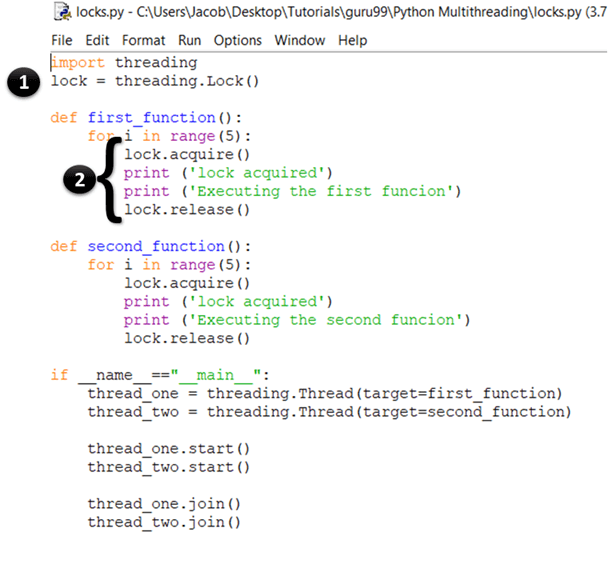
- Ovdje jednostavno stvarate novu bravu pozivom threading.Lock() tvornička funkcija. Interno, Lock() vraća instancu najučinkovitije konkretne klase Lock koju održava platforma.
- U prvoj izjavi zaključavanje dobivate pozivanjem metode Acquisi(). Kada je zaključavanje odobreno, ispisujete "zaključavanje stečeno" na konzolu. Nakon što sav kod za koji želite da se nit pokrene završi s izvršenjem, otključavate zaključavanje pozivanjem metode release().
Teorija je u redu, ali kako znate da je brava stvarno radila? Ako pogledate izlaz, vidjet ćete da svaka od naredbi print ispisuje točno jedan redak u isto vrijeme. Podsjetimo se da su u ranijem primjeru izlazi iz printa bili nasumični jer je više niti istovremeno pristupalo metodi print(). Ovdje se funkcija print poziva tek nakon što je brava stečena. Dakle, izlazi se prikazuju jedan po jedan i redak po redak.
Osim brava, Python također podržava neke druge mehanizme za rukovanje sinkronizacijom niti, kao što je navedeno u nastavku:
- RLocks
- Semaphores
- Uvjeti
- Događaji, i
- Prepreke
Globalno zaključavanje tumača (i kako to riješiti)
Prije nego što uđemo u detalje PythonŠto se tiče GIL-a, definirajmo nekoliko pojmova koji će biti korisni za razumijevanje sljedećeg odjeljka:
- Kod vezan uz CPU: ovo se odnosi na bilo koji dio koda koji će izravno izvršavati CPU.
- I/O kod: to može biti bilo koji kod koji pristupa datotečnom sustavu putem OS-a.
- CPython: to je referenca izvršenje of Python i može se opisati kao tumač napisan u C i Python (programski jezik).
U čemu je GIL Python?
Globalna brava tumača (GIL) in Python je brava procesa ili mutex koji se koristi pri radu s procesima. Osigurava da jedna nit može pristupiti određenom resursu u određenom trenutku, a također sprječava istovremenu upotrebu objekata i bajtkodova. To koristi programima s jednom niti povećanjem performansi. GIL u Python vrlo je jednostavan i lako se provodi.
Zaključavanje se može koristiti kako bi se osiguralo da samo jedna nit ima pristup određenom resursu u određenom trenutku.
Jedna od značajki Python jest da koristi globalno zaključavanje na svakom procesu interpretatora, što znači da svaki proces tretira Python sam tumač kao resurs.
Na primjer, pretpostavimo da ste napisali Python program koji koristi dvije niti za izvođenje i CPU i 'I/O' operacija. Kada izvršite ovaj program, događa se sljedeće:
- The Python Interpreter stvara novi proces i pokreće niti.
- Kada se nit-1 pokrene, prvo će nabaviti GIL i zaključati ga.
- Ako se nit-2 sada želi izvršiti, morat će pričekati da se GIL oslobodi čak i ako je drugi procesor slobodan.
- Sada, pretpostavimo da thread-1 čeka I/O operaciju. U to će vrijeme osloboditi GIL, a thread-2 će ga preuzeti.
- Nakon dovršetka I/O operacija, ako se nit-1 sada želi izvršiti, ponovno će morati pričekati da nit-2 oslobodi GIL.
Zbog toga, samo jedna nit može pristupiti interpreteru u bilo kojem trenutku, što znači da će se izvršavati samo jedna nit. Python kod u određenom trenutku.
To je u redu u jednojezgrenom procesoru jer bi se koristilo određivanje vremena (pogledajte prvi odjeljak ovog vodiča) za rukovanje nitima. Međutim, u slučaju višejezgrenih procesora, funkcija vezana uz CPU koja se izvršava na više niti imat će značajan utjecaj na učinkovitost programa jer zapravo neće koristiti sve dostupne jezgre istovremeno.
Zašto je GIL bio potreban?
CPython Sakupljač smeća koristi učinkovitu tehniku upravljanja memorijom poznatu kao brojanje referenci. Evo kako to funkcionira: Svaki objekt u Python ima broj referenci koji se povećava kada se dodijeli novom nazivu varijable ili doda u spremnik (poput n-torki, popisa itd.). Slično tome, broj referenci se smanjuje kada referenca izađe izvan dosega ili kada se pozove naredba del. Kada broj referenci objekta dosegne 0, on se skuplja kao smeće, a dodijeljena memorija se oslobađa.
Ali problem je u tome što je varijabla broja referenci sklona uvjetima utrke kao i svaka druga globalna varijabla. Kako bi riješili taj problem, programeri Python odlučili su koristiti globalno zaključavanje interpretera. Druga mogućnost bila je dodati zaključavanje svakom objektu, što bi rezultiralo zastojima i povećanim opterećenjem od poziva acquire() i release().
Stoga je GIL značajno ograničenje za višenitne Python programe koji izvršavaju operacije koje zahtijevaju puno prostora na CPU-u (što ih zapravo čini jednonitnima). Ako želite koristiti više jezgri CPU-a u svojoj aplikaciji, upotrijebite višeobradbeni modul umjesto toga.
