
8 NAJBOLJIH alata za upravljanje projektima (2026.)
 Uredništvo
Objava: Guru99 podržavaju čitatelji. Možemo zaraditi proviziju kada kupujete putem poveznica na ovoj stranici. Saznajte više.

Project management software should bring order, yet poor visibility, unreliable updates, wasted planning time, confusing interfaces, hidden plan limits, and inconsistent performance often create more work. Deadlines slip, ownership becomes unclear, and reports quickly lose trust. Many buyers overlook adoption effort, seat minimums, and data portability. The right platform clarifies priorities and exposes risks earlier. It also improves collaboration and turns progress into useful decisions. That brings relief, control, and a clear route forward.
I spent 120+ hours researching 20 tools, evaluating current features, pricing, integrations, security controls, and recurring customer feedback. After rigorous analysis, I shortlisted eight Best Project Management Tools with practical strengths, limitations, and clearly documented costs. Each recommendation includes independent editorial evaluation and balanced pros and cons, backed-by current official evidence. Continue reading to find the platform that best fits your team.
Best Project Management Tools: Top Picks!
| Oruđe |  Zoho Projects Zoho Projects |
 Miro Miro |
 Monday.com Monday.com |
 Brza baza Brza baza |
| Značajke | ✔️ Sučelje jednostavno za korištenje koje olakšava besprijekornu navigaciju. ✔️ Ugrađeni mjerač vremena za ubrzavanje naplate klijentima |
✔️ Vizualno platno za planove i ovisnosti ✔️ Suradnja u stvarnom vremenu s agilnim predlošcima |
✔️ Upravljajte svime u jednom radnom prostoru ✔️ Postavite za nekoliko minuta |
✔️ Izrada prilagođenih aplikacija bez koda ✔️ Nadzorne ploče Gantt, proračuna i portfelja u stvarnom vremenu |
| Cijena | Doživotni besplatni plan | Doživotni besplatni osnovni plan | Besplatan plan zauvijek | 30-dnevno besplatno probno razdoblje |
| Review/Ocjena |  4.7 4.7 |
4.8 |
4.5 |
4.5 |
| Veza | Posjetite web stranicu | Posjetite web stranicu | Posjetite web stranicu | Posjetite web stranicu |
1) Zoho Projects
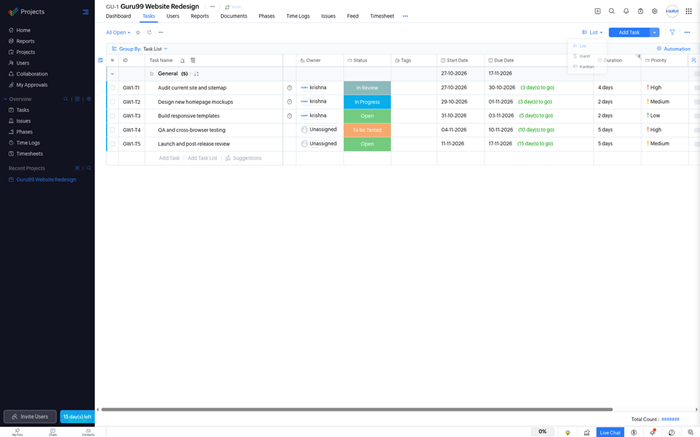
Zoho Projects is a structured project management platform for planning tasks, dependencies, schedules, budgets, and team workloads. Its Ganttove ljestvice make sequencing visible, while milestones and baselines help managers monitor progress. The platform suits growing teams that want project controls without enterprise pricing.
Its main advantage is the connected Zoho ecosystem. Timesheets, issue tracking, approvals, dashboards, and automation sit inside one workspace, while Zia assists with summaries and task creation. New users may need time to understand advanced settings, yet the plans remain accessible for feature-rich project management.
Značajke
- Planiranje zadataka: Create tasks, subtasks, milestones, dependencies, recurring work, and reminders. Multiple views help teams examine the same plan from different operational perspectives.
- Gantt Controls: Interactive Gantt charts reveal dependencies, critical paths, baselines, and schedule changes. Managers can adjust dates while understanding how revisions affect connected work.
- Vrijeme Tracking: Built-in timers, manual logs, approvals, and timesheets connect effort with projects. Billable classifications and reports support service teams tracking utilization and invoicing.
- Automatizacija tijeka rada: Blueprints, rules, webhooks, and custom functions automate repetitive handoffs. Teams can standardize approvals and reduce manual status updates across recurring processes.
- Upravljanje resursima: Workload views compare assignments against availability across projects. Managers can rebalance responsibilities before bottlenecks become missed dates or sustained overtime.
- Izdanje Tracking: Dedicated issue records capture severity, ownership, status, and resolution details. Development and operations teams can manage defects beside planned project activity.
- Zia AI: Zia can summarize discussions, create tasks, answer workspace questions, and surface insights. Availability and usage depend on the selected paid plan.
- integracije: Connections cover Zoho applications and popular third-party services. APIs, webhooks, and marketplace extensions help teams fit projects into existing business systems.
Prednosti
Nedostaci
Cijene
Zoho Projects has a capable free tier, while paid annual plans start at $4 per user monthly.
| Plan | Cijene |
|---|---|
| Besplatno | $0; up to 5 users; 3 projects; 5 GB storage |
| premija | $4/user/month billed annually; unlimited projects; advanced task and time controls |
| Poduzeće | $9/user/month billed annually; portfolio, customization, and governance features |
Free Plan; 15-Day Trial
2) Miro
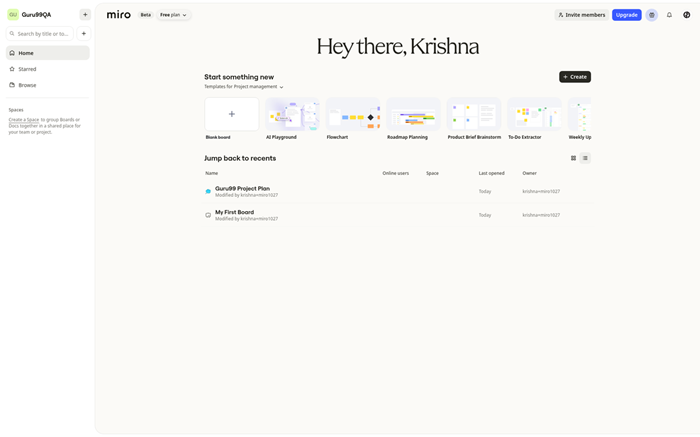
Miro is a visual workspace built around an beskonačno platno for brainstorming, mapping, workshops, and collaborative planning. Teams can combine sticky notes, diagrams, documents, timelines, and structured tables on one board. It works well when discovery and alignment matter as much as formal task trackralj.
Miro works best for teams that think visually. Live cursors, facilitation controls, templates, voting, and comments make sessions engaging. AI workflows and integrations connect ideas with delivery systems. However, boards need organization, and resource planning remains lighter than dedicated project suites.
Značajke
- Visual Canvas: An expandable canvas supports diagrams, notes, documents, media, and planning artifacts. Teams can explore complex topics without forcing everything into fixed rows.
- Suradnja uživo: Participants can edit simultaneously, follow presenters, vote, comment, and use timers. These controls keep distributed workshops focused and make decisions visible.
- Predlošci: A broad template library covers discovery, roadmaps, retrospectives, journeys, and planning. Teams can start structured sessions without designing every board manually.
- Strukturirano planiranje: Tables, timelines, dependencies, and cards add operational structure to visual work. This helps teams move concepts toward owners, dates, and deliverables.
- Tijekovi rada umjetne inteligencije: Miro AI can cluster notes, summarize discussions, generate diagrams, and assist with content. Credits and advanced capabilities vary across subscriptions.
- integracije: Connections with Jira, Asana, Linearno, ClickUp, Azure DevOps, and communication tools link boards with execution systems used across departments daily.
- Kontrole poduzeća: Single sign-on, domain controls, permissions, audit capabilities, and data governance support larger deployments. The strongest controls require enterprise packaging companywide.
- Alati za prezentaciju: Frames, interactive displays, and presenter controls turn working boards into guided narratives. Teams can explain decisions without rebuilding content in slides.
Prednosti
Nedostaci
Cijene
Miro offers a three-board free plan; Starter costs $8 per member monthly when billed annually.
| Plan | Cijene |
|---|---|
| Besplatno | $0; unlimited members; 3 editable boards; 10 AI credits monthly |
| Starter | $8/member/month billed annually; unlimited boards; private spaces and exports |
| posao | $20/member/month billed annually; advanced integrations, security, and workspace controls |
Free Plan; 14-Day Trial
3) Monday.com
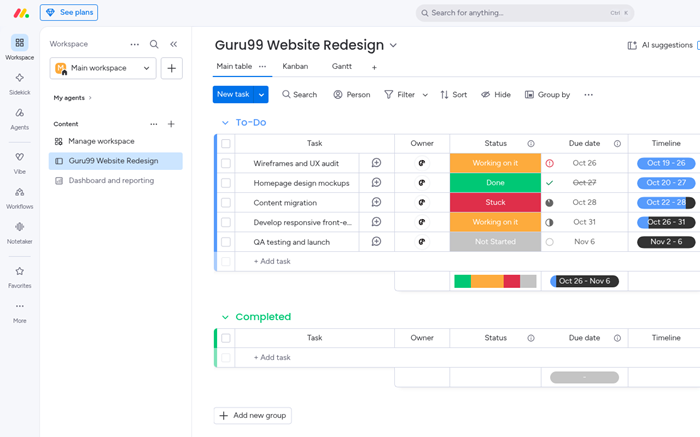
Monday.com organizes projects through colorful boards, configurable columns, dashboards, and no-code automations. Teams can represent campaigns, launches, service work, and operational processes without rebuilding their entire workflow. Multiple views translate the same records into timelines, calendars, Gantt charts, or workload displays.
Its flexibility suits cross-functional teams needing shared visibility. Templates accelerate setup, while dependencies, baselines, milestones, forms, and integrations support formal delivery. The interface remains approachable at first, although complex accounts require governance. Seat minimums and feature limits also deserve attention before teams select a plan.
Značajke
- Vizualne ploče: Configurable boards combine owners, dates, statuses, formulas, files, and dependencies. Teams can model different processes while preserving a consistent shared workspace.
- Project Views: Gantt, timeline, calendar, Kanban, chart, and workload views expose different planning questions for teams. Availability varies by plan and selected product.
- automatizacija: No-code recipes update records, notify owners, and trigger handoffs based on events. Monthly action limits increase as teams move to higher tiers.
- Nadzorne ploče: Dashboards combine widgets from multiple boards to summarize schedules, workload, progress, and risks. Managers can tailor reporting for different stakeholders.
- Planiranje resursa: Workload and capacity views reveal assignment pressure across people and projects. Higher tiers provide stronger portfolio and enterprise planning capabilities.
- AI mogućnosti: AI columns, agents, Sidekick, and workflow assistance can summarize or generate work. Packaging, credits, and availability continue evolving by plan.
- integracije: Connections with communication, development, CRM, and file services reduce duplicate updates. Standard and advanced integration limits depend on subscription level.
- Sigurnost: Permissions, single sign-on, audit features, and enterprise controls support governed deployments. Buyers should match required controls with the correct tier.
Prednosti
Nedostaci
Cijene
Monday.com includes a two-seat free plan; annual paid tiers begin at $9 per seat monthly.
| Plan | Cijene |
|---|---|
| Besplatno | $0; up to 2 seats; 3 boards; 3 Docs |
| osnovni | $9/seat/month billed annually; minimum 3 seats; unlimited items and dashboards |
| Standard | $12/seat/month billed annually; timeline, Gantt, calendar, automations, and integrations |
Free Plan; 14-Day Trial
4) Brza baza
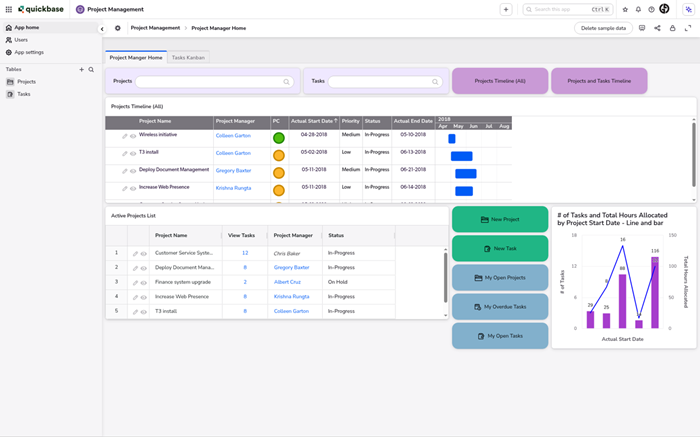
Quickbase is a low-code platform for building applications around projects, field operations, assets, and business processes. Its visual app builder lets teams combine relational data, forms, dashboards, permissions, and workflows without software development. It fits organizations whose work exceeds a standard task list.
Quickbase is most compelling for operational use cases requiring data models and controlled processes. Pipelines connect external systems, while reports and dashboards surface information. The flexibility carries trade-offs: builders need time to learn the platform, and plans include minimum commitments that can exceed smaller teams' budgets.
Značajke
- Alat za izradu aplikacija: Visual tools create relational applications, forms, rules, and interfaces without conventional coding. Teams can replace fragmented spreadsheets with governed operational systems.
- Automatizacija tijeka rada: Pipelines connect events, actions, approvals, and external services. Reusable automation reduces manual transfers while preserving process logic in one environment.
- Nadzorne ploče: Custom dashboards and more than thirteen report types summarize live operational data. Role-specific views help leaders and contributors focus on relevant information.
- Project Controls: Gantt capabilities, schedules, records, and custom status logic support project delivery. The data model can extend into assets, vendors, or field operations.
- AI pomoć: AI can generate applications, reports, workflows, spreadsheet imports, and insights from conversational prompts. Administrators should review generated logic before deployment.
- Upravljanje: Role-based access, encryption, audit logs, sandboxing, SSO, and SCIM support controlled enterprise use. Some protections require Business or Enterprise plans.
- integracije: Connectors, APIs, webhooks, and pipelines exchange data with business systems. Implementation depth depends on each source, workflow, and governance requirement.
- Omogućavanje: Quickbase University, community resources, and support help teams develop internal builders. Complex implementations may still benefit from specialist assistance when needed.
Prednosti
Nedostaci
Cijene
Quickbase provides a 30-day trial; Team starts at $35 per user monthly with annual platform minimums.
| Plan | Cijene |
|---|---|
| Besplatna proba | $0 for 30 days; includes Business plan features |
| Tim | From $35/user/month billed annually; platform minimum applies |
| posao | From $55/user/month billed annually; advanced security, governance, and sandbox features |
30-dnevno besplatno probno razdoblje
5) ActivTrak
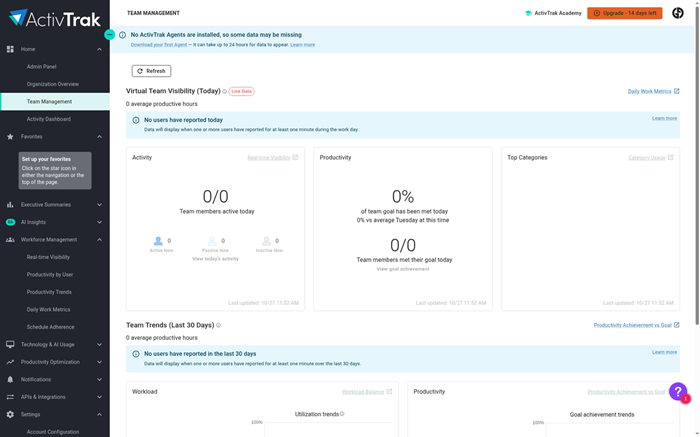
ActivTrak approaches project management through analitika radne snage rather than task scheduling. It analyzes work activity, focus time, workload, and schedule patterns across teams. Leaders can identify capacity problems, burnout risks, and process friction without asking employees to maintain manual timesheets.
ActivTrak is relevant for managers who already have task software but lack utilization evidence. Dashboards, productivity trends, coaching insights, and schedule adherence provide operational context. It does not replace a full project plan, dependency map, or backlog, so buyers should treat ActivTrak as a complementary workforce intelligence layer.
Značajke
- Automatski Tracking: The platform records work activity without manual timers. Configurable classifications turn application and website usage into understandable productivity and focus patterns.
- Workload Insights: Utilization and capacity views reveal overextended, underused, or balanced teams. Managers can investigate trends before assigning additional project work across projects.
- Schedule Analysis: Schedule adherence compares expected work patterns with observed activity. Meeting, break, and focus information helps leaders understand how time is distributed.
- Productivity Trends: Dashboards show productive time, focus, collaboration, and location patterns over time. Filters help managers examine teams without relying on isolated daily snapshots.
- treniranju: Automated insights suggest coaching opportunities around focus, workload, and healthy work habits. Managers should interpret recommendations within employee and organizational context.
- Podatkovne veze: ActivConnect exports workforce data into tools such as Power BI, Tableau, and Looker. This capability is an add-on for deeper analysis.
- Sigurnost: Role controls, privacy settings, encryption, and SOC 2 Type 2 practices support responsible administration. Clear internal policies remain essential for employee trust.
Prednosti
Nedostaci
Cijene
ActivTrak offers free visibility for three people; paid annual plans begin at $10 per worker monthly.
| Plan | Cijene |
|---|---|
| Besplatno | $0; up to 3 people; 30 days of data history |
| Radna aktivnost Tracking | $10/worker/month; annual contract; 6 months of history |
| Upravljanje radnom snagom | $15/worker/month; annual contract; schedules, workload, and capacity insights |
Free Plan; 14-Day Trial
6) ClickUp
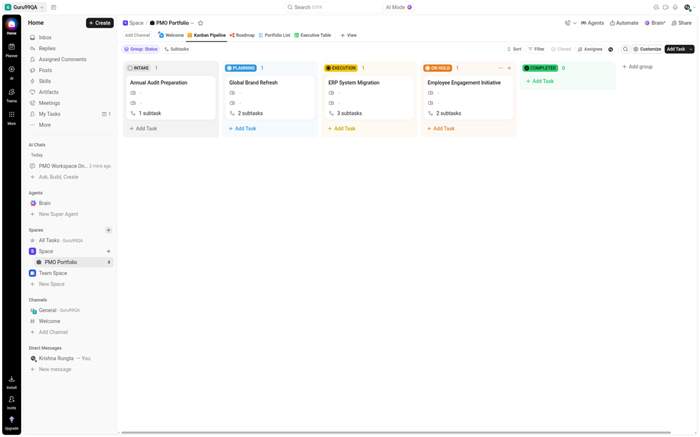
ClickUp combines tasks, documents, goals, dashboards, chat, whiteboards, forms, and calendars inside one workspace. Its custom views let teams examine work as lists, boards, timelines, Gantt charts, workloads, or tables. The feature set suits organizations trying to consolidate separate productivity tools.
ClickUp works best when teams accept setup in exchange for flexibility. Custom fields, statuses, automations, time tracking, and sprint tools support many delivery styles. AI packages can search and generate across workspace content. However, the interface can feel busy, and configuration complexity may challenge teams seeking simplicity.
Značajke
- Fleksibilnost zadataka: Custom statuses, fields, priorities, dependencies, and recurring rules adapt tasks to different departments. Hierarchies organize spaces, folders, lists, and work items.
- Više prikaza: List, board, calendar, Gantt, timeline, workload, and table views present shared data differently. Some view limits depend on the selected plan.
- Vrijeme Tracking: Native timers, estimates, timesheets, billable flags, and reports connect effort with delivery and billing. Detailed controls increase on paid plans.
- Automatizacija: Rules trigger assignments, updates, notifications, and cross-list actions. Usage allowances vary, so high-volume teams should estimate monthly automation demand before purchase.
- suradnja: Docs, comments, proofing, chat, whiteboards, and email centralize project conversations. Teams can link discussion and documentation directly to work items.
- AI Options: ClickUp Brain and broader AI packages can search, summarize, write, and assist workflows. These products carry separate pricing and usage considerations.
- integracije: Native connections, an API, webhooks, and automation services link ClickUp with popular business applications. Unlimited integrations begin on paid tiers.
- Izvješćivanje: Dashboards, goals, portfolios, sprint reports, and resource views support operational oversight at scale. Advanced widgets and controls require higher subscriptions.
Prednosti
Nedostaci
Cijene
ClickUp has a generous Free Forever plan; Unlimited costs $7 per user monthly when billed annually.
| Plan | Cijene |
|---|---|
| Besplatno zauvijek | $0; unlimited tasks and members; 60 MB storage; Docs, boards, and calendar |
| Neograničen | $7/user/month billed annually; unlimited storage, Gantt, integrations, fields, and time trackralj |
| posao | $12/user/month billed annually; advanced dashboards, automation, workload, and sprint reporting |
Free Forever; Limited Trials
7) Smartsheet
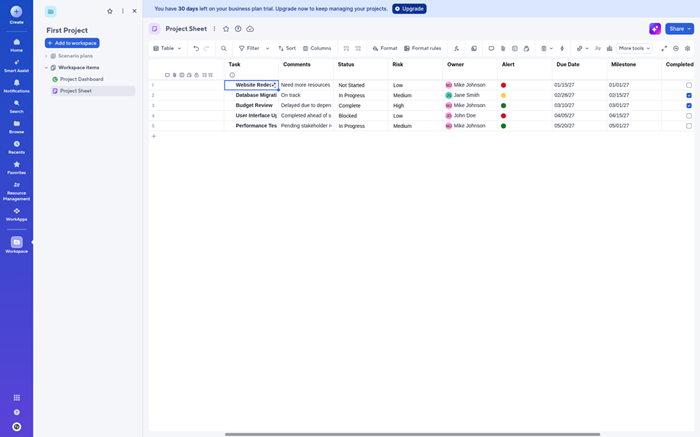
Smartsheet combines a spreadsheet-like grid with project views, forms, dashboards, reports, and workflow automation. Teams can track work without abandoning rows and columns. Portfolio reporting rolls information from multiple sheets into shared summaries, making the platform useful for operations, programs, and repeatable processes.
Smartsheet is practical for teams migrating from spreadsheets. Gantt, board, calendar, workload, and timeline views provide more control without hiding the underlying data. Automated reminders and approvals reduce follow-up work. Advanced resource management, governance, and portfolio capabilities can require higher tiers or add-ons, increasing total cost.
Značajke
- Grid Planning: Rows, columns, formulas, attachments, and dependencies create a familiar planning model. Teams can organize structured work without learning a database interface.
- Project Views: Gantt, board, calendar, table, and timeline views present shared sheet data for different roles and stakeholders. Some capabilities vary across subscriptions.
- Automatizacija tijeka rada: Rules send alerts, request approvals, update records, and trigger recurring actions. Plan allowances determine how many automated workflows teams can run.
- Izvješća: Cross-sheet reports collect relevant rows from multiple projects into current operational views. Filters and grouping help stakeholders focus on decisions.
- Nadzorne ploče: Widgets combine metrics, charts, reports, text, and images into stakeholder-ready summaries. Published views support broader visibility without exposing every sheet.
- Planiranje resursa: Radno opterećenje tracking reveals capacity and assignment conflicts across projects. Advanced resource management and portfolio controls may require additional packaging later.
- AI pomoć: AI features can help with formulas, summaries, charts, and form responses. Availability and governance controls depend on the selected plan.
- integracije: Connectors and automation services link Smartsheet with communication, storage, development, and enterprise systems. Premium connections may sometimes involve separate licensing.
Prednosti
Nedostaci
Cijene
Smartsheet provides a 30-day trial; Pro starts at $9 per member monthly with annual billing.
| Plan | Cijene |
|---|---|
| PRO | $9/member/month billed annually; 1 to 10 members; unlimited viewers |
| posao | $19/member/month billed annually; minimum 3 members; unlimited guests and automations |
| Poduzeće | Custom pricing; advanced security, governance, administration, and scale |
30-dnevno besplatno probno razdoblje
8) Wrike
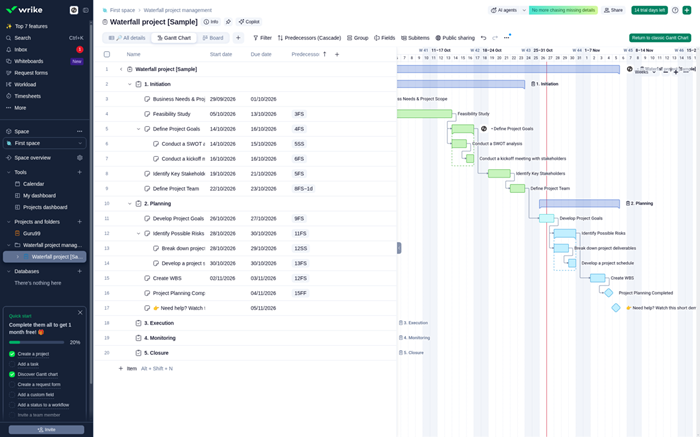
Wrike is a work management platform for cross-functional projects, campaigns, services, and portfolios. Interactive Gantt planning, request forms, dashboards, proofing, and approvals support work from intake through delivery. Its folder and space structure helps teams separate departments while maintaining shared reporting and governance.
Wrike works best for organizations handling many stakeholders and parallel initiatives. Blueprints standardize recurring work, while resource tools expose assignment pressure. AI features assist search, summaries, and risk awareness. The density of controls can slow onboarding, and useful planning capabilities sit on Business or custom tiers.
Značajke
- Work Intake: Custom request forms capture requirements and create structured work automatically. Conditional questions route submissions toward appropriate teams, templates, and approval paths.
- Ganttovo planiranje: Interactive Gantt charts expose dependencies, milestones, and critical paths. Managers can adjust schedules and understand the impact across related tasks.
- Upravljanje resursima: Workload, effort, time, and capacity views help managers balance assignments across projects. Advanced resource controls become available on higher plans.
- Provjera: Built-in proofing and approvals centralize feedback on creative assets and documents. Version history reduces confusion during review cycles involving many stakeholders.
- nacrti: Reusable blueprints standardize projects, tasks, and folders. Teams can launch repeatable work quickly while preserving required steps and ownership consistently.
- AI pomoć: AI capabilities support summaries, search, content generation, and risk insights. Essentials begin on Team, while broader functions require higher packaging.
- integracije: Standard connections link common business applications, while Wrike Integrirajte i Sync support deeper automation. Premium integration products may cost extra.
- Kontrole poduzeća: Permissions, SSO, audit reporting, governance, and controlled spaces support large deployments at scale. Advanced administration appears on custom enterprise tiers.
Prednosti
Nedostaci
Cijene
Wrike has a free plan and 14-day trial; Team costs $10 per user monthly when billed annually.
| Plan | Cijene |
|---|---|
| Besplatno | $0/user/month; basic task management and collaboration |
| Tim | $10/user/month billed annually; 2 to 15 users; Gantt, dashboards, and AI Essentials |
| posao | $25/user/month billed annually; 5 to 200 users; resource planning, reports, and advanced workflows |
Free Plan; 14-Day Trial
Comparison Between Top Project Management Tools
| Oruđe | Prikazi projekta | Auto Rules | Teamwork | Veze aplikacija | Admin | AI |
|---|---|---|---|---|---|---|
| Zoho Projects | ✅ | ✅ | ✅ | ✅ | ✅ | ✅ |
| Miro | ✅ | ✅ | ✅ | ✅ | ✅ | ✅ |
| Monday.com | ✅ | ✅ | ✅ | ✅ | ✅ | ✅ |
| Brza baza | ✅ | ✅ | ✅ | ✅ | ✅ | ✅ |
| ActivTrak | ❌ | ✅ | ✅ | ✅ | ✅ | ✅ |
What Are Project Management Tools and How Do They Work?
Alati za upravljanje projektima organize tasks, owners, deadlines, files, conversations, and progress in one system. Teams create projects, divide work into manageable activities, and assign responsibility. Views such as boards, calendars, and Gantt charts show different planning details. Automations can send reminders or update records after events. Dashboards summarize progress for managers and stakeholders. The software improves visibility, but it does not fix unclear priorities. Teams still need agreed processes, realistic schedules, and accountable decision-makers to deliver successful work consistently together.
What Features Should You Look for in Project Management Tools?
The best feature set matches how your team plans and reports work. Begin with daily requirements, then evaluate controls needed as projects grow. Avoid paying for complexity that nobody will maintain.
- Planning Views: Look for boards, calendars, timelines, and Gantt charts matching different roles.
- Automatizacija: Rules should reduce reminders, handoffs, approvals, and repetitive record updates.
- Izvješćivanje: Dashboards must show progress, workload, risks, and overdue work clearly.
- integracije: Connections should exchange reliable data with communication and business systems.
- Upravljanje: Permissions, audit records, and administration should fit organizational security requirements.
How Do You Choose the Right Project Management Tool?
Start with three real workflows instead of a long feature checklist. Map who creates work, approves changes, reports progress, and needs access. Then test each shortlisted platform using current project data. Compare setup time, adoption effort, permissions, reporting, integrations, and total annual cost. Include occasional users because confusing tools often fail outside the core team. Check export options before migrating important information. Finally, run a limited pilot with clear success measures. A suitable tool should improve decisions and coordination without creating excessive administrative work.
What Are the Main Benefits of Project Management Software?
Project software creates a shared source for priorities, ownership, dates, and decisions. Team members spend less time asking where work stands. Managers can identify delays, dependencies, and capacity constraints earlier. Standard templates improve consistency across repeated projects. Dashboards communicate progress without manually rebuilding reports each week. Integrations reduce duplicate entry between business systems. Historical records also support better estimates and process reviews. These benefits appear only when teams keep information current. Simple governance and clear ownership matter more than enabling every available feature.
How Do Project Management Tools Compare With Task Management Apps?
Task applications focus mainly on personal or team assignments and deadlines. Project management platforms add dependencies, milestones, resource views, portfolios, budgets, and structured reporting. The boundary is increasingly blurred because many products offer both approaches. A small team handling independent work may only need lists and boards. Cross-functional programs usually benefit from formal scheduling and governance. Buyers should compare actual workflows instead of category labels. If reporting, capacity, or dependency management remains manual, a fuller project platform may provide better long-term control.
How Much Do Project Management Tools Cost?
Pricing commonly depends on seats, billing frequency, automation usage, and advanced controls. Free plans can support small teams but often restrict storage, boards, reports, or integrations. Entry paid plans generally cover core planning and collaboration. Portfolio management, enterprise security, and resource controls usually require higher tiers. Seat minimums can make advertised prices misleading for tiny teams. Add implementation, training, add-ons, and integration costs before comparing totals. Review renewal terms annually because packaging changes. The best value comes from features teams consistently use, not the lowest headline price.
How Do AI-Powered Project Management Tools Improve Workflows?
AI-powered project management can summarize discussions, draft tasks, search workspace content, create reports, and flag possible risks. These capabilities reduce repetitive administrative work and help teams find information faster. Some systems also suggest automations, formulas, or schedules. Results depend on complete, accurate project data. Teams should review generated dates, owners, and conclusions before acting. Usage credits and separate AI packages can affect costs significantly. Buyers should test high-value scenarios directly and confirm how vendors protect data used by AI features.
Can AI Replace Manual Project Management Tasks?
AI can replace portions of routine administration, but it cannot own project judgment. It handles summaries, status drafts, reminders, categorization, and information retrieval reasonably well. Managers still resolve trade-offs, negotiate resources, understand stakeholder concerns, and decide which risks matter. Automated recommendations may reflect incomplete or outdated records. Human review remains essential for commitments and sensitive communications. Teams should begin with reversible, low-risk tasks and measure saved time. Clear approval rules prevent convenience from turning into unaccountable project decisions during delivery.
How Do Project Management Tools Integrate With Existing Workflows?
Integrations connect project records with the systems where teams already communicate and work. Reliable connections should reduce duplicate entry without creating conflicting sources of truth. Test direction, frequency, ownership, and failure handling.
- Komunikacija: Notifications should reach appropriate channels without flooding teams with duplicate alerts.
- Razvoj: Issue and code connections should preserve owners, status, and traclakoća.
- Business Systems: CRM, finance, and service integrations should map fields consistently.
- Identitet: Single sign-on and provisioning should simplify secure access throughout employment changes.
- izvoz: Open formats and APIs should protect portability if requirements later change.
How Secure Are Cloud Project Management Tools?
Cloud project platforms can be secure when configured and governed carefully. Buyers should examine encryption, authentication, permissions, audit records, data residency, backup practices, and independent assurance reports. Enterprise certifications do not guarantee safe daily usage. Administrators must restrict guest access, remove former users, and review shared links regularly. Sensitive information should follow organizational classification rules. Ask how integrations and AI features process project content. Security teams should evaluate vendors before rollout, while workspace owners maintain practical controls after implementation continuously.
Kako smo odabrali najbolje alate za upravljanje projektima?

At Guru99, posvećeni smo pružanju vjerodostojnog, visokokvalitetnog sadržaja utemeljenog na točnim i objektivnim informacijama. Naš tim je proveo više od 100 sati analizirajući više od 40 besplatnih i plaćenih alata za upravljanje projektima, osiguravajući da se svaka preporuka testira na upotrebljivost, vrijednost i pouzdanost. Ovaj smo popis pročistili na temelju izazovi u stvarnom svijetu, kao što su neadekvatne značajke suradnje u skupim alatima. Cilj je usmjeriti korisnike prema učinkovitim rješenjima koja podržavaju različite poslovne potrebe i tijekove rada. Usredotočujemo se na sljedeće čimbenike prilikom pregleda alata na temelju
- Jednostavnost korištenja: Odabrali smo na temelju sučelja koja pojednostavljuju složene tijekove rada za sve korisnike, bez kompromisa.
- Skup značajki: Naš tim je odabrao platforme koje nude bitne alate poput zadataka trackralj, timska suradnja i dijeljenje datoteka.
- Integracijska podrška: Stručnjaci u našem timu odabrali su alate koji se glatko povezuju s CRM-ovima, kalendarima i aplikacijama za razmjenu poruka.
- skalabilnost: Pobrinuli smo se da u uži izbor uvrstimo opcije koje rastu s veličinom vašeg tima i složenošću projekta.
- Cijene i vrijednost: Odabrali smo na temelju pristupačnosti, besplatnih probnih razdoblja i značajki koje osiguravaju da je vaš proračun dobro potrošen.
- Korisnička podrška: Naš tim je odabrao platforme s responzivnim kanalima podrške kako bi brzo i dosljedno rješavao probleme.
How Do You Troubleshoot Common Project Management Tool Problems?
Most failures involve adoption, configuration, integrations, or inconsistent data. Reproduce the issue in a controlled workspace before changing active projects.
- Problem: Team members stop updating tasks because the workspace feels complicated and disconnected from daily routines.
Rješenje: The administrator should simplify required fields, create role-specific views, and train teams around three common workflows first. - Problem: Automations create duplicate notifications or unintended status changes after several workflow rules begin overlapping.
Rješenje: The workspace owner should document triggers, disable overlapping rules, and test each automation with controlled sample records. - Problem: Dashboards show inconsistent totals because projects use different statuses, date fields, and ownership conventions.
Rješenje: The reporting lead should standardize definitions, templates, and required fields before rebuilding portfolio-level charts and metrics. - Problem: Integrated records stop synchronizing after permissions, field mappings, or external application settings change unexpectedly.
Rješenje: The administrator should inspect connection logs, refresh authorization, verify field mappings, and retry a single controlled record. - Problem: Large boards, sheets, or workspaces load slowly as files, automations, and historical records accumulate.
Rješenje: The team should archive completed work, reduce heavy dashboards, split oversized structures, and ask support about documented limits. - Problem: Users cannot locate earlier decisions because conversations, files, and tasks are stored in different places.
Rješenje: The project owner should define one record of truth, link supporting files, and document important decisions within tasks.
Presuda
After evaluating top project management platforms, I found three options with the best balance of planning depth, collaboration, adaptability, and practical value for different teams.
- Zoho Projects: I preferred its structured planning, time tracking, and affordable annual pricing for teams wanting disciplined project control.
- Miro: Its fluid visual collaboration impressed me most for workshops, discovery, and remote planning across distributed teams.
- Monday.com: Monday.com impressed me with adaptable boards, approachable automation, and dashboards that made cross-functional progress easier to understand.
