---
description: This C++ For Loop tutorial covers all basics and advanced concepts. Learn What is For Loop, How it Works, When to Use, Syntax and program examples
title: For Loop in C++ with Syntax &#038; Program EXAMPLES
image: https://www.guru99.com/images/cpp-for-loop-1.png
---


[Skip to content](#main) 

**⚡ Smart Summary**

A for loop in C++ repeats a block of code a fixed number of times using a counter. Here you will learn how it works, when to use it, its syntax, and practical examples.

* 🔁 **What it is:** A for loop repeats a block of code a set number of times.
* 🧮 **Three parts:** It has an initialization, a condition, and an increment.
* ✅ **Condition:** The loop runs while the condition stays true.
* 🎯 **When to use:** Use it when you know the number of iterations in advance.
* 🤖 **AI help:** AI tools like GitHub Copilot write and optimize C++ loops.

[ Read More ](javascript:void%280%29;) 

![C++ For Loop](https://www.guru99.com/images/cpp-for-loop-1.png)

## What is a For Loop?

This is a repetition control structure that helps us iterate over a section of C++ code for a fixed number of times. A for loop runs provided the test expression is true. The loop terminates execution immediately the test expression becomes false. This means before the execution of the loop body in each iteration, the condition has to be evaluated. If the evaluation returns a true, the loop body is executed. If the evaluation returns a false, execution of the loop body is terminated.

## How for loop works?

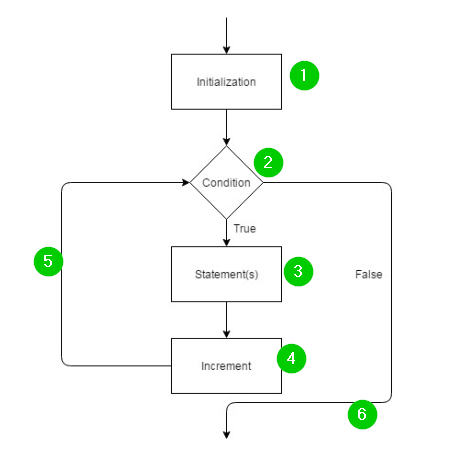
The for loop works as follows:

[![For Loop](https://www.guru99.com/images/2/030720_0509_CForLoopwi1.png)](https://www.guru99.com/images/2/030720%5F0509%5FCForLoopwi1.png)

**Flow Chart Explanation:**

1. The [C++ language compiler](https://www.guru99.com/best-cpp-ide-editor-free.html) begins by evaluating the initialization. This is only done once as execution begins.
2. The test expression is evaluated/executed.
3. If the test expression is true, the loop body is executed and the test expression is updated. If expression becomes false, the for loop terminates.
4. After the execution of test expression, the increment is executed to increase the value of the loop control variable.
5. The test expression is evaluated again, and the process continues until the expression becomes false.
6. If the expression is false, the loop body statements are skipped.

**Note**: The test expression is updated after every iteration. This means different values of the loop control variable are executed in each iteration.

## When to use a for loop?

The for loop should be used when:

* You have a fixed number of iterations.
* You know the exact number of iterations.

## Syntax of for loop

Here is the syntax for the for loop:

for ( initialization;condition;increment ) {
   statement(s);
}

Here is an explanation of the above parameters:

* **Initialization:** This part is executed first and only once. Here, you declare and initialize loop control variables. The loop control variables can be more than one, and their values will change after every iteration. However, their values must be evaluated before an iteration runs.
* **Condition:** This part is executed next. For the loop body to be executed, this condition must be true. If the condition is false, execution will jump to statements immediately after the loop body. If the condition is false on the first evaluation, the loop body will never be executed.
* **Increment:** Once the loop body has been executed, control jumps to the increment. You can leave out this part and use a semicolon instead.
* Again, the condition is evaluated. If it’s true, the loop body is executed, and this continues. The loop terminates immediately the condition becomes false.

### RELATED ARTICLES

* [C++ Switch Case Statement with Program EXAMPLES ](https://www.guru99.com/cpp-switch-example.html "C++ Switch Case Statement with Program EXAMPLES")
* [Stack in C++ STL with Example ](https://www.guru99.com/stack-in-cpp-stl.html "Stack in C++ STL with Example")
* [C++ Char Data Type with Examples ](https://www.guru99.com/cpp-char.html "C++ Char Data Type with Examples")
* [C++ Variables & Data Types: Int, Char, Float, Double ](https://www.guru99.com/cpp-variables-types.html "C++ Variables & Data Types: Int, Char, Float, Double")

## For Loop in C++ Example 1

#include <iostream>
using namespace std;
int main() {
	for (int x=0; x<5; x=x+1) {
		cout << "X is: " << x << endl;
	}
	return 0;
}

**Output:**

[![For Loop in C++](https://www.guru99.com/images/2/030720_0509_CForLoopwi2.png)](https://www.guru99.com/images/2/030720%5F0509%5FCForLoopwi2.png)

Here is a screenshot of the code:

[![For Loop in C++](https://www.guru99.com/images/2/030720_0509_CForLoopwi3.png)](https://www.guru99.com/images/2/030720%5F0509%5FCForLoopwi3.png)

**Code Explanation:**

1. Including the iostream header file in our code. It will allow us to read from and write to the console.
2. Including the std namespace so as to use its classes and [functions](https://www.guru99.com/cpp-functions.html) without calling it.
3. Calling the main() function inside which the logic of the program should be added. The { marks start of body of the main() function.
4. Creating a for loop. The initialization creates an integer variable x and assigns it a value of 0\. The condition states that the value of x must be less than 5\. The increment increases the value of x by 1 after every iteration. The { marks the beginning of the body of the for loop.
5. To print the value of variable x alongside other text on the console. The endl is a C++ keyword meaning end line. The cursor will print in the next line in the next iteration.
6. End of the loop body.
7. The main() function should return an value if the program runs fine.
8. End of the body of the main() function.

## For Loop in C++ Example 2

#include <iostream>
using namespace std;
int main()
{
	int x, num, factorial = 1;
	cout << "Type positive number: ";
	cin >> num;
	for (x = 1; x <= num; ++x) {
		factorial *= x;   // factorial = factorial * x;
	}
	cout << "Factorial of " << num << " = " << factorial;
	return 0;
}

**Output:**

[![For Loop in C++](https://www.guru99.com/images/2/030720_0509_CForLoopwi4.png)](https://www.guru99.com/images/2/030720%5F0509%5FCForLoopwi4.png)

Here is a screenshot of the code:

[![For Loop in C++](https://www.guru99.com/images/2/030720_0509_CForLoopwi5.png)](https://www.guru99.com/images/2/030720%5F0509%5FCForLoopwi5.png)

**Code Explanation:**

1. Including the iostream header file in our code. It will allow us to read from and write to the console.
2. Including the std namespace so as to use its classes and functions without calling it.
3. Calling the main() function inside which the logic of the program should be added.
4. The { marks start of body of the main() function.
5. Declaring integer variables, x, num, and factorial. The variable factorial has been assigned a value of 1.
6. Printing some text on the console.
7. Prompting user to enter a value for variable num.
8. Creating a for loop. The initialization creates an integer variable x and assigns it a value of 1\. The condition states that the value of x must be less than or equal to value of variable num. The increment increases the value of x by 1 after every iteration. The { marks the beginning of the body of the for loop.
9. Calculating the value of factorial using the formula factorial = factorial \* x.
10. End of the loop body.
11. To print the value of variables num and factorial alongside other text on the console.
12. The main() function should return an value if the program runs fine.
13. End of the body of the main() function.

## FAQs

🔁 What is a for loop in C++?

A for loop repeats code a fixed number of times using a counter with an initialization, a condition, and an increment.

🧮 What are the three parts of a C++ for loop?

A for loop has three parts: initialization sets the counter, the condition is checked each pass, and the increment updates the counter.

⚙️ How does a for loop work in C++?

The loop initializes the counter once, checks the condition, runs the body if true, then increments and rechecks, repeating until the condition is false.

🎯 When should you use a for loop?

Use a for loop when you know in advance how many times to repeat, such as iterating over an array.

🆚 What is the difference between a for loop and a while loop?

A for loop keeps its counter, condition, and increment in one line for a known count, while a while loop repeats while a condition is true.

✍️ What is the syntax of a for loop in C++?

The syntax is for(initialization; condition; increment) { statements }. The expressions are separated by semicolons, and the body runs while the condition holds.

🤖 How can AI tools like GitHub Copilot help with C++ loops?

AI assistants like GitHub Copilot generate for loops from a comment, convert them to range-based or while loops, and fix off-by-one and infinite-loop errors.

🧠 Can AI optimize C++ loops?

Yes. AI-powered tools spot infinite loops, simplify nested loops, and suggest range-based for loops for more efficient, correct C++ code.

#### Summarize this post with:

ChatGPT Perplexity Grok Google AI 

**Stay Updated on AI** **Get Weekly AI Skills, Trends, Actionable Advice.** 

##### Sign up for the newsletter

Subscribe for Free 

You have successfully subscribed.  
Please check your inbox. 

![AI-Newsletter](https://www.guru99.com/images/footer-email-avatar-imges-1.png) Chosen by over **350,000+** professionals 

[Scroll to top ](#wrapper)Scroll to top 

× 

Toggle Menu Close 

Search for: 

Search

```json
{"@context":"https://schema.org","@graph":[{"@type":"Organization","@id":"https://www.guru99.com/#organization","name":"Guru99","sameAs":["https://www.facebook.com/Guru99Official","https://twitter.com/guru99com"],"logo":{"@type":"ImageObject","@id":"https://www.guru99.com/#logo","url":"https://www.guru99.com/images/guru99-logo-v1-150x59.png","contentUrl":"https://www.guru99.com/images/guru99-logo-v1-150x59.png","caption":"Guru99","inLanguage":"en-US"}},{"@type":"WebSite","@id":"https://www.guru99.com/#website","url":"https://www.guru99.com","name":"Guru99","publisher":{"@id":"https://www.guru99.com/#organization"},"inLanguage":"en-US"},{"@type":"ImageObject","@id":"https://www.guru99.com/images/cpp-for-loop-1.png","url":"https://www.guru99.com/images/cpp-for-loop-1.png","width":"700","height":"250","caption":"C++ For Loop","inLanguage":"en-US"},{"@type":"BreadcrumbList","@id":"https://www.guru99.com/cpp-for-loop.html#breadcrumb","itemListElement":[{"@type":"ListItem","position":"1","item":{"@id":"https://www.guru99.com","name":"Home"}},{"@type":"ListItem","position":"2","item":{"@id":"https://www.guru99.com/cpp","name":"CPP"}},{"@type":"ListItem","position":"3","item":{"@id":"https://www.guru99.com/cpp-for-loop.html","name":"For Loop in C++ with Syntax &#038; Program EXAMPLES"}}]},{"@type":"WebPage","@id":"https://www.guru99.com/cpp-for-loop.html#webpage","url":"https://www.guru99.com/cpp-for-loop.html","name":"For Loop in C++ with Syntax &#038; Program EXAMPLES","dateModified":"2026-07-13T10:37:35+05:30","isPartOf":{"@id":"https://www.guru99.com/#website"},"primaryImageOfPage":{"@id":"https://www.guru99.com/images/cpp-for-loop-1.png"},"inLanguage":"en-US","breadcrumb":{"@id":"https://www.guru99.com/cpp-for-loop.html#breadcrumb"}},{"@type":"Person","@id":"https://www.guru99.com/author/benjamin","name":"Benjamin Walker","description":"I'm Benjamin Walker, an expert in C, C++, and C# programming, providing resources to enhance your coding proficiency and project outcomes.","url":"https://www.guru99.com/author/benjamin","image":{"@type":"ImageObject","@id":"https://www.guru99.com/images/benjamin-walker-author.png","url":"https://www.guru99.com/images/benjamin-walker-author.png","caption":"Benjamin Walker","inLanguage":"en-US"},"worksFor":{"@id":"https://www.guru99.com/#organization"}},{"articleSection":"CPP","headline":"For Loop in C++ with Syntax &#038; Program EXAMPLES","description":"This C++ For Loop tutorial covers all basics and advanced concepts. Learn What is For Loop, How it Works, When to Use, Syntax and program examples","keywords":"bigdata, programming, database, server","speakable":{"@type":"SpeakableSpecification","cssSelector":[".entry-title",".summary"]},"@type":"Article","author":{"@id":"https://www.guru99.com/author/benjamin","name":"Benjamin Walker"},"dateModified":"2026-07-13T10:37:35+05:30","image":{"@id":"https://www.guru99.com/images/cpp-for-loop-1.png"},"copyrightYear":"2026","name":"For Loop in C++ with Syntax &#038; Program EXAMPLES","subjectOf":[{"@type":"FAQPage","mainEntity":[{"@type":"Question","name":"What is a for loop in C++?","acceptedAnswer":{"@type":"Answer","text":"A for loop repeats code a fixed number of times using a counter with an initialization, a condition, and an increment."}},{"@type":"Question","name":"What are the three parts of a C++ for loop?","acceptedAnswer":{"@type":"Answer","text":"A for loop has three parts: initialization sets the counter, the condition is checked each pass, and the increment updates the counter."}},{"@type":"Question","name":"How does a for loop work in C++?","acceptedAnswer":{"@type":"Answer","text":"The loop initializes the counter once, checks the condition, runs the body if true, then increments and rechecks, repeating until the condition is false."}},{"@type":"Question","name":"When should you use a for loop?","acceptedAnswer":{"@type":"Answer","text":"Use a for loop when you know in advance how many times to repeat, such as iterating over an array."}},{"@type":"Question","name":"What is the difference between a for loop and a while loop?","acceptedAnswer":{"@type":"Answer","text":"A for loop keeps its counter, condition, and increment in one line for a known count, while a while loop repeats while a condition is true."}},{"@type":"Question","name":"What is the syntax of a for loop in C++?","acceptedAnswer":{"@type":"Answer","text":"The syntax is for(initialization; condition; increment) { statements }. The expressions are separated by semicolons, and the body runs while the condition holds."}},{"@type":"Question","name":"How can AI tools like GitHub Copilot help with C++ loops?","acceptedAnswer":{"@type":"Answer","text":"AI assistants like GitHub Copilot generate for loops from a comment, convert them to range-based or while loops, and fix off-by-one and infinite-loop errors."}},{"@type":"Question","name":"Can AI optimize C++ loops?","acceptedAnswer":{"@type":"Answer","text":"Yes. AI-powered tools spot infinite loops, simplify nested loops, and suggest range-based for loops for more efficient, correct C++ code."}}]}],"@id":"https://www.guru99.com/cpp-for-loop.html#schema-1142538","isPartOf":{"@id":"https://www.guru99.com/cpp-for-loop.html#webpage"},"publisher":{"@id":"https://www.guru99.com/#organization"},"inLanguage":"en-US","mainEntityOfPage":{"@id":"https://www.guru99.com/cpp-for-loop.html#webpage"}}]}
```