
Cómo leer un archivo CSV en Python (Módulo, Ejemplos de Pandas)
 Equipo editorial
⚡ Resumen inteligente
Un archivo CSV almacena datos tabulares como texto plano, con comas que separan las columnas y saltos de línea que separan las filas. Aquí aprenderás a leer y escribir archivos CSV en Python utilizando el módulo csv integrado y la biblioteca pandas.
¿Qué es un archivo CSV?
A archivo CSV es un tipo simple de archivo de texto sin formato que utiliza una estructura específica para organizar datos tabulares. El formato estándar de un archivo CSV se define mediante datos de filas y columnas donde una nueva línea termina cada fila para comenzar la siguiente y cada columna está separada por una coma dentro de la fila.
CSV es un formato común para el intercambio de datos, ya que es compacto, simple y general. Muchos servicios en línea permiten a sus usuarios exportar datos tabulares del sitio web a un archivo CSV. Los archivos CSV se abrirán en Excel y casi todas las bases de datos tienen una herramienta que permite importar desde archivos CSV.
Archivo de muestra CSV
Los datos en forma de tablas también se denominan CSV (valores separados por comas), literalmente "valores separados por comas". Este es un formato de texto destinado a la presentación de datos tabulares. Cada línea del archivo es una línea de la tabla. Los valores de las columnas individuales están separados por un símbolo separador: una coma (,), un punto y coma (;) u otro símbolo. CSV se puede leer y procesar fácilmente mediante Python.
Considere la siguiente tabla
Datos de la tabla
| Lenguaje de programación | Diseñado por | Aparecido | Extension |
|---|---|---|---|
| Python | Guido van Rossum | 1991 | py |
| Java | james gosling | 1995 | .Java |
| C++ | Bjarne Stroustrup | 1983 | .cpp |
Puede representar esta tabla en csv como se muestra a continuación.
Datos CSV
Lenguaje de programación, Diseñado por, Aparecido, Extensión
Python, Guido van Rossum, 1991, .py
Java, James Gosling, 1995, .java
C++, Bjarne Stroustrup, 1983, .cpp
Como puede ver, cada fila es una nueva línea y cada columna está separada por una coma. Este es un ejemplo de cómo se ve un archivo CSV.
Python Módulo CSV
Python proporciona un módulo CSV para manejar archivos CSV. Para leer/escribir datos, debe recorrer las filas del CSV. Debe utilizar el método de división para obtener datos de columnas específicas.
Funciones del módulo CSV
En la documentación del módulo CSV puedes encontrar las siguientes funciones:
- csv.field_size_limit: devuelve el tamaño máximo de campo
- csv.get_dialect: obtiene el dialecto asociado con el nombre
- csv.list_dialects: muestra todos los dialectos registrados
- csv.reader: lee datos de un archivo csv
- csv.register_dialect – asociar dialecto con nombre
- csv.writer: escribe datos en un archivo csv
- csv.unregister_dialect: elimina el dialecto asociado con el nombre del registro de dialecto
- csv.QUOTE_ALL – Cite todo, sin importar el tipo.
- csv.QUOTE_MINIMAL – Campos de cotización con caracteres especiales.
- csv.QUOTE_NONNUMERIC – Citar todos los campos que no sean valores numéricos
- csv.QUOTE_NONE – No cites nada en la salida.
En este tutorial, nos centraremos únicamente en las funciones de lectura y escritura que le permiten editar, modificar y manipular los datos en un archivo CSV.
Cómo leer un archivo CSV en Python
A continuación se detallan los pasos para leer el archivo CSV en Python.
Paso 1) Para leer datos de archivos CSV, debe utilizar la función de lector para generar un objeto lector.
La función de lector está desarrollada para tomar cada fila del archivo y hacer una lista de todas las columnas. Luego, debes elegir la columna para la que deseas los datos variables.
Suena mucho más complejo de lo que es. Echemos un vistazo a esto Python código para leer el archivo CSV y descubriremos que trabajar con un archivo csv no es tan difícil.
#import necessary modules
import csv
with open('X:\data.csv','rt')as f:
  data = csv.reader(f)
  for row in data:
        print(row)
Paso 2) Cuando ejecute el programa anterior, el resultado será:
['Programming language; Designed by; Appeared; Extension']
['Python; Guido van Rossum; 1991; .py']
['Java; James Gosling; 1995; .java']
['C++; Bjarne Stroustrup;1983;.cpp']
Cómo leer un archivo CSV en un diccionario en Python
También puedes usar DictReader para leer archivos CSV. Los resultados se interpretan como un diccionario donde la fila del encabezado es la clave y las otras filas son los valores.
Considere el siguiente código
#import necessary modules
import csv

reader = csv.DictReader(open("file2.csv"))
for raw in reader:
    print(raw)
El resultado de este código es:
OrderedDict([('Programming language', 'Python'), ('Designed by', 'Guido van Rossum'), (' Appeared', ' 1991'), (' Extension', ' .py')])
OrderedDict([('Programming language', 'Java'), ('Designed by', 'James Gosling'), (' Appeared', ' 1995'), (' Extension', ' .java')])
OrderedDict([('Programming language', 'C++'), ('Designed by', ' Bjarne Stroustrup'), (' Appeared', ' 1985'), (' Extension', ' .cpp')])

Y esta forma de leer datos de un archivo CSV es mucho más fácil que el método anterior. Sin embargo, esta no es la mejor manera de leer datos.
Cómo escribir un archivo CSV en Python
Aquí se explica cómo escribir un archivo CSV en Python:
Cuando tenga un conjunto de datos que desee almacenar en un archivo CSV, deberá utilizar la función escritor(). Para iterar los datos sobre las filas (líneas), debe usar la función writerow().
Considere el siguiente ejemplo: escribimos datos en un archivo “writeData.csv”, donde el delimitador es un apóstrofo.
#import necessary modules
import csv

with open('X:\writeData.csv', mode='w') as file:
    writer = csv.writer(file, delimiter=',', quotechar='"', quoting=csv.QUOTE_MINIMAL)

    #way to write to csv file
    writer.writerow(['Programming language', 'Designed by', 'Appeared', 'Extension'])
    writer.writerow(['Python', 'Guido van Rossum', '1991', '.py'])
    writer.writerow(['Java', 'James Gosling', '1995', '.java'])
    writer.writerow(['C++', 'Bjarne Stroustrup', '1985', '.cpp'])
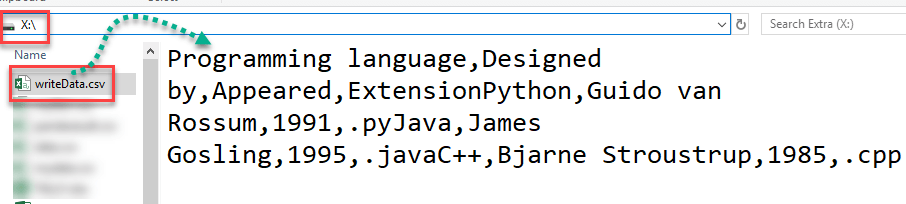
El resultado en el archivo csv es:
Programming language, Designed by, Appeared, Extension
Python, Guido van Rossum, 1991, .py
Java, James Gosling, 1995, .java
C++, Bjarne Stroustrup,1983,.cpp
Leer archivo CSV usando Pandas
Pandas es una biblioteca de código abierto que le permite importar CSV en Python y realizar manipulación de datos. Pandas proporciona una manera fácil de crear, manipular y eliminar datos.
Debes instalar la biblioteca pandas con el comando pip install pandas . En Windows, ejecutará este comando en el símbolo del sistema mientras esté en Linux en la Terminal.
Leer el CSV en un DataFrame de pandas es muy rápido y fácil:
#import necessary modules
import pandas
result = pandas.read_csv('X:\data.csv')
print(result)
Resultado de la leer pandas CSV ejemplo:
Programming language, Designed by, Appeared, Extension
0    Python, Guido van Rossum, 1991, .py
1    Java, James Gosling, 1995, .java
2    C++, Bjarne Stroustrup,1983,.cpp
Biblioteca muy útil. En solo tres líneas de código obtienes el mismo resultado que antes. Pandas sabe que la primera línea del CSV contenía nombres de columnas y los usará automáticamente.
Escribir archivo CSV usando Pandas
Escribir en un archivo CSV con Pandas es tan fácil como leer. Aquí puedes convencerte de ello. Primero debes crear un DataFrame basado en lo siguiente: Python escribir en código CSV.
from pandas import DataFrame
C = {'Programming language': ['Python','Java', 'C++'],
        'Designed by': ['Guido van Rossum', 'James Gosling', 'Bjarne Stroustrup'],
        'Appeared': ['1991', '1995', '1985'],
        'Extension': ['.py', '.java', '.cpp'],
    }
df = DataFrame(C, columns= ['Programming language', 'Designed by', 'Appeared', 'Extension'])
export_csv = df.to_csv (r'X:\pandaresult.csv', index = None, header=True) # here you have to write path, where result file will be stored
print (df)
Aquí está la salida
Programming language, Designed by, Appeared, Extension
0    Python, Guido van Rossum, 1991, .py
1    Java, James Gosling, 1995, .java
2    C++, Bjarne Stroustrup,1983,.cpp
Y el archivo CSV se crea en la ubicación especificada.

