---
description: SAP SCCL, SCC9, SCC8, STMS_IMPORT, SCC3Client copy means “transferring client specific data” within same instance(SID) or between different instances(SID).Client copy can be performed with three different methods.
title: SAP Client Copy: Local, Remote, Import/Export
image: https://www.guru99.com/images/client-copy-localremote-importexport.png
---


[Skip to content](#main) 

**⚡ Smart Summary**

SAP Client Copy transfers client-specific data within the same instance or between different instances using three methods: Local Copy (SCCL), Remote Copy (SCC9), and Client Import/Export (SCC8).

* ✅ **Local Copy:** Use T-code SCCL to copy data within the same SAP instance for fastest execution.
* 🔗 **Remote Copy:** Use T-code SCC9 with RFC connections to transfer data between different instances.
* 📦 **Import/Export:** Use T-codes SCC8 and STMS\_IMPORT for large database transfers without continuous network dependency.
* 🔒 **Pre-steps:** Lock users, suspend background jobs, and verify database space before every client copy.
* ⚡ **Performance:** Always use parallel processes and background scheduling to reduce copy duration.
* 📋 **Verification:** Monitor all client copy logs through T-code SCC3 and run SCC7 for post-import actions.

[ Read More ](javascript:void%280%29;) 

![SAP Local Client Copy within same SID using T-code SCCL](https://www.guru99.com/images/client-copy-localremote-importexport.png)

## What Is SAP Client Copy?

You can generate a blank client with T-code SCC4\. **But how do you fill the data in the client? The answer is the client copy.**

Client copy means **“transferring client-specific data”** within the same instance (SID) or between different instances (SID). It can be performed with three different methods:

1. Local client copy.
2. Remote client copy.
3. Client Import/Export.

Below, brief details are given about each client copy method.

**Local Client Copy:** This method copies client data within the same instance (SID). It is done by T-code **SCCL**.

[](https://www.guru99.com/images/sap/2013/02/ClientCopysameSID.jpg)

**Remote Client Copy:** This method copies client data between different instances (SID). It is performed by T-code **SCC9**.

[](https://www.guru99.com/images/sap/2013/02/ClientCopyDifferentSID.jpg)

**Client Import/Export:** This method copies client data between different instances (SID). It is performed by T-code **SCC8**.

[](https://www.guru99.com/images/sap/2013/02/ClientCopyDifferentSID.jpg)

The following table summarizes the key differences between these three methods:

| Feature            | Local Copy (SCCL)    | Remote Copy (SCC9)   | Import/Export (SCC8) |
| ------------------ | -------------------- | -------------------- | -------------------- |
| Scope              | Same instance        | Different instances  | Different instances  |
| Network Dependency | None                 | High (RFC required)  | Low (file-based)     |
| Best For           | Small to medium data | Small to medium data | Large databases      |

## Client Copy Pre-steps

To avoid data inconsistencies, perform these pre-steps before starting a client copy:

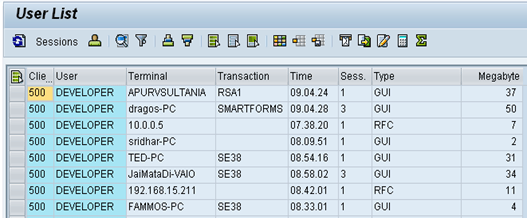
**1) Disconnect and lock business users (SU10).** End sessions of active users through T-code **SM04**. Verify that no canceled or pending update requests exist.

[](https://www.guru99.com/images/sap/2013/02/022613%5F0657%5FIntroductio14.png)

**2) Suspend all background jobs.**

* Execute T-code **SE38** as given below.

[](https://www.guru99.com/images/sap/2013/02/022613%5F0657%5FIntroductio15.png)

* Fill program name with “BTCTRNS1” as shown above.
* Press Execute.

[](https://www.guru99.com/images/sap/2013/02/022613%5F0657%5FIntroductio16.png)

**3) For a local copy, the system must have enough space in the database or tablespace.** For remote copy, the target system must have enough space. Check space using T-code **DB02**.

[](https://www.guru99.com/images/sap/2013/02/022613%5F0657%5FIntroductio17.png)

**4)** To avoid inconsistencies during client copy, users should not be allowed to work in the source client.

**5)** The **rdisp/max\_wprun\_time** parameter should be changed to 2000 seconds as per [SAP](https://www.guru99.com/what-is-sap.html) recommendation. Although you use parallel processes and schedule jobs in background, dialog processes will be used.

## Local Client Copy

Local client copy is performed using T-code SCCL. This is the simplest method when copying data within the same system.

**Scenario:**

* Source Instance & Client: DKM-000
* Target Instance & Client: DKM-202

**Step 1)** Create an entry for your new target client using T-code SCC4\. In this scenario, create client 202 in the DKM system. Log on to this newly created target client (**DKM-202**) with user SAP\* and default password “pass”.

**Step 2)** Execute T-code **SCCL**.

[](https://www.guru99.com/images/sap/2013/02/022613%5F0657%5FIntroductio18.png)

**Step 3)** Select your desired profile, enter the source client, and enter a description.

[](https://www.guru99.com/images/sap/2013/02/022613%5F0657%5FIntroductio19.png)

**Step 4)** By default, client copy is executed as a single process, which takes a long time. Distribute the workload to parallel (multiple) processes to reduce copying time.

1. Select **Goto** from the menu bar.
2. Select **Parallel Process**. Parallel processes exploit database capacity more effectively.

[](https://www.guru99.com/images/sap/2013/02/022613%5F0657%5FIntroductio21.png)

**Step 5)** Always execute long-running processes in background mode rather than foreground/dialog mode. Some processes run more quickly in background.

[](https://www.guru99.com/images/sap/2013/02/022613%5F0657%5FIntroductio22.png)

**Step 6)** The client copy logs are available in T-code **SCC3**. Status “Successfully Completed” means the client copy is done.

[](https://www.guru99.com/images/sap/2013/02/022613%5F0657%5FIntroductio23.png)

### RELATED ARTICLES

* [How to Download & Install SAP GUI ](https://www.guru99.com/guide-to-install-sap-gui-aka-frontend.html "How to Download & Install SAP GUI")
* [SAP USR40: How to set Password Restrictions ](https://www.guru99.com/how-to-set-password-restrictions.html "SAP USR40: How to set Password Restrictions")
* [SAP RSBTCDEL2: How to Delete a Background Job ](https://www.guru99.com/how-to-delete-a-background-job.html "SAP RSBTCDEL2: How to Delete a Background Job")
* [STMS Configuration in SAP ](https://www.guru99.com/how-to-configure-tms.html "STMS Configuration in SAP")

## Remote Client Copy

Remote client copy uses Remote Function Call (RFC). You can view RFC destinations in T-code SM59\. This technique depends on network connectivity, so the connection must be strong and stable.

**Scenario:**

* Source Instance & Client: BD1-101
* Target Instance & Client: DKM-202

**Step 1)** Log on to the target system (DKM). Create a new target client entry (202) using T-code **SCC4**. Log on to this new target client with user SAP\* and default password “pass”.

**Step 2)** Execute T-code SCC9.

[](https://www.guru99.com/images/sap/2013/02/022613%5F0657%5FIntroductio24.png)

**Step 3)** Fill in the basic details as per your requirement.

[](https://www.guru99.com/images/sap/2013/02/022613%5F0657%5FIntroductio25.png)

**Step 4)** Select Parallel Process to exploit database capacity more effectively.

[](https://www.guru99.com/images/sap/2013/02/022613%5F0657%5FIntroductio28.png)

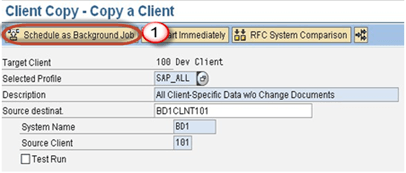
**Step 5)** Schedule the client copy in background.

[](https://www.guru99.com/images/sap/2013/02/022613%5F0657%5FIntroductio29.png)

**Step 6)** The client copy logs are available in T-code **SCC3** as given below.

[](https://www.guru99.com/images/sap/2013/02/022613%5F0657%5FIntroductio30.png)

## Client Import/Export

For large databases, it is recommended to use client import/export instead of remote client copy. This file-based approach does not require continuous network connectivity.

**Scenario:**

* Source Instance & Client: PKT-300
* Target Instance & Client: DKM-202

This technique always starts with the client **export** step.

**Note:** You must have enough space in the /usr/sap/trans\_SID file system to perform the client export.

## How to Export a Client?

**Step 1)** Log on to the target system (DKM). Create an entry for your new target client using T-code **SCC4**. Log on to the source system/source client (PKT).

**Step 2)** Before you import a client, you need to export it first. Export transfers data files and co-files from the source system database to the target system import buffer. Execute T-code **SCC8**.

[](https://www.guru99.com/images/sap/2013/02/022613%5F0657%5FIntroductio31.png)

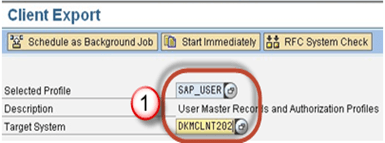
**Step 3)** Select the export profile and choose the target system.

[](https://www.guru99.com/images/sap/2013/02/022613%5F0657%5FIntroductio32.png)

**Step 4)** Schedule the export in background.

[](https://www.guru99.com/images/sap/2013/02/022613%5F0657%5FIntroductio33.png)

**Step 5)** Once the job executes, data files and co-files from PKT system database are transferred to DKM system import buffer. The data will be reflected in the DKM database only after you import the transport requests.

Depending on the chosen export profile, up to 3 transport requests are created:

* Request PKTKO00151 holds the cross-client data.
* Request PKTKT00151 holds the client-dependent data.
* Request PKTKX00151 also holds client-dependent data.

## How to Import the Client?

**Step 1)** Log on to the newly created target client (DKM-202) using SAP\* and password “pass”.

**Step 2)** Start the **STMS\_IMPORT** transaction.

[](https://www.guru99.com/images/sap/2013/02/022613%5F0657%5FIntroductio34.png)

As shown below, the import queue will open:

[](https://www.guru99.com/images/sap/2013/02/022613%5F0657%5FIntroductio35.png)

**Step 3)** Select the transport requests generated by client export. Import them on the target client in the following sequence:

1. Request PKTKO00151
2. Request PKTKT00151
3. Request PKTKX00151

The system automatically detects these are client export transport requests and performs the import of all 3 requests. The import logs can be seen in **STMS\_IMPORT**.

[](https://www.guru99.com/images/sap/2013/02/022613%5F0657%5FIntroductio36.png)

**Step 4)** Post-import phase: Once the import is done, execute T-code **SCC7** to perform the post-client-import actions.

[](https://www.guru99.com/images/sap/2013/02/022613%5F0657%5FIntroductio37.png)

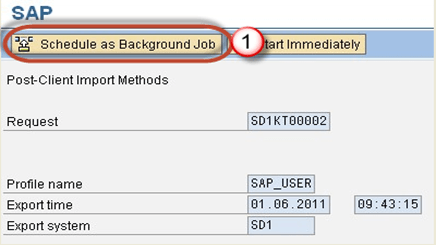
Schedule the post-import job in background.

[](https://www.guru99.com/images/sap/2013/02/022613%5F0657%5FIntroductio38.png)

**Step 5)** The import log is available in T-code **SCC3**. A successful status confirms the client has been imported.

## How to Choose the Right Client Copy Method

Selecting the correct method depends on your system landscape, database size, and network conditions.

**Use Local Client Copy (SCCL)** when source and target clients reside in the same SAP instance. This is the fastest method because data does not traverse a network.

**Use Remote Client Copy (SCC9)** when clients are on different instances and database size is moderate. This method uses RFC for real-time copy, so network interruptions can cause failures.

**Use Client Import/Export (SCC8 + STMS\_IMPORT)** when the database is large or the network is unreliable. It creates transport files and does not require a continuous connection.

## FAQs

⚡ What is the difference between local and remote client copy in SAP?

Local client copy (T-code SCCL) transfers data within the same SAP instance. Remote client copy (T-code SCC9) transfers data between different SAP instances using RFC connections over the network.

🚀 Which T-code is used for SAP client export?

T-code SCC8 is used to export a client. It creates transport requests containing cross-client and client-dependent data that can be imported into the target system using STMS\_IMPORT.

💡 How long does an SAP client copy take?

Duration depends on database size, system resources, and method used. A small client may take a few hours, while large databases can take several days. Parallel processes significantly reduce the time.

🔒 What pre-steps are required before performing a client copy?

Lock all business users (SU10), suspend background jobs (SE38 with BTCTRNS1), verify database space (DB02), and set the rdisp/max\_wprun\_time parameter to at least 2000 seconds.

📋 Where can I check client copy logs in SAP?

Client copy logs for all methods are available in T-code SCC3\. The log shows the status, duration, and any errors encountered during the copy process.

⏱️ What is T-code SCC7 used for in SAP?

T-code SCC7 performs post-client-import actions after a client import/export operation. It must be executed in the target client after all transport requests have been imported.

🤖 Can AI tools help automate SAP client copy processes?

AI-powered SAP management platforms can monitor system health, predict storage shortfalls, and automate pre-step checks. They reduce manual effort and minimize errors during client copy operations.

🧠 How is AI changing SAP Basis administration tasks like client copy?

AI-driven tools provide predictive analytics for resource planning, automated health checks, and intelligent scheduling. They help SAP administrators optimize client copy timing and detect potential failures proactively.

#### Summarize this post with:

ChatGPT Perplexity Grok Google AI 

**Stay Updated on AI** **Get Weekly AI Skills, Trends, Actionable Advice.** 

##### Sign up for the newsletter

Subscribe for Free 

You have successfully subscribed.  
Please check your inbox. 

![AI-Newsletter]() Chosen by over **350,000+** professionals 

[Scroll to top ](#wrapper)Scroll to top 

× 

Toggle Menu Close 

Search for: 

Search

```json
{"@context":"https://schema.org","@graph":[{"@type":"Organization","@id":"https://www.guru99.com/#organization","name":"Guru99","sameAs":["https://www.facebook.com/Guru99Official","https://twitter.com/guru99com"],"logo":{"@type":"ImageObject","@id":"https://www.guru99.com/#logo","url":"https://www.guru99.com/images/guru99-logo-v1-150x59.png","contentUrl":"https://www.guru99.com/images/guru99-logo-v1-150x59.png","caption":"Guru99","inLanguage":"en-US"}},{"@type":"WebSite","@id":"https://www.guru99.com/#website","url":"https://www.guru99.com","name":"Guru99","publisher":{"@id":"https://www.guru99.com/#organization"},"inLanguage":"en-US"},{"@type":"ImageObject","@id":"https://www.guru99.com/images/client-copy-localremote-importexport.png","url":"https://www.guru99.com/images/client-copy-localremote-importexport.png","width":"700","height":"250","inLanguage":"en-US"},{"@type":"BreadcrumbList","@id":"https://www.guru99.com/all-about-client-copy-localremote-importexport.html#breadcrumb","itemListElement":[{"@type":"ListItem","position":"1","item":{"@id":"https://www.guru99.com","name":"Home"}},{"@type":"ListItem","position":"2","item":{"@id":"https://www.guru99.com/sap-basis","name":"SAP - Basis"}},{"@type":"ListItem","position":"3","item":{"@id":"https://www.guru99.com/all-about-client-copy-localremote-importexport.html","name":"SAP Client Copy: Local, Remote, Import/Export"}}]},{"@type":"WebPage","@id":"https://www.guru99.com/all-about-client-copy-localremote-importexport.html#webpage","url":"https://www.guru99.com/all-about-client-copy-localremote-importexport.html","name":"SAP Client Copy: Local, Remote, Import/Export","dateModified":"2026-04-23T18:46:08+05:30","isPartOf":{"@id":"https://www.guru99.com/#website"},"primaryImageOfPage":{"@id":"https://www.guru99.com/images/client-copy-localremote-importexport.png"},"inLanguage":"en-US","breadcrumb":{"@id":"https://www.guru99.com/all-about-client-copy-localremote-importexport.html#breadcrumb"}},{"@type":"Person","@id":"https://www.guru99.com/author/jessica","name":"Jessica Blake","description":"I'm Jessica Blake, an SAP Consultant, dedicated to helping businesses achieve their goals with expert SAP guidance.","url":"https://www.guru99.com/author/jessica","image":{"@type":"ImageObject","@id":"https://www.guru99.com/images/jessica-blake-author.png","url":"https://www.guru99.com/images/jessica-blake-author.png","caption":"Jessica Blake","inLanguage":"en-US"},"worksFor":{"@id":"https://www.guru99.com/#organization"}},{"headline":"SAP Client Copy: Local, Remote, Import/Export","description":"SAP SCCL, SCC9, SCC8, STMS_IMPORT, SCC3Client copy means \u201ctransferring client specific data\u201d within same instance(SID) or between different instances(SID).Client copy can be performed with three different methods.","keywords":"sap-basis, sap","speakable":{"@type":"SpeakableSpecification","cssSelector":[".entry-title",".summary"]},"@type":"Article","author":{"@id":"https://www.guru99.com/author/jessica","name":"Jessica Blake"},"dateModified":"2026-04-23T18:46:08+05:30","image":{"@id":"https://www.guru99.com/images/client-copy-localremote-importexport.png"},"articleSection":"SAP - Basis","copyrightYear":"2026","name":"SAP Client Copy: Local, Remote, Import/Export","subjectOf":[{"@type":"HowTo","name":"How to export client?","description":"SAP Client Copy: Local, Remote, Import/Export","step":[{"@type":"HowToStep","text":"Log on to the target system(DKM).","name":"Create an entry for your new target client using SCC4. Log on to the source system/source client(PKT).","url":"https://www.guru99.com/all-about-client-copy-localremote-importexport.html"},{"@type":"HowToStep","text":"Before you import a Client you need to export","name":"Export is nothing but transferring data files and co-files from source system\u2019s database to target system\u2019s import buffer.Execute T-code SCC8.","image":"https://www.guru99.com/images/sap/2013/02/022613_0657_Introductio31.png","url":"https://www.guru99.com/all-about-client-copy-localremote-importexport.html"},{"@type":"HowToStep","text":"Select profile","name":"Choose target system.","image":"https://www.guru99.com/images/sap/2013/02/022613_0657_Introductio32.png","url":"https://www.guru99.com/all-about-client-copy-localremote-importexport.html"},{"@type":"HowToStep","text":"Once the job is executed data files and co-files of profiles from PKT system\u2019s database are transferred to DKM system\u2019s import buffer.","name":"Once we will import request in DKM only then it will be reflected in a database of DKM system.","url":"https://www.guru99.com/all-about-client-copy-localremote-importexport.html"}]},{"@type":"FAQPage","mainEntity":[{"@type":"Question","name":"What are the three main components of SQL Server architecture?","acceptedAnswer":{"@type":"Answer","text":"SQL Server architecture consists of three layers: the Protocol Layer (handles network communication via Shared Memory, TCP/IP, or Named Pipes), the Relational Engine (processes queries), and the Storage Engine (manages data storage and retrieval)."}},{"@type":"Question","name":"What is TDS in SQL Server?","acceptedAnswer":{"@type":"Answer","text":"TDS (Tabular Data Stream) is a protocol used by all three SQL Server connection methods. It encapsulates data into network packets for transfer between client and server. TDS was originally developed by Sybase."}},{"@type":"Question","name":"What is the difference between soft parsing and hard parsing in SQL Server?","acceptedAnswer":{"@type":"Answer","text":"Soft parsing retrieves data from the Buffer Cache in memory, resulting in faster execution. Hard parsing occurs when data is not cached and must be read from disk storage, requiring more I/O operations."}},{"@type":"Question","name":"How does the SQL Server Optimizer choose an execution plan?","acceptedAnswer":{"@type":"Answer","text":"The Optimizer searches through three phases: trivial plan detection, transaction processing plan search, and parallel processing optimization. It selects the cheapest cost-effective plan based on CPU, memory, and I/O factors."}},{"@type":"Question","name":"What are dirty pages in SQL Server?","acceptedAnswer":{"@type":"Answer","text":"Dirty pages are data pages in the Buffer Cache that have been modified but not yet written to disk. The checkpoint process and Lazy Writer handle flushing dirty pages to disk storage periodically."}},{"@type":"Question","name":"What is Write-Ahead Logging in SQL Server?","acceptedAnswer":{"@type":"Answer","text":"Write-Ahead Logging ensures that transaction log entries are written to disk before the actual data pages. This guarantees data recovery in case of system failure and maintains transaction durability."}},{"@type":"Question","name":"Can AI tools help optimize SQL Server query performance?","acceptedAnswer":{"@type":"Answer","text":"Yes. AI-powered database management tools can analyze query patterns, recommend index optimizations, predict resource bottlenecks, and automate performance tuning tasks that traditionally require manual DBA intervention."}},{"@type":"Question","name":"How is AI transforming SQL Server database administration?","acceptedAnswer":{"@type":"Answer","text":"AI-driven platforms provide automated query tuning, predictive capacity planning, anomaly detection, and intelligent workload management. These capabilities reduce manual effort and help administrators proactively prevent performance issues."}}]}],"@id":"https://www.guru99.com/all-about-client-copy-localremote-importexport.html#schema-551093","isPartOf":{"@id":"https://www.guru99.com/all-about-client-copy-localremote-importexport.html#webpage"},"publisher":{"@id":"https://www.guru99.com/#organization"},"inLanguage":"en-US","mainEntityOfPage":{"@id":"https://www.guru99.com/all-about-client-copy-localremote-importexport.html#webpage"}}]}
```