
SAP Positionstypenbestimmung: VOV4, VOV7
 Redaktion
⚡ Intelligente Zusammenfassung
Die Artikelkategorienbestimmung steuert, wie sich jede Position innerhalb eines Verkaufsbelegs verhält, und legt fest, ob der Artikel für die Fakturierung, Preisgestaltung oder Lieferung relevant ist, basierend auf der Art des Verkaufsbelegs und dem Material, konfiguriert über die Transaktionen VOV7 und VOV4.
Was ist eine Artikelkategorie?
Eine Artikelkategorie definiert, wie sich ein Artikel in einer Verkaufstransaktion verhält.
SAP Verwendet den Artikeltyp, um ein Material in jeder Verkaufsbelegart anders zu verarbeiten.
z.B
AFX – Es handelt sich um eine Anfrageartikelkategorie, die für die Abrechnung nicht relevant ist.
AGX – Es handelt sich um eine Angebotsartikelkategorie, die für die Abrechnung nicht relevant ist.
TAN – Dies ist eine Standardartikelkategorie und für die Abrechnung relevant.
Der T-Code für die Kategorie „Artikel definieren“ lautet VOV7.
Schritt 1)
- Geben Sie Tcode VOV7 in die Befehlsleiste ein.
- Liste der Artikelkategorien einschließlich SAP und Kategorie „Benutzerdefiniertes Element“.
- Klicken Sie auf Neue Einträge
 Schaltfläche zum Erstellen einer Artikelkategorie.
 Schaltfläche zum Erstellen einer Artikelkategorie.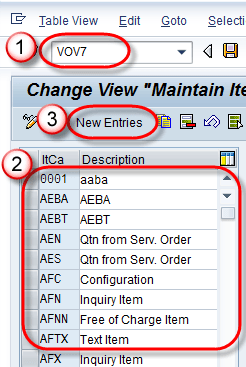
Schritt 2) Beim Anlegen einer neuen Artikelkategorie können die folgenden Abschnitte ausgefüllt werden.
- Geschäftsdaten (Informationen zu Abrechnung, Preisen usw.).
- Allgemeine Steuerung (Sie legt fest, ob automatische Chargenbildung, Rundungsberechtigung und Bestellmenge auf 1 gerundet werden dürfen oder nicht).
- Transaktionsablauf (Artikelbildschirmdetails).
- Bill des Materials (wird für die Variantenkonfiguration verwendet).
- Wertkonditiontract (für Wert contracT).
- Service Management (Service-Szenario).
- Ressourcenkontrolle (ressourcenbezogenes Abrechnungsszenario).
Wir geben Daten im Abschnitt „Geschäftsdaten“ ein.

Schritt 3)
1. Wir werden YTA2 (Standardartikelkategorie) erstellen.
2. Geben Sie Billing Relevanz / Preisgestaltung. Überprüfen
- Geschäftsgegenstand
- Geplant. Leitung erlaubt
- Gewicht
- Bd. Relevant
- Kredit aktiv
- Kosten ermitteln.

Schritt 4) Klicken Sie auf Speichern Taste.
Es wurde die Meldung „Daten wurden gespeichert“ angezeigt.




Bestimmung der Artikelkategorie
Sobald Artikelkategorien existieren, SAP muss entschieden werden, welche Kategorie für jeden einzelnen Posten gilt. Die Artikelkategorie steuert das Verhalten des Artikels, z. B. legt die Artikelkategorie fest, für welchen Bereich ein Artikel relevant ist. Billing oder Preisgestaltung.
Der Positionstyp im Verkaufsbeleg hängt von der Verkaufsbelegart und dem Material ab.
Die Ermittlung der Artikelkategorie erfolgt über den Transaktionscode VOV4. Es gibt zahlreiche Standardartikelkategorien, die von … bereitgestellt werden. SAP, Einige davon sind unten aufgeführt.
| Artikelkategorien | Beschreibung |
|---|---|
| TAN | Standardartikel |
| TAB | Individuelle Bestellung |
| TAS | Artikel von Drittanbietern |
| TAD | Service |
| TATX | Textelement |
| TANN | Kostenlos |
| AFX | Anfrageartikel |
| AGX | Angebotsposition |
Schritt 1)
- Geben Sie den T-Code VOV4 in das Befehlsfeld ein.
- Es wird eine Liste der vorhandenen Artikelkategorien angezeigt.
- Um eine neue Artikelkategorie zu erstellen, klicken Sie auf Neue Einträge
 Taste.
 Taste.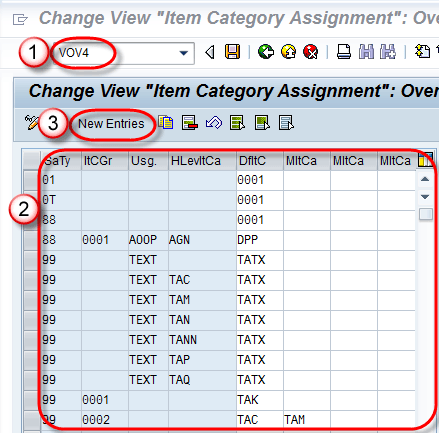
Schritt 2)
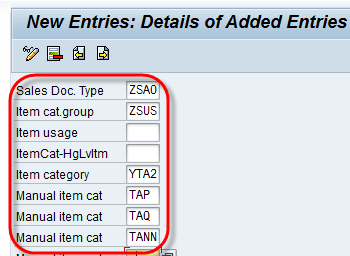
Um eine neue Artikelkategorie zu erstellen, geben Sie folgende Daten ein –
- Verkaufsdok. Typ.
- Artikelkat. Gruppe.
- Artikelkategorie (Standardartikelkategorie, diese kann mit einem manuellen Artikelkategoriewert überschrieben werden).
- Manuelle Artikelkategorie (bei geschäftlichen Anforderungen können wir eine manuelle Artikelkategorie hinzufügen, um die Standardartikelkategorie zu überschreiben).
Hinweis: Die Standardartikelkategorie wird automatisch für den Verkaufsbelegtyp ausgewählt, in dem sie definiert ist. Alternativ kann die Standardartikelkategorie durch eine manuelle Artikelkategorie ersetzt werden. Beispielsweise kann die Standardartikelkategorie (YTA2) durch eine manuelle Artikelkategorie (TAP, TAQ, TANN) ersetzt werden.
Schritt 3) Klicken Sie auf Speichern  Taste.
Die Meldung „Daten wurden gespeichert“ wird wie folgt angezeigt –

